Repository navigation
Mullion 2.0 — new look, project pages, terminal, Git, and more

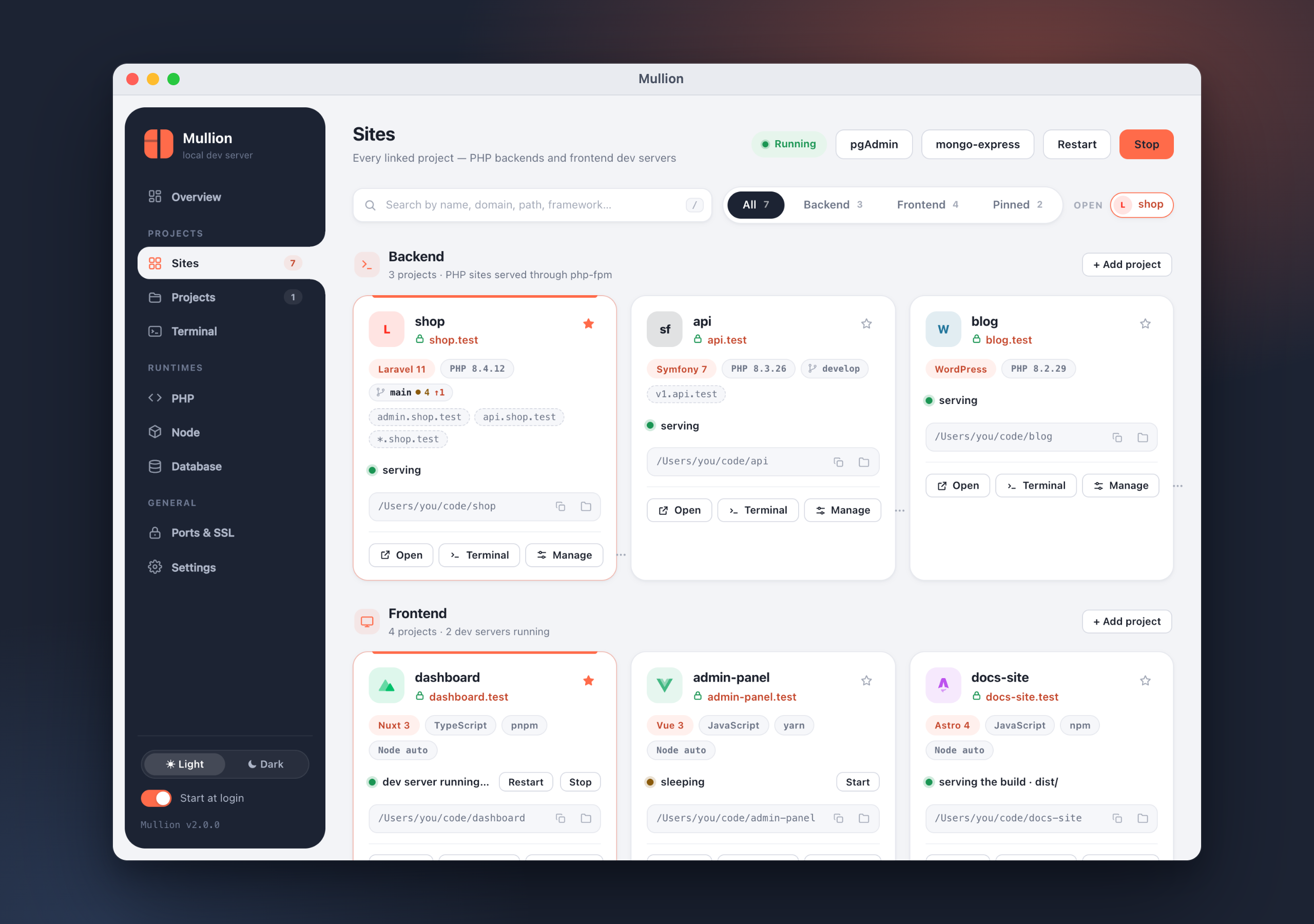
Mullion 2.0 is a big release: a new look, a new identity, and a panel that does almost everything for you. Full docs: https://anabiiil.github.io/mullion/
Install / upgrade
brew upgrade mullion # macOS (Homebrew)scoop update mullion # Windows (Scoop)On macOS, open Mullion.app from Applications (or run mullion app once).
The biggest release so far: a new identity, a native macOS app, a page for
every project (commands, workers, packages, Git, terminal, domains), a
built-in terminal, PostgreSQL and MongoDB next to MySQL, backups, and a
Ports & SSL page.
Highlights
- New look. New logo and app icon, and a redesigned "Midnight + coral"
control panel with a dark mode and in-app dialogs in place of browser
pop-ups. - Mullion.app on macOS. Setup puts a native app in
/Applications
(mullion appreinstalls it). It uses real windows, and those windows
merge into macOS window tabs. On Windows the panel opens in its own app
window. - Sites as cards. Mullion detects each project's framework and
language. The page has search, filters, pinning, and project tabs. - A page for every project, with Commands, Workers, Packages, Git,
Terminal, Domains and Settings tabs. - A built-in terminal with tabs and suggestions as you type. Each
project's own PHP and Node versions are onPATH. - PostgreSQL and MongoDB, alongside MySQL/MariaDB, each with its own
admin tool (pgAdmin 4 and mongo-express). Also new: backups and restore. - Ports & SSL. Shows every port Mullion uses and who holds it. You can
change ports, manage the local certificate authority, and turn on
wildcard DNS.
Added
- Sites page
- Cards detect the framework (Laravel, Symfony, WordPress, Drupal,
CodeIgniter, Yii, CakePHP, Slim, Nuxt, Next.js, SvelteKit, Astro,
Angular, Remix, Vue, React, Svelte, Vite, …) with its major version,
the language, and the package manager. - Search by name, domain, path or framework; filter by Backend, Frontend
or Pinned; pin sites to the top. - Copy path and Show in Finder/Explorer from each card. Cards also show
the Git branch and a count of changes. - Project tabs keep several projects open side by side. A project can
also open in its own window.
- Cards detect the framework (Laravel, Symfony, WordPress, Drupal,
- Project page
- Commands — artisan (Laravel),
bin/console(Symfony), Composer
and npm scripts. Commands run with live output, and you can mark
favorites. Quick actions cover the common tasks. - Workers — supervised queue workers, the scheduler
(schedule:work, no cron needed), Horizon, Reverb, Symfony Messenger,
or any custom command.- A worker can start with the stack (autostart).
- Crashed workers restart with backoff (1s, 2s, 4s… capped at a
minute). After 5 crashes within 2 minutes a worker is marked
crash-looping and retries stop. - Each worker has a log in
~/.mullion/logs.
- Packages — search Packagist and the npm registry, then install or
remove packages. Both can go in as dev dependencies. - Git
- Status, stage/unstage, discard, and a side-by-side diff.
- Commit, amend, and "Commit & Push".
- Fetch, then pull by merge, rebase or fast-forward only.
- Push, publish a new branch, or push with
--force-with-lease. - Branches (create, switch, delete), history, and stashes.
- A banner appears during a merge or rebase with conflicts.
- Domains — subdomain aliases (
api.shop.test) and a wildcard
(*.shop.test). - Terminal and Settings tabs.
- Commands — artisan (Laravel),
- Terminal (xterm.js)
- Tabs.
- Suggestions for paths, commands, npm and Composer scripts, artisan commands
and Git branches; Tab or Enter accepts one. - The project's own PHP, Node and Composer are first on
PATH. - Opens on the Terminal page, in a separate window, or on the project
page, as chosen in Settings.
- Databases
- Tabs for MySQL, PostgreSQL and MongoDB. Each engine installs, starts
and stops on its own, and a stopped engine stays stopped. - Create and drop databases.
- Backups: back up now, restore, delete, and choose a backup folder.
- Uninstalling an engine offers a backup first.
- Admin tools (phpMyAdmin, pgAdmin 4, mongo-express) sit in the top bar
and can be uninstalled.
- Tabs for MySQL, PostgreSQL and MongoDB. Each engine installs, starts
- PHP
- Extension toggles: all extensions on Windows; OPcache and APCu on
macOS, where builds are static. - A php.ini editor for the common settings (memory and upload limits,
execution time, errors, timezone, OPcache timestamps). - On macOS, the LDAP extension is built automatically when a version is
installed. This needs the Command Line Tools. - Uninstall a version, and install or update Composer.
- Extension toggles: all extensions on Windows; OPcache and APCu on
- Node — choose the npm version for each Node install, uninstall
versions, and view diagnostics. - Ports & SSL
- Every port Mullion uses and which process holds it.
- Move database or dev-server ports, with conflict detection.
- Trust or export the local CA, and turn HTTPS on or off for every site.
- Wildcard DNS: a built-in DNS server plus
/etc/resolver(macOS) or an
NRPT rule (Windows).
- Settings — change the TLD, choose where terminals open, set the
backup folder, and run diagnostics (doctor). - New commands:
postgres(pg),mongo,pgadmin,mongo-express,
phpmyadmin uninstall,backups,alias,dns,ports,port set,
port dev,ssl(trust,export,all),worker,run,pkg,
php ini,app.
Changed
- Rebranded panel, app icon, Windows
.exeicon and favicon. - Panel preferences (theme, open project tabs, terminal placement, favorite
commands, …) are now stored inconfig.jsonunderuiinstead of the
browser's storage. - The sidebar has new pages: Sites (backend and frontend together),
Terminal, and Ports & SSL. The old separate Backend and Frontend pages
are gone. - Managed dev servers and a project's commands now trust Mullion's local
CA (NODE_EXTRA_CA_CERTS), so server-side calls to other
https://*.testsites work.
Fixed
- New domains added from the panel or the wake agent work right away.
Background processes were mistaken for an interactive terminal, so the
hosts-file update asked for asudopassword that nobody could type.
Mullion now detects a real terminal and otherwise shows the system
password dialog. - Stopped the bursts of 502 errors on Vite pages that load many modules
at once (max_conns_per_hoston the dev-server proxy). - Config files are written atomically, so a crash in the middle of a
write can no longer corruptconfig.jsonorsites.json. - Stopping a database engine now sticks: Mullion no longer restarts an
engine you stopped on purpose.
Notes for upgrading
- Run
mullion setuponce after upgrading (it's idempotent). On macOS
this installs Mullion.app into/Applications. - Panel preferences start fresh once. They now live in
~/.mullion/config.json
(C:\Mullion\config.jsonon Windows) instead of the browser's storage.
The reason: the panel runs on a random127.0.0.1port each launch, so
anything the browser saved for one launch was lost on the next. - Wildcard aliases (
*.site.test) needmullion dns ononce, which asks
for administrator rights. Named aliases (api.site.test) keep using the
hosts file. - Existing sites, PHP/Node versions and MySQL data carry over unchanged.