
The agent isn't a feature — it is the environment.


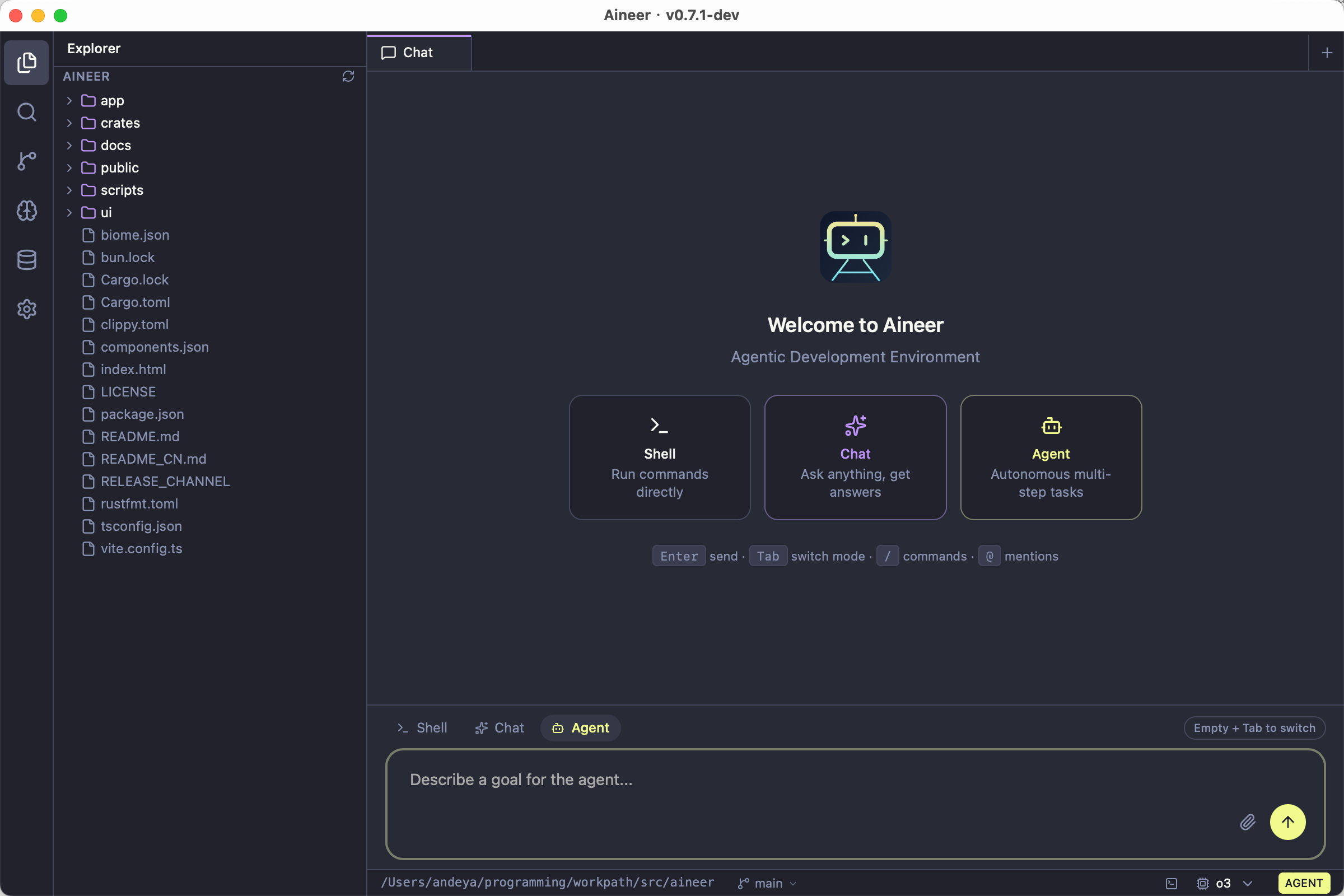
Aineer is an ADE (Agentic Development Environment). Shell, conversational AI, and autonomous agent work share one continuous stream, grounded in your workspace — reducing context switching from reading code through to shipping changes. The CLI REPL is the mature, full-featured interface (40+ tools, streaming execution, multi-provider AI, plugins, MCP). The Desktop GUI provides settings, themes, integrated terminal, and model selection; desktop AI chat is under active development.
Built with Tauri 2 + React 19 + Tailwind CSS + xterm.js. No daemon, no runtime dependency — bring any model and go.
Most AI coding CLIs lock you into a single provider. Claude Code requires Anthropic. Codex CLI requires OpenAI. Aineer works with all of them — and local models too.
| Aineer | Claude Code | Codex CLI | Aider | |
|---|---|---|---|---|
| Multi-provider (Anthropic, OpenAI, xAI, Ollama, …) | All built-in | Anthropic only | OpenAI + Ollama | Yes |
| Zero-token-cost (free access to major models) | Yes | No | No | No |
| Zero-config local AI (auto-detect Ollama) | Yes | No | --oss flag |
Manual setup |
| Single binary (no runtime deps) | Rust+Tauri | Node.js | Node.js | Python |
Multimodal input (@image.png, clipboard paste) |
Yes | Yes | Limited | Limited |
| MCP protocol (external tool integration) | Yes | Yes | Yes | Yes |
| Plugin system + agents + skills | Yes | Yes | No | No |
| Permission modes (read-only → full access) | Yes | Yes | Yes | Partial |
| Streaming tool executor (parallel tools, sibling abort) | Yes | Yes | No | No |
| Context caching (Gemini + Anthropic) | Yes | Anthropic only | No | No |
| Git workflow (/commit, /pr, /diff, /branch) | Built-in | Via tools | Via tools | Auto-commit |
| Vim mode in REPL | Yes | No | No | No |
Desktop app (recommended):
Download the latest installer from Releases:
| Platform | File |
|---|---|
| macOS (Apple Silicon) | Aineer_*_aarch64.dmg |
| macOS (Intel) | Aineer_*_x64.dmg |
| Linux (x86_64) | aineer_*_amd64.deb / .AppImage |
| Linux (ARM64) | aineer_*_arm64.deb |
| Windows (x86_64) | Aineer_*_x64-setup.exe |
CLI-only mode:
brew install andeya/aineer/aineer            # Homebrew (macOS / Linux)
cargo install aineer                           # Cargo (from crates.io)
Build from source
git clone https://github.com/andeya/aineer.git
cd aineer
bun install                                    # Install frontend dependencies
cargo tauri build                              # Build Tauri desktop app (GUI + CLI)
# Or for CLI-only:
cargo install --path app --locked
Prerequisites: Rust toolchain, Bun, and platform-specific Tauri dependencies.
# 1. Pick a provider
export ANTHROPIC_API_KEY="sk-ant-..."        # or OPENAI_API_KEY, XAI_API_KEY, GEMINI_API_KEY, etc.
ollama serve                                  # or just start Ollama — no key needed
aineer login                                  # or OAuth login

# 2. Start coding
aineer init                                   # scaffold project context (optional)
aineer                                        # interactive REPL
aineer "explain this project"                 # one-shot prompt
Aineer auto-detects your provider from available credentials. No extra flags needed. See Models & Providers for all options.
Define short names in settings.json and use them everywhere:
{
  "modelAliases": {
    "sonnet": "claude-sonnet-4-6",
    "gpt": "gpt-4o",
    "flash": "gemini/gemini-2.5-flash"
  }
}
aineer --model sonnet "review my changes"
aineer models # list all available modelsAny OpenAI-compatible API works with provider/model syntax:
aineer --model ollama/qwen3-coder "refactor this module"
aineer --model groq/llama-3.3-70b-versatile "explain this"
aineer --model ollama                          # auto-pick best local model
Zero-config Ollama: when no API keys are found and Ollama is running, Aineer auto-detects it and picks the best coding model. Models without function calling automatically fall back to text-only mode.
When no --model flag is given: settings.json → available credentials → running Ollama. If the primary model is unavailable, Aineer tries each entry in fallbackModels:
{
  "model": "sonnet",
  "fallbackModels": ["ollama/qwen3-coder", "groq/llama-3.3-70b-versatile"]
}
Switch model mid-session: /model <name>
Zero API token cost — log in via browser once, then call Claude, ChatGPT, Gemini, DeepSeek, and 10+ more through a single unified gateway — completely free.
Token Free Gateway drives official model web UIs instead of paid API keys. If you can use a model in the browser, you can call it through Aineer.
| Traditional approach | Token Free Gateway way |
|---|---|
| Buy API tokens | Completely free |
| Pay per request | No enforced quota |
| Credit card required | Browser login only |
| API tokens may leak | Credentials stored local |
Setup instructions
- Deploy and start the Token Free Gateway (default port 3456)
- Add the provider to
settings.json:
{
  "model": "token-free-gateway/claude-sonnet-4-6",
  "env": { "TFG_API_KEY": "your-gateway-token" },
  "providers": {
    "token-free-gateway": {
      "baseUrl": "http://127.0.0.1:3456/v1",
      "apiKeyEnv": "TFG_API_KEY",
      "defaultModel": "claude-opus-4-6"
    }
  }
}
Google Gemini setup (free API key)
Get a free key from Google AI Studio. Use the OpenAI-compatible endpoint:
{
  "model": "gemini/gemini-2.5-flash",
  "env": { "GEMINI_API_KEY": "AIzaSy..." },
  "providers": {
    "gemini": {
      "baseUrl": "https://generativelanguage.googleapis.com/v1beta/openai",
      "apiKeyEnv": "GEMINI_API_KEY"
    }
  }
}
Alibaba DashScope / Azure OpenAI setup
DashScope: aineer --model dashscope/qwen-plus-2025-07-28 "..." with DASHSCOPE_API_KEY set. Configure baseUrl per the official docs.
Azure OpenAI: Set apiVersion (e.g. 2024-02-15-preview) on a providers.<name> entry. See settings.example.json.
aineerThe prompt is ❯. Type naturally. Use slash commands (Tab-autocomplete supported):
| Category | Commands |
|---|---|
| Info | /help /status /version /model /cost /config /memory |
| Session | /compact /clear /session /resume /export |
| Git | /diff /branch /commit /commit-push-pr /pr /issue /worktree |
| Agents | /agents /skills /plugin |
| Advanced | /ultraplan /bughunter /teleport /debug-tool-call /vim |
| Diagnostics | /doctor |
| Update | /update [check | apply | dismiss | status] |
Keyboard shortcuts
| Shortcut | Action |
|---|---|
? |
Inline shortcuts reference panel |
!<cmd> |
Bash mode — sends a shell command request to the AI |
@ |
File / image attachment (Tab-complete path) |
Ctrl+V / /image |
Paste clipboard image |
Up / Down |
History recall |
Shift+Enter, Ctrl+J, \ + Enter |
Insert newline |
Ctrl+C |
Cancel input; press twice on empty prompt to exit |
Ctrl+D |
Exit (on empty prompt) |
Double-tap Esc |
Clear input |
/vim |
Toggle Vim modal editing |
Use @ to attach context directly to your message:
| Syntax | What happens |
|---|---|
@src/main.rs |
Inject file content (up to 2000 lines) |
@src/main.rs:10-50 |
Inject a specific line range |
@src/ |
List directory entries |
@photo.png |
Attach as a multimodal image block (base64) |
Clipboard images: Ctrl+V (macOS/Linux) or /image (all platforms). Drag-and-drop image paths are auto-detected.
aineer "explain this project's architecture"
aineer -p "list all TODO comments" --output-format json
aineer --permission-mode read-only "audit the codebase"| Flag | Description |
|---|---|
--model <name> |
Choose model |
--output-format text | json | stream-json |
Output format |
--allowedTools <list> |
Restrict tool access (comma-separated) |
--permission-mode <mode> |
read-only, workspace-write, danger-full-access |
--resume <file> |
Resume a saved session |
| Mode | Allows |
|---|---|
read-only |
Read and search only — no writes |
workspace-write |
Edit files inside the workspace (default) |
danger-full-access |
Unrestricted access including system commands |
Aineer merges JSON settings from multiple files (highest to lowest precedence):
| File | Scope | Committed? |
|---|---|---|
.aineer/settings.local.json |
Project — local overrides | No (gitignored) |
.aineer/settings.json |
Project settings | Yes |
~/.aineer/settings.json |
User — global settings | — |
Full example with all fields:
settings.example.json
{
  "model": "sonnet",
  "modelAliases": { "sonnet": "claude-sonnet-4-6" },
  "permissionMode": "workspace-write",
  "env": { "ANTHROPIC_API_KEY": "sk-ant-..." },
  "providers": { "ollama": { "baseUrl": "http://my-server:11434/v1" } },
  "mcpServers": { "my-server": { "command": "node", "args": ["server.js"] } },
  "hooks": { "PreToolUse": ["lint-check"] }
}
aineer config set model sonnet # set a value
aineer config get model # read a value
aineer config list # show all settingsEnvironment variables
Set via shell export or "env" in settings.json (shell exports take precedence):
| Variable | Purpose |
|---|---|
ANTHROPIC_API_KEY |
Claude API key |
OPENAI_API_KEY |
OpenAI API key |
XAI_API_KEY |
xAI / Grok API key |
GEMINI_API_KEY |
Google Gemini API key (free) |
OPENROUTER_API_KEY |
OpenRouter API key |
GROQ_API_KEY |
Groq Cloud API key |
DASHSCOPE_API_KEY |
Alibaba DashScope |
OLLAMA_HOST |
Ollama endpoint (e.g. http://192.168.1.100:11434) |
AINEER_WORKSPACE_ROOT |
Override workspace root |
AINEER_CONFIG_HOME |
Override global config dir (default ~/.aineer) |
AINEER_PERMISSION_MODE |
Default permission mode |
NO_COLOR / CLICOLOR=0 |
Disable ANSI colors |
Credential chain & Claude Code auto-discovery
| Provider | Chain |
|---|---|
| Anthropic (Claude) | ANTHROPIC_API_KEY / ANTHROPIC_AUTH_TOKEN → Aineer OAuth (aineer login) → Claude Code auto-discover |
| xAI (Grok) | XAI_API_KEY |
| OpenAI | OPENAI_API_KEY |
| Custom providers | inline apiKey → apiKeyEnv env var |
If you have Claude Code installed and logged in, Aineer automatically discovers your credentials — no separate API key needed:
{ "credentials": { "autoDiscover": true, "claudeCode": { "enabled": true } } }Check auth status: aineer status or aineer status anthropic
.aineer/AINEER.md is the project memory file — injected into every conversation's system prompt so the AI understands your codebase without re-asking. Typical content: tech stack, build/test commands, coding conventions.
aineer init # auto-generate from detected stackAineer walks up the directory tree and loads all matching instruction files (.aineer/AINEER.md, AINEER.md, AINEER.local.md, .aineer/instructions.md), deduplicated and concatenated. Monorepo sub-projects can augment the root file.
Connect external tools via the Model Context Protocol:
{
  "mcpServers": {
    "my-server": { "command": "node", "args": ["mcp-server.js"] }
  }
}
Transports: stdio (default), sse, http, ws.
Plugins extend Aineer with custom tools, slash commands, hooks, and lifecycle scripts:
.aineer/plugins/my-plugin/
├── plugin.json              ← manifest
├── tools/query-db.sh        ← AI calls this tool automatically
├── hooks/audit.sh           ← runs before/after every tool call
└── commands/deploy.sh       ← user types /deploy
/plugin list                        # list all plugins with status
/plugin install ./path/to/plugin    # install from local path or Git URL
/plugin enable my-plugin            # enable / disable
Full plugin development guide:
crates/plugins/README.md
Agents are named sub-agent configs. Skills are reusable prompt templates. Manage with aineer agents, aineer skills, or /agents, /skills in the REPL.
Every conversation is saved automatically. Resume any session later — even across reboots:
aineer --resume /path/to/session.jsonlInside the REPL: /session (show path), /resume <path>, /export, /compact (compress context), /clear.
Aineer checks for updates every 24h and notifies when a new version is available.
aineer update # check and auto-installInside the REPL: /update, /update apply, /update dismiss, /update status.
No API key / authentication errors
aineer status                         # check which credentials are detected
aineer login                          # OAuth login
aineer login anthropic --source claude-code   # reuse Claude Code credentials
Set API keys via shell exports or settings.json → "env". See Environment variables.
Model not found / unsupported model
aineer models                         # list all available models
aineer --model ollama/qwen3-coder "test"   # use explicit provider/model
For custom providers, ensure baseUrl uses the OpenAI-compatible endpoint.
"assistant stream produced no content"
Some providers send non-standard response formats. Aineer normalizes these and auto-retries with a non-streaming request. Ensure you're on the latest version: aineer update.
Permission denied when editing files
Change mode: aineer --permission-mode danger-full-access or set permanently in settings.json: "permissionMode": "danger-full-access"
Ollama not detected
- Ensure Ollama is running:
ollama serve - Check the endpoint:
curl http://localhost:11434/v1/models - For remote Ollama:
export OLLAMA_HOST=http://your-server:11434
| Area | Status |
|---|---|
| CLI REPL + 40+ built-in tools | Stable |
| Multi-provider AI (Anthropic, OpenAI, xAI, Ollama, custom) | Stable |
| Streaming tool executor + permission system | Stable |
| MCP protocol + Plugin system + Sessions | Stable |
| Context caching (Gemini + Anthropic) + Self-update | Stable |
| Desktop GUI — settings, themes, terminal, model selection | Stable |
| Desktop GUI — AI chat | In progress |
| Collaboration tools (TeamCreate, SendMessage) | Experimental |
| Multi-channel delivery (Lark, WeChat, WhatsApp bots) | Planned |
Made with 🦀 by andeya