wo is a fast workspace jumper for repo-style directories.
It indexes workspaces once, resolves names quickly, and (with shell integration) changes directory and runs trusted hooks.
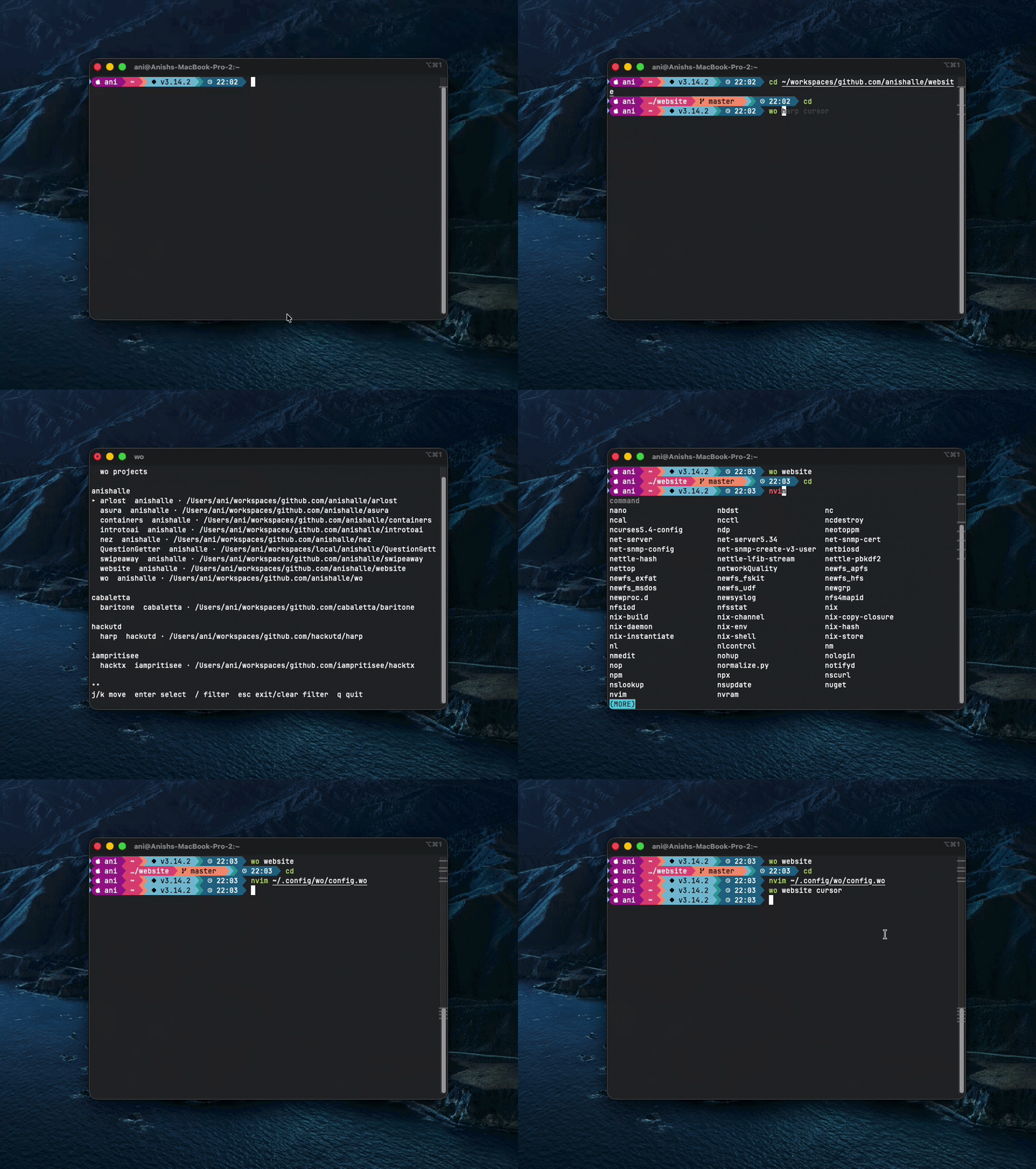
- Jump to a workspace by name:
wo harp - Browse indexed workspaces in an interactive picker:
wo - Resolve ambiguous names with picker/confirmation
- Discover workspaces from
.git/or.wo - Run startup hooks and named hook profiles
- Support workspace-local and global hook profiles
- Provide shell completion for workspace names and hook profile names
make install
# or
./scripts/install.shmake uninstall
# or
./scripts/uninstall.shuninstall removes:
- installed
wobinary - installed
woman page - runtime SQLite index/trust state (
wo.db*)
uninstall keeps:
- workspace
.wofiles - config files
wo only changes your current shell directory when shell integration is loaded.
Without integration, wo prints the resolved path.
# zsh
source <(wo init zsh)

# bash
source <(wo init bash)

# fish
wo init fish | source
After loading shell integration:
wo <TAB>completes workspace names for arg 1wo <workspace> <TAB>completes hook profiles for arg 2
# index default roots (~/workspaces if present)
wo scan --depth 1

# scan custom roots
wo scan --root ~/workspaces --root ~/src --depth 2

# jump to workspace
wo harp

# jump and run named profile hook
wo harp code

# force global profile
wo harp code --global

# skip all hooks for this invocation
wo harp --clean

# always force picker
wo harp --pickA directory is indexed if it has either:
.git/.wo
Place a .wo file at workspace root.
name = "harp" # optional name and owner
owner = "hackutd"

[enter]   # commands that run on enter ( wo harp )
commands = ["echo startup", "nvim ."]
shell = "inherit"

[code]
command = "code ."
chdir = false

[nvim]
comand = "nvim ."
chdir = true   #implicitly true

[test]
commands = ["go test ./...", "make lint"]
chdir = false
Schema notes:
[enter]is startup hooks.- Top-level tables other than
name,owner, andenterare hook profiles. - Profiles support
command(single),commands(list), andchdir(bool, defaulttrue). chdir = falsemeans: run hooks in workspace, then return to your original directory.- If both startup and profile hooks exist,
woruns startup first, then profile. - Hook failures are printed to stderr;
wocontinues running remaining hooks.
Location:
os.UserConfigDir()/wo/config.toml- Example by OS:
- macOS:
~/Library/Application Support/wo/config.toml - Linux:
~/.config/wo/config.toml
- macOS:
Default values:
roots = ["~/workspaces"]

[scan]
depth_default = 1
follow_symlink = false

[search]
backend = "auto" # auto|internal|fzf

[ui]
theme = "gh"

[hooks]
enabled = true

[correction]
enabled = true
min_score = 0.72
min_gap = 0.10Location:
$XDG_CONFIG_HOME/wo/config.woifXDG_CONFIG_HOMEis set- else
~/.config/wo/config.wo
Example:
[cursor]
command = "cursor ."
chdir = true

[code]
command = "code ."
chdir = false
Rules:
- Global profile names are available to all workspaces.
wo <workspace> <profile>checks workspace profile first, then global.wo <workspace> <profile> --globalforces global profile lookup.- If profile exists in both places, workspace definition overrides global.
[enter]in globalconfig.wois disallowed;wowarns and ignores it.- Missing requested profile returns an error.
For wo <workspace> <TAB>:
- workspace profiles are listed first
- global profiles are listed after workspace profiles
- names are prefix-filtered as you type
- duplicate names are deduped with workspace definition winning
[enter]is never shown in profile completion
Top-level usage:
wo [workspace] [profile] [--clean] [--pick] [--global]
wo
Commands:
wo
Opens interactive browse picker.wo <workspace>
Resolves workspace, changes directory, runs startup hooks.wo <workspace> <profile>
Resolves workspace, runs startup + selected profile hooks.wo scan [--root <path> ...] [--depth <n>] [--follow-symlinks] [--prune]
Index filesystem roots.wo list [--owner <owner>] [--json]
List indexed workspaces.wo doctor
Run config/db/fzf/root checks.wo trust list|allow|deny|reset
Manage workspace hook trust decisions.wo init <zsh|bash|fish>
Print shell integration script.wo completion <bash|zsh|fish>
Print shell completion script.
Root flags:
--cleanskip all hooks for this invocation--pickforce interactive picker even if one exact match--globaluse global profile source (requires profile argument)
Workspace hook execution is trust-gated:
- first run prompts for trust decision
- decision is stored with workspace fingerprint
- if
.wochanges, trust is re-evaluated
Manage trust:
wo trust list
wo trust allow <workspace>
wo trust deny <workspace>
wo trust reset <workspace>
wo trust reset --all
Global config.wo profiles are considered user-managed and are not trust-prompted.
hook profile "<name>" not found:- Workspace file must be named
.wo(notconfig.wo) inside the repo. - Global profiles must be in
~/.config/wo/config.wo(or$XDG_CONFIG_HOME/wo/config.wo).
- Workspace file must be named
woprints a path but does not change directory:- Load shell integration (
wo init zsh|bash|fish).
- Load shell integration (
- Completion not reflecting latest behavior:
- Reload shell integration in your current shell session.
fzfis optional. If installed andsearch.backend=auto|fzf,wocan use it for interactive picking.WO_DEBUG=1enables debug logs.
