


Instant mission state awareness without opening a single chat.
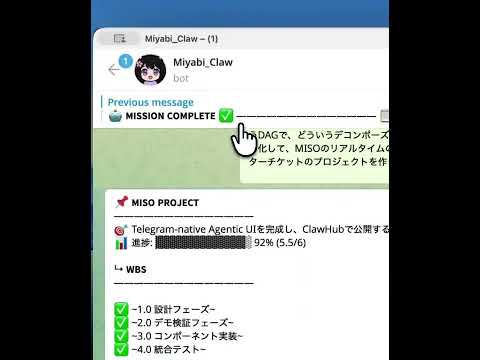
Real-time multi-agent orchestration in Telegram. No Web UI needed.
MISO is an OpenClaw skill that implements a 4+1 layer UX model for mission-critical work. It leverages Telegram's rich reaction system to give you immediate state visibility at a glance—no need to open conversations to check progress.
Unlike traditional project management tools that require dashboards, refreshes, or manual status checks, MISO pushes state changes to the surface using emoji reactions and strategic message patterns. Your agents read SKILL.md and follow the patterns automatically—no Python code required.
MISO organizes communication into four distinct layers, each optimized for speed and cognitive load:
| Layer | Element | Purpose | Speed |
|---|---|---|---|
| 0 | 📌 Pin | Presence announcement | Instant (chat open) |
| 1 | 🔥👀🎉❌ Reaction | State identification | Instant (chat list) |
| 2 | Message Body | Detailed information | Read when needed |
| 3 | Inline Buttons | Actions | Execute on interaction |
The magic happens at Layer 1: You see mission state right in the chat list without opening any conversations.
- Zero-Dashboard Visibility — See all mission states from your chat list
- Reaction-Based State Machine — Emoji reactions carry semantic meaning
- OpenClaw Native — Drop it in your skills directory, configure once, done
- Design System Compliant — Follows MISO's visual and formatting standards
- WBS Master Ticket Pattern — Track complex work with strike-through updates
- Phase Templates — Consistent, emoji-rich status formats for every phase
- Extensive Reaction Mode — Full emoji reaction support required
- No Code Required — Agents read patterns from SKILL.md and follow them
# Clone the repository
git clone https://github.com/shunsukehayashi/miso.git ~/.openclaw/skills/miso

# Or install via clawhub (if available)
clawhub install misoEdit ~/.openclaw/openclaw.json to enable extensive reactions:
{
  channels: {
    telegram: {
      reactionLevel: "extensive"
    }
  }
}- Start a mission with the MISO pattern
- Agents automatically apply reactions (🔥 in-progress, 👀 pending, 🎉 complete, ❌ failed)
- Track state from your chat list—no need to open conversations
- Use inline buttons for actions (approve, reject, etc.)
That's it. No Python imports, no setup code. Just patterns that agents follow.
Here's a sample phase message following the MISO design system:
🏗️ Phase: Implementation

— Started 2026-02-17 · Estimated 2026-02-20 —
Status: 🔥 In Progress (Day 2 of 4)

This phase covers the core feature development:
  ↳ Backend API endpoints
  ↳ Frontend components
  ↳ Integration testing

Next: Validation & Review phase
🌸 ᴘᴏᴡᴇʀᴇᴅ ʙʏ ᴍɪʏᴀʙɪ
Key design elements:
- Em dash (
—) separators - Unicode bold where needed
- Indented hierarchy with ↳
- Sakura (🌸) footer
- Reaction-friendly structure
{
  // Enable extensive reactions for full MISO support
  channels: {
    telegram: {
      reactionLevel: "extensive"
    }
  },

  // Optional: Configure MISO-specific settings
  skills: {
    miso: {
      enabled: true,
      reactionEmojis: {
        inProgress: "🔥",
        pending: "👀",
        complete: "🎉",
        failed: "❌",
        blocked: "🚫",
        approved: "✅",
        rejected: "👎"
      }
    }
  }
}| Emoji | Meaning | When to Use |
|---|---|---|
| 🔥 | In Progress | Active work happening |
| 👀 | Pending | Waiting on something |
| 🎉 | Complete | Phase/mission done |
| ❌ | Failed | Hit a blocker |
| 🚫 | Blocked | Waiting on external dependency |
| ✅ | Approved | Green-lit to proceed |
| 👎 | Rejected | Changes requested |
Track complex work with strike-through updates:
📋 WBS Master: E-Commerce Platform Migration

— Started 2026-02-10 · Target 2026-02-28 —
Status: 🔥 In Progress (60%)

## Phase 1: Discovery [COMPLETE]
  ↳ ~~Audit current system~~
  ↳ ~~Define migration scope~~
  ↳ ~~Risk assessment~~

## Phase 2: Architecture [COMPLETE]
  ↳ ~~Design new data model~~
  ↳ ~~API specification~~
  ↳ ~~Infrastructure plan~~

## Phase 3: Implementation [IN PROGRESS]
  ↳ ~~Core backend services~~
  ↳ ~~User authentication module~~
  ↳ ~~Payment integration~~
  ↳ Order management system (active)
  ↳ Inventory sync
  ↳ ~~Frontend components~~
  ↳ ~~Admin dashboard~~
  ↳ Customer portal (active)

## Phase 4: Testing [PENDING]
  ↳ Unit tests
  ↳ Integration tests
  ↳ Load testing
  ↳ Security audit

## Phase 5: Launch [PENDING]
  ↳ ~~Staging deployment~~
  ↳ Production cutover
  ↳ Monitoring setup
  ↳ Rollback plan verification

Next: Testing phase kickoff
🌸 ᴘᴏᴡᴇʀᴇᴅ ʙʏ ᴍɪʏᴀʙɪ
When following MISO patterns, remember:
- Left-align only — No centering, no right alignment
- No ASCII box diagrams — Use Markdown tables instead
- Tables are OK — Markdown tables are allowed
- Code blocks are OK — For config examples, code snippets, etc.
- Emojis carry structure — Use them strategically
- Em dash separators — Use
—between sections - ↳ for hierarchy — Indicate nested items with ↳
- 🌸 footer — Always end with the MISO signature
Created by Shunsuke Hayashi as part of the OpenClaw ecosystem.
Inspired by the need for mission-critical visibility without dashboard fatigue.
MIT License — See LICENSE for details.
Ready to transform your mission visibility? Install MISO and never wonder "what's the status?" again.