bug: failed to use etcd service name as etcd endpoint #267

Description

Issue description
使用官方的docker-compos文件,下面这一部分
......
  apisix:
    image: apache/apisix:2.11.0-alpine
    restart: always
    volumes:
      - ./apisix_log:/usr/local/apisix/logs
      - ./apisix_conf/config.yaml:/usr/local/apisix/conf/config.yaml:ro
    depends_on:
      - etcd
    ##network_mode: host
    ports:
      - "9080:9080/tcp"
      - "9091:9091/tcp"
      - "9443:9443/tcp"
      - "9092:9092/tcp"
    networks:
      apisix:

  etcd:
    image: bitnami/etcd:3.4.15
    restart: always
    volumes:
      - etcd_data:/bitnami/etcd
    environment:
      ETCD_ENABLE_V2: "true"
      ALLOW_NONE_AUTHENTICATION: "yes"
      ETCD_ADVERTISE_CLIENT_URLS: "http://0.0.0.0:2379"
      ETCD_LISTEN_CLIENT_URLS: "http://0.0.0.0:2379"
    ports:
      - "2379:2379/tcp"
    networks:
      apisix:
......
此时对应的apisix镜像的配置文件etcd部分是这样的
......
etcd:
  host:                           # it's possible to define multiple etcd hosts addresses of the same etcd cluster.
    - "http://etcd:2379"     # multiple etcd address
  prefix: "/apisix"               # apisix configurations prefix
  timeout: 30                     # 30 seconds
......
这是官方的默认配置是没有问题的.
如果把其中的etcd的部分改成下面这样
  mf_etcd:
    image: bitnami/etcd:3.4.15
    container_name: mf_etcd
    restart: always
    volumes:
      - etcd_data:/bitnami/etcd
    environment:
      ETCD_ENABLE_V2: "true"
      ALLOW_NONE_AUTHENTICATION: "yes"
      ETCD_ADVERTISE_CLIENT_URLS: "http://0.0.0.0:2379"
      ETCD_LISTEN_CLIENT_URLS: "http://0.0.0.0:2379"
    ports:
      - "2379:2379/tcp"
    networks:
      apisix:
此时对应的etcd配置应当修改为如下
......
etcd:
  host:                           # it's possible to define multiple etcd hosts addresses of the same etcd cluster.
    - "http://mf_etcd:2379"     # multiple etcd address
  prefix: "/apisix"               # apisix configurations prefix
  timeout: 30                     # 30 seconds
......
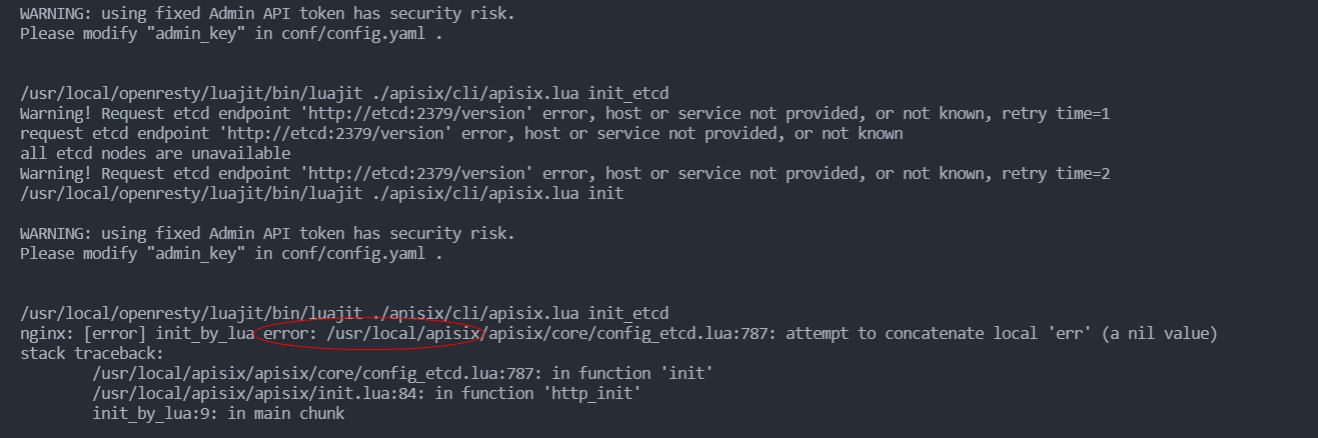
此时就会启动报错
Environment
bash-5.1# apisix version
/usr/local/openresty/luajit/bin/luajit ./apisix/cli/apisix.lua version
2.11.0
bash-5.1# uname -a
Linux b2c3fc362a79 5.10.60.1-microsoft-standard-WSL2 apache/apisix#1 SMP Wed Aug 25 23:20:18 UTC 2021 x86_64 Linux
bash-5.1# nginx -V
nginx version: openresty/1.19.3.2
built by gcc 9.3.0 (Alpine 9.3.0)
built with OpenSSL 1.1.1g  21 Apr 2020
TLS SNI support enabled
configure arguments: --prefix=/usr/local/openresty/nginx --with-cc-opt='-O2 -DAPISIX_BASE_VER=1.19.3.2.2 -DNGX_LUA_ABORT_AT_PANIC -I/usr/local/openresty/zlib/include -I/usr/local/openresty/pcre/include -I/usr/local/openresty/openssl111/include' --add-module=../ngx_devel_kit-0.3.1 --add-module=../echo-nginx-module-0.62 --add-module=../xss-nginx-module-0.06 --add-module=../ngx_coolkit-0.2 --add-module=../set-misc-nginx-module-0.32 --add-module=../form-input-nginx-module-0.12 --add-module=../encrypted-session-nginx-module-0.08 --add-module=../srcache-nginx-module-0.32 --add-module=../ngx_lua-0.10.19 --add-module=../ngx_lua_upstream-0.07 --add-module=../headers-more-nginx-module-0.33 --add-module=../array-var-nginx-module-0.05 --add-module=../memc-nginx-module-0.19 --add-module=../redis2-nginx-module-0.15 --add-module=../redis-nginx-module-0.3.7 --add-module=../ngx_stream_lua-0.0.9 --with-ld-opt='-Wl,-rpath,/usr/local/openresty/luajit/lib -Wl,-rpath,/usr/local/openresty/wasmtime-c-api/lib -L/usr/local/openresty/zlib/lib -L/usr/local/openresty/pcre/lib -L/usr/local/openresty/openssl111/lib -Wl,-rpath,/usr/local/openresty/zlib/lib:/usr/local/openresty/pcre/lib:/usr/local/openresty/openssl111/lib' --add-module=/tmp/tmp.Po19j8606M/openresty-1.19.3.2/../mod_dubbo --add-module=/tmp/tmp.Po19j8606M/openresty-1.19.3.2/../ngx_multi_upstream_module --add-module=/tmp/tmp.Po19j8606M/openresty-1.19.3.2/../apisix-nginx-module --add-module=/tmp/tmp.Po19j8606M/openresty-1.19.3.2/../wasm-nginx-module --add-module=/tmp/tmp.Po19j8606M/openresty-1.19.3.2/../lua-var-nginx-module --with-poll_module --with-pcre-jit --with-stream --with-stream_ssl_module --with-stream_ssl_preread_module --with-http_v2_module --without-mail_pop3_module --without-mail_imap_module --without-mail_smtp_module --with-http_stub_status_module --with-http_realip_module --with-http_addition_module --with-http_auth_request_module --with-http_secure_link_module --with-http_random_index_module --with-http_gzip_static_module --with-http_sub_module --with-http_dav_module --with-http_flv_module --with-http_mp4_module --with-http_gunzip_module --with-threads --with-compat --with-stream --with-http_ssl_module
bash-5.1# curl http://127.0.0.1:9092/v1/server_info
{"hostname":"b2c3fc362a79","boot_time":1641116153,"id":"b3949f69-8817-47c0-895e-25387a09adc6","up_time":383,"last_report_time":1641116512,"etcd_version":"3.5.0","version":"2.11.0"}
Steps to reproduce
- 修改etcd 的label为mf_etcd,container_name为mf_etcd
- 修改apisix的有关etcd部分的配置文件如下
etcd:
  host:                           # it's possible to define multiple etcd hosts addresses of the same etcd cluster.
    - "http://mf_etcd:2379"     # multiple etcd address
  prefix: "/apisix"               # apisix configurations prefix
  timeout: 30                     # 30 seconds
Actual result
不能通过etcd的label名初始化
Error log
WARNING: using fixed Admin API token has security risk.
Please modify "admin_key" in conf/config.yaml .
/usr/local/openresty/luajit/bin/luajit ./apisix/cli/apisix.lua init_etcd
Warning! Request etcd endpoint 'http://etcd:2379/version' error, host or service not provided, or not known, retry time=1
request etcd endpoint 'http://etcd:2379/version' error, host or service not provided, or not known
all etcd nodes are unavailable
Warning! Request etcd endpoint 'http://etcd:2379/version' error, host or service not provided, or not known, retry time=2
/usr/local/openresty/luajit/bin/luajit ./apisix/cli/apisix.lua init
WARNING: using fixed Admin API token has security risk.
Please modify "admin_key" in conf/config.yaml .
/usr/local/openresty/luajit/bin/luajit ./apisix/cli/apisix.lua init_etcd
nginx: [error] init_by_lua error: /usr/local/apisix/apisix/core/config_etcd.lua:787: attempt to concatenate local 'err' (a nil value)
stack traceback:
/usr/local/apisix/apisix/core/config_etcd.lua:787: in function 'init'
/usr/local/apisix/apisix/init.lua:84: in function 'http_init'
init_by_lua:9: in main chunk
Expected result
用docker-compose的label名或者容器的container都能正确启动. 其他容器一般都能这样