UI - Minor UI Issue - Failed "Resize volume" action is listed in notification list with a "Successfully resized volume" title #6501

Description

ISSUE TYPE
- Bug Report
COMPONENT NAME
UI
CLOUDSTACK VERSION
4.17.0.0
SUMMARY
If the instance disk size is fixed per the disk offering and one tries to resize the volume, the action fails. Pop-up notification shows the actual result and the cause of the failure, but in the notifications list it is titled as "Successfully resized volume".
STEPS TO REPRODUCE
[UI] Navigate to Storage / Volumes / Choose fixed size volume / Select "Resize volume" / Input the size, Submit
OR
[UI] Navigate to Storage / Volumes / Hover over fixed size volume's 3 dots / Select "Resize volume" / Input the size, Submit
EXPECTED RESULTS
The title of the notification message is consistent with the actual result and the pop-up notification.
ACTUAL RESULTS
When the action fails, notification pops up:
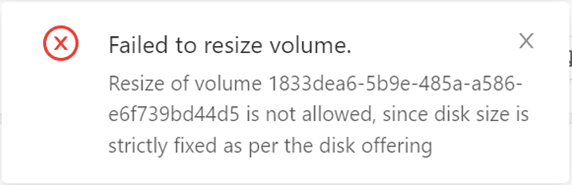
When the notifications list is chosen, the message is titled as "Successfully resized volume", although it has failed:
