Latest Cordova doesn't play well with latest Android Studio #502

Description

Bug Report
Problem
I have just installed and updated the latest version of Android studio (3.6.1) and the latest Cordova (9.0.1).
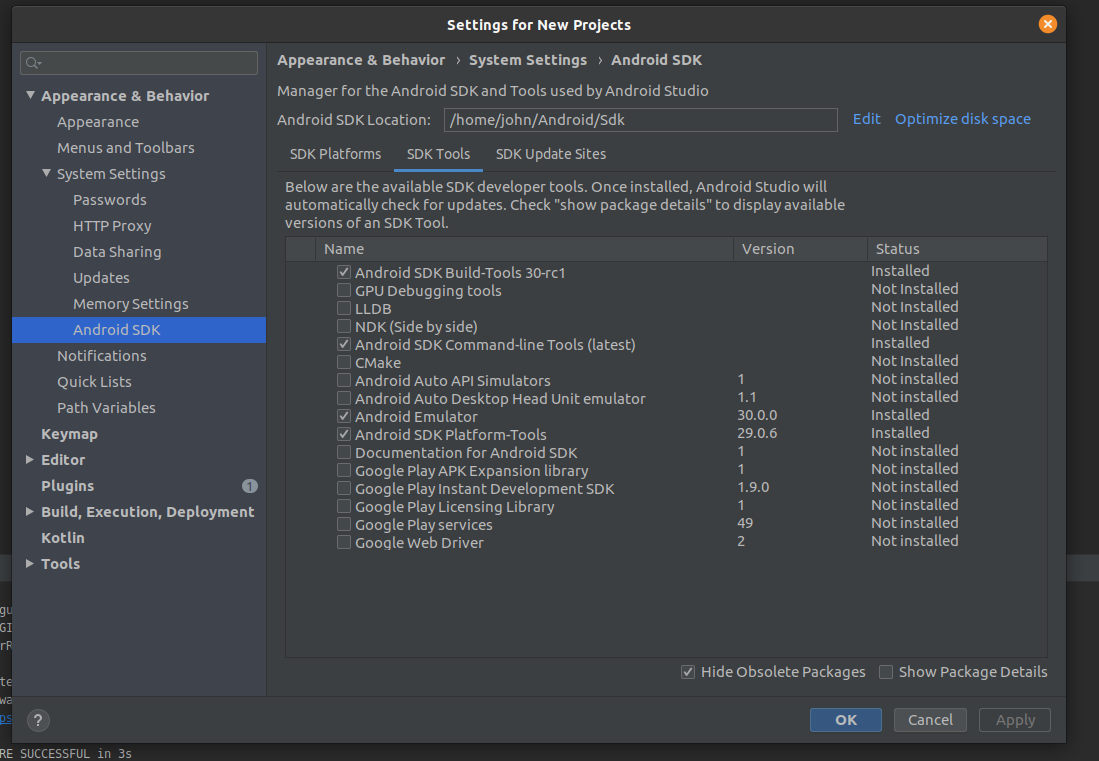
However after installing new SDKs I've noticed that android studio no longer has the $ANDROID_SDK_ROOT/tools/bin directory. After a bit more digging I found that I had to enable "Android SDK Command-Line Tools" in Android Studio. This then gave me the avdmanager under: $ANROID_SDK_ROOT/cmdline-tools/latest/bin
However Cordova is still not happy with this and is throwing the error:
Detected 'avdmanager' command at /home/john/Android/Sdk/cmdline-tools/latest/bin but no 'tools/bin' directory found near.
Try reinstall Android SDK or update your PATH to include valid path to SDK/tools/bin directory.
What is expected to happen?
I would hope that Cordova could somehow work with Android Studio's changed file structure
What does actually happen?
It throws the above error and I am unable to build
Information
My Android Studio SDK configuration:
Command or Code
cordova build android
Environment, Platform, Device
Ubuntu 19.10
Version information
Cordova 9.0.1
Android Studio 3.6.1
Checklist
- I searched for existing GitHub issues
- I updated all Cordova tooling to most recent version
- I included all the necessary information above