Adding Android SDK Tools info #1067
Merged
Conversation
This file contains hidden or bidirectional Unicode text that may be interpreted or compiled differently than what appears below. To review, open the file in an editor that reveals hidden Unicode characters.
Learn more about bidirectional Unicode characters


In newer versions of Android Studio, you need to explicitly install the Obsolete Android SDK's `tools` before you can set the path variable.

Contributor
|
You can modify your PR description to add the keyword: "Closes #1065" I think we should also confirm that the non-obsolete "Android SDK Command-line Tools" will work in place of using the obsolete package. If so, I'd favour the documentation stating that "Android SDK Command-line Tools" should be installed. |


Member
|
I added the issue to linked issues and linked a duplicate PR. |

breautek
approved these changes
Apr 6, 2020

timbru31
reviewed
Jul 13, 2020
Member
 timbru31
left a comment
timbru31
left a comment
timbru31
left a comment
There was a problem hiding this comment.
Minor formatting improvements.


Co-authored-by: Tim Brust <github@timbrust.de>
Co-authored-by: Tim Brust <github@timbrust.de>
Contributor
|
Reviewing this, I no longer see
|
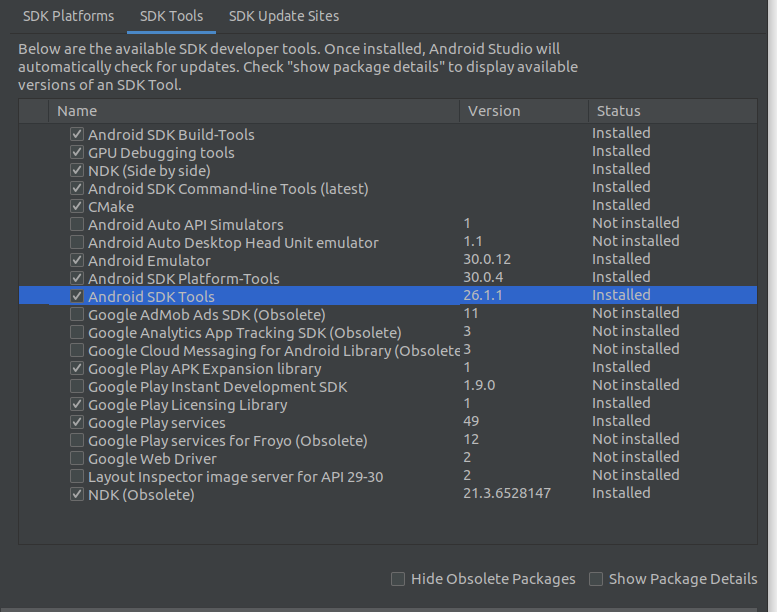


Member
|
@breautek uninstall and reinstall the |


erisu
approved these changes
Aug 7, 2020

purplecabbage
pushed a commit
that referenced
this pull request
Oct 15, 2020


Co-authored-by: Tim Brust <github@timbrust.de>
Co-authored-by: Norman Breau <norman@normanbreau.com>
Co-authored-by: エリス <erisu@users.noreply.github.com>
Sign up for free
to join this conversation on GitHub.
Already have an account?
Sign in to comment
5 participants


Add this suggestion to a batch that can be applied as a single commit.
This suggestion is invalid because no changes were made to the code.
Suggestions cannot be applied while the pull request is closed.
Suggestions cannot be applied while viewing a subset of changes.
Only one suggestion per line can be applied in a batch.
Add this suggestion to a batch that can be applied as a single commit.
Applying suggestions on deleted lines is not supported.
You must change the existing code in this line in order to create a valid suggestion.
Outdated suggestions cannot be applied.
This suggestion has been applied or marked resolved.
Suggestions cannot be applied from pending reviews.
Suggestions cannot be applied on multi-line comments.
Suggestions cannot be applied while the pull request is queued to merge.
Suggestion cannot be applied right now. Please check back later.
In newer versions of Android Studio, you need to explicitly install the Obsolete Android SDK's
toolsbefore you can set the path variable.Platforms affected
All
Motivation and Context
When following the current docs, you are instructed to set a path variable for android sdk tools.
If you are doing a fresh install of the latest android studio, you will not have the android sdk tools directory.
Closes #1065
Description
Added short instructions about how to show obsolete packages and install android sdk tools.
Testing
Checklist
(platform)if this change only applies to one platform (e.g.(android))