Skip to content
Merged
Show file tree
Hide file tree
Changes from all commits
Commits
File filter

Filter by extension

Filter by extension

Conversations
Failed to load comments.
Loading
Jump to
Jump to file
Failed to load files.
Loading
Diff view
Diff view
4 changes: 3 additions & 1 deletion web-console/src/components/json-input/json-input.tsx
Original file line number Diff line number Diff line change
Expand Up @@ -24,7 +24,9 @@ import AceEditor from 'react-ace';
import './json-input.scss';

function parseHjson(str: string) {
return str === '' ? null : Hjson.parse(str);
// Throwing on empty input is more consistent with how JSON.parse works
Copy link
Contributor

Choose a reason for hiding this comment

The reason will be displayed to describe this comment to others. Learn more.

What happens when the text in the area can't be parsed?

Copy link
Contributor Author

Choose a reason for hiding this comment

The reason will be displayed to describe this comment to others. Learn more.

When it can not parse the editor itself would keep the partial string value inside of it - so nothing interesting would happen. The issue is when it does parse... in simple terms this was the old problem:

Let say you were deleting text and you have { entered. Then you press backspace.

The simplified logic flow would go like this:

  • AceEditor: user has changed input to ''
  • JsonInput: '' is valid JSON it parses to null, notify the parent
  • DataLoader: user changed the spec to null that is not workable as a spec, adjust it to {}
  • JsonInput: adjusting the input to "{}"
  • AceEditor: shows {} after you pressed backspace on {

Now it would go like this:

  • AceEditor: user has changed input to ''
  • JsonInput: '' is not valid JSON because it throws, keep waiting
  • AceEditor: shows nothing

Note that Hjson.parse({}) is {} so that is why we need to special case white space only strings. If we were not being that fancy and using boring old JSON.parse this would not be an issue as JSON.parse does not recognize '' as valid json.

Copy link
Contributor

Choose a reason for hiding this comment

The reason will be displayed to describe this comment to others. Learn more.

Thanks for the detailed explanation!!

if (str.trim() === '') throw new Error('empty hjson');
return Hjson.parse(str);
}

function stringifyJson(item: any): string {
Expand Down
Original file line number Diff line number Diff line change
@@ -1,6 +1,187 @@
// Jest Snapshot v1, https://goo.gl/fbAQLP

exports[`spec dialog matches snapshot 1`] = `
exports[`spec dialog matches snapshot no initSpec 1`] = `
Copy link
Contributor

Choose a reason for hiding this comment

The reason will be displayed to describe this comment to others. Learn more.

What's all this new stuff for and what are the XXXXXXXXXXXXXXXXXXXXXXXXXXXXXXXXXXXXXXXXXXXXXXXXXXXXXXXXXXXXXXXXXXXXXXXXXXXXXXXXXXXXXXXXXXXXXXXXXXXX about?

Copy link
Contributor Author

Choose a reason for hiding this comment

The reason will be displayed to describe this comment to others. Learn more.

The .snap files are snapshots, they are unit tests that virtually render the UI and then take a snapshot of the dom.
The XXXXXXXXXXXX is some part of the internals of the AceEditor this is the 3rd party component we use to give the IDE like editor for the JSON. What does it do? No idea, but we will know if it changes!

Copy link
Contributor

Choose a reason for hiding this comment

The reason will be displayed to describe this comment to others. Learn more.

Oh, interesting…

Do we bundle this with the released app or is it skipped? I didn't realize it was a test file at first, because it's in the same src path that the main code is in.

Copy link
Contributor Author

Choose a reason for hiding this comment

The reason will be displayed to describe this comment to others. Learn more.

none of the tests (and test aids like this one) are included in the bundle because none of the code depends on any of the test code (if it did then it would not compile because tests run in a different environment jest than the prod code node/dom).

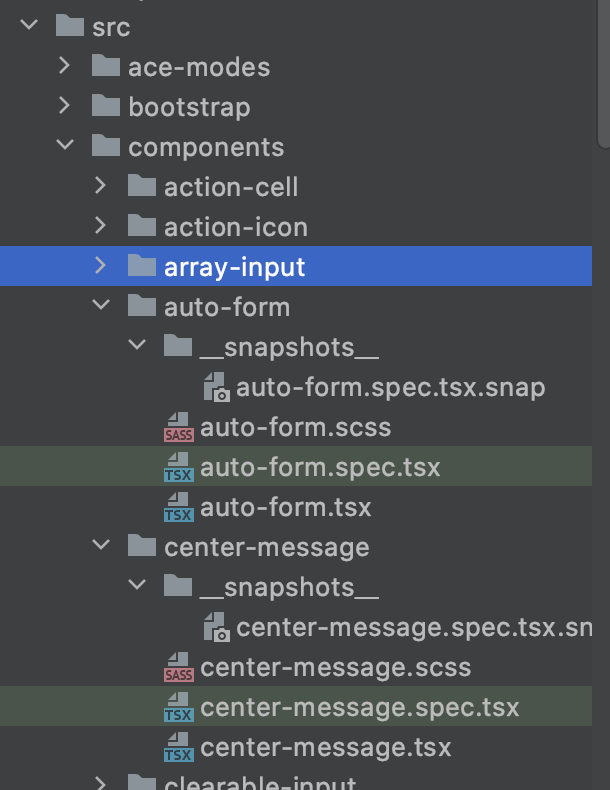
In general the web console follows a standard where every class (or functional component) lives in a file next to the style and the test

image

... this has been the case from day one (of the unified console) and is pretty idiomatic of the modern web-dev world.

The tests are separated from the code with file extensions *.spec.* vs location

Copy link
Contributor

Choose a reason for hiding this comment

The reason will be displayed to describe this comment to others. Learn more.

TIL

<div
class="bp3-portal"
>
<div
class="bp3-overlay bp3-overlay-open bp3-overlay-scroll-container"
>
<div
class="bp3-overlay-backdrop bp3-overlay-appear bp3-overlay-appear-active"
/>
<div
class="bp3-dialog-container bp3-overlay-content bp3-overlay-appear bp3-overlay-appear-active"
tabindex="0"
>
<div
class="bp3-dialog spec-dialog"
>
<div
class="bp3-dialog-header"
>
<h4
class="bp3-heading"
>
test
</h4>
<button
aria-label="Close"
class="bp3-button bp3-minimal bp3-dialog-close-button"
type="button"
>
<span
class="bp3-icon bp3-icon-small-cross"
icon="small-cross"
>
<svg
data-icon="small-cross"
height="20"
viewBox="0 0 20 20"
width="20"
>
<desc>
small-cross
</desc>
<path
d="M11.41 10l3.29-3.29c.19-.18.3-.43.3-.71a1.003 1.003 0 00-1.71-.71L10 8.59l-3.29-3.3a1.003 1.003 0 00-1.42 1.42L8.59 10 5.3 13.29c-.19.18-.3.43-.3.71a1.003 1.003 0 001.71.71l3.29-3.3 3.29 3.29c.18.19.43.3.71.3a1.003 1.003 0 00.71-1.71L11.41 10z"
fill-rule="evenodd"
/>
</svg>
</span>
</button>
</div>
<div
class=" ace_editor ace-tm spec-dialog-textarea"
id="brace-editor"
style="width: 100%; height: 500px;"
>
<textarea
autocapitalize="off"
autocorrect="off"
class="ace_text-input"
spellcheck="false"
style="opacity: 0;"
wrap="off"
/>
<div
aria-hidden="true"
class="ace_gutter"
>
<div
class="ace_layer ace_gutter-layer ace_folding-enabled"
/>
<div
class="ace_gutter-active-line"
/>
</div>
<div
class="ace_scroller"
>
<div
class="ace_content"
>
<div
class="ace_layer ace_print-margin-layer"
>
<div
class="ace_print-margin"
style="left: 4px; visibility: hidden;"
/>
</div>
<div
class="ace_layer ace_marker-layer"
/>
<div
class="ace_layer ace_text-layer"
style="padding: 0px 4px;"
/>
<div
class="ace_layer ace_marker-layer"
/>
<div
class="ace_layer ace_cursor-layer ace_hidden-cursors"
>
<div
class="ace_cursor"
/>
</div>
</div>
<div
class="ace_comment ace_placeholder"
style="padding: 0px 9px; position: absolute; z-index: 3;"
>
{ JSON spec... }
</div>
</div>
<div
class="ace_scrollbar ace_scrollbar-v"
style="display: none; width: 20px;"
>
<div
class="ace_scrollbar-inner"
style="width: 20px;"
/>
</div>
<div
class="ace_scrollbar ace_scrollbar-h"
style="display: none; height: 20px;"
>
<div
class="ace_scrollbar-inner"
style="height: 20px;"
/>
</div>
<div
style="height: auto; width: auto; top: 0px; left: 0px; visibility: hidden; position: absolute; white-space: pre; overflow: hidden;"
>
<div
style="height: auto; width: auto; top: 0px; left: 0px; visibility: hidden; position: absolute; white-space: pre; overflow: visible;"
/>
<div
style="height: auto; width: auto; top: 0px; left: 0px; visibility: hidden; position: absolute; white-space: pre; overflow: visible;"
>
XXXXXXXXXXXXXXXXXXXXXXXXXXXXXXXXXXXXXXXXXXXXXXXXXXXXXXXXXXXXXXXXXXXXXXXXXXXXXXXXXXXXXXXXXXXXXXXXXXXX
</div>
</div>
</div>
<div
class="bp3-dialog-footer"
>
<div
class="bp3-dialog-footer-actions"
>
<button
class="bp3-button"
type="button"
>
<span
class="bp3-button-text"
>
Close
</span>
</button>
<button
class="bp3-button bp3-disabled bp3-intent-primary"
disabled=""
tabindex="-1"
type="button"
>
<span
class="bp3-button-text"
>
Submit
</span>
</button>
</div>
</div>
</div>
</div>
</div>
</div>
`;

exports[`spec dialog matches snapshot with initSpec 1`] = `
<div
class="bp3-portal"
>
Expand Down
15 changes: 14 additions & 1 deletion web-console/src/dialogs/spec-dialog/spec-dialog.spec.tsx
Original file line number Diff line number Diff line change
Expand Up @@ -22,9 +22,22 @@ import React from 'react';
import { SpecDialog } from './spec-dialog';

describe('spec dialog', () => {
it('matches snapshot', () => {
it('matches snapshot no initSpec', () => {
const specDialog = <SpecDialog onSubmit={() => {}} onClose={() => {}} title={'test'} />;
render(specDialog);
expect(document.body.lastChild).toMatchSnapshot();
});

it('matches snapshot with initSpec', () => {
const specDialog = (
<SpecDialog
initSpec={{ type: 'some-spec' }}
onSubmit={() => {}}
onClose={() => {}}
title={'test'}
/>
);
render(specDialog);
expect(document.body.lastChild).toMatchSnapshot();
});
});
3 changes: 2 additions & 1 deletion web-console/src/dialogs/spec-dialog/spec-dialog.tsx
Original file line number Diff line number Diff line change
Expand Up @@ -33,7 +33,7 @@ export interface SpecDialogProps {

export const SpecDialog = React.memo(function SpecDialog(props: SpecDialogProps) {
const { onClose, onSubmit, title, initSpec } = props;
const [spec, setSpec] = useState(() => (initSpec ? JSON.stringify(initSpec, null, 2) : '{\n\n}'));
const [spec, setSpec] = useState(() => (initSpec ? JSON.stringify(initSpec, null, 2) : ''));

function postSpec(): void {
if (!validJson(spec)) return;
Expand Down Expand Up @@ -65,6 +65,7 @@ export const SpecDialog = React.memo(function SpecDialog(props: SpecDialogProps)
tabSize: 2,
}}
style={{}}
placeholder="{ JSON spec... }"
Copy link
Contributor

Choose a reason for hiding this comment

The reason will be displayed to describe this comment to others. Learn more.

What does placeholder do?

Copy link
Contributor Author

Choose a reason for hiding this comment

The reason will be displayed to describe this comment to others. Learn more.

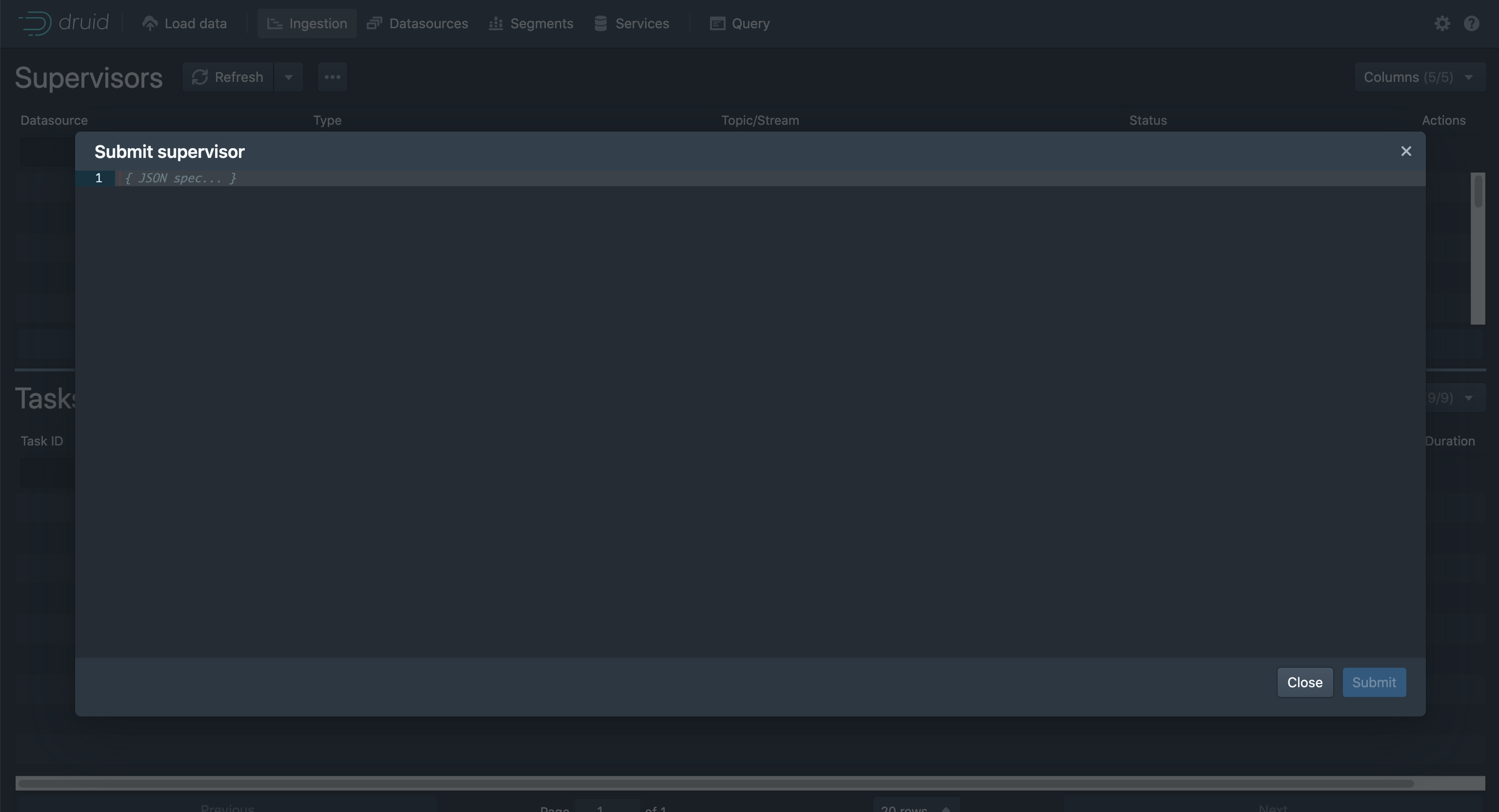
There are two changes in this PR that are thematically similar (when you fix an issue it is better to look for other potential issues in the code). A placeholder is the ghost text that appears in an input that goes away as soon as you start typing.

image

Before this change this dialog (which is not part of the data loader) would start of with {\n\n} as the initial value.
Now it start off blank (but with a placeholder) meaning that you do not need to delete or select over the initial value if you want to paste your own spec.

/>
<div className={Classes.DIALOG_FOOTER}>
<div className={Classes.DIALOG_FOOTER_ACTIONS}>
Expand Down