Advanced Tree Map supporting multiple views based on view port and data size. #17370

Description

What problem does this feature solve?
We have a requirement where we need to display different views for the data depending on the data size and viewport/screen width.
There are 5 types of cards with the level of details reduced in each card as shown below.
The requirement is to show the most detailed card possible to be viewed in one single row in the current viewport based on the data size.
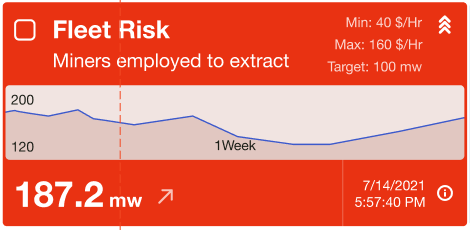
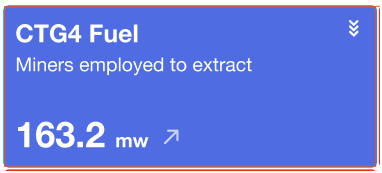



For example, in a screen width of 1920px, if there are 4 data points, then Card 1 with maximum details should be displayed.
For the same width in case, there are 200 data points, then card 5 with only color boxes should be displayed in multiline.
We tried to implement the same using a TREEMAP. The TREEMAP is able to manage the card sizes based on the viewport but we are unable to customize the cards based on the above design. Kindly provide a handle on the TREEMAP in order to create customized HTML content based on the card size.
What does the proposed API look like?
We tried using a TREEMAP for this use case where it tree map is able to generate the required different size cards based on the screensize. But we are unable to design the content of the card based on the size of the card.
Please find the treemap option configuration used below:
const option = { series: [ { type: 'treemap', data: mapdata, label: { show: true, // formatter: '{b}: {a}' position: 'insideTopLeft', formatter: function (params) { let arr = [ params.name, ' ', 'Description: '+ params.data.description, 'Actual: '+ params.data.actualValue + params.data.actualUnit, 'Target: '+ params.data.targetValue + params.data.targetUnit, 'Min Value: '+ params.data.valueMin, 'Max Value: '+ params.data.valueMax, 'valueMax'+ params.data.valueMax, 'valueMax'+ params.data.valueMax, 'Status: '+ params.data.status, ]; return arr.join('\n'); }, }, itemStyle: { gapWidth: 2 }, nodeClick: false, breadcrumb: { show: false } } ] };
In the above options, the label only takes a string as an input and not HTML content.
We need the label to take HTML content as input with control on which content to be displayed based on the card size.