-
Notifications
You must be signed in to change notification settings - Fork 119
Add thingsboard document #349
New issue
Have a question about this project? Sign up for a free GitHub account to open an issue and contact its maintainers and the community.
By clicking “Sign up for GitHub”, you agree to our terms of service and privacy statement. We’ll occasionally send you account related emails.
Already on GitHub? Sign in to your account
Merged
Merged
Changes from all commits
Commits
Show all changes
2 commits
Select commit
Hold shift + click to select a range
File filter
Filter by extension
Conversations
Failed to load comments.
Loading
Jump to
Jump to file
Failed to load files.
Loading
Diff view
Diff view
There are no files selected for viewing
This file contains hidden or bidirectional Unicode text that may be interpreted or compiled differently than what appears below. To review, open the file in an editor that reveals hidden Unicode characters.
Learn more about bidirectional Unicode characters
This file contains hidden or bidirectional Unicode text that may be interpreted or compiled differently than what appears below. To review, open the file in an editor that reveals hidden Unicode characters.
Learn more about bidirectional Unicode characters
100 changes: 100 additions & 0 deletions
100
src/UserGuide/Master/Ecosystem-Integration/Thingsboard_timecho.md
This file contains hidden or bidirectional Unicode text that may be interpreted or compiled differently than what appears below. To review, open the file in an editor that reveals hidden Unicode characters.
Learn more about bidirectional Unicode characters
| Original file line number | Diff line number | Diff line change |
|---|---|---|
| @@ -0,0 +1,100 @@ | ||
| <!-- | ||
|
|
||
| Licensed to the Apache Software Foundation (ASF) under one | ||
| or more contributor license agreements. See the NOTICE file | ||
| distributed with this work for additional information | ||
| regarding copyright ownership. The ASF licenses this file | ||
| to you under the Apache License, Version 2.0 (the | ||
| "License"); you may not use this file except in compliance | ||
| with the License. You may obtain a copy of the License at | ||
|
|
||
| http://www.apache.org/licenses/LICENSE-2.0 | ||
|
|
||
| Unless required by applicable law or agreed to in writing, | ||
| software distributed under the License is distributed on an | ||
| "AS IS" BASIS, WITHOUT WARRANTIES OR CONDITIONS OF ANY | ||
| KIND, either express or implied. See the License for the | ||
| specific language governing permissions and limitations | ||
| under the License. | ||
|
|
||
| --> | ||
| # ThingsBoard | ||
|
|
||
| ## Product Overview | ||
|
|
||
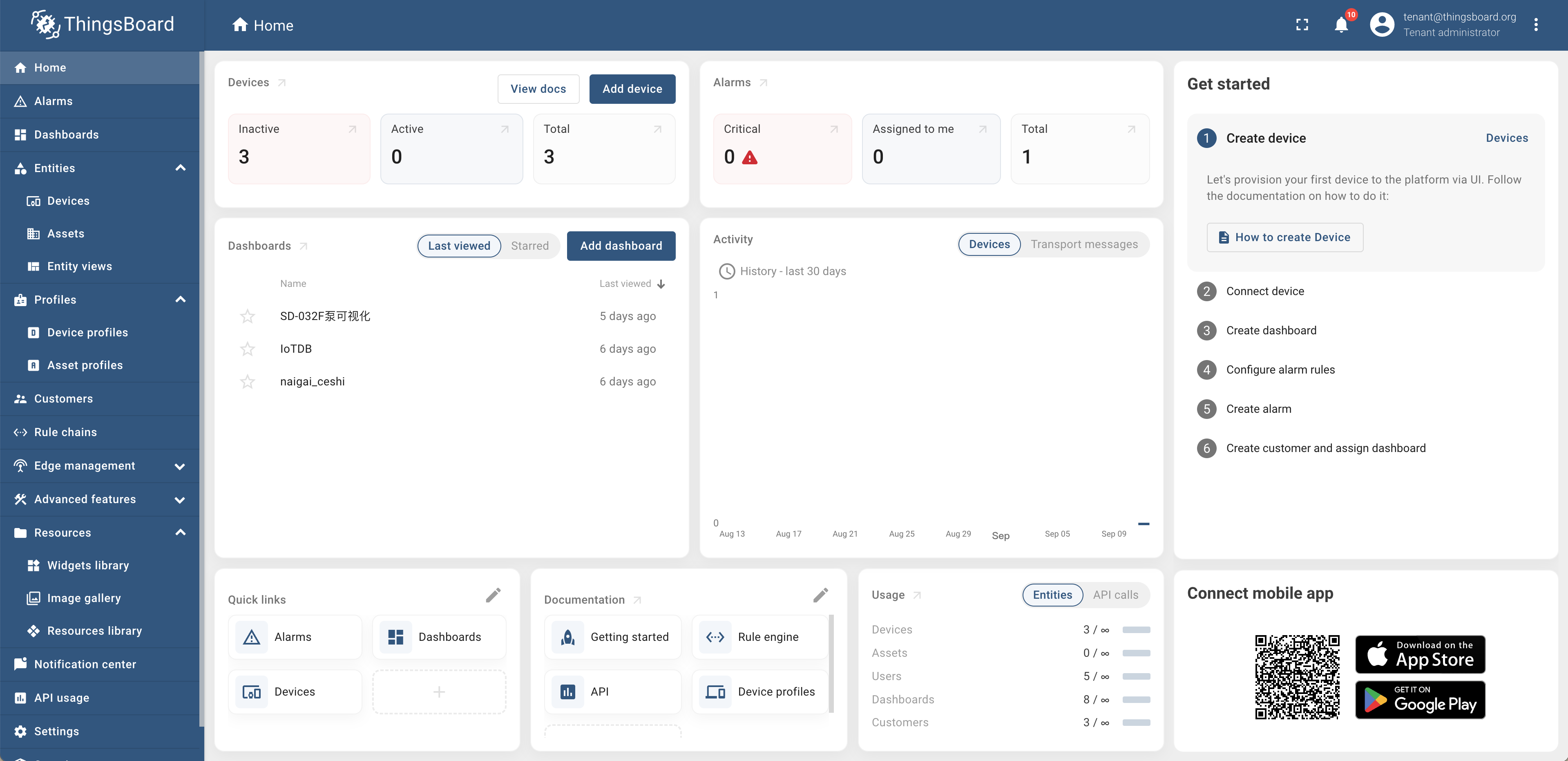
| 1. Introduction to ThingsBoard | ||
|
|
||
| ThingsBoard is an open-source IoT platform that enables rapid development, management, and expansion of IoT projects. For more detailed information, please refer to [ThingsBoard Official Website](https://thingsboard.io/docs/getting-started-guides/what-is-thingsboard/https://thingsboard.io/docs/getting-started-guides/what-is-thingsboard/). | ||
|
|
||
|  | ||
|
|
||
| 2. Introduction to ThingsBoard-IoTDB | ||
|
|
||
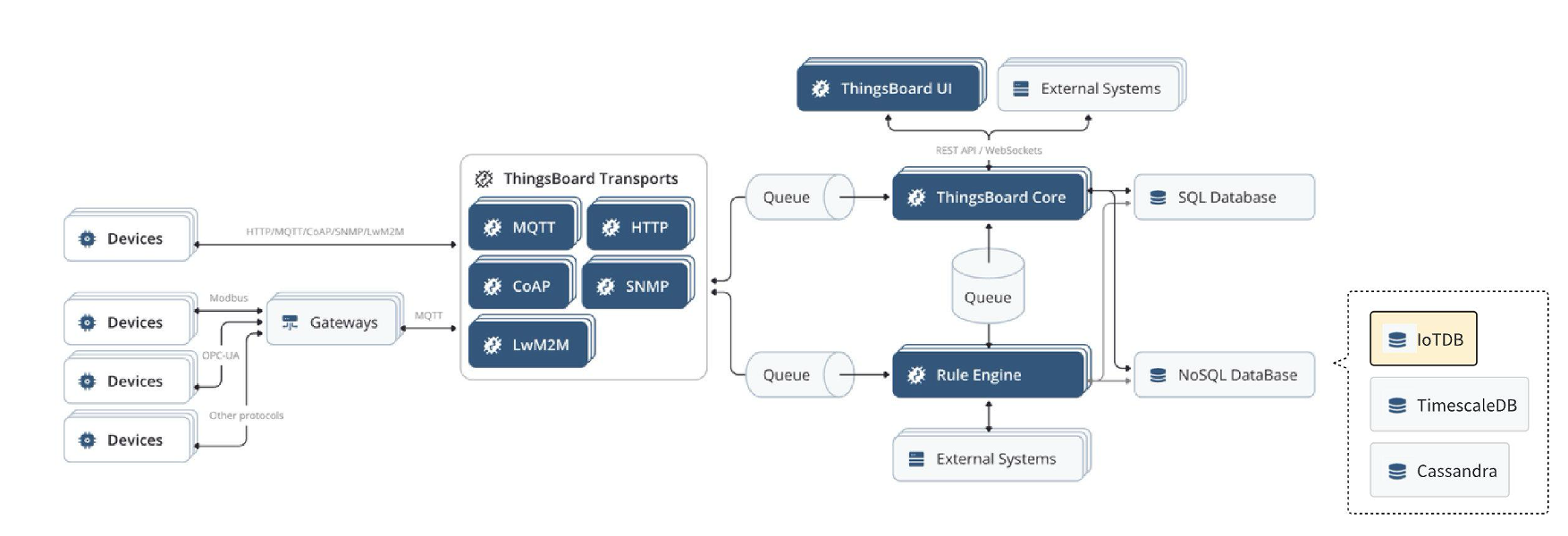
| ThingsBoard IoTDB provides the ability to store data from ThingsBoard to IoTDB, and also supports reading data information from the `root.thingsboard` database in ThingsBoard. The detailed architecture diagram is shown in yellow in the following figure. | ||
|
|
||
| ### Relationship Diagram | ||
|
|
||
|  | ||
|
|
||
| ## Installation Requirements | ||
|
|
||
| | **Preparation Content** | **Version Requirements** | | ||
| | :---------------------------------------- | :----------------------------------------------------------- | | ||
| | JDK | Requirement to have installed version 17 or above. Please refer to the specific download for details [Oracle Official Website](https://www.oracle.com/java/technologies/downloads/) | | ||
| | IoTDB | Require installation of V1.3.0 and above. Please refer to the specific installation process [Deployment guidance](https://www.timecho.com/docs/UserGuide/latest/Deployment-and-Maintenance/IoTDB-Package_timecho.html) | | ||
| | ThingsBoard<br /> (IoTDB adapted version) | Please contact the business department to obtain the installation package. For specific installation steps, please refer to the following text | | ||
|
|
||
| ## Installation Steps | ||
|
|
||
| Please refer to the specific installation steps [ThingsBoard Official Website](https://thingsboard.io/docs/user-guide/install/ubuntu/)。wherein: | ||
|
|
||
| - [ThingsBoard Official Website](https://thingsboard.io/docs/user-guide/install/ubuntu/)【 Step 2: ThingsBoard Service Installation 】 Use the installation package obtained from the business above to install (using the official ThingsBoard installation package cannot use IoTDB) | ||
| - [ThingsBoard Official Website](https://thingsboard.io/docs/user-guide/install/ubuntu/) 【Step 3: Configure ThingsBoard Database - ThingsBoard Configuration】 In this step, you need to add environment variables according to the following content | ||
|
|
||
| ```Shell | ||
| # ThingsBoard original configuration | ||
| export SPRING_DATASOURCE_URL=jdbc:postgresql://localhost:5432/thingsboard | ||
| export SPRING_DATASOURCE_USERNAME=postgres | ||
| export SPRING_DATASOURCE_PASSWORD=PUT_YOUR_POSTGRESQL_PASSWORD_HERE ##Change password to pg | ||
|
|
||
| # To use IoTDB, the following variables need to be modified | ||
| export DATABASE_TS_TYPE=iotdb ## Originally configured as SQL, change the variable value to iotdb | ||
|
|
||
|
|
||
| # To use IoTDB, the following variables need to be added | ||
| export DATABASE_TS_LATEST_TYPE=iotdb | ||
| export IoTDB_HOST=127.0.0.1 ## The IP address where iotdb is located | ||
| export IoTDB_PORT:6667 ## The port number for iotdb is 6667 by default | ||
| export IoTDB_USER:root ## The username for iotdb,defaults as root | ||
| export IoTDB_PASSWORD:root ## The password for iotdb,default as root | ||
| export IoTDB_CONNECTION_TIMEOUT:5000 ## IoTDB timeout setting | ||
| export IoTDB_FETCH_SIZE:1024 ## The number of data pulled in a single request is recommended to be set to 1024 | ||
| export IoTDB_MAX_SIZE:200 ## The maximum number of sessions in the session pool is recommended to be set to>=concurrent requests | ||
| export IoTDB_DATABASE:root.thingsboard ## Thingsboard data is written to the database stored in IoTDB, supporting customization | ||
| ``` | ||
|
|
||
| ## Instructions | ||
|
|
||
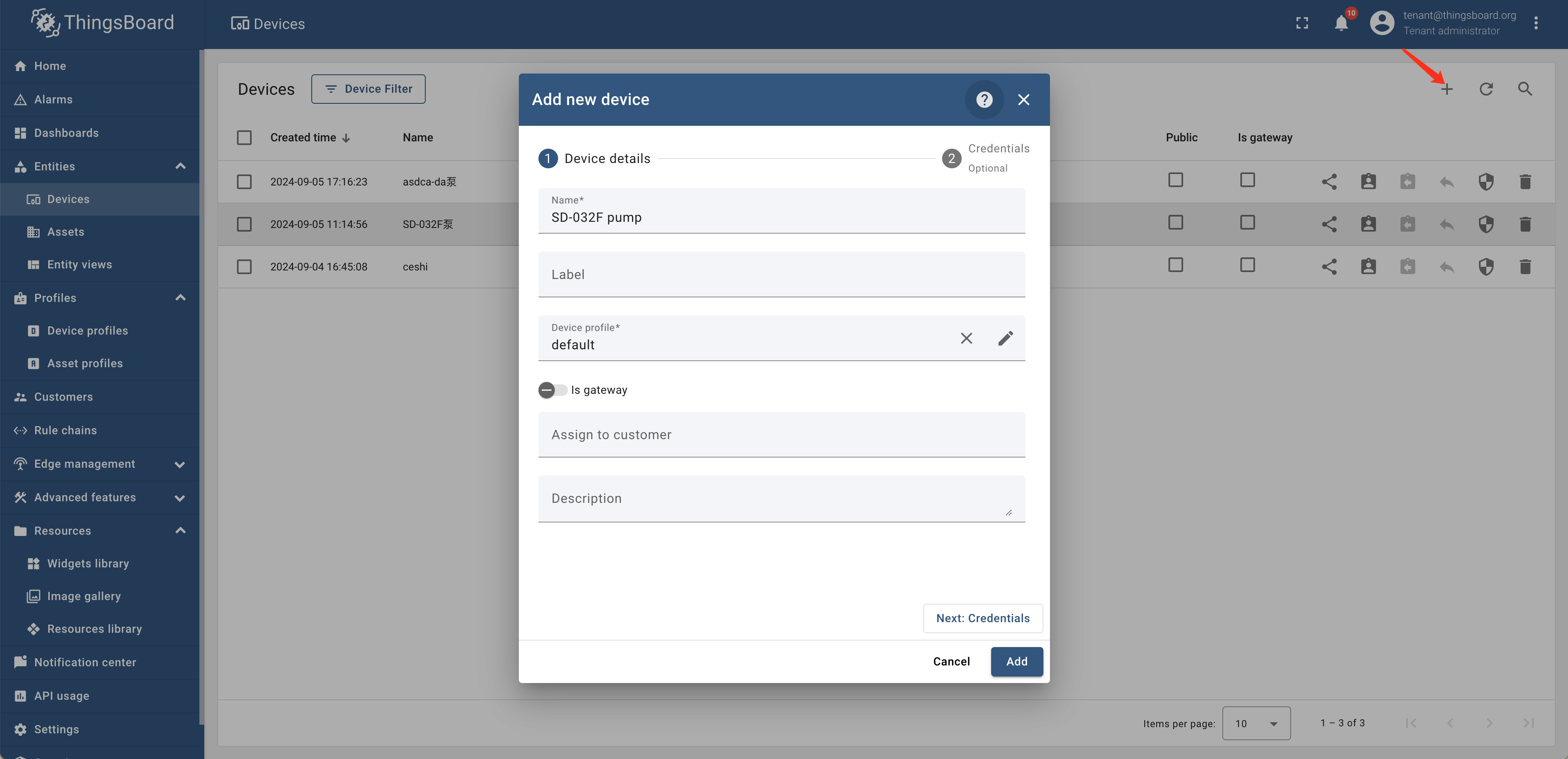
| 1. Create devices and connect data:Create devices in the entity device of Thingsboard and send data to the specified devices on ThingsBoard through an industrial gateway | ||
|
|
||
|  | ||
|
|
||
| 2. Set rule chain:Set alarm rules for "SD-032F pump" in the rule chain library and set the rule chain as the root chain | ||
|
|
||
| <div style="display: flex;justify-content: space-between;"> | ||
| <img src="https://alioss.timecho.com/docs/img/thingsboard-en3.png" alt=" " style="width: 50%;"/> | ||
| <img src="https://alioss.timecho.com/docs/img/thingsborad-en4.png" alt=" " style="width: 50%;"/> | ||
| </div> | ||
|
|
||
|
|
||
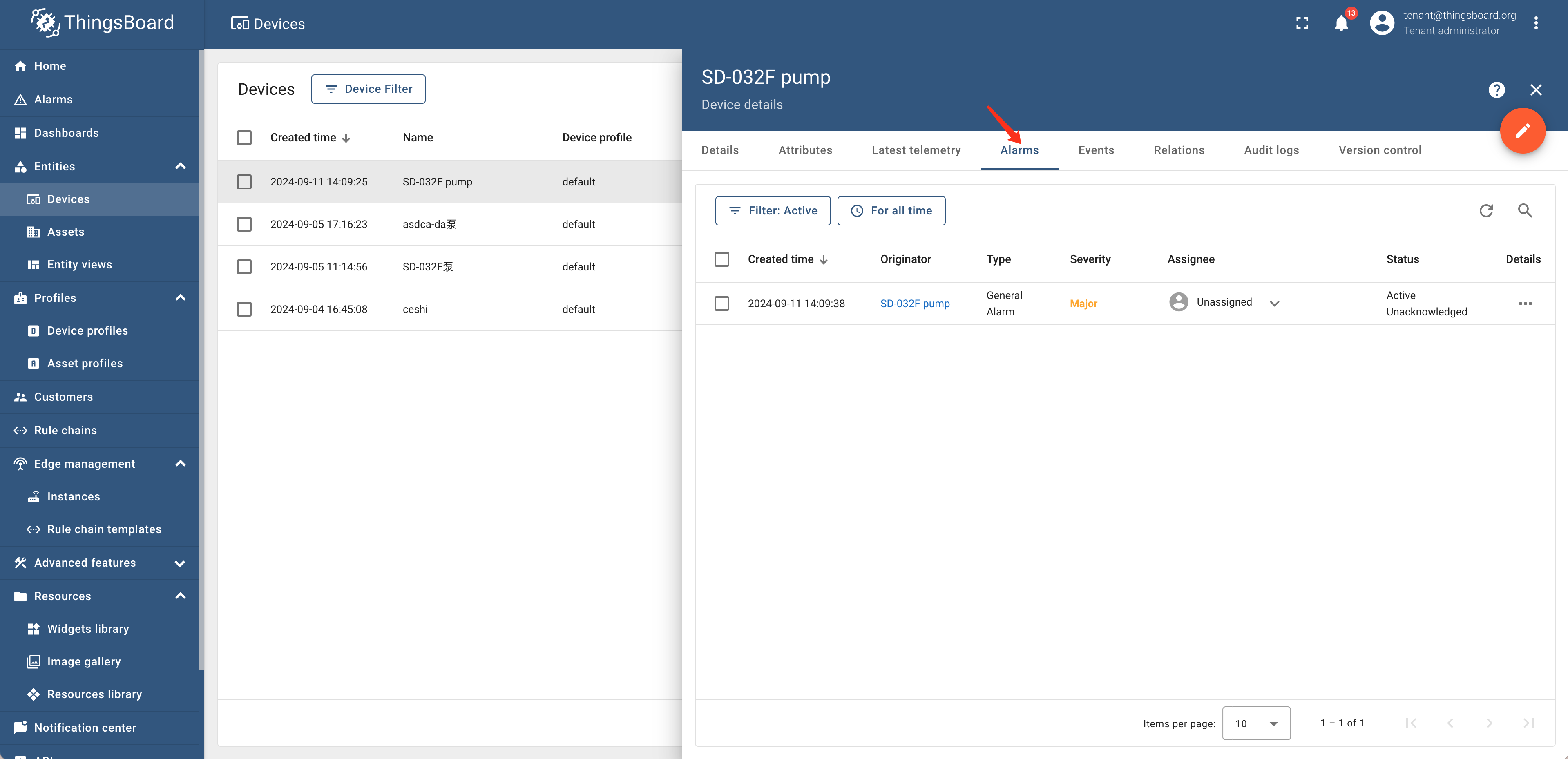
| 3. View alarm records:The generated alarm records have been viewed by clicking on "Device Alarm" | ||
|
|
||
|  | ||
|
|
||
| 4. Data Visualization:Visualize settings through "New Dashboard - Bind Devices - Associate Parameters" in the "Dashboard" | ||
|
|
||
| <div style="display: flex;justify-content: space-between;"> | ||
| <img src="https://alioss.timecho.com/docs/img/thingsboard-en6.png" alt=" " style="width: 50%;"/> | ||
| <img src="https://alioss.timecho.com/docs/img/thingsboard-en7.png" alt=" " style="width: 50%;"/> | ||
| </div> | ||
|
|
100 changes: 100 additions & 0 deletions
100
src/UserGuide/latest/Ecosystem-Integration/Thingsboard_timecho.md
This file contains hidden or bidirectional Unicode text that may be interpreted or compiled differently than what appears below. To review, open the file in an editor that reveals hidden Unicode characters.
Learn more about bidirectional Unicode characters
| Original file line number | Diff line number | Diff line change |
|---|---|---|
| @@ -0,0 +1,100 @@ | ||
| <!-- | ||
|
|
||
| Licensed to the Apache Software Foundation (ASF) under one | ||
| or more contributor license agreements. See the NOTICE file | ||
| distributed with this work for additional information | ||
| regarding copyright ownership. The ASF licenses this file | ||
| to you under the Apache License, Version 2.0 (the | ||
| "License"); you may not use this file except in compliance | ||
| with the License. You may obtain a copy of the License at | ||
|
|
||
| http://www.apache.org/licenses/LICENSE-2.0 | ||
|
|
||
| Unless required by applicable law or agreed to in writing, | ||
| software distributed under the License is distributed on an | ||
| "AS IS" BASIS, WITHOUT WARRANTIES OR CONDITIONS OF ANY | ||
| KIND, either express or implied. See the License for the | ||
| specific language governing permissions and limitations | ||
| under the License. | ||
|
|
||
| --> | ||
| # ThingsBoard | ||
|
|
||
| ## Product Overview | ||
|
|
||
| 1. Introduction to ThingsBoard | ||
|
|
||
| ThingsBoard is an open-source IoT platform that enables rapid development, management, and expansion of IoT projects. For more detailed information, please refer to [ThingsBoard Official Website](https://thingsboard.io/docs/getting-started-guides/what-is-thingsboard/https://thingsboard.io/docs/getting-started-guides/what-is-thingsboard/)。 | ||
|
|
||
|  | ||
|
|
||
| 2. Introduction to ThingsBoard-IoTDB | ||
|
|
||
| ThingsBoard IoTDB provides the ability to store data from ThingsBoard to IoTDB, and also supports reading data information from the `root.thingsboard` database in ThingsBoard. The detailed architecture diagram is shown in yellow in the following figure. | ||
|
|
||
| ### Relationship Diagram | ||
|
|
||
|  | ||
|
|
||
| ## Installation Requirements | ||
|
|
||
| | **Preparation Content** | **Version Requirements** | | ||
| | :---------------------------------------- | :----------------------------------------------------------- | | ||
| | JDK | Requirement to have installed version 17 or above. Please refer to the specific download for details [Oracle Official Website](https://www.oracle.com/java/technologies/downloads/) | | ||
| | IoTDB | Require installation of V1.3.0 and above. Please refer to the specific installation process [Deployment guidance](https://www.timecho.com/docs/UserGuide/latest/Deployment-and-Maintenance/IoTDB-Package_timecho.html) | | ||
| | ThingsBoard<br /> (IoTDB adapted version) | Please contact the business department to obtain the installation package. For specific installation steps, please refer to the following text | | ||
|
|
||
| ## Installation Steps | ||
|
|
||
| Please refer to the specific installation steps [ThingsBoard Official Website](https://thingsboard.io/docs/user-guide/install/ubuntu/)。wherein: | ||
|
|
||
| - [ThingsBoard Official Website](https://thingsboard.io/docs/user-guide/install/ubuntu/)【 Step 2: ThingsBoard Service Installation 】 Use the installation package obtained from the business above to install (using the official ThingsBoard installation package cannot use IoTDB) | ||
| - [ThingsBoard Official Website](https://thingsboard.io/docs/user-guide/install/ubuntu/) 【Step 3: Configure ThingsBoard Database - ThingsBoard Configuration】 In this step, you need to add environment variables according to the following content | ||
|
|
||
| ```shell | ||
| # ThingsBoard original configuration | ||
| export SPRING_DATASOURCE_URL=jdbc:postgresql://localhost:5432/thingsboard | ||
| export SPRING_DATASOURCE_USERNAME=postgres | ||
| export SPRING_DATASOURCE_PASSWORD=PUT_YOUR_POSTGRESQL_PASSWORD_HERE ##Change password to pg | ||
|
|
||
| # To use IoTDB, the following variables need to be modified | ||
| export DATABASE_TS_TYPE=iotdb ## Originally configured as SQL, change the variable value to iotdb | ||
|
|
||
|
|
||
| # To use IoTDB, the following variables need to be added | ||
| export DATABASE_TS_LATEST_TYPE=iotdb | ||
| export IoTDB_HOST=127.0.0.1 ## The IP address where iotdb is located | ||
| export IoTDB_PORT:6667 ## The port number for iotdb is 6667 by default | ||
| export IoTDB_USER:root ## The username for iotdb,defaults as root | ||
| export IoTDB_PASSWORD:root ## The password for iotdb,default as root | ||
| export IoTDB_CONNECTION_TIMEOUT:5000 ## IoTDB timeout setting | ||
| export IoTDB_FETCH_SIZE:1024 ## The number of data pulled in a single request is recommended to be set to 1024 | ||
| export IoTDB_MAX_SIZE:200 ## The maximum number of sessions in the session pool is recommended to be set to>=concurrent requests | ||
| export IoTDB_DATABASE:root.thingsboard ## Thingsboard data is written to the database stored in IoTDB, supporting customization | ||
| ``` | ||
|
|
||
| ## Instructions | ||
|
|
||
| 1. Create devices and connect data:Create devices in the entity device of Thingsboard and send data to the specified devices on ThingsBoard through an industrial gateway | ||
|
|
||
|  | ||
|
|
||
| 2. Set rule chain:Set alarm rules for "SD-032F pump" in the rule chain library and set the rule chain as the root chain | ||
|
|
||
| <div style="display: flex;justify-content: space-between;"> | ||
| <img src="https://alioss.timecho.com/docs/img/thingsboard-en3.png" alt=" " style="width: 50%;"/> | ||
| <img src="https://alioss.timecho.com/docs/img/thingsborad-en4.png" alt=" " style="width: 50%;"/> | ||
| </div> | ||
|
|
||
|
|
||
| 3. View alarm records:The generated alarm records have been viewed by clicking on "Device Alarm" | ||
|
|
||
|  | ||
|
|
||
| 4. Data Visualization:Visualize settings through "New Dashboard - Bind Devices - Associate Parameters" in the "Dashboard" | ||
|
|
||
| <div style="display: flex;justify-content: space-between;"> | ||
| <img src="https://alioss.timecho.com/docs/img/thingsboard-en6.png" alt=" " style="width: 50%;"/> | ||
| <img src="https://alioss.timecho.com/docs/img/thingsboard-en7.png" alt=" " style="width: 50%;"/> | ||
| </div> | ||
|
|
99 changes: 99 additions & 0 deletions
99
src/zh/UserGuide/Master/Ecosystem-Integration/Thingsboard_timecho.md
This file contains hidden or bidirectional Unicode text that may be interpreted or compiled differently than what appears below. To review, open the file in an editor that reveals hidden Unicode characters.
Learn more about bidirectional Unicode characters
| Original file line number | Diff line number | Diff line change |
|---|---|---|
| @@ -0,0 +1,99 @@ | ||
| <!-- | ||
|
|
||
| Licensed to the Apache Software Foundation (ASF) under one | ||
| or more contributor license agreements. See the NOTICE file | ||
| distributed with this work for additional information | ||
| regarding copyright ownership. The ASF licenses this file | ||
| to you under the Apache License, Version 2.0 (the | ||
| "License"); you may not use this file except in compliance | ||
| with the License. You may obtain a copy of the License at | ||
|
|
||
| http://www.apache.org/licenses/LICENSE-2.0 | ||
|
|
||
| Unless required by applicable law or agreed to in writing, | ||
| software distributed under the License is distributed on an | ||
| "AS IS" BASIS, WITHOUT WARRANTIES OR CONDITIONS OF ANY | ||
| KIND, either express or implied. See the License for the | ||
| specific language governing permissions and limitations | ||
| under the License. | ||
|
|
||
| --> | ||
| # ThingsBoard | ||
|
|
||
| ## 产品概述 | ||
|
|
||
| 1. ThingsBoard 简介 | ||
|
|
||
| ThingsBoard 是一个开源物联网平台,可实现物联网项目的快速开发、管理和扩展。更多介绍详情请参考[ ThingsBoard 官网](https://thingsboard.io/docs/getting-started-guides/what-is-thingsboard/https://thingsboard.io/docs/getting-started-guides/what-is-thingsboard/)。 | ||
|
|
||
| 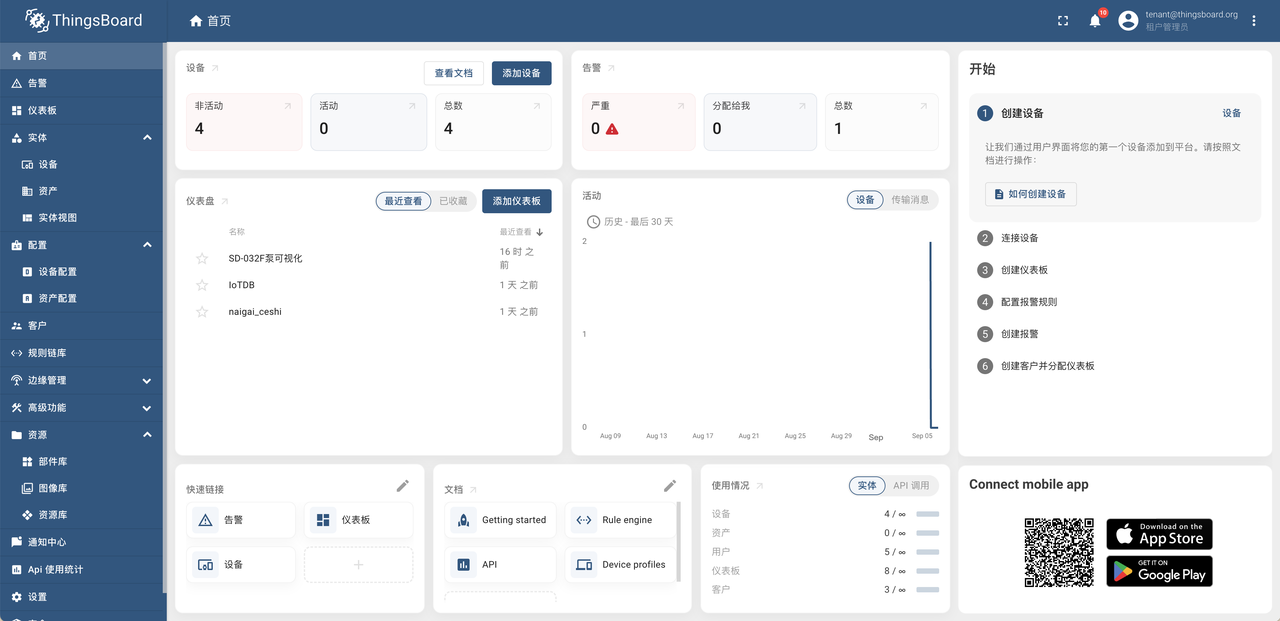 | ||
|
|
||
| 2. ThingsBoard-IoTDB 简介 | ||
|
|
||
| ThingsBoard-IoTDB 提供了将 ThingsBoard 中的数据存储到 IoTDB 的能力,也支持在 ThingsBoard 中读取 root.thingsboard 数据库下的数据信息。详细架构图如下图黄色标识所示。 | ||
|
|
||
| ### 关系示意图 | ||
|
|
||
|  | ||
|
|
||
| ## 安装要求 | ||
|
|
||
| | 准备内容 | 版本要求 | | ||
| | :-------------------------- | :----------------------------------------------------------- | | ||
| | JDK | 要求已安装 17 及以上版本,具体下载请查看 [Oracle 官网](https://www.oracle.com/java/technologies/downloads/) | | ||
| | IoTDB | 要求已安装 V1.3.0 及以上版本,具体安装过程请参考[ 部署指导](https://www.timecho.com/docs/zh/UserGuide/latest/Deployment-and-Maintenance/IoTDB-Package_timecho.html) | | ||
| | ThingsBoard(IoTDB 适配版) | 安装包请联系商务获取,具体安装步骤参见下文 | | ||
|
|
||
| ## 安装步骤 | ||
|
|
||
| 具体安装步骤请参考 [ThingsBoard 官网](https://thingsboard.io/docs/user-guide/install/ubuntu/)。其中: | ||
|
|
||
| - [ThingsBoard 官网](https://thingsboard.io/docs/user-guide/install/ubuntu/)中【步骤 2 ThingsBoard 服务安装】使用上方从商务获取的安装包进行安装(使用 ThingsBoard 官方安装包无法使用 iotdb) | ||
| - [ThingsBoard 官网](https://thingsboard.io/docs/user-guide/install/ubuntu/)中【步骤 3 配置 ThingsBoard 数据库-ThingsBoard 配置】步骤中需要按照下方内容添加环境变量 | ||
|
|
||
| ```Bash | ||
| # ThingsBoard 原有配置 | ||
| export SPRING_DATASOURCE_URL=jdbc:postgresql://localhost:5432/thingsboard | ||
| export SPRING_DATASOURCE_USERNAME=postgres | ||
| export SPRING_DATASOURCE_PASSWORD=PUT_YOUR_POSTGRESQL_PASSWORD_HERE ##修改为pg的密码 | ||
|
|
||
| # 使用IoTDB需修改以下变量 | ||
| export DATABASE_TS_TYPE=iotdb ## 原配置为sql,将变量值改为iotdb | ||
|
|
||
|
|
||
| # 使用IoTDB需增加以下变量 | ||
| export DATABASE_TS_LATEST_TYPE=iotdb | ||
| export IoTDB_HOST=127.0.0.1 ## iotdb所在的ip地址 | ||
| export IoTDB_PORT:6667 ## iotdb的端口号,默认为6667 | ||
| export IoTDB_USER:root ## iotdb的用户名,默认为root | ||
| export IoTDB_PASSWORD:root ## iotdb的密码,默认为root | ||
| export IoTDB_CONNECTION_TIMEOUT:5000 ## iotdb超时时间设置 | ||
| export IoTDB_FETCH_SIZE:1024 ## 单次请求所拉取的数据条数,推荐设置为1024 | ||
| export IoTDB_MAX_SIZE:200 ##sessionpool内的最大数量,推荐设置为>=并发请求数 | ||
| export IoTDB_DATABASE:root.thingsboard ##thingsboard数据写入iotdb所存储的数据库,支持自定义 | ||
| ``` | ||
|
|
||
| ## 使用说明 | ||
|
|
||
| 1. 创建设备并接入数据:在 Thingsboard 的实体-设备中创建设备并通过工业网关将数据发送到 ThingsBoard 指定设备中 | ||
|
|
||
| 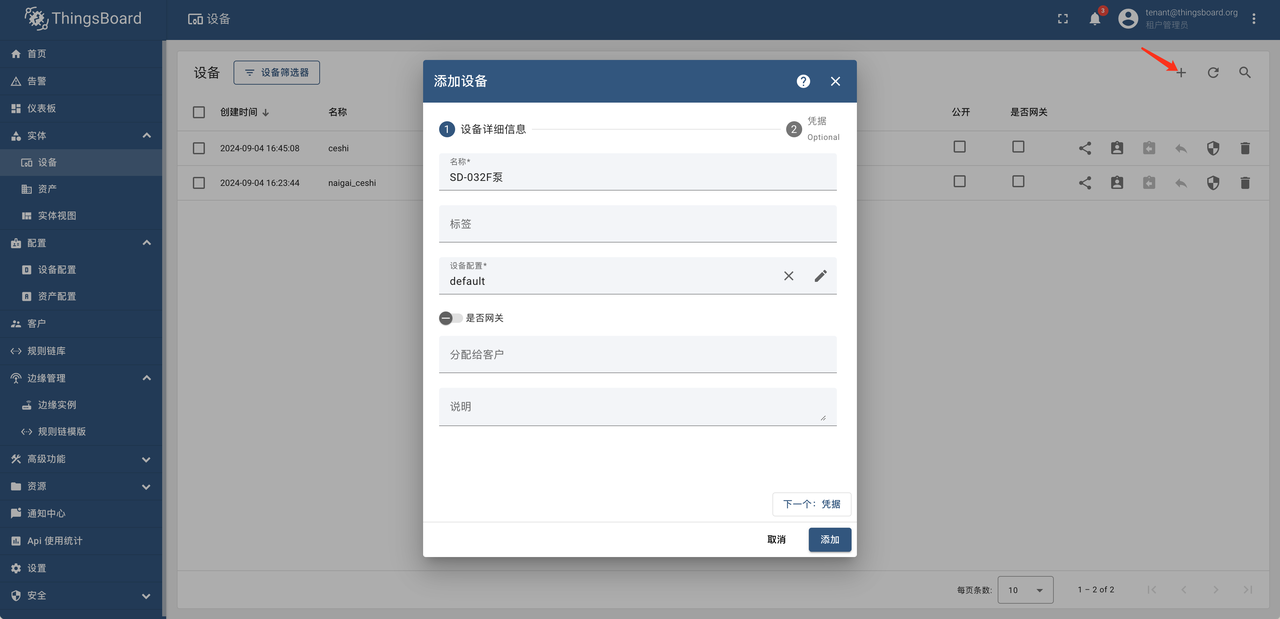 | ||
|
|
||
| 2. 设置规则链:在规则链库中对于“SD-032F 泵”设置告警规则并将该规则链设置为根链 | ||
|
|
||
| <div style="display: flex;justify-content: space-between;"> | ||
| <img src="https://alioss.timecho.com/docs/img/ThingsBoard-4.PNG" alt=" " style="width: 50%;"/> | ||
| <img src="https://alioss.timecho.com/docs/img/ThingsBoard-5.PNG" alt=" " style="width: 50%;"/> | ||
| </div> | ||
|
|
||
| 3. 查看告警记录:对于产生的告警记录已经通过点击“设备-告警”来进行查看 | ||
|
|
||
| 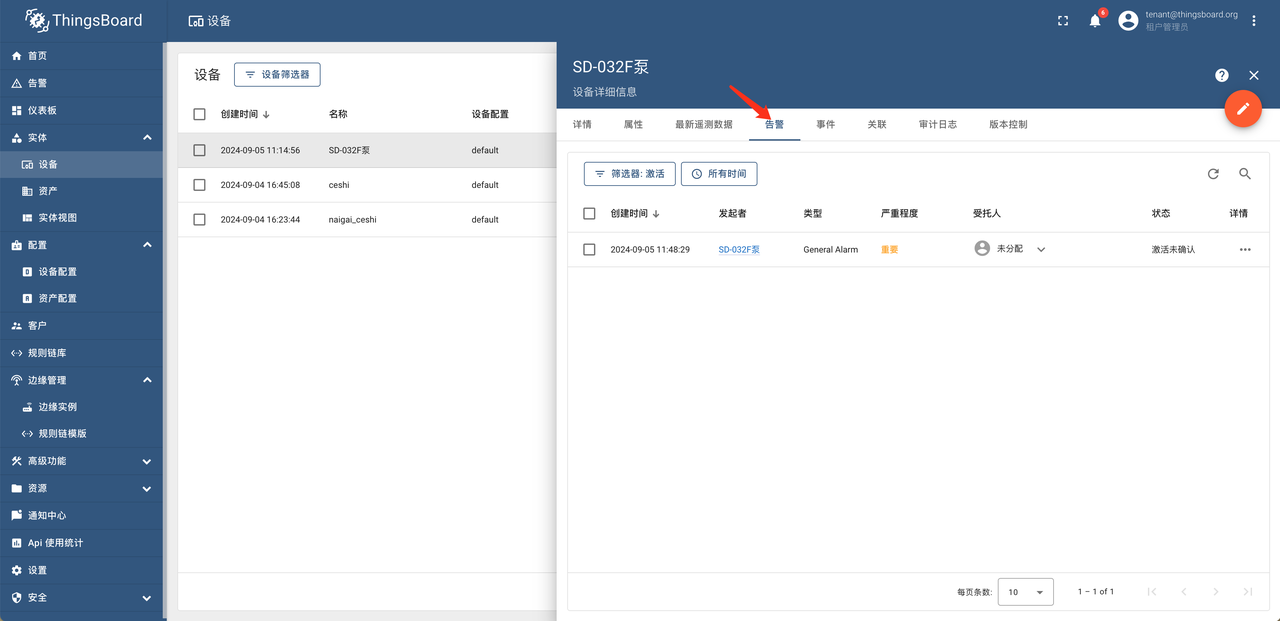 | ||
|
|
||
| 4. 数据可视化:在“仪表板”中通过“新建仪表板-绑定设备-关联参数”进行可视化设置 | ||
|
|
||
| <div style="display: flex;justify-content: space-between;"> | ||
| <img src="https://alioss.timecho.com/docs/img/ThingsBoard-7.png" alt=" " style="width: 50%;"/> | ||
| <img src="https://alioss.timecho.com/docs/img/Thingsboard-10.png" alt=" " style="width: 50%;"/> | ||
| </div> | ||
|
|
Oops, something went wrong.
Add this suggestion to a batch that can be applied as a single commit.
This suggestion is invalid because no changes were made to the code.
Suggestions cannot be applied while the pull request is closed.
Suggestions cannot be applied while viewing a subset of changes.
Only one suggestion per line can be applied in a batch.
Add this suggestion to a batch that can be applied as a single commit.
Applying suggestions on deleted lines is not supported.
You must change the existing code in this line in order to create a valid suggestion.
Outdated suggestions cannot be applied.
This suggestion has been applied or marked resolved.
Suggestions cannot be applied from pending reviews.
Suggestions cannot be applied on multi-line comments.
Suggestions cannot be applied while the pull request is queued to merge.
Suggestion cannot be applied right now. Please check back later.
There was a problem hiding this comment.
Choose a reason for hiding this comment
The reason will be displayed to describe this comment to others. Learn more.
艺儒的提交之后你再pull一次,dataease的没有在这里