KYLIN-4181 Schedule Kylin using Kubernetes #864
There are no files selected for viewing
| Original file line number | Diff line number | Diff line change |
|---|---|---|
| @@ -0,0 +1,78 @@ | ||
| FROM centos:6.9 | ||
|
|
||
| ARG APACHE_MIRRORS=http://mirrors.aliyun.com | ||
|
Member
There was a problem hiding this comment. Please use the official apache repository |
||
| ENV APACHE_MIRRORS ${APACHE_MIRRORS} | ||
|
|
||
| ENV JAVA_VERSION 1.8.0 | ||
|
||
| ENV SPARK_VERSION 2.3.4 | ||
| ENV KAFKA_VERSION 2.1.1 | ||
| ENV KYLIN_VERSION 3.0.0 | ||
|
|
||
| ENV JAVA_HOME /usr/lib/jvm/java-${JAVA_VERSION} | ||
| ENV HADOOP_HOME /usr/lib/hadoop | ||
| ENV HIVE_HOME /usr/lib/hive | ||
| ENV HCAT_HOME /usr/lib/hive-hcatalog | ||
| ENV HBASE_HOME /usr/lib/hbase | ||
| ENV SPARK_HOME /opt/spark-${SPARK_VERSION}-bin-hadoop2.6 | ||
| ENV KAFKA_HOME /opt/kafka_2.11-${KAFKA_VERSION} | ||
| ENV KYLIN_HOME /opt/apache-kylin-${KYLIN_VERSION}-bin-cdh57 | ||
|
|
||
| ENV PATH $PATH:\ | ||
| $SPARK_HOME/bin:\ | ||
| $KAFKA_HOME/bin:\ | ||
| $KYLIN_HOME/bin | ||
|
|
||
| ENV HADOOP_CONF_DIR /etc/hadoop/conf | ||
| ENV HIVE_CONF_DIR /etc/hive/conf | ||
| ENV HBASE_CONF_DIR /etc/hbase/conf | ||
| ENV HIVE_CONF ${HIVE_CONF_DIR} | ||
| ENV HIVE_LIB ${HIVE_HOME}/lib | ||
|
|
||
| RUN echo $'[cloudera-cdh5] \n\ | ||
| # Packages for Cloudera\'s Distribution for Hadoop, Version 5, on RedHat or CentOS 6 x86_64 \n\ | ||
| name=Cloudera\'s Distribution for Hadoop, Version 5 \n\ | ||
| baseurl=https://archive.cloudera.com/cdh5/redhat/6/x86_64/cdh/5.7.6/ \n\ | ||
| gpgkey =https://archive.cloudera.com/cdh5/redhat/6/x86_64/cdh/RPM-GPG-KEY-cloudera \n\ | ||
| gpgcheck = 1' > /etc/yum.repos.d/cloudera-cdh5.repo | ||
|
|
||
| WORKDIR /opt | ||
|
|
||
| # Download Kafka from APACHE_MIRRORS | ||
| RUN set -xeu && \ | ||
| curl -o kafka_2.11-${KAFKA_VERSION}.tgz \ | ||
| ${APACHE_MIRRORS}/apache/kafka/${KAFKA_VERSION}/kafka_2.11-${KAFKA_VERSION}.tgz && \ | ||
| tar -zxf kafka_2.11-${KAFKA_VERSION}.tgz && rm kafka_2.11-${KAFKA_VERSION}.tgz | ||
|
|
||
| # Download Spark from APACHE_MIRRORS | ||
| RUN set -xeu && \ | ||
| curl -o spark-${SPARK_VERSION}-bin-hadoop2.6.tgz \ | ||
| ${APACHE_MIRRORS}/apache/spark/spark-${SPARK_VERSION}/spark-${SPARK_VERSION}-bin-hadoop2.6.tgz && \ | ||
| tar -zxf spark-${SPARK_VERSION}-bin-hadoop2.6.tgz && rm spark-${SPARK_VERSION}-bin-hadoop2.6.tgz | ||
|
|
||
| # Download Kylin from APACHE_MIRRORS | ||
| RUN set -xeu && \ | ||
| curl -o apache-kylin-${KYLIN_VERSION}-bin-cdh57.tar.gz \ | ||
| ${APACHE_MIRRORS}/apache/kylin/apache-kylin-${KYLIN_VERSION}/apache-kylin-${KYLIN_VERSION}-bin-cdh57.tar.gz && \ | ||
| tar -zxf apache-kylin-${KYLIN_VERSION}-bin-cdh57.tar.gz && rm apache-kylin-${KYLIN_VERSION}-bin-cdh57.tar.gz | ||
|
|
||
| # Setup Hadoop & Hive & HBase using CDH Repository. PS: The libhadoop.so provided by CDH is complied with snappy | ||
| RUN set -xeu && \ | ||
| yum -y -q install java-1.8.0-openjdk-devel && \ | ||
| yum -y -q install krb5-workstation && \ | ||
| yum -y -q install hadoop-client && \ | ||
| yum -y -q install hive hive-hcatalog && \ | ||
| yum -y -q install hbase && \ | ||
| curl -o ${HIVE_HOME}/lib/hadoop-lzo-0.4.15.jar \ | ||
| https://clojars.org/repo/hadoop-lzo/hadoop-lzo/0.4.15/hadoop-lzo-0.4.15.jar && \ | ||
| curl -o ${HIVE_HOME}/lib/mysql-connector-java-5.1.24.jar \ | ||
| https://repo1.maven.org/maven2/mysql/mysql-connector-java/5.1.24/mysql-connector-java-5.1.24.jar && \ | ||
| yum -q clean all && \ | ||
| rm -rf /var/cache/yum && \ | ||
| rm -rf /tmp/* /var/tmp/* && \ | ||
| groupadd kylin --gid 1000 && \ | ||
| useradd kylin --uid 1000 --gid 1000 && \ | ||
| chown -R "kylin:kylin" ${KYLIN_HOME} | ||
|
|
||
| EXPOSE 7070 | ||
| USER kylin:kylin | ||
| CMD ${KYLIN_HOME}/bin/kylin.sh run | ||


| Original file line number | Diff line number | Diff line change |
|---|---|---|
| @@ -0,0 +1,109 @@ | ||
| # Kubernetes QuickStart | ||
|
|
||
| This guide shows how to run Kylin cluster using Kubernetes StatefulSet Controller. The following figure depicts a typical scenario for Kylin cluster mode deployment: | ||
|
|
||
| 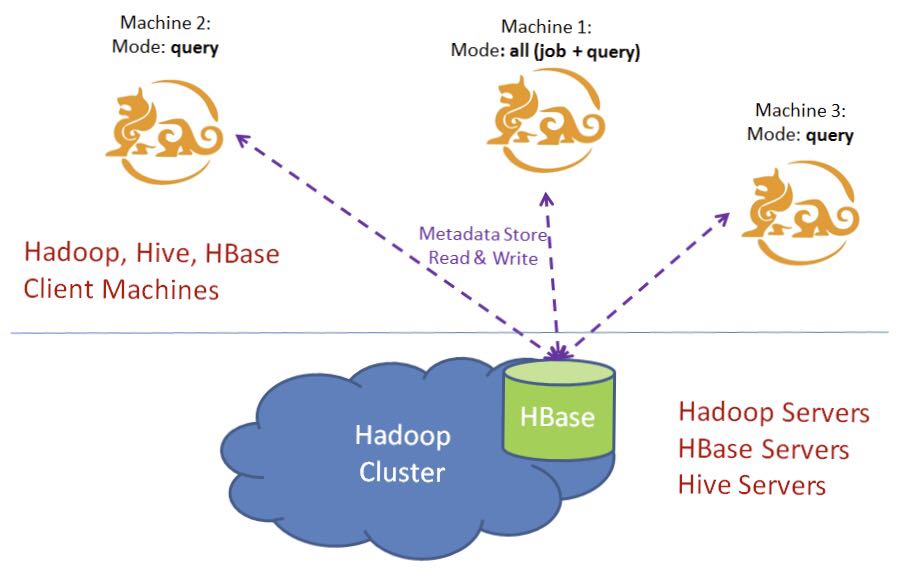 | ||
|
|
||
| ## Build or Pull Docker Image | ||
|
|
||
| You can pull the image from Docker Hub directly if you do not want to build the image locally: | ||
|
|
||
| ```bash | ||
| docker pull apachekylin/apache-kylin:3.0.0-cdh57 | ||
| ``` | ||
|
|
||
| TIPS: If you are woking with air-gapped network or slow internet speeds, we suggest you prepare the binary packages by yourself and execute this: | ||
|
|
||
| ```bash | ||
| docker build -t "apache-kylin:${KYLIN_VERSION}-cdh57" --build-arg APACHE_MIRRORS=http://127.0.0.1:8000 . | ||
| ``` | ||
|
|
||
| ## Prepare your Hadoop Configuration | ||
|
|
||
| Put all of the configuration files under the "conf" directory. | ||
|
|
||
| ```bash | ||
| kylin.properties | ||
| applicationContext.xml # If you need to set cacheManager to Memcached | ||
| hbase-site.xml | ||
| hive-site.xml | ||
| hdfs-site.xml | ||
| core-site.xml | ||
| mapred-site.xml | ||
| yarn-site.xml | ||
| ``` | ||
|
|
||
| If you worked with Kerberized Hadoop Cluster, do not forget to prepare the following files: | ||
|
|
||
| ```bash | ||
| krb5.conf | ||
| kylin.keytab | ||
| ``` | ||
|
|
||
| ## Create ConfigMaps and Secret | ||
|
|
||
| We recommand you to create separate Kubernetes namespace for Kylin. | ||
|
|
||
| ```bash | ||
| kubectl create namespace kylin | ||
| ``` | ||
|
|
||
| Execute the following shell scripts to create the required ConfigMaps: | ||
|
|
||
| ```bash | ||
| ./kylin-configmap.sh | ||
| ./kylin-secret.sh | ||
| ``` | ||
|
|
||
| ## Create Service and StatefulSet | ||
|
|
||
| Make sure the following resources exist in your namespace: | ||
|
|
||
| ```bash | ||
| kubectl get configmaps,secret -n kylin | ||
|
|
||
| NAME DATA AGE | ||
| configmap/hadoop-config 4 89d | ||
| configmap/hbase-config 1 89d | ||
| configmap/hive-config 1 89d | ||
| configmap/krb5-config 1 89d | ||
| configmap/kylin-config 1 89d | ||
| configmap/kylin-context 1 45d | ||
|
|
||
| NAME TYPE DATA AGE | ||
| secret/kylin-keytab Opaque 1 89d | ||
|
|
||
| ``` | ||
|
|
||
| Then, you need to create headless service for stable DNS entries(kylin-0.kylin, kylin-1.kylin, kylin-2.kylin...) of StatefulSet members. | ||
|
|
||
| ```bash | ||
| kubectl apply -f kylin-service.yaml | ||
| ``` | ||
|
|
||
| Finally, create the StatefulSet and try to use it: | ||
|
|
||
| ```bash | ||
| kubectl apply -f kylin-job-statefulset.yaml | ||
| kubectl apply -f kylin-query-statefulset.yaml | ||
| ``` | ||
|
|
||
| If everything goes smoothly, you should see all 3 Pods become Running: | ||
|
|
||
| ```bash | ||
| kubectl get statefulset,pod,service -n kylin | ||
|
|
||
| NAME READY AGE | ||
| statefulset.apps/kylin-job 1/1 36d | ||
| statefulset.apps/kylin-query 3/3 36d | ||
|
|
||
| NAME READY STATUS RESTARTS AGE | ||
| pod/kylin-job-0 1/1 Running 0 13m | ||
| pod/kylin-query-0 1/1 Running 0 40h | ||
| pod/kylin-query-1 1/1 Running 0 40h | ||
|
|
||
| NAME TYPE CLUSTER-IP EXTERNAL-IP PORT(S) AGE | ||
| service/kylin ClusterIP None <none> 7070/TCP 58d | ||
| service/kylin-job ClusterIP xx.xxx.xx.xx <none> 7070/TCP 89d | ||
| service/kylin-query ClusterIP xx.xxx.xxx.xxx <none> 7070/TCP 89d | ||
| ``` |
| Original file line number | Diff line number | Diff line change |
|---|---|---|
| @@ -0,0 +1,17 @@ | ||
| #!/usr/bin/env bash | ||
|
|
||
| kubectl create configmap -n kylin hadoop-config --from-file=conf/core-site.xml \ | ||
| --from-file=conf/hdfs-site.xml \ | ||
| --from-file=conf/yarn-site.xml \ | ||
| --from-file=conf/mapred-site.xml \ | ||
| --dry-run -o yaml | kubectl apply -f - | ||
| kubectl create configmap -n kylin hive-config --from-file=conf/hive-site.xml \ | ||
| --dry-run -o yaml | kubectl apply -f - | ||
| kubectl create configmap -n kylin hbase-config --from-file=conf/hbase-site.xml \ | ||
| --dry-run -o yaml | kubectl apply -f - | ||
| kubectl create configmap -n kylin kylin-config --from-file=conf/kylin.properties \ | ||
| --dry-run -o yaml | kubectl apply -f - | ||
| kubectl create configmap -n kylin krb5-config --from-file=conf/krb5.conf \ | ||
| --dry-run -o yaml | kubectl apply -f - | ||
| kubectl create configmap -n kylin kylin-context --from-file=conf/applicationContext.xml \ | ||
| --dry-run -o yaml | kubectl apply -f - |
| Original file line number | Diff line number | Diff line change |
|---|---|---|
| @@ -0,0 +1,95 @@ | ||
| apiVersion: apps/v1 | ||
| kind: StatefulSet | ||
| metadata: | ||
| annotations: {} | ||
| name: kylin-job | ||
| namespace: kylin | ||
| spec: | ||
| replicas: 1 | ||
| selector: | ||
| matchLabels: | ||
| app: kylin | ||
| type: job | ||
| serviceName: kylin | ||
| template: | ||
| metadata: | ||
| labels: | ||
| app: kylin | ||
| type: job | ||
| spec: | ||
| containers: | ||
| - image: 'apachekylin/apache-kylin:3.0.0-cdh57' | ||
| imagePullPolicy: Always | ||
| lifecycle: | ||
| postStart: | ||
| exec: | ||
| command: | ||
| - bash | ||
| - '-c' | ||
| - | | ||
| set -ex | ||
| # initialize the keytab | ||
| kinit -kt /home/kylin/kylin.keytab kylin | ||
|
There was a problem hiding this comment. Maybe we can create a bootstrap.sh to includes these command, and exec the shell script in here. There was a problem hiding this comment. Do we have any keytab refresh requirement? For example, refresh keytab every ** minutes. |
||
| # set the kylin.server.mode | ||
| sed "s/kylin\.server\.mode.*/kylin\.server\.mode=all/g" /mnt/kylin-config/kylin.properties > ${KYLIN_HOME}/conf/kylin.properties | ||
| sed -i "s/kylin\.server\.host-address.*/kylin\.server\.host-address=`hostname`\.kylin:7070/g" ${KYLIN_HOME}/conf/kylin.properties | ||
|
Member
Author
There was a problem hiding this comment. @Smallhi Maybe, you need pay attention to my postStart script. |
||
| sed -i "s/export KYLIN_JVM_SETTINGS.*/export KYLIN_JVM_SETTINGS=\"-Xms40g -Xmx40g -XX:NewSize=10g -XX:MaxNewSize=10g -XX:SurvivorRatio=3 -XX:+CMSClassUnloadingEnabled -XX:+CMSParallelRemarkEnabled -XX:+UseConcMarkSweepGC -XX:+CMSIncrementalMode -XX:CMSInitiatingOccupancyFraction=70 -XX:+DisableExplicitGC -XX:+HeapDumpOnOutOfMemoryError\"/g" ${KYLIN_HOME}/conf/setenv.sh | ||
| # unarchive the war file and replace the applicationContext if needed | ||
| mkdir ${KYLIN_HOME}/tomcat/webapps/kylin | ||
| cd ${KYLIN_HOME}/tomcat/webapps/kylin | ||
| jar -xvf ${KYLIN_HOME}/tomcat/webapps/kylin.war | ||
| cp /mnt/kylin-context/applicationContext.xml ${KYLIN_HOME}/tomcat/webapps/kylin/WEB-INF/classes | ||
| name: kylin | ||
| ports: | ||
| - containerPort: 7070 | ||
| readinessProbe: | ||
| httpGet: | ||
| path: /kylin | ||
| port: 7070 | ||
| resources: | ||
| limits: | ||
| cpu: 16 | ||
| memory: 50G | ||
| requests: | ||
| cpu: 8 | ||
| memory: 50G | ||
| volumeMounts: | ||
| - mountPath: /etc/hadoop/conf | ||
| name: hadoop-config | ||
| - mountPath: /etc/hive/conf | ||
| name: hive-config | ||
| - mountPath: /etc/hbase/conf | ||
| name: hbase-config | ||
| - mountPath: /home/kylin | ||
| name: kylin-keytab | ||
| - mountPath: /etc/krb5.conf | ||
| name: krb5-config | ||
| subPath: krb5.conf | ||
| - mountPath: /mnt/kylin-context | ||
| name: kylin-context | ||
| - mountPath: /mnt/kylin-config | ||
| name: kylin-config | ||
| volumes: | ||
| - configMap: | ||
| name: hadoop-config | ||
| name: hadoop-config | ||
| - configMap: | ||
| name: hive-config | ||
| name: hive-config | ||
| - configMap: | ||
| name: hbase-config | ||
| name: hbase-config | ||
| - configMap: | ||
| name: kylin-config | ||
| name: kylin-config | ||
| - configMap: | ||
| name: krb5-config | ||
| name: krb5-config | ||
| - configMap: | ||
| name: kylin-context | ||
| name: kylin-context | ||
| - name: kylin-keytab | ||
| secret: | ||
| secretName: kylin-keytab | ||
| updateStrategy: | ||
| type: RollingUpdate | ||
There was a problem hiding this comment.
Choose a reason for hiding this comment
The reason will be displayed to describe this comment to others. Learn more.
It is not recommended to use the operating system as the base image, you can use the base image provided by maven. Https://hub.docker.com/_/maven