METRON-1650: Cut size of packaging docker containers#1091
METRON-1650: Cut size of packaging docker containers#1091jameslamb wants to merge 3 commits intoapache:masterfrom jameslamb:master
Conversation


|
You of course also have to make sure they work |

|
Thank you for the contribution @jameslamb! This failed for me when I tried to run it up in full dev: I think the "Have you verified the basic functionality of the build by building and running locally with Vagrant full-dev environment or the equivalent?" item in the PR checklist is a requirement for this one. |

|
@merrimanr ok no problem! Yeah I can run those later and report back. IMHO it's a problem that your CI doesn't catch this though? Like ideally shouldn't these package builds should be done on Travis so reviewers don't need to remind contributors to run these tests locally? Making contributors run tests locally exposes you to either false positives or false negatives caused by differences between their local environment and whatever actual environment you use to build these. |
|
Point taken. The issue we have is that our builds take a long time so we have to prioritize what is included in travis. There are several components that can't be tested in travis even if we wanted to so we test with our VM environment frequently (daily). That's the world we live in :) This could be added to travis but I don't know that it's worth it because this part of Metron (setting up a Docker container to build in) doesn't change very often. Changes that modify our packages (adding/removing scripts or other assets) need to be tested and demonstrated in full dev anyways. Others might have a different opinion though. |
|
ok that's fair! And I do appreciate that you had an issue template saying "hey do these things before you make contributions". I'll update the PR when I've had a chance to re-run them. Thanks for the review! |
|
I THINK I found the issue with my original PR. The command to register the scl repo doesn't get picked up by this fails to find devtoolset-4 this finds it Testing locally now, will update later tonight. I am testing locally by walking through the build instructions in each README in the |
|
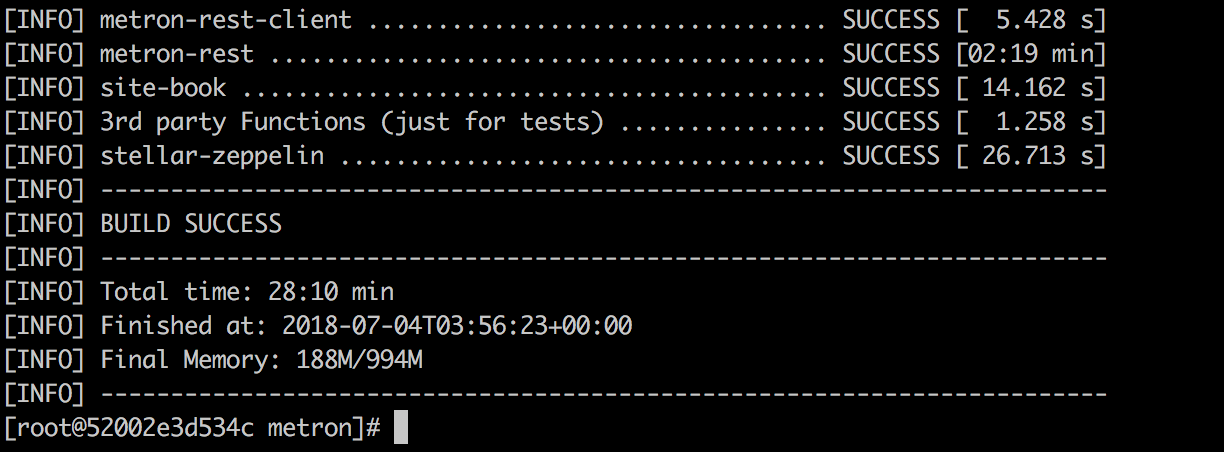
Running
|

|
just pushed the |
cd metron-deployment/development/centos6
vagrant up
To run it. This will build, build the rpms in docker, create a vagrant machine and install metron in that machine with ambari. After it is done if you go to http://node1:8080 it is the vagrant ambari, where you can check that everything loaded and installed. |
|
@ottobackwards I tried to get this running on my local but was hitting some weird networking errors, even on current master (without any of my changes). I'm not very familiar with vagrant and don't have the time to pick it up right now. If familiarity with vagrant is a prerequisite for contributing on this project then I probably won't be able to contribute. I will leave it to you and @merrimanr to do what you want with this PR. Cheers, -James |
|
The vagrant stuff is the general information on how to run it. For the docker containers that you have worked on, it would be fine I think to say that you tested that the containers work for their purpose. It would be enough for you to say in the description: Our vagrant build for centos and ubuntu targets actually use the rpm and deb dockers so that is one way they get tests, but doesn't have to be the only way. the ansible docker must be tested explicitly |
|
@jameslamb, this is still failing for me. Just to be clear, the "build-rpms" and "build-debs" maven profiles should be used when testing this. You don't necessarily have to build full dev. When I run this command in metron-deployment: I am still getting this error: I think your change may not have been pushed out correctly. I still only see 1 commit in the PR when I would expect 2: your original commit + the commit to fix this issue. Because of this I'm also not able to see what you did to fix the error, I only see all changes. |
|
@merrimanr Oh I force-pushed over the old commit. I don't like having failing commits in the history. Apologies if that was not what you expected. In the future I can push new ones individually. |
|
I broke this into two steps (was previously one): because the other deps installed need |
|
I (and I expect most in our community) would prefer separate commits. It makes it easier to see changes you make in response to feedback. Also when I pulled your recent commits I got a merge conflict because of the forced push. We squash the commits when we merge a PR to master so it doesn't really matter anyways. In the end it's one commit. Running the command in my previous comment should reproduce the error. |
|
@merrimanr thank you, understood. I will try to reproduce the issue on my end and see if I can find what is failing. |
|
Unfortunately, I cannot even build the current When running I totally cleared out all my docker images before running, so it's not like this is being caused by docker finding one of the images built from my branch in its cache. I don't even know where to start with this error. It's disappointing, but you can just close this PR if you want. I hope you will borrow some of the ideas from it...there is a lot of excess stuff in these containers right now. |

|
@jameslamb Thank you for taking the time to contribute to the project. That command you're running is independent of the main build from root. It appears that it's probably failing because those tar.gz artifacts have not been built and thus will not have been copied to the SOURCES folder. Run the following from project root: |
|
@mmiklavc Thank you for the help! Unfortunately, this did not work for me. Running Env info from I did try googling around for this error (thinking maybe it's just something that Java developers understand and experience commonly), but I haven't had any luck. |

|
@jameslamb It looks like you are trying to build with Java 10. You need to be running Java 8 to build the project. You might be interested in the instructions here. Also, sending the output of running Feel free to reach out on the dev mailing list for help in getting your build environment setup. It might make sense to carry the conversation forward there, at least until you can build master and deploy the dev environment. Once you get past that hurdle we could restart the conversation here focusing on your specific contribution. Thanks for contributing! |
|
@nickwallen Thank you so much!! I was able to get Now that I know I can build, I'll be able to test my changes. Will comment on here once I think I have something that works. |
|
@merrimanr @ottobackwards Hey I think I got this working! See my recent commit. I had accidentally smashed together two commands, which is why node stuff was failing. I was able to get successful builds locally by running the following (after installing Java 8, per recommendations above): |
|
Great! I will give this a try asap |
|
+1 from me. I was able to do the above, along with building metron from the instructions ansible-docker's readme.md. Thanks for sticking with it. |
|
Hey, awesome! Thanks to you and the rest of the metron community for your patience and support |
|
@merrimanr are you all set? |

|
This gets a +1 from me too, great job! |
|
@merrimanr I'd like to get your sign off on this, now that @cestella and I have given a +1 |
|
+1 from me. Thank you so much @jameslamb for sticking with this. Nice work! |
|
can one of you ( @cestella or @merrimanr ) merge? I can't right now |

|
thanks again @jameslamb! |
|
thanks for helping me work through it! I will be back to Metron to contribute in the future 😄 |
6 participants


Contributor Comments
I have been looking through the project source code, and found that the packaging docker containers are bigger than they need to be.
The containers' size could be cut substantially by:
yum cleanandapt-get cleanwgettarandwget)In local testing, I found the following reductions in container size:
deb: 700MB --> 672MBrpm: 1GB --> 566MBansible: 2.48GB --> 1.21GBTo test these changes, run the following on current master from the repo root:
Then run again on the PR branch:
You can then use
docker imagesto compare the size of the original images to those generated by the Dockerfiles in this PR.Thanks for considering this change!
Pull Request Checklist
For all changes:
For code changes:
[y] Have you included steps to reproduce the behavior or problem that is being changed or addressed?
[y] Have you included steps or a guide to how the change may be verified and tested manually?
[] Have you ensured that the full suite of tests and checks have been executed in the root metron folder via:
Have you written or updated unit tests and or integration tests to verify your changes?
If adding new dependencies to the code, are these dependencies licensed in a way that is compatible for inclusion under ASF 2.0?
Have you verified the basic functionality of the build by building and running locally with Vagrant full-dev environment or the equivalent?
For documentation related changes:
Have you ensured that format looks appropriate for the output in which it is rendered by building and verifying the site-book? If not then run the following commands and the verify changes via
site-book/target/site/index.html: