feat: Edit columns in new dataset editor#19120
Closed
cccs-Dustin wants to merge 8 commits intoapache:masterfrom
Closed
feat: Edit columns in new dataset editor#19120cccs-Dustin wants to merge 8 commits intoapache:masterfrom
cccs-Dustin wants to merge 8 commits intoapache:masterfrom
Conversation


…centreCanada/superset into edit_columns_in_new_dataset_editor
Contributor
Author
|
Hi @geido! Would you be able to tag some reviewers for this PR? Thank you :) |
Contributor
Author
|
After some investigation, it turns out that the issue we were running into can be solved one of two ways. The first of the two ways is to cast the variable in the virtual dataset SQL statement to avoid it being assigned the wrong data type. The second way to avoid the issue mentioned in the use case was actually solved by this PR: https://github.com/apache/superset/pull/17360/files. Instead of having the column type set to be a maximum of 32 characters, it switches the type to TEXT which does not have a limit. Since the issue can now be avoided without having to make modifications to the code, we decided to close this PR (and the corresponding issue). |
This file contains hidden or bidirectional Unicode text that may be interpreted or compiled differently than what appears below. To review, open the file in an editor that reveals hidden Unicode characters.
Learn more about bidirectional Unicode characters
Sign up for free
to join this conversation on GitHub.
Already have an account?
Sign in to comment
1 participant

Add this suggestion to a batch that can be applied as a single commit.This suggestion is invalid because no changes were made to the code.Suggestions cannot be applied while the pull request is closed.Suggestions cannot be applied while viewing a subset of changes.Only one suggestion per line can be applied in a batch.Add this suggestion to a batch that can be applied as a single commit.Applying suggestions on deleted lines is not supported.You must change the existing code in this line in order to create a valid suggestion.Outdated suggestions cannot be applied.This suggestion has been applied or marked resolved.Suggestions cannot be applied from pending reviews.Suggestions cannot be applied on multi-line comments.Suggestions cannot be applied while the pull request is queued to merge.Suggestion cannot be applied right now. Please check back later.
SUMMARY
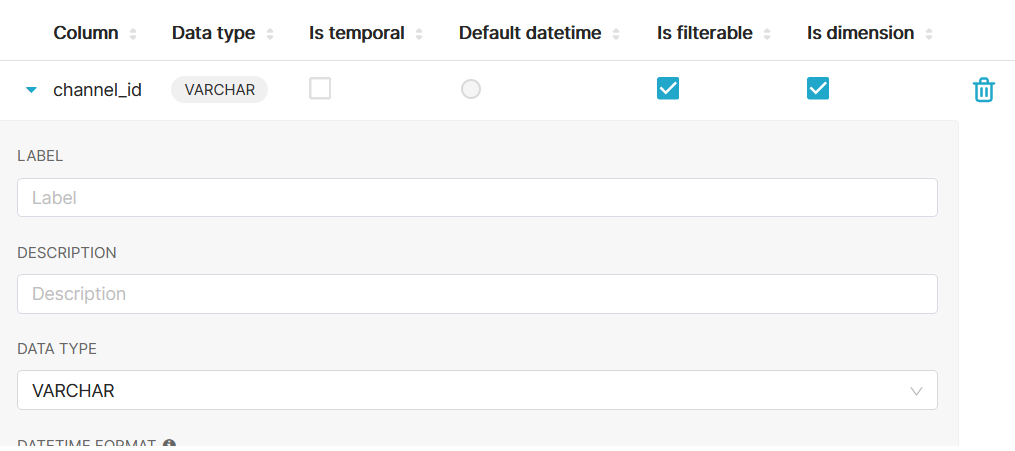
When users are creating a new dataset, if that dataset contains a field with a long, complex data type, users will get an error because the field type is too long. To get around this issue, users must change the field type to JSON. This can currently only be done (in the UI) through the Legacy Datasource Editor. It should be possible to do this through the new dataset editor as well.
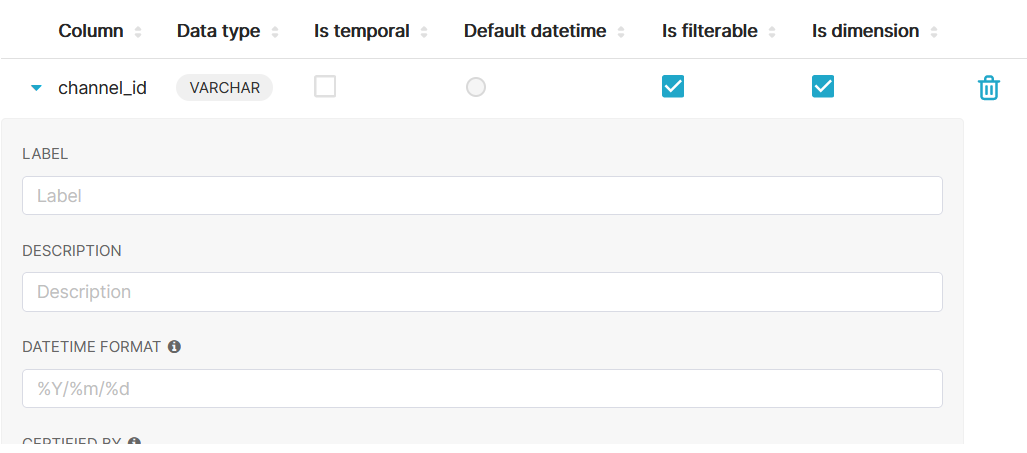
In the new dataset editor, even if a user wanted to simply change the column's data type from one data type to another, it is not currently possible. To do it, they need to go into the Legacy Datasource Editor, again, this should be possible in the new dataset editor.
Within the front-end code, there is a prop for the
ColumnCollectionTablecomponent namedallowEditDataType. It is currently always set to false, but if you manually change it to true and reload, you can modify the column's data type in the new dataset editor. So it seems like the implementation was almost complete, it was just never finished off.My solution to this issue includes creating a new feature flag which would allow users to simply modify the config file instead of having to dig into the front-end code to enable this feature. I also created/modified unit tests to make sure that the UI behaves as expected when the flag is either enabled or disabled.
BEFORE/AFTER SCREENSHOTS OR ANIMATED GIF
Dataset editor before:
Dataset editor after (with feature flag enabled):
TESTING INSTRUCTIONS
To test that that you can edit the column's data type when feature flag is enabled
ENABLE_EDIT_COLUMN_TYPEfeature flag by setting it to beTrue.Data > Datasetsfrom the menu.Columnsoption.Toggle Expandbutton just to the left of the column name.To test that that you cannot edit the column's data type when feature flag is disabled
ENABLE_EDIT_COLUMN_TYPEfeature flag by setting it to beFalse.Data > Datasetsfrom the menu.Columnsoption.Toggle Expandbutton just to the left of the column name.ADDITIONAL INFORMATION