Repository navigation
Skills and Workspaces
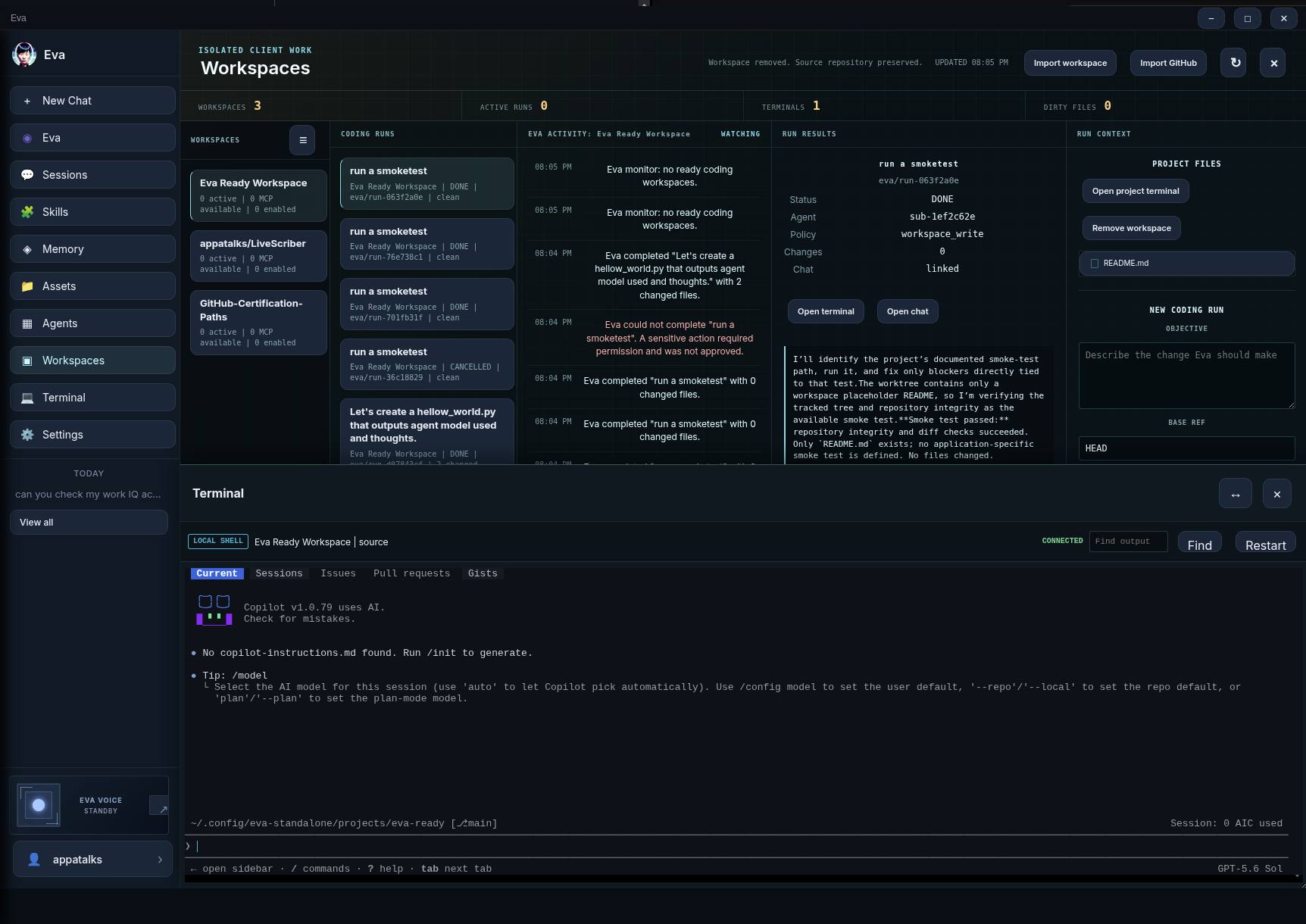
Skills help Eva repeat a workflow consistently. Workspaces give Eva an isolated place to make and test code changes. They solve different problems: use a Skill for reusable instructions and a Workspace for a durable Git project task.
A Skill is a reusable instruction set that Eva can match to a relevant request. It can describe a preferred workflow, tools, tags, source, and status. Skill text is reference data, not permission to override Eva's fixed policy.
Open Skills and choose an import source:
| Source | Use it when |
|---|---|
| Paste | You have a short, trusted workflow description |
| URL | The instructions are in a public HTTP(S) document |
| GitHub | A repository contains SKILL.md, skill.md, or a relevant README |
| File | You have a local text file up to the supported size limit |
Eva normalizes imported material into a name, description, instructions, tools, and tags. The source is treated as untrusted content during import to reduce prompt-injection risk.
Before enabling a Skill:
- Read the instructions as if they were a script someone else asked you to run.
- Remove requests for credentials, broad destructive actions, or unrelated instructions.
- Confirm the declared tools and tags match its purpose.
- Keep auto-learned Skills as Draft until you explicitly review and enable them.
The Skills library supports search, filters for active/draft/disabled state and source, sorting, edit/reimport, enable/disable, and delete. Changing a Skill does not retroactively alter completed conversations or runs.
# Release Notes Draft

When asked to prepare release notes:
1. Collect merged changes and user-visible behavior.
2. Separate features, fixes, and known limitations.
3. State any manual migration or configuration steps.
4. Do not claim validation that has not occurred.
Keep Skills narrow. A set of small, reviewable Skills is safer and easier to maintain than one enormous instruction bundle.
Coding Workspaces are an experimental Eva Standalone capability. They create isolated Git worktrees and run a dedicated ACP coding agent inside the assigned project, keeping project work separate from the source checkout.
The standalone app supports workspaces when it launches with the workspace capability. Development launch:
cd standalone
npm run start:workspace
Packaged Linux launches use the --eva-workspace-terminal-v1 capability flag.
The normal eva launcher includes the current supported workspace terminal
configuration.
- Open Workspaces.
- Choose Eva Ready Workspace for a managed starter project, or select a Git repository you own. Non-Git folders are rejected.
- Write a concrete objective, constraints, and expected validation command.
- Choose the run's auto-approval setting deliberately.
- Start the run and inspect status, progress, and final report in Workspace Monitor and Agents.
Eva creates a dedicated branch and worktree for the run. It does not operate inside your primary working tree.
Workspace agents use a constrained policy:
- Routine reads, local edits, and trusted local build/test commands are scoped to the assigned worktree.
- Auto approve actions can approve certain one-time remote actions for that run, but it still rejects edits outside the worktree and commands involving protected credential/config paths.
- Other chats and generic subagents keep their interactive approval behavior.
- A workspace run never grants permanent global permission.
Begin with auto approval off for unfamiliar projects. Turn it on only for a well-scoped task where you understand the allowed remote interactions.
The monitor shows project, objective, branch, agent state, dirty count, activity history, policy, linked chat, terminal access, and a bounded final report. Its display controls can clear or show the visible Coding Runs, activity, and run results without deleting the durable underlying record.
Completed worktrees remain available for review. Use the lifecycle actions with their intended meanings:
| Action | Effect |
|---|---|
| Retry / Dispatch | Resume or start an eligible active run |
| Archive | Retain the checkout for later review |
| Discard | Explicitly clean up a run's worktree and branch after checks |
| Terminal | Open an approved, worktree-confined terminal |
| Chat | Return to the linked conversation |
Discard refuses unsafe cleanup, including active work and dirty worktrees unless you explicitly confirm. Review the diff and test outcome before discarding a run.
Eva's Electron terminal is a real PTY with a bounded replay buffer, resize, search, and cancellation. It is intentionally restricted to an approved workspace root; the renderer cannot supply an arbitrary working directory or environment.
Assets combines files Eva generated with changed files from retained coding runs. Workspace files are shown as relative paths and opened through the Electron main process after confinement checks.
In this workspace, add CSV export to the report screen.

Constraints:
- Preserve existing UI patterns.
- Do not change authentication or deployment files.
- Add focused tests for empty and populated data.
- Run the relevant test command and report the result.
- Leave changes uncommitted for my review.
Use one objective per run when possible. Review the final report, changed files, and tests before you archive, discard, or make a separate commit/merge decision.