WinScript is a Scripting Language designed to simplify and automate common tasks in Windows environments. It is easy to learn and use, making it ideal for users with little to no programming experience. WinScript is based on C, but it has a simplified syntax that is easier to read and write.
WinScript is executed by a WinScript interpreter, which is a standalone program that reads and executes WinScript Scripts. The interpreter can be invoked from the command line or from within a batch file.
WinScript includes a set of built-in functions that can be used to perform common tasks, such as printing into the console, starting/ending executables, and more. These functions are accessed using a simple, easy-to-remember syntax.
Some of the built-in functions in WinScript include:
- echo: Prints a message to the console.
- start: Starts a new process.
- sudo: Starts a new process with elevated privileges.
- cmd: Executes a command.
- msgbox: Displays a message box.
- about: Displays information about the program.
To Use WinScript, downlaod the interperter, then run it using

{make sure to be as the same directory as the winsc interperter!!!!)
to use the echo fucntion, use echo then type what you want to print

to use the start fucntion, use start then type what you want to run

to use the sudo fucntion, use sudo then type what you want to run with elevated privalges
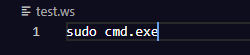
to use the cmd fucntion, use cmd then type what you want to run with the command processor

to use the msgbox fucntion, use msgbox then type what you want to display in the message box

to use the about fucntion, run about

Enjoy Using WinScript, Its in its beta stage currently, but it will be updated routinely