Mobile support does not seem to work #464

Replies: 67 comments 5 replies

-
|
I don't have an Android device so I can't easily debug this.
|
Beta Was this translation helpful? Give feedback.

-
|
Sure, can do that. This is the debug info: Next, I can confirm that the conceal and color matching brackets are working. Lastly, The v1.3.0 didn't work, even the v1.4.0 to v1.4.2 had no luck. Trying v1.3.0: |


Beta Was this translation helpful? Give feedback.
-
|
I see. The fact that the conceal and color matching brackets features are working means that the plugin is loading correctly, and CodeMirror extensions are working.
|
Beta Was this translation helpful? Give feedback.
-
|
Yes, I'm using the default snippets. In fact, I just discovered it then I found this issue. Unfortunately, I'm afraid auto-fraction, matrix shortcuts, and tabout features are not working. Trying the said features with the dev tools console opened. As you can see, I received no error while testing the features. Please let me know if you need further testing. |

Beta Was this translation helpful? Give feedback.
-
|
Hmm I see. Do you get any errors when you first enable the Latex Suite plugin? It does seem strange that you get no errors. Please give me some time to put together a debug build and get back to you! |
Beta Was this translation helpful? Give feedback.
-
Sorry for the late reply. It sure was strange but I just double checked it, and I really didn't saw any errors after I enabled the Latex suite plug-in. |
Beta Was this translation helpful? Give feedback.

-
|
@eliazar-sll Have you noticed the underline on what you typed? I think this is a problem about your input method . When you are typing , the input method actually hold the letters without passing it to obsidian . Only after you select a word or press something like |
Beta Was this translation helpful? Give feedback.
-
|
Your suggestion sounds very promising so I tried it with 2 different keyboards, each disabled their autocomplete functionalities Hacker's Keyboard: Simple Keyboard: And as you can see, the underline disappeared but the problem still persists. Do you have any thoughts about this? |


Beta Was this translation helpful? Give feedback.
-
|
Ah, It's a bit strange. I tried it by myself, and find almost all input methods on android won't work with latex suite... However, trime does work for me. I have no clue about why they work or not work though. Maybe something about input key event? |
Beta Was this translation helpful? Give feedback.
-
|
I've put together this debug build. It prints some console.log statements whenever the plugin detects a keypress. obsidian-latex-suite-1.6.0-debug.zip Can any android users test this build and upload a video of what appears in the console? It would be helpful if you did this using the different keyboards that do/do not work, described by @proItheus above. |
Beta Was this translation helpful? Give feedback.
-
|
Sorry but how can I enable the |
Beta Was this translation helpful? Give feedback.
-
|
@proItheus Quoting from @artisticat1, I think this is the process of enabling
|
Beta Was this translation helpful? Give feedback.
-
|
@artisticat1, I just tried the debug build and it logs Keyboard: Microsoft G-swift |

Beta Was this translation helpful? Give feedback.
-
|
Confirmed that the plugin logs keydown normally for the |
Beta Was this translation helpful? Give feedback.
-
|
Thank you both! It appears that keypresses are not being transferred to the plugin correctly. I'll try to investigate this further. |
Beta Was this translation helpful? Give feedback.

-
|
I have a TCL NEXTPaper 14 Android tablet. After much time, experimentation, and frustration, I finally managed to activate my snippets from an external keyboard using the Android app Unexpected Keyboard. The Hacker's Keyboard, which I use on my Motorola phone (Android 12), did not work! Additionally, I encountered the issue that Google does not provide an option to uninstall or deactivate the Gboard keyboard on Android 14. Unexpectedly, the app Keyboard Switcher allowed me to do deactivate it! As a result, the plugin now works just fine with an external keyboard. However, the snippets still cannot be expanded using the virtual keyboard. |
Beta Was this translation helpful? Give feedback.

-
|
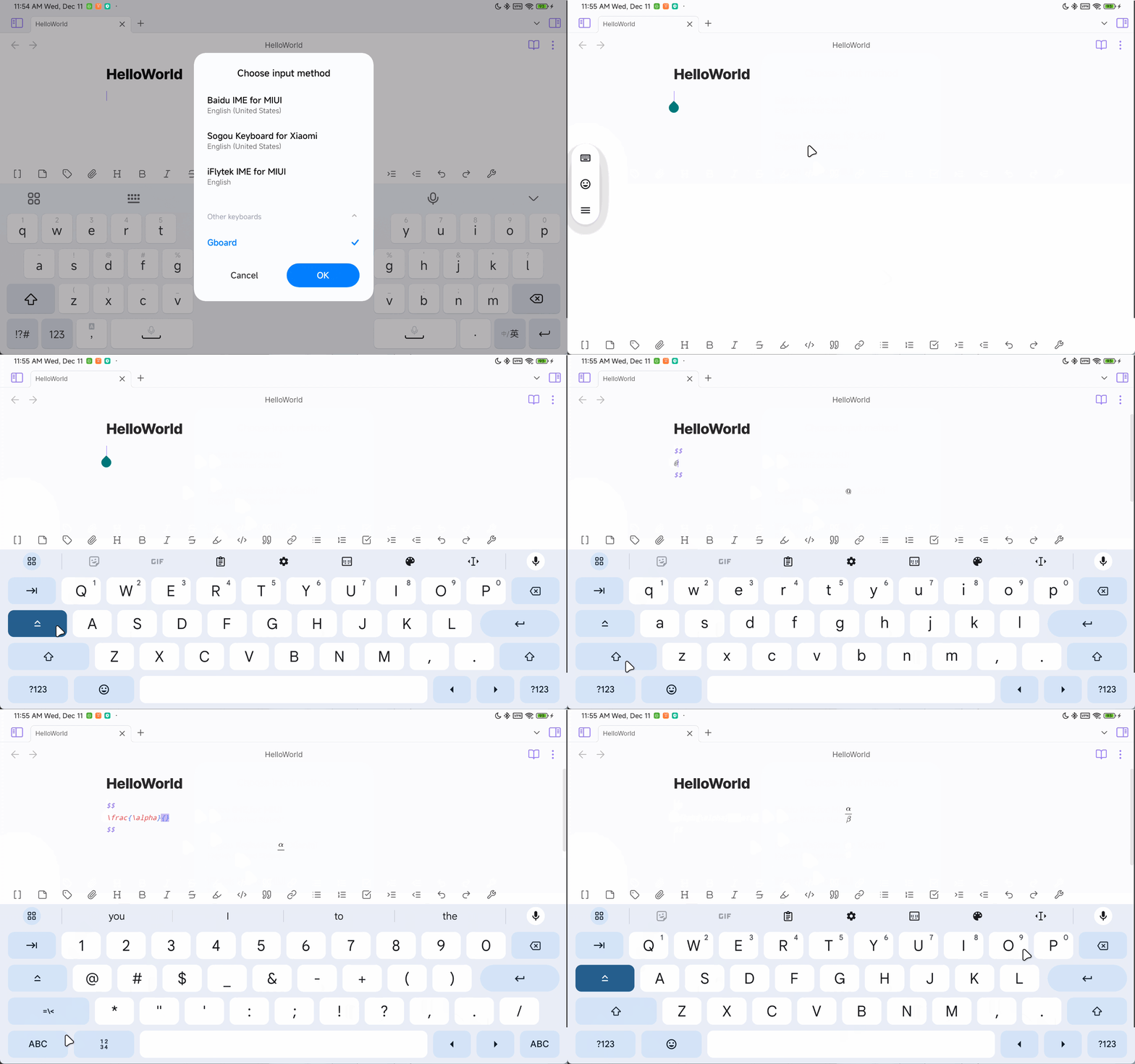
I have been using Latex-Suite for more than a year now and it helps a lot, thanks a lot to all the maintainers of this repo. I've updated the previous code and after testing with my device, the following keyboards have been supported nicely, including virtual and external keyboards, and there is no need to turn off the word completion.
You can try the plugin I compiled at Releases/1.9.7-dev, I would like to get feedback from you guys on testing it :) Important: You need to turn off |
Beta Was this translation helpful? Give feedback.
-
|
Hi @johnsidi77 , I only have two android device and my code still needs more testing, can you try it? I'd appreciate it. |
Beta Was this translation helpful? Give feedback.

-
|
Sad, I can't write math using this plugin on my chromebook even if I use a physical keyboard :( Hoping for someone to fix this, thanks. |
Beta Was this translation helpful? Give feedback.

-
|
+1 to this. Using Microsoft SwiftKey or Gboard and snippets don't work with the Space or Tab option. |
Beta Was this translation helpful? Give feedback.
-
|
Hi, @pigi5 |
Beta Was this translation helpful? Give feedback.
-
|
@oldkingOK Ok did that, and it didn't work. I tried both keyboards and tab/space options with the "Don't trigger snippets when IME is active" setting both off and on for good measure. |
Beta Was this translation helpful? Give feedback.
-
|
@pigi5 Thanks for your feedback! Can you install the debug version (Release/1.9.7-debug) I just compile and a dev tools plugin (https://github.com/KjellConnelly/obsidian-dev-tools) ? This will give us access to a console on mobile. The full tutorial of the dev tool is here. After enabling the plugin, open a console using the Command palette. Type something and 'Tab' then screenshot the output in the console. |

Beta Was this translation helpful? Give feedback.

-
|
@oldkingOK It works for me. My device is Xiaomi 6S Pro and the keyboard is Sogou keyboard. |
Beta Was this translation helpful? Give feedback.

-
|
I'm using a Lenovo N22 Chromebook running the android version of Obsidian with the built-in physical keyboard. Snippets weren't working on the main version, but they work smoothly on 1.9.7-dev with IME setting off. |
Beta Was this translation helpful? Give feedback.

-
|
@liuyun1993 hey! I use xiaomi 6S pro too. I just tried baidu keyboard and it magically worked. oh my gosh |
Beta Was this translation helpful? Give feedback.

-
|
@oldkingOK The Jan 13 1.9.7 debug build worked for me , tested on ms swift keyboard , gboard , unexpected keyboard |
Beta Was this translation helpful? Give feedback.

-
You are a Hero!!! It really worked!!! |
Beta Was this translation helpful? Give feedback.

-
|
@oldkingOK Thanks for your contribution.Wish for merge. |
Beta Was this translation helpful? Give feedback.

-
|
(maintainer here) This only added support for gboards version of IME (swiftkey, etc), not for diacritic keyboards (so pressing The solution will be added in the next release in about 2-4 weeks. |
Beta Was this translation helpful? Give feedback.

-
|
Hello. In the recent (I think) update to the settings menu, I can no longer find the setting to stop triggering the snippets. I have looked through all the tabs, all the way to the bottom, and haven't been able to find the setting. Where is it? |
Beta Was this translation helpful? Give feedback.

-
|
Which setting exactly?, the |
Beta Was this translation helpful? Give feedback.
-
|
global settings search did find both of them thankfully. This is the tabs of the settings visible to me. I can't find the area where snippets is located either. |

Beta Was this translation helpful? Give feedback.
-
|
That's a different plugin? This is latex suite not easy-typing or do you have a plugin modifying your settings UI? |
Beta Was this translation helpful? Give feedback.
-
|
Oh! My bad, I must have misread the notification in Obsidian and through my research stumbled across what was actually causing the issue. No wonder I couldn't find the appropriate setting through navigating to it! |
Beta Was this translation helpful? Give feedback.


 and others
Uh oh!
There was an error while loading. Please reload this page.
-
The support for mobile (android) doesn't seem to work.
I tried it on both of my android devices but neither of them worked. I checked if other plug-ins caused that, so I made a fresh obsidian installation but it still has no effect.
Additional Details:
Beta Was this translation helpful? Give feedback.
All reactions