GUI Help
The GUI help menu is displayed at the top left corner. Pressing the key 'h' toggle between the states showing and hiding the help menu.
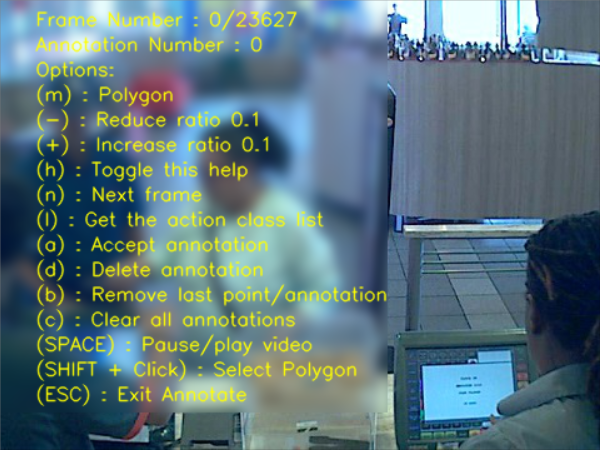
The following keyboard keys and mouse actions define an action while using the Annotate tool.
The m key switches between the three different annotation modes: axis align rectangle, rotated rectangle and polygon.
It's used to reduce by 0.1 the aspect ratio of rectangles while in axis align and rotated mode. The ratio is ignored when defining a free polygon. If your ratio cannot be defined by the 0.1 increments/decrements refer to the command line arguments options for more options.
The aspect radio defines the ratio between height/weight of the annotation.
When decreasing the ratio, it becomes 0, the ratio constraint is removed. You can see the current selected ratio next to the name of the selected mode.
It's used to increment the aspect ratio by 0.1. Refer to '-' for more details
Hides and show the help menu
Advances to the next frame in the sequence.
Accepts a new annotation, changing its status from drawing to added (i.e. red color to yellow color with numbering). This command is called automatically called in the modes: axis align rectangle and rotated rectangle.
In mode polygon, a new annotation needs to be accepted by inputing the key 'a'.
Deletes the current selected annotation. It must be in drawing mode (i.e., red color).
It removes the last point in the current annotation. It acts as a 'back' button. Once there is no more points to remove from the current drawing, it will start deleting previous annotations.
Clear all annotations in the frame.
Pause/play video sequence.
Allows you the select any annotation. You could also drag the annotation for reposition.
Exits the Annotate tool