Type of Annotations
Annotate currently supports three modes:
- Axis align rectangles
- Rotated rectangles
- Polygons
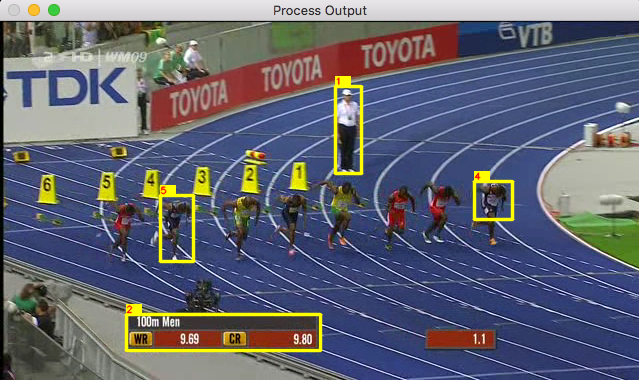
Example of multiple axis align rectangles. The user can define the aspect ratio
for each rectangular annotation or remove the constraint. The numbering defines the output's order
for each frame.
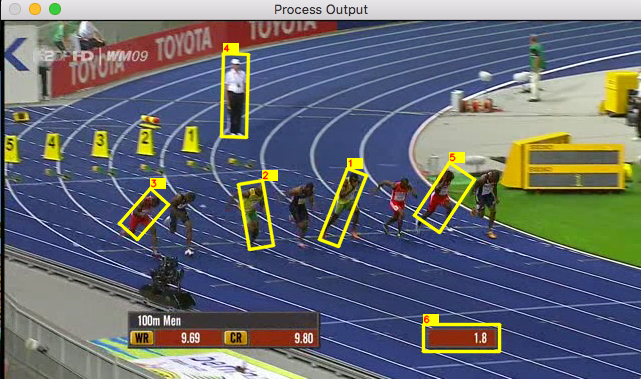
Example of multiple rotated rectangles. This mode allows the user
to define a rectangle with an angle without defining each corner manually.
The user can also define the aspect ratio
for each rotated rectangular annotation or remove the constraint.
Example of multiple polygons. The user can specify as many sides as desired per polygon. This
mode allows a more detailed annotation of the target when necessary; the user can define a linear approximation of the shape's contour.
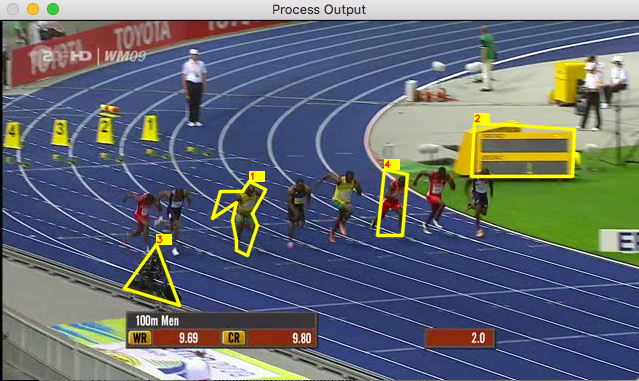
It is possible to use the three methods shown above simultaneously.
The user can change modes while defining new annotations and create multiple objects with different methods. This gives the user the flexibility of creating perfect axis align and rotated rectangles, while combining them with any other kind of polygon.