A fast, easy-to-use AF_XDP traffic generator for Linux. The iPerf of packet generators.



You reach for Wireblast at the point where iperf stops being enough. You need real Ethernet frames at a specific size, or ten thousand distinct flows, or a capture replayed back onto the wire, but you are nowhere near standing up a dedicated traffic-generation appliance and you would rather not spend a week learning DPDK. That is the gap Wireblast fills.
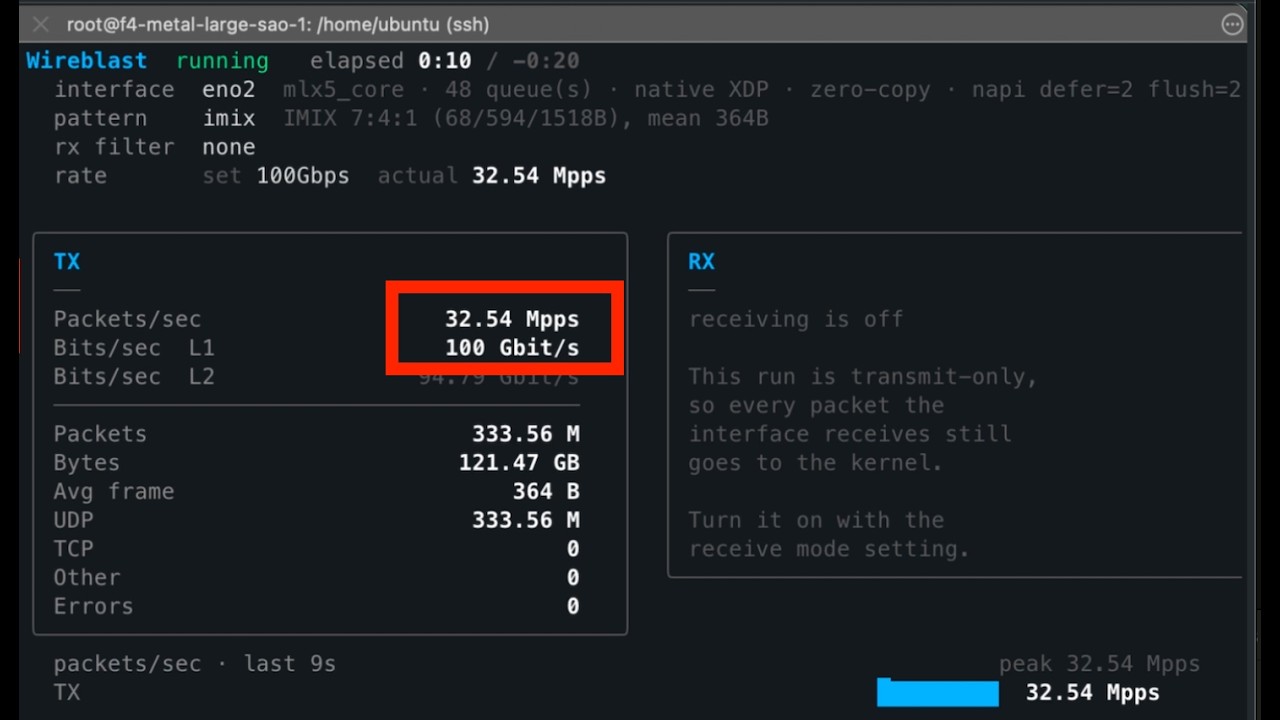
It puts real frames on a real NIC as fast as the hardware will take them, and tells you exactly what it sent. On a 100G Mellanox link it fills the pipe at every frame size, including 138 million packets a second of the smallest frames, from a single process. It is one static Go binary: no cgo, no libpcap, no DPDK, no kernel modules.
sudo wireblast
Run it with no arguments and a wizard walks you through picking an interface, a traffic pattern, and a rate. Thirty seconds later you have numbers.
Check out the demo video below.
The full documentation lives at wireblast.mintlify.site. This README is a quick start; the docs cover everything in depth:
- Quickstart and a no-NIC-needed veth lab
- Traffic patterns: UDP, TCP SYN, IMIX, raw Ethernet, PCAP replay
- Transmit vs receive, the safety model, and why it is transmit-only by default
- Reading the numbers: L1 vs L2 bit rates, and why your monitoring tool disagrees
- Performance: measured 100G results
- Common tasks and the FAQ
Wireblast is a single static binary. Download the latest release:
| Platform | Architecture | Download |
|---|---|---|
| Linux | x86-64 / amd64 | wireblast_linux_amd64.tar.gz |
| Linux | arm64 / aarch64 | wireblast_linux_arm64.tar.gz |
Checksums are published alongside each release as checksums.txt.
curl -L https://github.com/atoonk/wireblast/releases/latest/download/wireblast_linux_amd64.tar.gz \
  -o wireblast.tar.gz
tar -xzf wireblast.tar.gz
sudo install -m 0755 wireblast /usr/local/bin/wireblast
wireblast --version
Those URLs always resolve to the newest release, so you can script against them.
Or install with Go 1.25+:
go install github.com/atoonk/wireblast/cmd/wireblast@latestThe arm64 build runs on modern 64-bit Raspberry Pis (Pi 4, Pi 5, Zero 2 W and newer, on a 64-bit OS). Note that a Pi's onboard NIC has no native XDP, so Wireblast falls back to generic mode there: it works, but not at line rate.
See Install for requirements, the setcap alternative to sudo, and the locked-memory setting that catches first runs.
The wizard is the easy path, but everything it sets is also a flag:
# Interactive wizard
sudo wireblast

# Or specify it all and watch the live dashboard
sudo wireblast -i eth1 --dst-ip 192.0.2.10 --packet-size 512 --pps 1M -d 30s

# Scriptable: no wizard, no dashboard, plain text out
sudo wireblast --no-tui -i eth1 --dst-ip 192.0.2.10 --pps 1M -d 30s -y
No spare interface? A veth pair gives you a sender and a receiver on one machine, with nothing touching your real network:
sudo ip netns add wblab
sudo ip link add wb0 type veth peer name wb1
sudo ip link set wb1 netns wblab
sudo ip addr add 10.99.0.1/24 dev wb0 && sudo ip link set wb0 up
sudo ip netns exec wblab ip addr add 10.99.0.2/24 dev wb1
sudo ip netns exec wblab ip link set wb1 up

sudo wireblast -i wb0 --dst-ip 10.99.0.2 --packet-size 512 --pps 100k -d 10s
The namespace lab guide builds this out into a full sender and receiver.
The examples/ directory has 20 runnable examples, simplest to most advanced, each with a short README and a shell script driven by environment variables:
cd examples/010-imix
IFACE=eth1 DST=192.0.2.10 ./run.sh
They cover benchmarking a link, IMIX, PCAP replay, flow hashing, VLAN tagging, receiving, and running unattended.
Everything above is covered in depth in the docs; this section is for working on Wireblast itself.
go build -o wireblast ./cmd/wireblast        # local build
CGO_ENABLED=0 go build ./cmd/wireblast       # fully static, portable to any Linux of the same arch

go test ./...                                # no root, no hardware, no AF_XDP required
go vet ./... && gofmt -l .                   # what CI checks
Tests that need root and a real NIC live behind a build tag and are excluded from the normal run:
sudo go test -tags integration ./...The command is a thin shell; the work is in internal/:
| Package | Responsibility |
|---|---|
cmd/wireblast |
main, signal handling, version |
internal/cli |
Cobra command and flag parsing |
internal/config |
the single central config, validation, and unit helpers |
internal/discovery |
reads interfaces, addresses, routes, neighbours; resolves the next hop |
internal/packet |
builds Ethernet / 802.1Q / IPv4 / UDP / TCP frames with incremental checksums |
internal/generator |
turns a config into a stream of frames (flows, IMIX, raw, PCAP) |
internal/pcapfile |
pure-Go loader for Ethernet .pcap / .pcapng captures |
internal/rate |
the aggregate token-bucket rate limiter |
internal/dataplane |
everything AF_XDP: opening sockets, the XDP filter, the run loop |
internal/stats |
atomic counters, rate snapshots, history |
internal/tui |
the interactive wizard and live dashboard (Bubble Tea) |
internal/prefs |
remembers your last run under ~/.wireblast/ |
internal/app |
wires a validated config into a running dataplane for --no-tui |
Releases are cut by tagging. Pushing a vX.Y.Z tag runs .github/workflows/release.yml, which tests and then runs GoReleaser (.goreleaser.yaml) to cross-compile, archive, checksum, and publish the GitHub Release. Asset filenames carry no version so the releases/latest/download/… URLs stay stable.
The AF_XDP machinery (UMEM, the four rings, XDP program loading, the zero-copy paths) lives in go-afxdp, a standalone Go library. Wireblast is the packet generator on top of it. If you want to build your own line-rate tool in Go, start there.
Apache-2.0. Built on go-afxdp.