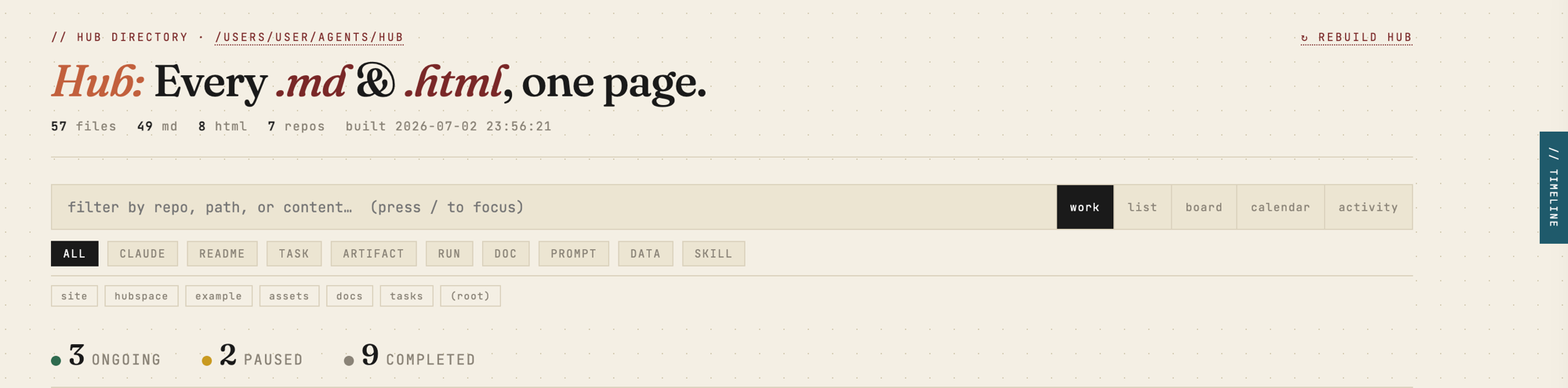
Point it at a folder. Get every .md and .html inside as one searchable, previewable page.


Hub scans a directory tree, indexes every document into SQLite with full-text search and task lineage, and serves a fast local browser at http://localhost:8787. No npm. No framework. No runtime dependencies — pure stdlib Python (3.11+).
pipx install hubspaces       # isolated, recommended
# or
pip install hubspaces
From a clone (no publish needed):
git clone https://github.com/auth-02/hub && cd hub
pipx install .
This puts the hub command on your PATH: hub builds the index, and hub serve serves it and watches for changes.
cd ~/my-project        # any folder you want to browse
hub serve              # serves http://localhost:8787 and rebuilds on change
Then open http://localhost:8787. That's it — Hub indexes the current directory by default.
Want to see it before pointing it at your own files? hub serve --demo builds and serves a bundled example repo.
hub serve --demoThe fastest way to see Hub is to run it — the bundled demo shows the real, current UI in one command, no install required:
uvx --from hubspaces hub serve --demo # demo hub on http://localhost:8787What you'll see:
- Index — grouped by repo, filtered by kind, sorted by recency; every task manifest carries a status badge you click to cycle
ongoing → completed → paused. - Split-pane preview — click any row for a live render with a
// tracepanel linking related runs, artifacts, and the parent task. - Timeline (
Ctrl+T) — a daily work summary: what have I worked on today / yesterday / this week, with git commits, runs, and artifacts inline. - Document pages — every
.md/.htmlopens in a clean reading view with a// tracebar; HTML artifacts get the hub's own CSS injected.
- Full-text search — filter by repo, path, title, and body simultaneously. Implicit AND,
repo:nameprefix supported. - Kind chips — one-click filters for TASK, RUN, ARTIFACT, CLAUDE, README, DOC, PROMPT. Stack with repo chips and search.
- Task status badges — every task manifest shows a clickable status pill. Cycles
ongoing → completed → paused. Persisted — survives DB resets, scan-root changes, and git branch switches. - Split-pane preview — click any row for a live rendered preview with lineage trace. No page navigation needed.
- Hub Timeline — drawer (
Ctrl+T) with a synthesised daily summary grouped by today / yesterday / this week, pulling from the activity log +git logacross all repos. - Activity view — a main view listing recent file events across the scan root: what changed, which task, how long ago.
- Auto-rebuild — file watcher triggers a rebuild within ~3 s of any change in the scan root.
- Keyboard-first — navigate the full list without a mouse.
Everything is optional. Drop a hub.toml in the folder you run Hub from (or run hub init to scaffold one):
[hub]
scan_root    = "."                      # directory to index (default: CWD)
port         = 8787                      # local server port
exclude_dirs = ["vendor", "fixtures"]   # extra dirs to skip (added to built-ins)
default_view = "board"                   # work | list | board | calendar | activity
Environment variables override the file:
| Var | Default | Purpose |
|---|---|---|
HUB_SCAN_ROOT |
(current directory) | Directory to scan |
HUB_SERVER_PORT |
8787 |
Server port |
HUB_OUTPUT |
~/.local/state/hub/build/docs-index.html |
Generated HTML path |
HUB_DB |
~/.local/state/hub/hub.db |
SQLite database |
HUB_DEBUG |
off | 1 enables logging to ~/.local/state/hub/hub.log |
Scan-root priority: --root flag → HUB_SCAN_ROOT → hub.toml → .scan_root sidecar → current directory.
You can also change it live: click the scan-root path in the header → edit → Save & Rebuild.
Hub understands this layout and builds a lineage graph automatically:
{repo}/tasks/{slug}/
    ├── manifest.md        ← TASK  (links to all below)
    ├── runs/YYYY-MM-DD/   ← RUN   (↑ back-link to manifest)
    ├── artifacts/         ← ARTIFACT
    └── prompts/           ← PROMPT
hub new task <slug> scaffolds a valid task for you.
Hub is the viewer. If you drive work with Claude Code, the companion
hub-agent plugin is a self-sufficient producer + viewer: it bundles four
producer skills — manifest, stacked, kagaz, dak — that create the
tasks/<slug>/manifest.md structure above as you work, plus a /hub command
that builds and serves the dashboard. So the board, trace, and timeline fill
themselves in.
/plugin marketplace add auth-02/hub
/plugin install hub-agent@hub
Fully opt-in — Hub needs no plugin and no agent to deliver the full index/search/preview/trace experience.
| Query | Finds |
|---|---|
session tokens |
files whose title or body contains both words |
repo:tasks manifest |
manifests in the tasks repo |
repo:docs architecture |
docs matching "architecture" |
| Key | Action | Key | Action | |
|---|---|---|---|---|
/ |
Focus search | j / ↓ |
Next file | |
Ctrl+T |
Toggle timeline drawer | k / ↑ |
Previous file | |
Enter |
Open in new tab | Esc |
Close preview / drawer |
Two launchd agents start Hub at login — the server (+ watcher) and a periodic rebuild:
bash scripts/setup-launchd.sh
# custom scan root:
HUB_SCAN_ROOT=~/work bash scripts/setup-launchd.sh
Reload after upgrading:
launchctl kickstart -k gui/$(id -u)/com.user.hub-server
launchctl kickstart -k gui/$(id -u)/com.user.hubgit clone https://github.com/auth-02/hub && cd hub
python3 -m hubspace.cli.hub serve # run from source, no install
python3 tests/run_tests.py # stdlib unittestLayout: code is the hubspace/ package; all generated/writable state (index, DB, log)
lives under ~/.local/state/hub/, never the package directory.