Describe the problem
When using multiple auth0 providers (the second with a custom context) the useAuth0 hooks do not return the correct status for each provider unless a page refresh occurs.
What was the expected behavior?
I expect both hooks to appropriately display the user information without requiring a page refresh.
Reproduction
- Setup two auth0 providers using
cacheLocation="localstorage".
- Login using provider A
- Verify useAuth0 displays correct information
- Login using provider B
useAuth0(providerBContext) returns correct information. useAuth0() returns initial information (isAuthenticated=false)- Refresh the page to see
useAuth0(providerBContext) & useAuth0() both return correct information
Example
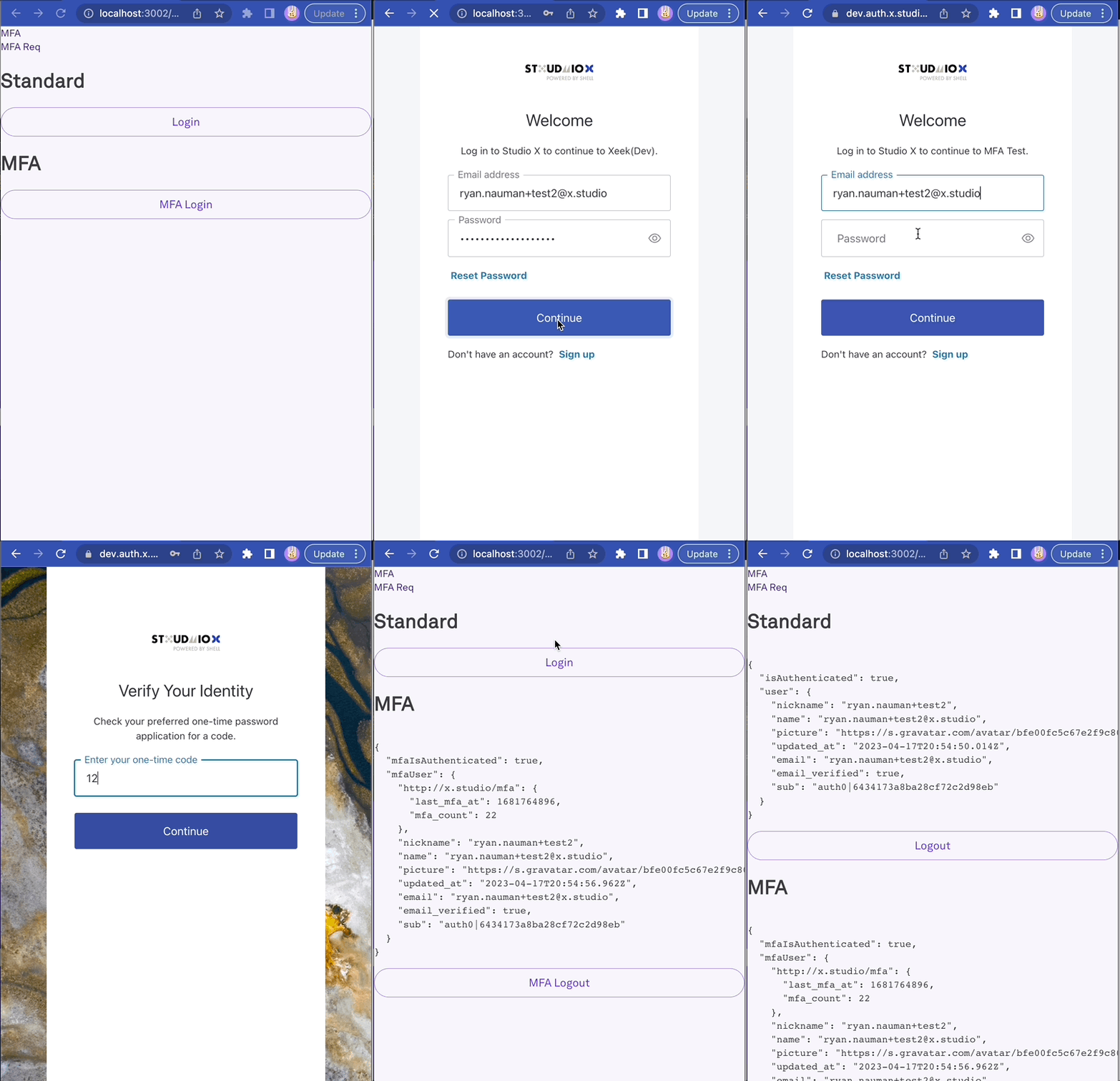
MFA.tsx
const MFA = () => {
  const {
    user: mfaUser,
    isAuthenticated: mfaIsAuthenticated,
    loginWithRedirect: mfaLoginWithRedirect,
    logout: mfaLogout,
  } = useAuth0(MFAContext);
  const { user, isAuthenticated, loginWithRedirect, logout } = useAuth0();

  return (
    <>
      <MFANav />
      <h1>Standard</h1>
      {isAuthenticated ? (
        <>
          <pre>{JSON.stringify({ isAuthenticated, user }, null, 2)}</pre>
          <Button
            variant="outlined"
            color="primary"
            onClick={() => {
              logout({ returnTo: `${window.location.origin}/mfa` });
            }}
          >
            Logout
          </Button>
        </>
      ) : (
        <Button
          variant="outlined"
          color="primary"
          onClick={() => {
            loginWithRedirect({
              returnTo: `${window.location.origin}/mfa`,
            });
          }}
        >
          Login
        </Button>
      )}
      <h1>MFA</h1>
      {mfaIsAuthenticated ? (
        <>
          <pre>{JSON.stringify({ mfaIsAuthenticated, mfaUser }, null, 2)}</pre>
          <Button
            variant="outlined"
            color="primary"
            onClick={() => {
              mfaLogout({ returnTo: `${window.location.origin}/mfa` });
            }}
          >
            MFA Logout
          </Button>
        </>
      ) : (
        <Button
          variant="outlined"
          color="primary"
          onClick={() => {
            mfaLoginWithRedirect({
              acr_values: MFA_ACR_VALUES,
              max_age: 0,
              returnTo: `${window.location.origin}/mfa`,
            });
          }}
        >
          MFA Login
        </Button>
      )}
    </>
  );
};
MFAContext:
import { Auth0ContextInterface, initialContext } from '@auth0/auth0-react';

const MFAContext = React.createContext<Auth0ContextInterface>({
  ...initialContext,
});
Provider A:
    <Auth0Provider
      domain={domain}
      clientId={clientId}
      audience={audience}
      redirectUri={window.location.origin}
      onRedirectCallback={onRedirectCallback}
      scope="read:current_user update:current_user_metadata"
      cacheLocation="localstorage"
      useRefreshTokens
    >
      {children}
    </Auth0Provider>
Provider B:
    <Auth0Provider
      domain={domain}
      clientId={clientId}
      audience={audience}
      redirectUri={`${window.location.origin}/mfa`}
      onRedirectCallback={onRedirectCallback}
      scope="read:current_user"
      cacheLocation="localstorage"
      useRefreshTokens
      context={MFAContext}
    >
      {children}
    </Auth0Provider>
Environment
- Version of
auth0-react used: tested with both "@auth0/auth0-react": "1.12.0", & "@auth0/auth0-react": "2.0.1",
- Which browsers have you tested in? Chrome
- Which framework are you using, if applicable (Angular, React, etc): React
- Other modules/plugins/libraries that might be involved: -

Describe the problem
When using multiple auth0 providers (the second with a custom context) the useAuth0 hooks do not return the correct status for each provider unless a page refresh occurs.
What was the expected behavior?
I expect both hooks to appropriately display the user information without requiring a page refresh.
Reproduction
cacheLocation="localstorage".useAuth0(providerBContext)returns correct information.useAuth0()returns initial information (isAuthenticated=false)useAuth0(providerBContext)&useAuth0()both return correct informationExample
MFA.tsx
MFAContext:
Provider A:
Provider B:
Environment
auth0-reactused: tested with both "@auth0/auth0-react": "1.12.0", & "@auth0/auth0-react": "2.0.1",