Baker Node
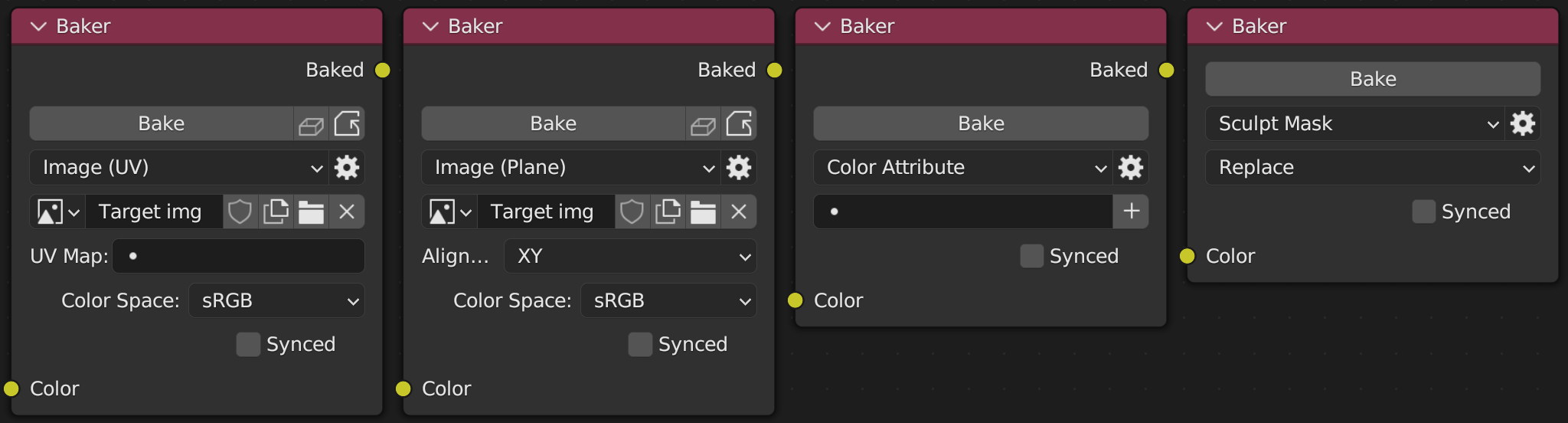
The value to bake. Can be connected to a scalar, color, or vector socket.
The type of target and how to bake to it.
-
Image (UV): Bake to an image using the active object's UV map.
-
Image (Plane): Bake to an axis-aligned plane using co-ordinates between 0 and 1. Useful for creating masks/textures for brushes.
-
Color Attribute - Bake to a color attribute on the active object.
-
Sculpt Mask - Replace or modify the active object's sculpt mask.
If Synced is checked then baking this node triggers the bake of all other baker nodes in the node tree for which Synced is also checked (excluding muted nodes).
In other words when a synced node is baked all other synced baker nodes in the material will also be baked.
The image data-block to bake to when Target Type is Image (UV) or Image (Plane). If this is blank and Create Missing Targets is enabled then an image will be created automatically when the node is baked.
Image (UV) only. The name of the UV map to use when baking. If this is blank or invalid then the object's currently active UV map is used.
Image (Plane) only. Which axes the plane should be aligned with. This can be XY, XZ, or YZ.
For Image (UV) or Image (Plane). Identical to the setting on an Image Texture Node.
The color space of the target image. This should generally be Non-Color when a scalar or vector socket is connected to the node's input.
If this property can't be edited then target image may have unsaved changes. Either save the image or discard the changes (e.g. by using Discard Image Changes in the node's context menu).
Color Attribute only. The name of the color attribute to bake to.
If a color attribute with this name does not exist on the active object then it will be created automatically when then node is baked. If this is left blank and Create Missing Targets is enabled then it will be set to a unique value before baking.
Sculpt mask only. How to combine the existing sculpt mask with the result of the bake. This can be Replace, Add, Subtract or Multiply. Replace is the default and completely replaces the existing mask.
Settings that can be viewed and changed by clicking the gear icon to the right of the Target Type box.
The maximum number of samples that Cycles should use when baking. Defaults to the value set in the add-on preferences.
If set then this object is used instead of the active object when baking. Ignored if Target Type is Image (Plane).
RGB color from the node's bake target. This behaves as if the node were an Image Texture Node (for an Image (UV) target) or a Color Attribute Node (for a Color Attribute target).