feat: add alert for publishing @next version #2297
Conversation


|

| aws-secret-access-key: ${{ secrets.AWS_SECRET_ACCESS_KEY }} | ||
| aws-region: us-east-1 | ||
| - run: aws cloudwatch put-metric-data --metric-name RunTimeTestsFailure --namespace GithubCanaryApps --value 0 | ||
| - run: aws cloudwatch put-metric-data --metric-name RunTimeTestsSuccess --namespace GithubCanaryApps --value 0 |

There was a problem hiding this comment.
We don't have a RunTimeTestsSuccess metric setup with any alarms right now. Is the idea that we'll use this in the future to alarm if it's missing for a certain period of time?
There was a problem hiding this comment.
From my understanding, this line will create a RunTimeTestsSuccess metric and we'll need to manually set up the alarm from the metric. Is that right?
There was a problem hiding this comment.
Looking at this further this might be an issue. The way the alarm works is that if RunTimeTestsFailure > 0 for 2 data points within 40 minutes the alarm is triggered. When a success occurs the RunTimeTestsFailure is sent a 0. If a 0 is never sent won't the RunTimeTestsFailure be above 0 forever?
Perhaps you have to change the additional configuration to have missing data treated as being good.
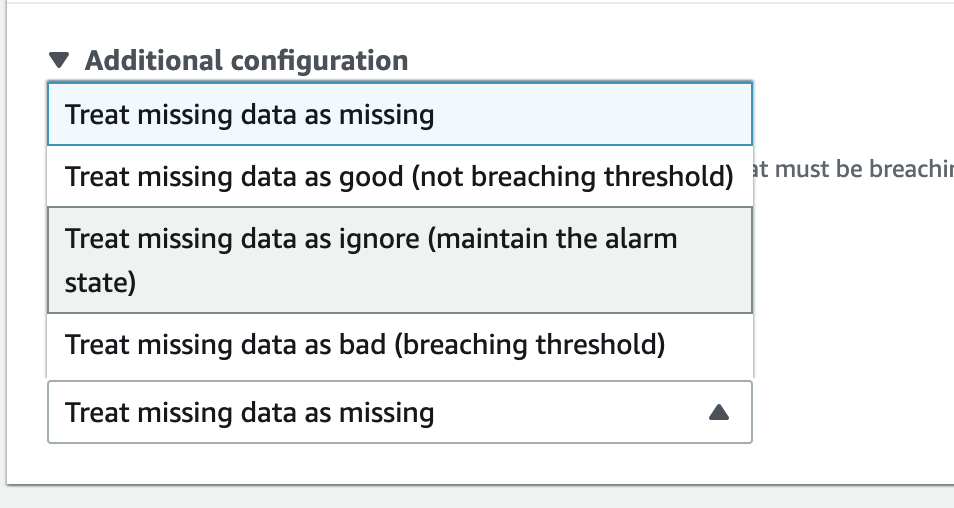
There was a problem hiding this comment.
Or change this back to RunTimeTestsFailure
There was a problem hiding this comment.
With @ErikCH on this one, is this change required? This would break the existing metric because we've been relying on the value 0 and 1 to determine the alarm state.

There was a problem hiding this comment.
Awesome point! Thanks for catching it. That means I need to add the success action back to the publish workflow as well.
Just pushed a new commit 😁
| aws-access-key-id: ${{ secrets.AWS_ACCESS_KEY_ID }} | ||
| aws-secret-access-key: ${{ secrets.AWS_SECRET_ACCESS_KEY }} | ||
| aws-region: us-east-1 | ||
| - run: aws cloudwatch put-metric-data --metric-name publishSuccess --namespace GithubCanaryApps --value 0 |
There was a problem hiding this comment.
Same here with these two alarms. Will the success alarm on missing data?
There was a problem hiding this comment.
Same. I think this line is only for metrics
There was a problem hiding this comment.
We configured canary to trigger alarm on missing data.
I don't think we can do that here though, because publish to @next does not happen on a regular schedule. IMO should have @next trigger alarm only on failure data and ignore missing data.
There was a problem hiding this comment.
I thought this PR would add a canary for the failures? Not sure about the missing data, but can we take a look once it's added?
There was a problem hiding this comment.
Right, my thought here is that we shouldn't even need to add success metrics here. We can safely delete trigger-success-alarm and only have trigger-failure-alarm job.
There was a problem hiding this comment.
Good point! I just removed the trigger-success-alarm 😁
| aws-access-key-id: ${{ secrets.AWS_ACCESS_KEY_ID }} | ||
| aws-secret-access-key: ${{ secrets.AWS_SECRET_ACCESS_KEY }} | ||
| aws-region: us-east-1 | ||
| - run: aws cloudwatch put-metric-data --metric-name publishFailure --namespace GithubCanaryApps --value 1 |
There was a problem hiding this comment.
I'm assuming publishFailure will be setup to alarm right away?
There was a problem hiding this comment.
I remember we manually set up the run-and-test-build failure. Still remember we were on a call and @wlee221 set it up...I hope my memory is not lying to me

 wlee221
left a comment
wlee221
left a comment
wlee221
left a comment
There was a problem hiding this comment.
LGTM, let's make sure cloudwatch alarms are set up before we make this happen.

| - run: aws cloudwatch put-metric-data --metric-name RunTimeTestsFailure --namespace GithubCanaryApps --value 1 | ||
|
|
||
| trigger-sucess-alarm: | ||
| trigger-success-alarm: |
There was a problem hiding this comment.
Shouldn't this be called put-success-metric? It doesn't actually trigger an alarm
| working-directory: ./canary | ||
|
|
||
| trigger-failure-alarm: | ||
| # Triggers an alarm if any of builds failed. |
There was a problem hiding this comment.
this comment isn't actually correct. Can we change this language to saw that it publishes a metric, which we separately alarm on?

wlee221
left a comment
wlee221
left a comment
There was a problem hiding this comment.
Added a comment on run-and-test-builds changes 🙏


Co-authored-by: Scott Rees <6165315+reesscot@users.noreply.github.com>
4 participants


Description of changes
Issue #, if available
https://app.asana.com/0/1201736086077862/1201914591116096/f
Description of how you validated changes
This PR add metrics for success and failures of the after merge next tag publishing events in Prod account.
TODO:
Checklist
yarn testpassessideEffectsfield updatedBy submitting this pull request, I confirm that my contribution is made under the terms of the Apache 2.0 license.