
Point it at your app. It tries to break it.
A dynamic, target-adaptive security scanner for localhost servers and Android APKs.





Warning
Authorized testing only. Only scan systems you own or are explicitly
authorized in writing to test. Scanning a target that is not local requires
the --i-am-authorized flag. Unauthorized scanning may be illegal. You are
responsible for how you use this tool. See SECURITY.md.
- What it is
- Highlights
- Install
- Quickstart
- Scan profiles
- What it checks
- How it adapts per target
- External tools
- Reports
- Architecture
- Contributing
- Acknowledgements
- License
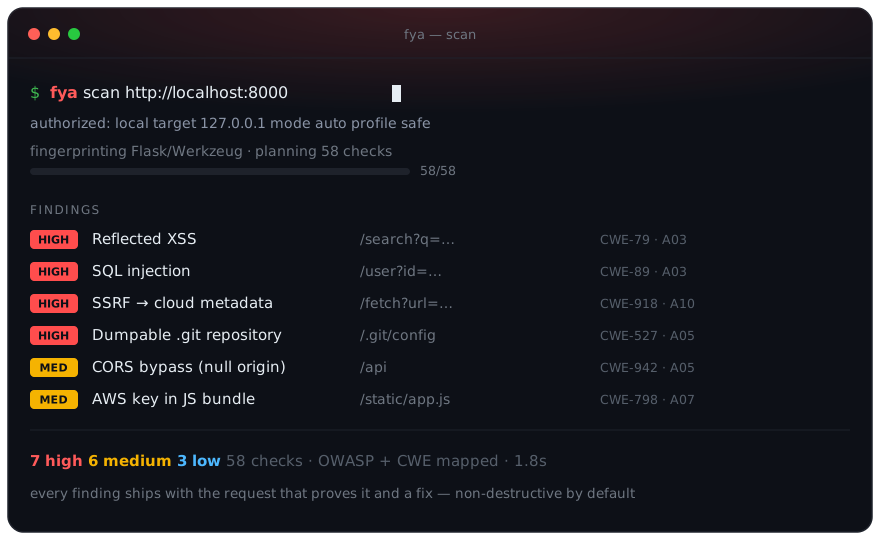
fya is an open-source, dynamic security scanner. Give it a running server
(localhost or a URL), an Android .apk, or a source directory, and it detects
what the target is, fingerprints it, tunes its own scan parameters to fit, and
runs a battery of security checks mapped to the OWASP Top 10 and OWASP MASVS. It
ships its own fast, pure-Python checks and, when they are installed, orchestrates
the best-in-class tools (Nuclei, Nikto, sqlmap, nmap, testssl, jadx, apkleaks)
instead of reinventing them.
- One tool, three targets. Scan a running web server, an Android
.apk, or a source directory with the same command. - Black, gray, and white box. Fuzz inputs from outside, probe access control (IDOR, auth bypass) with partial knowledge, or run static analysis over the source itself.
- Adaptive. Detects the stack, tunes payloads and request pacing, and runs only the checks that apply.
- You pick the mode. Choose
recon,web,api,mobile,blackbox,graybox,whitebox, orfull(or an interactive menu), and watch a live per-category progress animation as it runs. - Fits real apps and CI. Authenticated scans (
--header/--cookie/--bearer), scope and request-budget controls, an optional headless-browser crawler for single-page apps, and a baseline file to suppress known findings. - 58 checks, OWASP-mapped. Web, API, TLS, black/gray-box, source static analysis, and APK, each tagged to OWASP Top 10 / MASVS and CWE, and grouped by test strategy in the report.
- Orchestrates, does not reinvent. Uses Nuclei, Nikto, sqlmap, nmap, and testssl when present; falls back to built-in checks when not.
- Safe by default. Non-destructive, no flooding, request pacing that backs off on errors, localhost allowed, remote requires explicit authorization.
- CI-ready reports. Console, JSON, SARIF, Markdown, and self-contained HTML, with
--fail-onexit codes. - Tiny core.
requestsandrichonly. APK analysis, a browser, and external tools are optional.
pip install fya                 # from PyPI
pip install "fya[apk]"          # add Android APK manifest analysis (androguard)
pip install "fya[browser]"      # add the headless-browser crawler for SPAs (playwright)
From a clone, with test tooling:
git clone https://github.com/ayam04/fya
cd fya
pip install -e ".[dev]"
Python 3.9 or newer. The core install pulls only requests and rich; APK, browser, and dev tooling are optional extras.
Or run it in Docker (the image bundles nmap):
docker build -t fya .
docker run --rm --network host fya scan http://127.0.0.1:8000# scan a local dev server (no authorization flag needed for localhost)
fya scan http://127.0.0.1:8000
# read-only, then progressively heavier
fya scan http://127.0.0.1:8000 --profile passive
fya scan http://127.0.0.1:8000 --profile safe # default
fya scan http://127.0.0.1:8000 --profile aggressive
# pick what to run, or choose from a menu
fya scan http://127.0.0.1:8000 --mode web # web + tls + api
fya scan http://127.0.0.1:8000 --mode blackbox # input fuzzing + outside-in
fya scan http://127.0.0.1:8000 --mode graybox # IDOR, auth bypass, API
fya scan http://127.0.0.1:8000 --mode full # everything, aggressive
fya scan http://127.0.0.1:8000 --interactive # menu to pick mode + profile
fya modes # list the modes
# authenticated and scoped, with a request budget
fya scan http://127.0.0.1:8000 -H "Authorization: Bearer $TOKEN" --exclude '/logout' --max-requests 500
fya scan http://127.0.0.1:8000 --cookie "session=abc123"
fya scan http://127.0.0.1:8000 --spa # render JS/SPA pages (needs the [browser] extra)
# baseline for CI: record once, then fail only on new findings
fya scan http://127.0.0.1:8000 --write-baseline .fya-baseline.json
fya scan http://127.0.0.1:8000 --baseline .fya-baseline.json --fail-on high
# analyze an Android app
fya scan ./app-release.apk
# white-box static analysis of a source directory
fya scan ./my-service --mode whitebox
# write a shareable report (format inferred from the extension)
fya scan http://127.0.0.1:8000 -o report.html
fya scan http://127.0.0.1:8000 -o findings.sarif # for CI code scanning
# fail a CI job if anything high or worse is found
fya scan http://127.0.0.1:8000 --fail-on high
# a non-local target requires explicit authorization
fya scan https://staging.example.com --i-am-authorized
# see which external tools fya can hand off to
fya toolsTry it right now against the bundled deliberately-vulnerable app:
python examples/vulnerable_app.py       # starts on http://127.0.0.1:5001
fya scan http://127.0.0.1:5001 --profile aggressive -o report.html| Profile | What it does |
|---|---|
passive |
Read-only. Headers, TLS, cookies, disclosure, fingerprinting. |
safe |
Non-destructive active probes. Reflection, error signatures, CORS. |
aggressive |
Heavier probing and external-tool handoff. Still non-destructive. |
fya never floods a target or runs denial-of-service payloads. Request pacing
adapts automatically, slowing down on errors, timeouts, and slow responses.
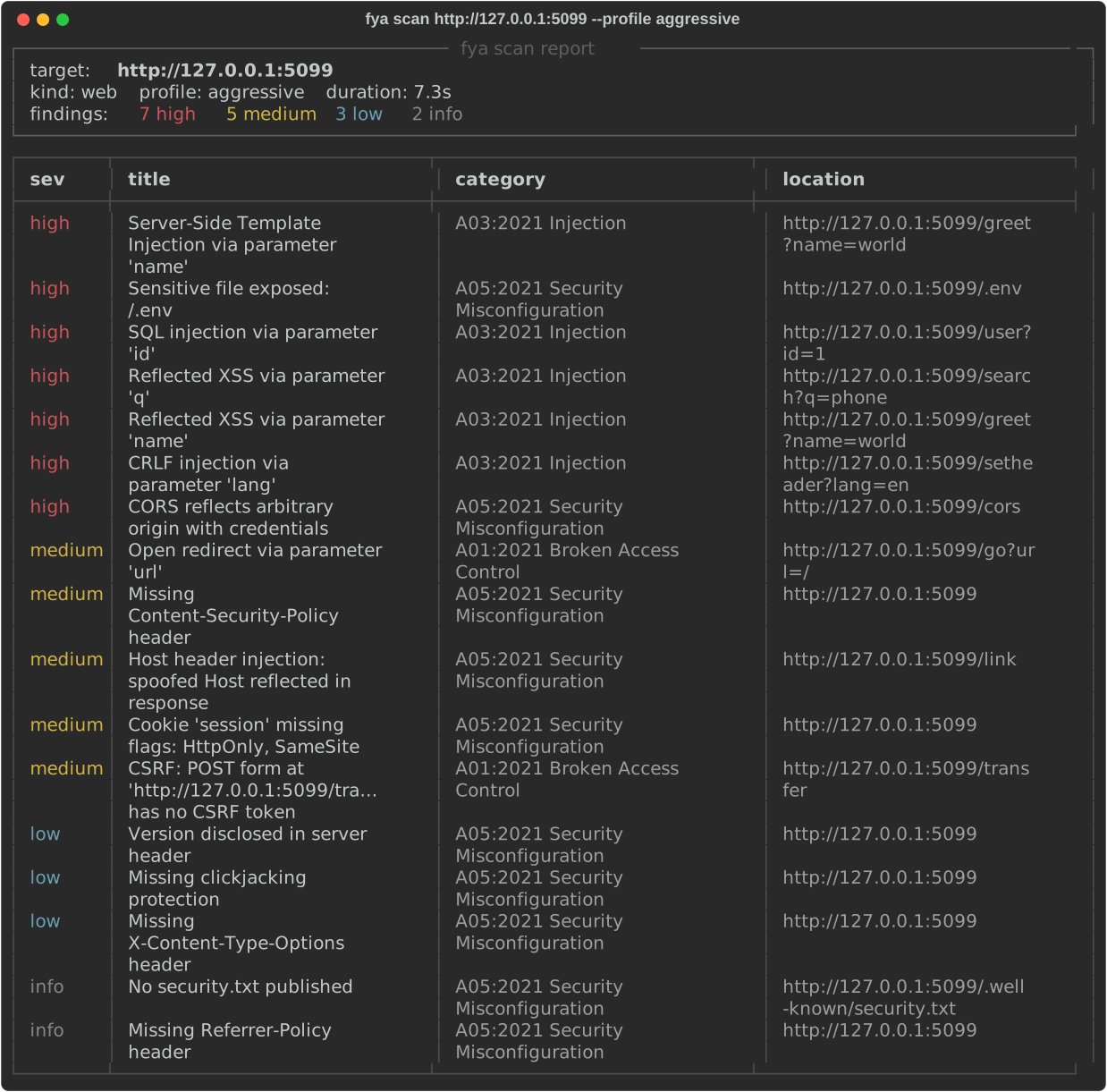
58 checks across the areas below, each mapped to OWASP Top 10 / MASVS and a CWE, and grouped by test strategy in the report. Full catalog in docs/checks.md.
| Area | Checks |
|---|---|
| Web (passive) | Security headers, server/version disclosure, insecure cookie flags |
| Web (active) | Reflected XSS, error-based SQLi, open redirect, path traversal, CORS misconfiguration, advanced CORS bypasses (null/prefix/suffix), dangerous HTTP methods, sensitive file exposure |
| Web (advanced) | Server-side template injection (SSTI), missing CSRF token, Host header injection, CRLF/header injection, forwarded-header cache poisoning, X-Original-URL/X-Rewrite-URL access-control bypass |
| Web (secrets & files) | Secrets in client-side JavaScript, exposed source maps, dumpable .git/.svn/.hg/.bzr repos, leaked config/credential files, directory listing |
| Web (SSRF & injection) | SSRF via cloud metadata and file:// (signature-based), MongoDB-style NoSQL injection, XPath / LDAP / SSI injection |
| Web (hardening) | CSP policy weaknesses, COOP/CORP/Permissions-Policy, cookie prefix and scope misuse, JWT (alg / expiry / sensitive claims), outdated JS libraries, security.txt and robots.txt |
| Black box | Input fuzzing and robustness: malformed, oversized, wrong-type, unicode, null-byte, and format-string payloads that surface 5xx crashes and leaked stack traces |
| Gray box | Insecure direct object references (IDOR), protected routes reachable without authentication |
| White box (source) | Hardcoded secrets, risky sinks (eval, exec, shell=True, pickle, verify=False), dangerous GitHub Actions workflows (pwn-request, script injection), semgrep/bandit folded in when installed |
| TLS | Certificate validity and trust, weak protocol versions, missing HTTP to HTTPS upgrade |
| API | OpenAPI/Swagger exposure, GraphQL introspection, GraphQL hardening (field suggestions, batching, GET/CSRF), verbose error disclosure, unauthenticated admin/debug endpoints |
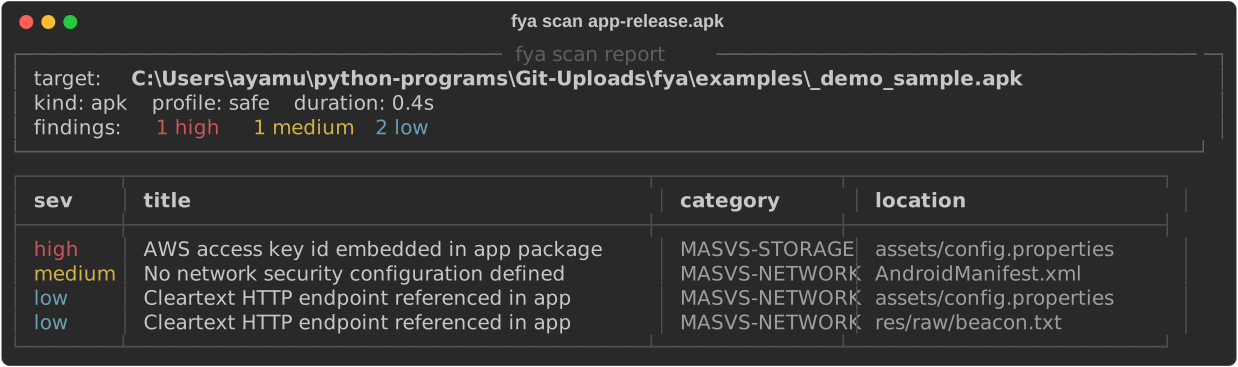
| APK (static) | Hardcoded secrets, cleartext HTTP endpoints, manifest issues (debuggable, backup, exported, cleartext, minSdk, permissions, unverified App Links, weak custom permissions), insecure WebView configuration |
| Integrations | Nuclei, Nikto, nmap, sqlmap, testssl/sslyze handoff, normalized into the same report |
Load, stress, and network-chaos testing are deliberately out of scope: they are denial-of-service shaped and break the non-destructive guarantee. Use k6, Locust, or Toxiproxy for those, on infrastructure you own.
- Detect whether the target is a web server, an
.apk, or a source directory. - Fingerprint the tech stack (server, framework, cookies, whether it is a JSON API) from the first responses.
- Select only the checks that apply to that target kind and profile.
- Tune payloads, pacing, and concurrency to what the target tolerates.
- Normalize every finding to OWASP / CWE and de-duplicate.
- Report to console, JSON, SARIF, Markdown, or a self-contained HTML page.
If any of these are on your PATH, fya uses them and folds their results
into one normalized report. If not, it silently falls back to built-in checks.
nuclei · nikto · sqlmap · nmap · testssl.sh · sslyze · jadx · apkleaks
Check what is detected with fya tools.
| Format | Use it for |
|---|---|
console |
The default. A colored summary table in your terminal. |
json |
Machine-readable output for pipelines and dashboards. |
sarif |
Upload to GitHub code scanning and other SARIF consumers. |
markdown |
Drop into issues, wikis, or pull requests. |
html |
A self-contained, shareable page. See docs/sample-report.html. |
Format is inferred from the -o file extension, or set it explicitly with
--format. Use --fail-on {low,medium,high,critical} to return a non-zero
exit code in CI.
fya/
  models.py        finding, target, profile, scan-result data models
  detect.py        target-kind detection (web vs apk)
  fingerprint.py   web tech fingerprinting used to tune checks
  http.py          adaptive, self-throttling HTTP client
  registry.py      the Check base class and auto-discovery
  engine.py        orchestrator: fingerprint, plan, run in parallel, collect
  authorization.py the scope and consent gate
  tools.py         detection and safe subprocess handoff to external tools
  report.py        console / json / sarif / markdown / html reporters
  checks/          one file per area, auto-registered on import
Details in docs/architecture.md.
Issues and PRs welcome. Adding a check is a single file dropped in
fya/checks/, auto-discovered on import. Run pytest and ruff check .
before submitting. See CONTRIBUTING.md for the walkthrough.
Built on the shoulders of OWASP (Top 10 and MASVS/MASTG), the tools it orchestrates (Nuclei, Nikto, sqlmap, Nmap, testssl.sh, androguard), and requests + rich.
fya is dual-licensed:
- Free for noncommercial and personal use under the PolyForm Noncommercial License 1.0.0. Hobby projects, research, education, personal study, and nonprofit or government use are all free.
- Commercial use requires a paid license. Using
fyain, or for, a for-profit company's products, services, or internal operations needs a commercial license. See COMMERCIAL-LICENSE.md and contact ayamullahkhan04@gmail.com.
Versions before 0.5.0 were released under the MIT License and remain available under those terms.