


Retarget any song to any length - without time-stretching.
A native REAPER extension that finds where to splice and stitches a new version of your track at the duration you ask for.
The technique is beat-aligned splicing, not time-stretching: the algorithm finds pairs of beats where the splice is least likely to be heard as an edit - matched phase, matched chroma, matched energy, matched structural role - and stitches those splices into a path that hits the target duration.
Quality goal: edits that go unnoticed in casual listening. Results depend on genre and tempo - see Scope + limitations below for what works well and what doesn't.
| Mode | What it does | Status |
|---|---|---|
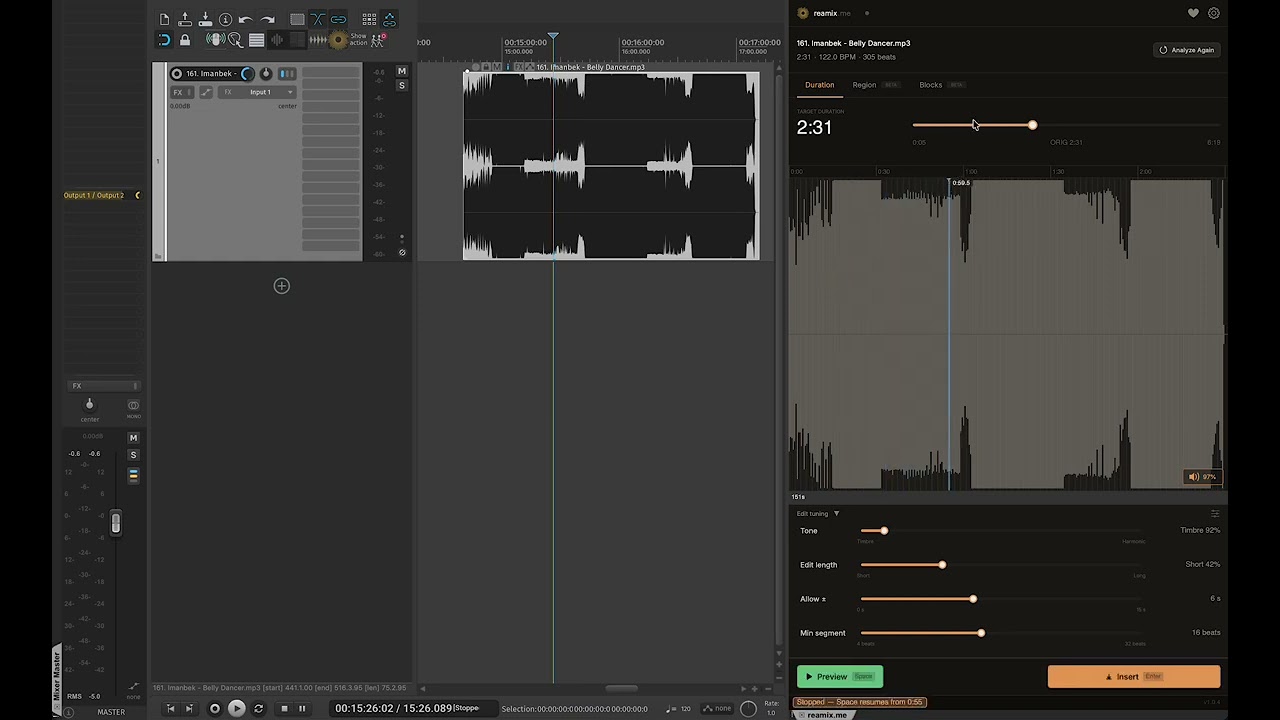
| Target Duration | Set a duration; the algorithm picks the optimal splice path across the whole track. | Stable |
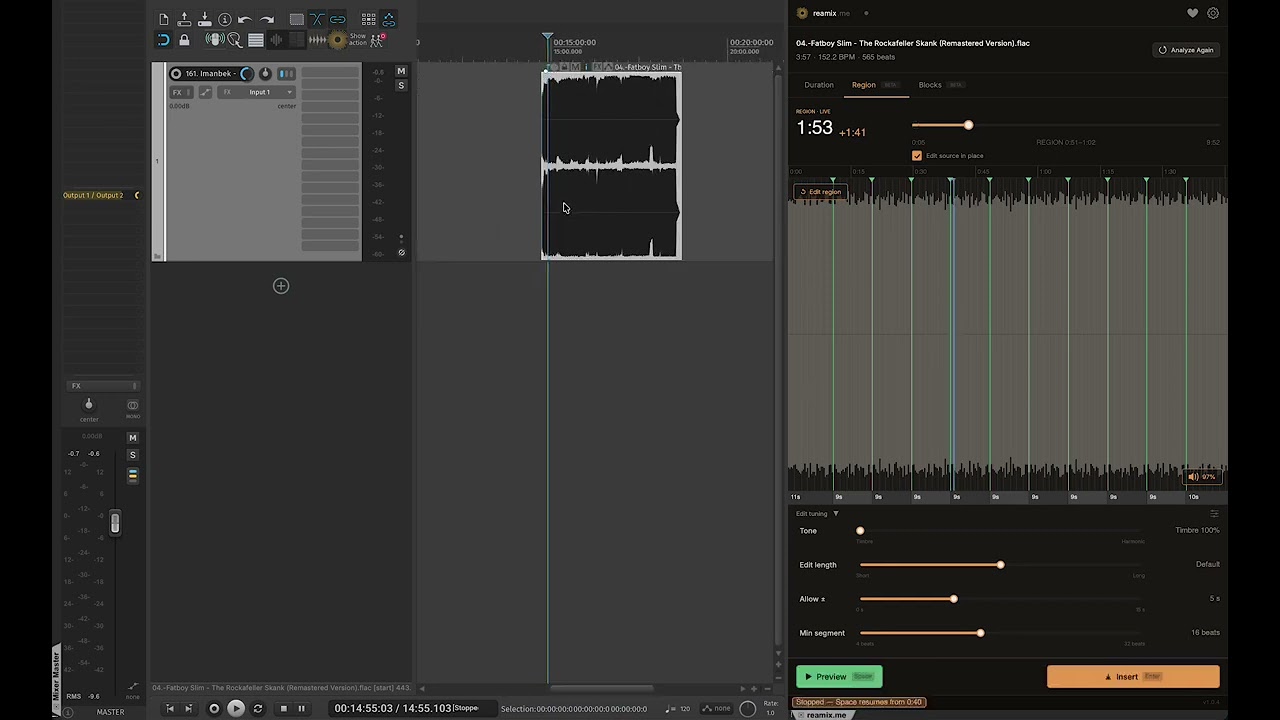
| Region Remix | Retarget only the REAPER time-selection; rest of the track untouched. Two flavors via the Edit source in place checkbox in the Region tab: ON (default) edits the original clip directly - splice in place, like Adobe Audition Remix. OFF inserts the remix as a new item right after the source on the same track; the original stays untouched. Running Insert again updates that appended remix instead of duplicating it. |
Beta |
| Block Assembly | Manually order sections (Intro → Chorus → Verse → Chorus → Outro); the algorithm optimizes only the splice at each junction. | Beta |
Set a duration, the algorithm picks the optimal splice path across the whole track.
Retarget just the REAPER time-selection; the rest of the track stays untouched.
reamix.me is tuned for music where beats land on a regular grid and structural sections (verse / chorus / bridge) are well-defined.
Works best on: pop, dance, EDM, house, hip-hop, pop-rock, and other beat-driven, predominantly mid-tempo material (~90-145 BPM). Validated against a multi-genre listening corpus.
Mixed results on: rock with extended freeform sections, ballads with rubato timing, jazz, classical, acoustic singer-songwriter material with sparse percussion.
Not currently in scope: drum'n'bass and other fast-tempo genres above ~150 BPM where the beat rate exceeds the rate of sung syllables - mid-word vocal cuts become architecturally unavoidable. Genre-specific stem-aware paths are on the v1.x roadmap.
If a track falls outside the supported scope you may still get usable results, but expect more audible splices. Feedback on edge cases is welcome - see About this project below.
- REAPER 6.0 or newer
- OS: macOS 13+, Windows 10+, or Linux with X11 +
libcurl4 - SWS Extension - free, recommended. Required for Preview playback; Analyze and Insert work without it. Install via ReaPack (default repository includes SWS) or download from the SWS site.
- Disk space: ~80 MB for the one-time AI beat-detection model + the plugin binary
- Internet: required for the first analysis only (model download)
A typical 4-minute track analyzes in under 30 seconds on first run. Subsequent analyses on the same track are instant - the result is cached on disk per source path.
You can inspect cache size and clear it from Settings (gear icon) → Cache → Clear, or open the cache folder via Show in Finder.
The first-ever analysis on a clean install also downloads the ~80 MB AI model (one-time, ~2 minutes on typical broadband). If you already have REABeat installed, reamix.me reuses its cached model and skips this download entirely.
ReaPack is REAPER's package manager. It downloads the correct binary for your OS and architecture, places it where REAPER expects it, and bypasses macOS Gatekeeper / Windows SmartScreen because REAPER itself loads the plugin (not Finder / Explorer).
- Install ReaPack if you don't have it already.
- In REAPER: Extensions → ReaPack → Import repositories… and paste:
https://github.com/b451c/reamix.me/raw/main/index.xml - Extensions → ReaPack → Browse packages… → search
reamix→ Install. - Restart REAPER. The plugin opens via Extensions → reamix.me: Show/Hide Window.
On first analysis the beat-detection model (~79 MB) downloads automatically to a per-platform application-data directory. One-time only.
macOS 13+ may quarantine downloaded plugins on first use. If REAPER shows "reaper_reamix.dylib cannot be opened" or fails to list the plugin:
- Open System Settings → Privacy & Security (or System Preferences → Security & Privacy on macOS 12).
- Scroll to the bottom - there will be a message about
reaper_reamix.dylibbeing blocked. Click Allow Anyway. - Restart REAPER. The plugin loads on the second attempt.
If that doesn't work, run this in Terminal (replace .dylib paths if you installed manually):
xattr -d com.apple.quarantine ~/Library/Application\ Support/REAPER/UserPlugins/reaper_reamix.dylib
xattr -d com.apple.quarantine ~/Library/Application\ Support/REAPER/UserPlugins/libonnxruntime.*.dylib
ReaPack-installed binaries normally bypass this - the steps above only apply to fresh-from-browser downloads.
If you can't use ReaPack:
- Download the binary for your platform from the Releases page. You need two files per platform: the plugin (
reaper_reamix-*.dylib/.dll/.so) and the matching ONNX Runtime sidecar. - Place both files in REAPER's
UserPlugins/folder:- macOS:
~/Library/Application Support/REAPER/UserPlugins/ - Windows:
%APPDATA%\REAPER\UserPlugins\ - Linux:
~/.config/REAPER/UserPlugins/
- macOS:
- On Linux, rename the ONNX library from
libonnxruntime.so.1-Linux-<arch>tolibonnxruntime.so.1(REAPER's loader expects the soname). - On macOS, clear the quarantine flag from both files (see the macOS section above).
- Restart REAPER → Extensions → reamix.me: Show/Hide Window.
audio in  →  beat detection (beat-this ONNX)
          →  structure segmentation (CBM, bar-level)
          →  per-beat 59-dim feature vector (MFCC + chroma + spectral contrast)
          →  transition cost matrix (10 perceptual signals + hard gates)
          →  Viterbi DP finds min-cost splice path under duration / cooldown / intro-outro constraints
          →  multi-band crossfade renders the splices
          →  WAV out
The whole pipeline is in-process C++. No Python runtime, no TCP server, no external interpreter. Single .dylib / .dll / .so drop-in.
- C++20 compiler (Clang 14+, GCC 12+, MSVC 2022+)
- CMake 3.22+
- Git
- Platform deps:
- macOS: Xcode command-line tools
- Linux:
freetype,libx11,libxrandr,libxcursor,libxinerama,alsa,webkit2gtk-4.0,libcurl4-openssl-dev - Windows: Visual Studio 2022 with C++ workload
git clone --recurse-submodules https://github.com/b451c/reamix.me.git
cd reamix.me

# Download ONNX Runtime for your platform into vendor/onnxruntime/
# (URLs in .github/workflows/build.yml step "Download ONNX Runtime")

cmake -S . -B build -DCMAKE_BUILD_TYPE=Release
cmake --build build -j 8

# Run tests
ctest --test-dir build -j 8
The compiled binary is at build/reaper_reamix.{dylib,dll,so}. Copy it to REAPER's UserPlugins/ folder.
The repo is organized as a port of an earlier Python+Lua implementation. Each pipeline stage corresponds to a closed phase:
| Phase | Module |
|---|---|
| 1 | Beat detection (beat-this ONNX) |
| 2 | Feature extraction (MFCC + chroma + spectral contrast) |
| 3 | Structure segmentation (CBM, bar-level) |
| 4 | Transition cost matrix (10 perceptual signals) |
| 5 | Optimization + rendering (Viterbi DP + multi-band crossfade) |
| 6 | JUCE UI (this is where the user-facing plugin lives) |
| 7 | Packaging + OSS release |
Each pipeline stage has parity tests against the Python reference. CI runs the full parity suite on every PR; failures block merges.
The src/dsp/ layer is a bit-exact C++ port of librosa + scipy.signal primitives - mel filterbank, MFCC, chroma STFT, HPSS, onset strength, butterworth + SOS filtering, DCT type-II ortho, YIN pitch tracking, spectral centroid, RMS. The port runs in pure C++ with no Python interpreter; parity tests in tests/parity/ verify numerical equivalence to the librosa/scipy reference within ~1e-6 ULP per module. If you need a portable C++ alternative to librosa for embedded / game / plugin audio work, this layer may eventually be extracted into its own repository - open an issue if that's interesting to you.
For contributors, the canonical entry point is CONTRIBUTING.md.
reamix.me was originally developed as a commercial product. After completing the C++ port and bringing it to release quality, I chose to release it under MIT instead - in the belief that the GitHub and REAPER communities will help take it further than a single maintainer could alone.
Every contribution is genuinely appreciated: bug reports, edge-case audio samples that surface failure modes, UX feedback from real REAPER workflows, code improvements, and documentation corrections. If you find a rough edge or have an idea that would make the plugin sharper, please open a GitHub issue or submit a pull request.
Donations (see Support development below) fund ongoing maintenance - CI runners for the 5-platform build matrix, time to triage community reports, and the long tail of polish that turns a v1.0 into a v1.x worth recommending.
reamix.me's own source code is MIT licensed (see LICENSE).
The plugin links against JUCE, which is licensed under AGPLv3 on the free track. The distributed binary therefore inherits AGPLv3 obligations when combined with JUCE: when redistributing the precompiled .dylib / .dll / .so, you must provide source under AGPLv3-compatible terms (the MIT source meets this) and preserve the JUCE copyright notice.
In practice this means:
- You can use reamix.me freely, including in commercial REAPER sessions.
- You can modify and redistribute the source under MIT.
- If you redistribute the binary, your distribution carries AGPLv3 terms for the combined work. Linking your own MIT source against JUCE is allowed.
| Component | License | Used for |
|---|---|---|
| JUCE | AGPLv3 (free track) | UI framework |
| ONNX Runtime | MIT | Neural inference |
| beat-this (CPJKU, ISMIR 2024) | CC-BY-4.0 | Beat detection model (downloaded at runtime) |
| reaper-sdk | LGPL-2.1 / custom | REAPER plugin headers |
| WDL (SWELL) | zlib | macOS / Linux dialog layer |
| PocketFFT | BSD-3-Clause | FFT |
| Eigen | MPL 2.0 | Cross-platform LAPACK fallback (non-Apple eigendecomposition) |
| Inter | SIL OFL 1.1 | UI font |
| JetBrains Mono | SIL OFL 1.1 | Monospace font |
Bundled font licenses are preserved under assets/fonts/*-LICENSE.txt.
- librosa and scipy - the DSP primitives in
src/dsp/are a faithful C++ port of librosa +scipy.signal. The Python reference is the source of truth for every parity test intests/parity/. - CPJKU for the beat-this model (ISMIR 2024) - best published F1 scores for beat + downbeat tracking.
- REABeat - sibling REAPER extension by the same author; serves as the architectural template for native C++/JUCE/REAPER integration.
- SneakPeak / EditView - UI patterns (waveform, minimap, fade handles).
- The REAPER community for ReaPack (cfillion), SWS extension (numerous contributors), and the wider plugin ecosystem.
If reamix.me saves you time, consider supporting development:
Donations fund the donate-funded OSS model for this project - no commercial licensing, no paywall, no telemetry.
- Bugs and feature requests: GitHub Issues
- Discussion: REAPER Forum thread (coming with v1.0.0 release)
- Security: see SECURITY.md