Releases: ba1lly/Mynah
v1.4.0 — on-disk logs · first self-updatable release

Quality-of-life release — and the first one you can install from inside the app.
⚡ Updating from v1.3.0?
Click the amber UPDATE badge in the top bar → Update now. Mynah downloads this release, verifies it, applies only what changed (under a minute), and restarts itself. This is the new normal.
On v1.1.0/v1.2.0? One last manual run of MynahSetup.exe below brings you into the self-update world.
⬇️ New here?
Download MynahSetup.exe (~11 MB), run it, done — no Python, Git, or PowerShell. Then the 2-minute Discord setup. Heads-up: the Client ID is the long number on your application's OAuth2 tab — not the Client Secret.
Added
- On-disk logs (#19) — the console pane now also writes to
logs\mynah.log(daily rotation, 7 days kept, scrubbed, traceback-friendly). A folder icon in the Console card opens the folder, and the crash dialog offers to open the crash log directly. Reporting a bug is now "attach the latest mynah.log".
Changed
- Fresh README screenshot showing the current UI (#20).
Deprecated
start.ps1 -Build(the ~4 GB standalone bundle) — superseded byMynahSetup.exe; will be removed in a future release (#17). Still works, now with a warning.
Full Changelog: v1.3.0...v1.4.0
v1.3.0 — one-click in-app updates
Mynah now updates itself. This is the last release you'll ever need to download by hand.
⬇️ New here?
Download MynahSetup.exe below (~11 MB) and run it — no Python, Git, or PowerShell needed. It detects your NVIDIA driver, installs everything self-contained into %LOCALAPPDATA%\Mynah, and resumes if interrupted. Then do the 2-minute Discord setup.
Added
- One-click in-app updates — when a new version is out, the UPDATE badge's dialog now offers Update now: the app downloads the new installer straight from the release (verified against the release's SHA-256 checksum; download URLs locked to this repo's assets), restarts into a silent update mode that re-runs only the changed steps — typically under a minute, never a multi-GB re-download — and relaunches itself on the new version.
- Update safety: blocked while a recording or transcription is running; dev checkouts and the standalone build keep the manual download link.
Upgrading from 1.1.0 / 1.2.0
Those versions predate the in-app updater, so one last manual step: download MynahSetup.exe from this release and run it over your existing install — it detects the install, skips everything unchanged, and only refreshes the app itself (well under a minute). From then on, updates are one click inside the app.
Full Changelog: v1.2.0...v1.3.0
v1.2.0 — one-click installer
The release Mynah was missing: a one-click installer. No Python, no Git, no PowerShell — download, run, record.
⬇️ Installing
Download MynahSetup.exe below (~11 MB), run it, click Install.
- Detects your NVIDIA driver and picks the CUDA build automatically (~2.5 GB download); falls back to a CPU build with a clear message otherwise
- Installs everything self-contained into
%LOCALAPPDATA%\Mynahwith Start Menu + Desktop shortcuts - Interrupted? Run it again — it resumes from the last completed step
- Verify the download against
MynahSetup.exe.sha256if you like
Then do the 2-minute Discord setup (create an application, enable Public Client, paste the Client ID).
Added
- One-click installer (#9) —
MynahSetup.exe, built and attached automatically on every release from here on - Proper uninstall — the install registers in Windows Settings → Apps; uninstalling from there removes everything, with a prompt to keep or delete your recordings and settings
- Update notifications — the app checks GitHub's releases API on launch (off-switchable in Settings; documented in the README privacy section as the app's only phone-home). A newer version shows an UPDATE badge with the release notes and a download link
- App icon — title bar, taskbar, shortcuts, and both exes now wear the Mynah mark
Fixed
- Fatal-error dialog falls back to a native Win32 message box when tkinter is unavailable
- A review pass on this branch fixed several pre-release bugs, including a CPU→CUDA upgrade that silently no-opped and an uninstall self-delete race — details in the commit history
Notes for dev installs
git clone + .\start.ps1 works exactly as before. The installer is just a second door into the same app.
Full Changelog: v1.1.0...v1.2.0
v1.1.0 — PKCE: no more Client Secret
Security release: Discord OAuth now uses PKCE — the Client Secret is gone.
⚠️ One-time setup change for existing users
Open your Discord application → OAuth2 tab → enable Public Client → Save Changes. Without it, connecting fails with a clear "enable Public Client" error.
That's all: on next launch the app deletes the now-obsolete Client Secret from Windows Credential Manager automatically, and your existing connection keeps working (re-authorization happens automatically if needed).
Changed
- Discord OAuth migrated to PKCE (RFC 7636) — closes #1. The app no longer asks for, transmits, or stores a Client Secret:
AUTHORIZEcarries an S256code_challenge+ per-requeststate- Token exchange and refresh prove possession of the
code_verifierinstead of a secret - The Client Secret field is removed from Settings (both UIs)
- A secret stored by an older version is removed from the OS credential store on launch; a plaintext one in a legacy
config.jsonis discarded
- README setup flow simplified: no more "Reset Secret" step.
Why this matters
A desktop app can't keep a Client Secret secret — any same-user process could read it from the credential store, and it was sent over the network on every token exchange. PKCE eliminates the shared secret entirely: each authorization is protected by a one-time cryptographic challenge, so a stolen authorization code is useless without the matching verifier that never leaves the running process.
Verified live end-to-end: full PKCE authorize, secret-less token refresh, and the credential-store cleanup.
Full Changelog: v1.0.1...v1.1.0
v1.0.1 — new WebView2 UI
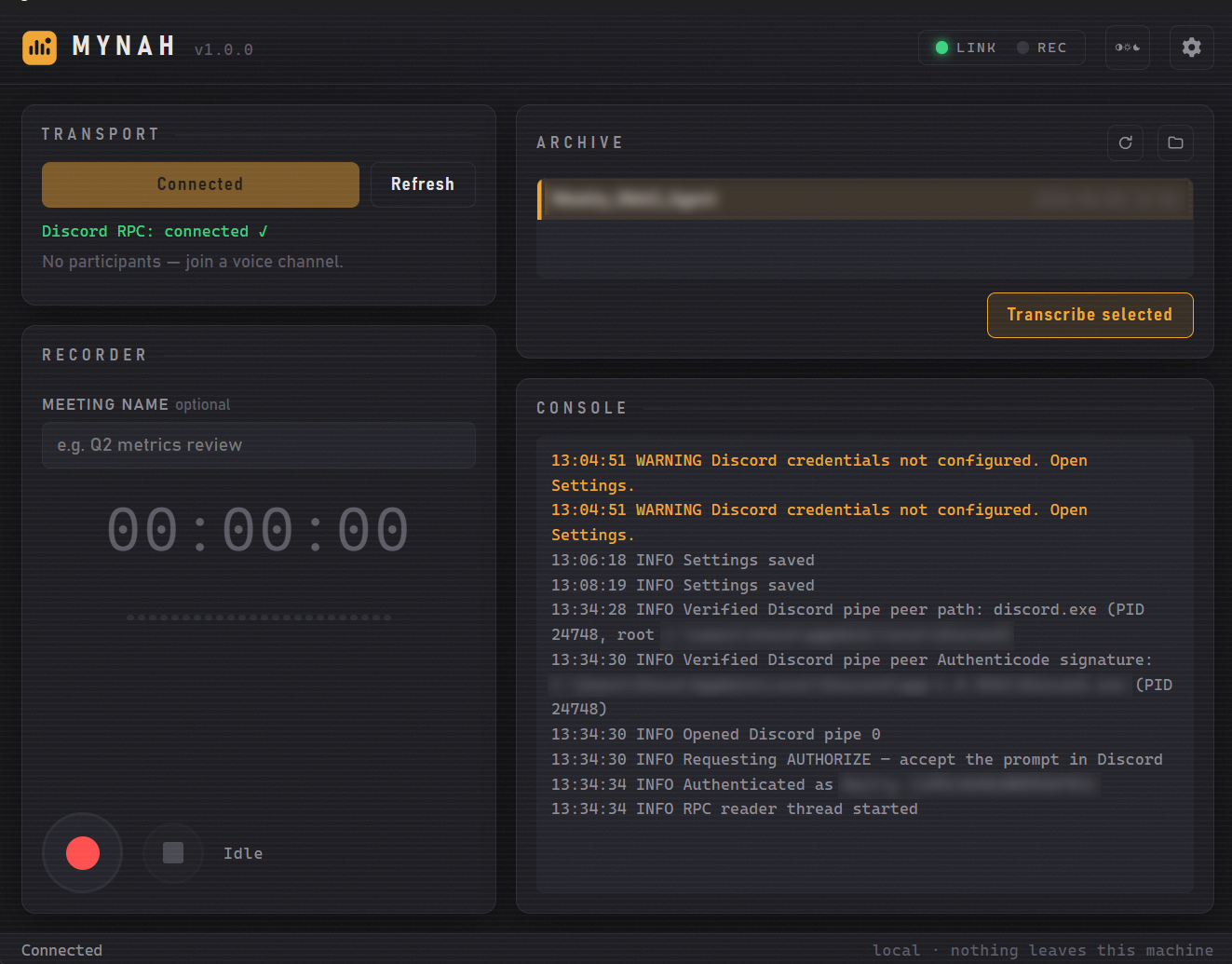
A new face for Mynah — the Tkinter window is replaced by a modern WebView2-based UI, plus quieter startup logs.
Added
- New default UI — rendered in WebView2 via pywebview: light/dark/system theme toggle, live recording timer, status LEDs, recordings list, streaming console pane, and in-window settings/consent dialogs. No frameworks, no webfonts — nothing fetched from the network.
- The legacy Tk UI remains available via
--legacy-uiand is the automatic fallback when pywebview or the WebView2 runtime is missing. uicore.py— UI-toolkit-agnostic core (log scrubbing, atomic settings apply, consent attestation, recordings indexing) shared by both UIs.
Fixed
- Silenced two benign-but-noisy startup warnings (#7): pyannote/torchcodec's "torchcodec is not installed correctly" UserWarning and Lightning's checkpoint auto-upgrade INFO on every transcription. Both suppressions are narrowly scoped to the exact message/logger.
Compatibility
- Consent dialog text is byte-identical to v1.0.0 — the attestation
dialog_sha256in participants.json is unchanged. - Recording, RPC, and transcription pipelines are untouched.
Full Changelog: v1.0.0...v1.0.1