Shell CLI aims to simplify running PowerShell commands. It is no different from a regular PowerShell session, but it provides a more user-friendly interface, simpler commands and interactive menus. The idea is to streamlines tasks on Windows computers such as user, system and network management, by providing short, intuitive commands and/or menus.
NOTE There are some anti-virus softwares that block Shell CLI. Some do and some don't. If you encounter an av software that does there are some steps you can take.
You may also need to enable running powershell scripts on your system.
Open powershell as an administrator, paste in the command below and hit Enter. That's it!
Getting started
irm shellcli.com | iex
The above command is shorthand Powershell. It is the same as
Invoke-RestMethod shellcli.com | Invoke-Expression
If you don't know any commands, you can just enter the menu command. Once in the menu, you can use the up and down arrow keys to make selections
and then the enter key to confirm your selection.
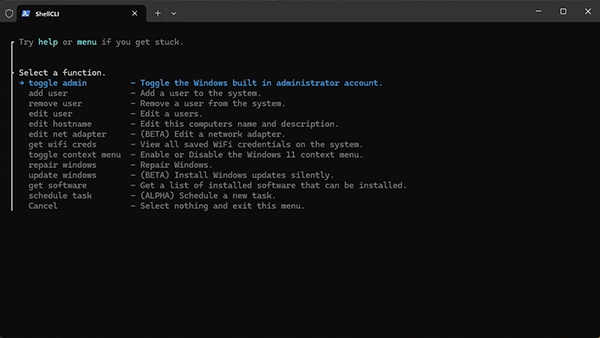
You don't need to rely on the menu. You can accomplish more, faster, by accessing commands directly. For instance, creating a new user or editing the target PC's network adapter can be done with short intuitive commands.
Add a new local user to the system.
add local user
Edit the network adapters on target PC.
edit net adapter
Toggle the Windows built-in administrator account.
toggle admin
Add a new user to the target system. Gives option to add local or domain users.
add user
Add a new local user to the target system. Skips prompt to choose local or domain.
add local user
Add a new domain user to the target system. Skips prompt to choose local or domain.
add domain user
Remove an existing user account from the target system.
remove user
Edit an existing user account on the system.
edit user
Edit a user account name.
edit user name
Edit a user account password.
edit user password
Edit a user accounts groups.
edit user group
Edit the hostname and description of the target computer.
edit hostname
Edit network adapter settings on the target computer.
edit net adapter
View WiFi SSID and passwords for the currently enabled NIC's.
get wifi creds
Run common Windows repair commands like system file checks and cleanup & restore.
repair windows
Its fairly common that running powershell scripts is disabled by default. You can enable running powershell scripts by opening powershell as an administrator and entering this command.
Set the execution policy to unrestricted. Set-ExecutionPolicy Unrestricted
Some antivirus programs may block the use of ShellCLI. Typically when they do, it's the initial connection command triggers the warning or the block. That's because of the irm (Invoke-RestMethod) portion of the command. The reason anti-virus software will sometimes block this command is because it can be used to send and retrieve information over the internet. In this case you retrieve the root powershell functions of Shell CLI.
You should be able to bypass most anti-virus programs by pasting the ShellCLI initializer into an admin powershell or terminal directly. The link to the initializer is below.