- Java: Explain JVM, JRE and JDK?
- Java: Is Java a Compiled or an Interpreted programming language ?
- Java: Why java is not 100% Object-oriented?
- Java: What are wrapper classes?
- Java: What is singleton class and how can we make a class singleton?
- Java: What is the difference between Array list and vector?
- Java: What is the difference between equals() and == ?
- Java: What are the differences between Heap and Stack Memory?
- Java: What is Polymorphism?
- Java: What are the OOP Concepts in Java?
- Java: What is the difference between abstract classes and interfaces?
- Java: What is method overloading and method overriding?
- Java: Can you override a private or static method in Java?
- Java: What is multiple inheritance? Is it supported by Java?
- Java: What is association?
- Java: Is Java platform independent?
- Java: What are the various access specifiers for Java classes?
- Java: What all memory areas are allocated by JVM?
- Java: What’s the purpose of Static methods and static variables?
- Java: What is class?
- Java: What is data encapsulation and what’s its significance?
- Java: Primivite data types in Java and their size
- Java: What is unicode?
- Java: What are Literals?
- Java: What is Type casting in Java?
- Java: Why should I have super type reference & sub class object?
- Java: What is the difference between double and float variables in Java?
- Java: Can we override a static method?
- Java: Does Java support operator overloading?
- Java: Can we overload a method by just changing the return type and without changing the signature of method?
- Java: Is it possible to overload main() method of a class?
- Java: What is the difference between an Inner Class and a Sub-Class?
- Java: What is static and dynamic binding?
- Java: What is the difference between abstract class and interface?
- Java: Can Java interfaces have fields?
- Java: Which access modifiers can be applied to the inner classes?
- Java: Can main() method in Java can return any data?
- Java: Can we declare a class as Abstract without having any abstract method?
- Java: Is Java “pass-by-reference” or “pass-by-value”?
- Java: What is static block?
- Java: Use of final keyword in Java
- Java: How an object is serialized in java?
- Java: What are the types of exceptions?
- Java: In the below example, how many String Objects are created?
- Java: What is multi-threading?
- Java: Describe and compare fail-fast and fail-safe iterators. Give examples.
- Java: ArrayList, LinkedList, and Vector are all implementations of the List interface. Which of them is most efficient for adding and removing elements from the list? Explain your answer, including any other alternatives you may be aware of.
- Java: Why would it be more secure to store sensitive data (such as a password, social security number, etc.) in a character array rather than in a String?
- Java: What is the ThreadLocal class? How and why would you use it?
- Java: What is the volatile keyword? How and why would you use it?
- Java: What is stale state?
- Java: Compare the sleep() and wait() methods in Java, including when and why you would use one vs. the other.
- Java: Tail recursion is functionally equivalent to iteration. Since Java does not yet support tail call optimization, describe how to transform a simple tail recursive function into a loop and why one is typically preferred over the other.
- Java: How can you catch an exception thrown by another thread in Java?
- Java: When designing an abstract class, why should you avoid calling abstract methods inside its constructor?
- Java: What variance is imposed on generic type parameters? How much control does Java give you over this?
- Java: If one needs a Set, how do you choose between HashSet vs. TreeSet?
- Java: What are method references, and how are they useful?
- Java: How are Java enums more powerful than integer constants? How can this capability be used?
- Java: What is reflection? Give an example of functionality that can only be implemented using reflection.
- Java: What are static initializers and when would you use them?
- Java: Nested classes can be static or non-static (also called an inner class). How do you decide which to use? Does it matter? When exactly is it leak safe to use (anonymous) inner classes?
- Java: What is the difference between String s = "Test" and String s = new String("Test")? Which is better and why?
- Java: What is classloader?
- Java: Can you use
this()andsuper()both in a constructor? - Java: What is the default value of the local variables?
- Java: Does constructor return any value?
- Java: Can we execute a program without main() method?
- Java: What if the static modifier is removed from the signature of the main method?
- Java: What is composition?
- Java: What is a marker interface?
- Java: When can an object reference be cast to an interface reference?
- Java: What is the difference between StringBuffer and StringBuilder?
- Java: What is the difference between synchronized and non-synchronized collection classes in Java?
- Java: How can we create immutable class in java?
- Java: What is a nested class?
- Java: What is nested interface ?
- Java: Can a class have an interface?
- Java: Can an Interface have a class?
- Java: What is transient keyword?
- Java: What is the difference between Serializalble and Externalizable interface?
- Java: How do I convert a numeric IP address like 192.18.97.39 into a hostname like java.sun.com?
- JavaScript: What is a potential pitfall with using typeof bar === "object" to determine if bar is an object? How can this pitfall be avoided?
- JavaScript: What will the code below output to the console and why?
- JavaScript: What will the code below output to the console and why?
- JavaScript: What is the significance of, and reason for, wrapping the entire content of a JavaScript source file in a function block?
- JavaScript: What is the significance, and what are the benefits, of including 'use strict' at the beginning of a JavaScript source file?
- JavaScript: Consider the two functions below. Will they both return the same thing? Why or why not?
- JavaScript: What will the code below output? Explain your answer
- JavaScript: What is NaN? What is its type? How can you reliably test if a value is equal to NaN?
- JavaScript: Discuss possible ways to write a function isInteger(x) that determines if x is an integer.
- JavaScript: In what order will the numbers 1-4 be logged to the console when the code below is executed? Why?
- JavaScript: Consider the following code snippet
- JavaScript: What will the code below output to the console and why?
- JavaScript: The following recursive code will cause a stack overflow if the array list is too large. How can you fix this and still retain the recursive pattern?
- JavaScript: What is a “closure” in JavaScript? Provide an example.
- JavaScript: What would the following lines of code output to the console?
- JavaScript: What will be the output when the following code is executed? Explain the difference between == and ===
- JavaScript: What is the output out of the following code? Can an object be a key for another object? Explain your answer.
- JavaScript: What will the following code output to the console and why
- JavaScript: Visiting all elements in a tree (DOM).
- JavaScript: Testing your this knowledge in JavaScript: What is the output of the following code?
- JavaScript: Consider the following code. What will the output be, and why?
- JavaScript: What will be the output of this code?
- JavaScript: How do you clone an object?
- JavaScript: What do the following lines output, and why?
- JavaScript: How do you add an element at the begining of an array? How do you add one at the end?
- JavaScript: Holes in array. Imagine you have this code: ...
- JavaScript: What is the value of typeof undefined == typeof NULL?
- JavaScript: What will the following code output and why?
- [JavaScript: ]
How can you swap the values of two numeric variables without using any other variables? [What is the angle between the clock hands at 4:25?]
- Why did you choose this university?
- How did you choose your first employer?
- Why are you going to quit from your current job?
- Pitch us your best event idea for TQ
- What kind of technologies are you most interested in and why?
- Why do you want to work here?
- Design an email signup form with HTML, CSS, and JS in 30 minutes.
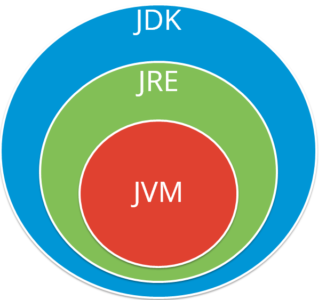
JVM (Java Virtual Machine): It is an abstract machine. It is a specification that provides run-time environment in which java bytecode can be executed. It follows three notations:
- Specification: It is a document that describes the implementation of the Java virtual machine. It is provided by Sun and other companies.
- Implementation: It is a program that meets the requirements of JVM specification.
- Runtime Instance: An instance of JVM is created whenever you write a java command on the command prompt and run the class.
JRE (Java Runtime Environment) : JRE refers to a runtime environment in which java bytecode can be executed. It implements the JVM (Java Virtual Machine) and provides all the class libraries and other support files that JVM uses at runtime. So JRE is a software package that contains what is required to run a Java program. Basically, it’s an implementation of the JVM which physically exists.
JDK(Java Development Kit) : It is the tool necessary to compile, document and package Java programs. The JDK completely includes JRE which contains tools for Java programmers. The Java Development Kit is provided free of charge. Along with JRE, it includes an interpreter/loader, a compiler (javac), an archiver (jar), a documentation generator (javadoc) and other tools needed in Java development. In short, it contains JRE + development tools.
Refer to this below image and understand how exactly these components reside:
Java implementations typically use a two-step compilation process. Java source code is compiled down to bytecode by the Java compiler. The bytecode is executed by a Java Virtual Machine (JVM). Modern JVMs use a technique called Just-in-Time (JIT) compilation to compile the bytecode to native instructions understood by hardware CPU on the fly at runtime.
Some implementations of JVM may choose to interpret the bytecode instead of JIT compiling it to machine code, and running it directly. While this is still considered an "interpreter," It's quite different from interpreters that read and execute the high level source code (i.e. in this case, Java source code is not interpreted directly, the bytecode, output of Java compiler, is.)
It is technically possible to compile Java down to native code ahead-of-time and run the resulting binary. It is also possible to interpret the Java code directly.
At run time, JVM interprets the byte code and executes them. However, a full interpreter based execution potentially hurts the performance of application since pretty much everything that a compiler could have done upfront at compile time will now be done repeatedly by the interpreter and this adds to the overall execution time of the program.
To summarize, depending on the execution environment, bytecode can be:
- compiled ahead of time and executed as native code (similar to most C++ compilers)
- compiled just-in-time and executed
- interpreted
- directly executed by a supported processor (bytecode is the native instruction set of some CPUs)

Java is not 100% Object-oriented because it makes use of eight primitive datatypes such as boolean, byte, char, int, float, double, long, short which are not objects.
Wrapper classes converts the java primitives into the reference types (objects). Every primitive data type has a class dedicated to it. These are known as wrapper classes because they “wrap” the primitive data type into an object of that class. Refer to the below image which displays different primitive type, wrapper class and constructor argument.
Singleton class is a class whose only one instance can be created at any given time, in one JVM. A class can be made singleton by making its constructor private.
// Java program implementing Singleton class
// with getInstance() method
class Singleton
{
    // static variable single_instance of type Singleton
    private static Singleton single_instance = null;

    // variable of type String
    public String s;

    // private constructor restricted to this class itself
    private Singleton()
    {
        s = "Hello I am a string part of Singleton class";
    }

    // static method to create instance of Singleton class
    public static Singleton getInstance()
    {
        if (single_instance == null)
            single_instance = new Singleton();

        return single_instance;
    }
}
The best example of singleton usage scenario is when there is a limit of having only one connection to a database due to some driver limitations or because of any licensing issues.
| Array List | Vector |
|---|---|
| Array List is not synchronized. | Vector is synchronized. |
| Array List is fast as it’s non-synchronized. | Vector is slow as it is thread safe. |
| If an element is inserted into the Array List, it increases its Array size by 50%. | Vector defaults to doubling size of its array. |
| Array List does not define the increment size. | Vector defines the increment size. |
| Array List can only use Iterator for traversing an Array List. | Except Hashtable, Vector is the only other class which uses both Enumeration and Iterator. |
Equals() method is defined in Object class in Java and used for checking equality of two objects defined by business logic. “==” or equality operator in Java is a binary operator provided by Java programming language and used to compare primitives and objects. public boolean equals(Object o) is the method provided by the Object class. The default implementation uses == operator to compare two objects. For example: method can be overridden like String class. equals() method is used to compare the values of two objects.
- .equals(...) will only compare what it is written to compare, no more, no less.
- If a class does not override the equals method, then it defaults to the equals(Object o) method of the closest parent class that has overridden this method.
- If no parent classes have provided an override, then it defaults to the method from the ultimate parent class, Object, and so you're left with the Object#equals(Object o) method. Per the Object API this is the same as ==; that is, it returns true if and only if both variables refer to the same object, if their references are one and the same. Thus you will be testing for object equality and not functional equality.
- Always remember to override hashCode if you override equals so as not to "break the contract". As per the API, the result returned from the hashCode() method for two objects must be the same if their equals methods show that they are equivalent. The converse is not necessarily true.
The major difference between Heap and Stack memory are:
| Features | Stack | Heap |
|---|---|---|
| Memory | Stack memory is used only by one thread of execution. | Heap memory is used by all the parts of the application. |
| Access | Stack memory can’t be accessed by other threads. | Objects stored in the heap are globally accessible. |
| Memory Management | Follows LIFO manner to free memory. | Memory management is based on generation associated to each object. |
| Lifetime | Exists until the end of execution of the thread. | Heap memory lives from the start till the end of application execution. |
| Usage | Stack memory only contains local primitive and reference variables to objects in heap space. | Whenever an object is created, it’s always stored in the Heap space. |
If you think about the Greek roots of the term, it should become obvious.
- Poly = many: polygon = many-sided, polystyrene = many styrenes (a), polyglot = many languages, and so on.
- Morph = change or form: morphology = study of biological form, Morpheus = the Greek god of dreams able to take any form. So polymorphism is the ability (in programming) to present the same interface for differing underlying forms (data types).
For example, in many languages, integers and floats are implicitly polymorphic since you can add, subtract, multiply and so on, irrespective of the fact that the types are different. They're rarely considered as objects in the usual term.
But, in that same way, a class like BigDecimal or Rational or Imaginary can also provide those operations, even though they operate on different data types.
The classic example is the Shape class and all the classes that can inherit from it (square, circle, dodecahedron, irregular polygon, splat and so on).
With polymorphism, each of these classes will have different underlying data. A point shape needs only two co-ordinates (assuming it's in a two-dimensional space of course). A circle needs a center and radius. A square or rectangle needs two co-ordinates for the top left and bottom right corners and (possibly) a rotation. An irregular polygon needs a series of lines.
By making the class responsible for its code as well as its data, you can achieve polymorphism. In this example, every class would have its own Draw() function and the client code could simply do:
shape.Draw() to get the correct behavior for any shape.
This is in contrast to the old way of doing things in which the code was separate from the data, and you would have had functions such as drawSquare() and drawCircle().
Another definition
The word polymorphism is used in various contexts and describes situations in which something occurs in several different forms. In computer science, it describes the concept that objects of different types can be accessed through the same interface. Each type can provide its own, independent implementation of this interface. It is one of the core concepts of object-oriented programming (OOP).
If you’re wondering if an object is polymorphic, you can perform a simple test. If the object successfully passes multiple is-a or instanceof tests, it’s polymorphic. As I’ve described in my post about inheritance, all Java classes extend the class Object. Due to this, all objects in Java are polymorphic because they pass at least two instanceof checks.
Different Types of Polymorphism Java supports 2 types of polymorphism:
- static or compile-time
- dynamic
Java, like many other object-oriented programming languages, allows you to implement multiple methods within the same class that use the same name but a different set of parameters. That is called method overloading and represents a static form of polymorphism.
The parameter sets have to differ in at least one of the following three criteria:
- They need to have a different number of parameters, e.g. one method accepts 2 and another one 3 parameters.
- The types of the parameters need to be different, e.g. one method accepts a String and another one a Long.
- They need to expect the parameters in a different order, e.g. one method accepts a String and a Long and another one accepts a Long and a String. This kind of overloading is not recommended because it makes the API difficult to understand.
In most cases, each of these overloaded methods provides a different but very similar functionality.
Due to the different sets of parameters, each method has a different signature. That allows the compiler to identify which method has to be called and to bind it to the method call. This approach is called static binding or static polymorphism.
Let’s take a look at an example.
A Simple Example for Static Polymorphism
I use the same CoffeeMachine project as I used in the previous posts of this series. You can clone it at https://github.com/thjanssen/Stackify-OopInheritance.
The BasicCoffeeMachine class implements two methods with the name brewCoffee. The first one accepts one parameter of type CoffeeSelection. The other method accepts two parameters, a CoffeeSelection, and an int.
public class BasicCoffeeMachine {
    // ...
    public Coffee brewCoffee(CoffeeSelection selection) throws CoffeeException {
        switch (selection) {
        case FILTER_COFFEE:
            return brewFilterCoffee();
        default:
            throw new CoffeeException(
                "CoffeeSelection ["+selection+"] not supported!");
        }
    }
    public List brewCoffee(CoffeeSelection selection, int number) throws CoffeeException {
        List coffees = new ArrayList(number);
        for (int i=0; i<number; i++) {
            coffees.add(brewCoffee(selection));
        }
        return coffees;
    }
    // ...
}
Now when you call one of these methods, the provided set of parameters identifies the method which has to be called.
In the following code snippet, I call the method only with a CoffeeSelection object. At compile time, the Java compiler binds this method call to the brewCoffee(CoffeeSelection selection) method.
BasicCoffeeMachine coffeeMachine = createCoffeeMachine();
coffeeMachine.brewCoffee(CoffeeSelection.FILTER_COFFEE);
If I change this code and call the brewCoffee method with a CoffeeSelection object and an int, the compiler binds the method call to the other brewCoffee(CoffeeSelection selection, int number) method.
BasicCoffeeMachine coffeeMachine = createCoffeeMachine();
List coffees = coffeeMachine.brewCoffee(CoffeeSelection.ESPRESSO, 2);
This form of polymorphism doesn’t allow the compiler to determine the executed method. The JVM needs to do that at runtime.
Within an inheritance hierarchy, a subclass can override a method of its superclass. That enables the developer of the subclass to customize or completely replace the behavior of that method.
It also creates a form of polymorphism. Both methods, implemented by the super- and subclass, share the same name and parameters but provide different functionality.
Let’s take a look at another example from the CoffeeMachine project.
Method Overriding in an Inheritance Hierarchy The BasicCoffeeMachine class is the superclass of the PremiumCoffeeMachine class.
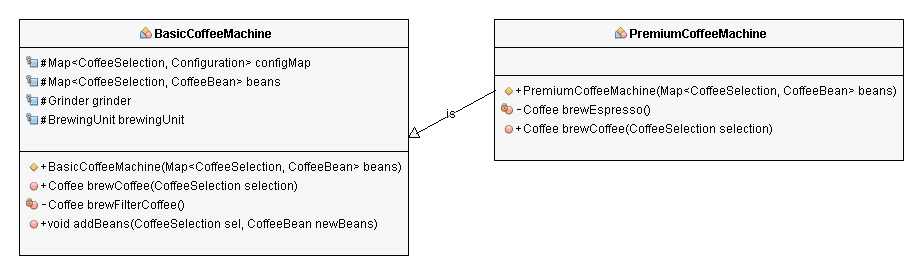
Both classes provide an implementation of the brewCoffee(CoffeeSelection selection) method.
import java.util.ArrayList;
import java.util.List;
import java.util.Map;
public class BasicCoffeeMachine extends AbstractCoffeeMachine {
    protected Map beans;
    protected Grinder grinder;
    protected BrewingUnit brewingUnit;
    public BasicCoffeeMachine(Map beans) {
        super();
        this.beans = beans;
        this.grinder = new Grinder();
        this.brewingUnit = new BrewingUnit();
        this.configMap.put(CoffeeSelection.FILTER_COFFEE, new Configuration(30, 480));
    }
    public List brewCoffee(CoffeeSelection selection, int number) throws CoffeeException {
        List coffees = new ArrayList(number);
        for (int i=0; i<number; i++) {
            coffees.add(brewCoffee(selection));
        }
        return coffees;
    }
    public Coffee brewCoffee(CoffeeSelection selection) throws CoffeeException {
        switch (selection) {
        case FILTER_COFFEE:
            return brewFilterCoffee();
        default:
            throw new CoffeeException("CoffeeSelection ["+selection+"] not supported!");
        }
    }
    private Coffee brewFilterCoffee() {
        Configuration config = configMap.get(CoffeeSelection.FILTER_COFFEE);
        // grind the coffee beans
        GroundCoffee groundCoffee = this.grinder.grind(this.beans.get(CoffeeSelection.FILTER_COFFEE), config.getQuantityCoffee());
        // brew a filter coffee
        return this.brewingUnit.brew(CoffeeSelection.FILTER_COFFEE, groundCoffee, config.getQuantityWater());
    }
    public void addBeans(CoffeeSelection selection, CoffeeBean newBeans) throws CoffeeException {
        CoffeeBean existingBeans = this.beans.get(selection);
        if (existingBeans != null) {
            if (existingBeans.getName().equals(newBeans.getName())) {
                existingBeans.setQuantity(existingBeans.getQuantity() + newBeans.getQuantity());
            } else {
                throw new CoffeeException("Only one kind of beans supported for each CoffeeSelection.");
            }
        } else {
            this.beans.put(selection, newBeans);
        }
    }
}
import java.util.Map;
public class PremiumCoffeeMachine extends BasicCoffeeMachine {
    public PremiumCoffeeMachine(Map beans) {
        // call constructor in superclass
        super(beans);
        // add configuration to brew espresso
        this.configMap.put(CoffeeSelection.ESPRESSO, new Configuration(8, 28));
    }
    private Coffee brewEspresso() {
        Configuration config = configMap.get(CoffeeSelection.ESPRESSO);
        // grind the coffee beans
        GroundCoffee groundCoffee = this.grinder.grind(this.beans.get(CoffeeSelection.ESPRESSO), config.getQuantityCoffee());
        // brew an espresso
        return this.brewingUnit.brew(
            CoffeeSelection.ESPRESSO, groundCoffee, config.getQuantityWater());
    }
    public Coffee brewCoffee(CoffeeSelection selection) throws CoffeeException {
        if (selection == CoffeeSelection.ESPRESSO)
            return brewEspresso();
        else
            return super.brewCoffee(selection);
    }
}
If you read the post about the OOP concept inheritance, you already know the two implementations of the brewCoffee method. The BasicCoffeeMachine only supports the CoffeeSelection.FILTER_COFFEE. The brewCoffee method of the PremiumCoffeeMachine class adds support for CoffeeSelection.ESPRESSO. If it gets called with any other CoffeeSelection, it uses the keyword super to delegate the call to the superclass.
Late Binding
When you want to use such an inheritance hierarchy in your project, you need to be able to answer the following question: which method will the JVM call?
That can only be answered at runtime because it depends on the object on which the method gets called. The type of the reference, which you can see in your code, is irrelevant. You need to distinguish three general scenarios:
- Your object is of the type of the superclass and gets referenced as the superclass. So, in the example of this post, a BasicCoffeeMachine object gets referenced as a BasicCoffeeMachine.
- Your object is of the type of the subclass and gets referenced as the subclass. In the example of this post, a PremiumCoffeeMachine object gets referenced as a PremiumCoffeeMachine.
- Your object is of the type of the subclass and gets referenced as the superclass. In the CoffeeMachine example, a PremiumCoffeeMachine object gets referenced as a BasicCoffeeMachine.
Superclass Referenced as the Superclass
The first scenario is pretty simple. When you instantiate a BasicCoffeeMachine object and store it in a variable of type BasicCoffeeMachine, the JVM will call the brewCoffee method on the BasicCoffeeMachine class. So, you can only brew a CoffeeSelection.FILTER_COFFEE.
// create a Map of available coffee beans
Map beans = new HashMap();
beans.put(CoffeeSelection.FILTER_COFFEE,
new CoffeeBean("My favorite filter coffee bean", 1000));
// instantiate a new CoffeeMachine object
BasicCoffeeMachine coffeeMachine = new BasicCoffeeMachine(beans);
Coffee coffee = coffeeMachine.brewCoffee(CoffeeSelection.FILTER_COFFEE);
Subclass Referenced as the Subclass
The second scenario is similar. But this time, I instantiate a PremiumCoffeeMachine and reference it as a PremiumCoffeeMachine. In this case, the JVM calls the brewCoffee method of the PremiumCoffeeMachineclass, which adds support for CoffeeSelection.ESPRESSO.
// create a Map of available coffee beans
Map beans = new HashMap();
beans.put(CoffeeSelection.FILTER_COFFEE,
new CoffeeBean("My favorite filter coffee bean", 1000));
beans.put(CoffeeSelection.ESPRESSO,
new CoffeeBean("My favorite espresso bean", 1000));
// instantiate a new CoffeeMachine object
PremiumCoffeeMachine coffeeMachine = new PremiumCoffeeMachine(beans);
Coffee coffee = coffeeMachine.brewCoffee(CoffeeSelection.ESPRESSO);
Subclass Referenced as the Superclass
This is the most interesting scenario and the main reason why I explain dynamic polymorphism in such details.
When you instantiate a PremiumCoffeeMachine object and assign it to the BasicCoffeeMachine coffeeMachine variable, it still is a PremiumCoffeeMachine object. It just looks like a BasicCoffeeMachine.
The compiler doesn’t see that in the code, and you can only use the methods provided by the BasicCoffeeMachine class. But if you call the brewCoffee method on the coffeeMachine variable, the JVM knows that it is an object of type PremiumCoffeeMachine and executes the overridden method. This is called late binding.
// create a Map of available coffee beans
Map beans = new HashMap();
beans.put(CoffeeSelection.FILTER_COFFEE,
new CoffeeBean("My favorite filter coffee bean", 1000));
// instantiate a new CoffeeMachine object
BasicCoffeeMachine coffeeMachine = new PremiumCoffeeMachine(beans);
Coffee coffee = coffeeMachine.brewCoffee(CoffeeSelection.ESPRESSO);
Summary
Polymorphism is one of the core concepts in OOP languages. It describes the concept that different classes can be used with the same interface. Each of these classes can provide its own implementation of the interface.
Java supports two kinds of polymorphism. You can overload a method with different sets of parameters. This is called static polymorphism because the compiler statically binds the method call to a specific method.
Within an inheritance hierarchy, a subclass can override a method of its superclass. If you instantiate the subclass, the JVM will always call the overridden method, even if you cast the subclass to its superclass. That is called dynamic polymorphism.
class Person {
    void walk() {
        System.out.println("Can Run….");
    }
}
class Employee extends Person {
    void walk() {
        System.out.println("Running Fast…");
    }
}

Person p = new Employee(); //upcasting
p.walk(); // Running Fast…
There are four main OOP concepts in Java. These are:
- Abstraction. Abstraction means using simple things to represent complexity. We all know how to turn the TV on, but we don’t need to know how it works in order to enjoy it. In Java, abstraction means simple things like objects, classes, and variables represent more complex underlying code and data. This is important because it lets avoid repeating the same work multiple times.
- Encapsulation. This is the practice of keeping fields within a class private, then providing access to them via public methods. It’s a protective barrier that keeps the data and code safe within the class itself. This way, we can re-use objects like code components or variables without allowing open access to the data system-wide.
- Inheritance. This is a special feature of Object Oriented Programming in Java. It lets programmers create new classes that share some of the attributes of existing classes. This lets us build on previous work without reinventing the wheel.
- Polymorphism. This Java OOP concept lets programmers use the same word to mean different things in different contexts. One form of polymorphism in Java is method overloading. That’s when different meanings are implied by the code itself. The other form is method overriding. That’s when the different meanings are implied by the values of the supplied variables.
How Abstraction Works Abstraction as an OOP concept in Java works by letting programmers create useful, reusable tools. For example, a programmer can create several different types of objects. These can be variables, functions, or data structures. Programmers can also create different classes of objects. These are ways to define the objects.
For instance, a class of variable might be an address. The class might specify that each address object shall have a name, street, city, and zip code. The objects, in this case, might be employee addresses, customer addresses, or supplier addresses.
How Encapsulation Works Encapsulation lets us re-use functionality without jeopardizing security. It’s a powerful OOP concept in Java because it helps us save a lot of time. For example, we may create a piece of code that calls specific data from a database. It may be useful to reuse that code with other databases or processes. Encapsulation lets us do that while keeping our original data private. It also lets us alter our original code without breaking it for others who have adopted it in the meantime.
How Inheritance Works Inheritance is another labor-saving Java OOP concept. It works by letting a new class adopt the properties of another. We call the inheriting class a subclass or a child class. The original class is often called the parent. We use the keyword extends to define a new class that inherits properties from an old class.
How Polymorphism Works Polymorphism in Java works by using a reference to a parent class to affect an object in the child class. We might create a class called “horse” by extending the “animal” class. That class might also implement the “professional racing” class. The “horse” class is “polymorphic,” since it inherits attributes of both the “animal” and “professional racing” class.
Two more examples of polymorphism in Java are method overriding and method overloading.
In method overriding, the child class can use the OOP polymorphism concept to override a method of its parent class. That allows a programmer to use one method in different ways depending on whether it’s invoked by an object of the parent class or an object of the child class.
In method overloading, a single method may perform different functions depending on the context in which it’s called. That is, a single method name might work in different ways depending on what arguments are passed to it.
| Abstract Class | Interfaces |
|---|---|
| An abstract class can provide complete, default code and/or just the details that have to be overridden. | An interface cannot provide any code at all,just the signature. |
| In case of abstract class, a class may extend only one abstract class. | A Class may implement several interfaces. |
| An abstract class can have non-abstract methods. | All methods of an Interface are abstract. |
| An abstract class can have instance variables. | An Interface cannot have instance variables |
| An abstract class can have any visibility: public, private, protected. | An Interface visibility must be public (or) none. |
| If we add a new method to an abstract class then we have the option of providing default implementation and therefore all the existing code might work properly | If we add a new method to an Interface then we have to track down all the implementations of the interface and define implementation for the new method (this is before Java 8) |
| An abstract class can contain constructors | An Interface cannot contain constructors |
| Abstract classes are fast | Interfaces are slow as it requires extra indirection to find corresponding method in the actual class |
Method Overloading :
- In Method Overloading, Methods of the same class shares the same name but each method must have different number of parameters or parameters having different types and order.
- Method Overloading is to “add” or “extend” more to method’s behavior.
- It is a compile time polymorphism.
- The methods must have different signature.
- It may or may not need inheritance in Method Overloading.
Let’s take a look at the example below to understand it better.
class Adder {
Static int add(int a, int b)
{
return a+b;
}
Static double add( double a, double b)
{
return a+b;
}
public static void main(String args[])
{
System.out.println(Adder.add(11,11));
System.out.println(Adder.add(12.3,12.6));
}}
Method Overriding :
- In Method Overriding, sub class have the same method with same name and exactly the same number and type of parameters and same return type as a super class.
- Method Overriding is to “Change” existing behavior of method.
- It is a run time polymorphism.
- The methods must have same signature.
- It always requires inheritance in Method Overriding.
Let’s take a look at the example below to understand it better.
class Car {
void run(){
System.out.println(“car is running”);
}
Class Audi extends Car{
void run()
{
System.out.prinltn(“Audi is running safely with 100km”);
}
public static void main( String args[])
{
Car b=new Audi();
b.run();
}
}You cannot override a private or static method in Java. If you create a similar method with same return type and same method arguments in child class then it will hide the super class method; this is known as method hiding. Similarly, you cannot override a private method in sub class because it’s not accessible there. What you can do is create another private method with the same name in the child class. Let’s take a look at the example below to understand it better.
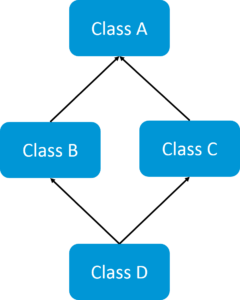
If a child class inherits the property from multiple classes is known as multiple inheritance. Java does not allow to extend multiple classes.
The problem with multiple inheritance is that if multiple parent classes have a same method name, then at runtime it becomes difficult for the compiler to decide which method to execute from the child class.
Therefore, Java doesn’t support multiple inheritance. The problem is commonly referred as Diamond Problem.
Association is a relationship where all object have their own lifecycle and there is no owner. Let’s take an example of Teacher and Student. Multiple students can associate with a single teacher and a single student can associate with multiple teachers but there is no ownership between the objects and both have their own lifecycle. These relationship can be one to one, One to many, many to one and many to many.
Yes. Java is a platform independent language. We can write java code on one platform and run it on another platform. For e.g. we can write and compile the code on windows and can run it on Linux or any other supported platform. This is one of the main features of java.
The types of access specifiers for classes are:
- Public: Class,Method,Field is accessible from anywhere.
- Protected: Method,Field can be accessed from the same class to which they belong or from the sub-classes,and from the class of same package,but not from outside.
- Default: Method,Field,class can be accessed only from the same package and not from outside of it’s native package.
- Private: Method,Field can be accessed from the same class to which they belong.
Heap, Stack, Program Counter Register and Native Method Stack.
When there is a requirement to share a method or a variable between multiple objects of a class instead of creating separate copies for each object, we use static keyword to make a method or variable shared for all objects. A static method or variable is shared across all object instances of that class.
Class is nothing but a template that describes the data and behavior associated with instances of that class. Another definition is that a class represents a blueprint.
Encapsulation is a concept in Object Oriented Programming for combining properties and methods in a single unit.
Encapsulation helps programmers to follow a modular approach for software development as each object has its own set of methods and variables and serves its functions independent of other objects. Encapsulation also serves data hiding purpose.
- byte — 8 bit (are esp. useful when working with a stream of data from a network or a file).
- short — 16 bit
- char — 16 bit Unicode
- int — 32 bit (whole number)
- float — 32 bit (real number)
- long — 64 bit (Single precision)
- double — 64 bit (double precision)
- boolean - virtual machine dependent.
Java uses Unicode to represent the characters. Unicode defines a fully international character set that can represent all of the characters found in human languages.
A literal is a value that may be assigned to a primitive or string variable or passed as an argument to a method.
To create a conversion between two incompatible types, we must use a cast. There are two types of casting in java: automatic casting (done automatically) and explicit casting (done by programmer).
Java object typecasting one object reference can be type cast into another object reference. The cast can be to its own class type or to one of its subclass or superclass types or interfaces. There are compile-time rules and runtime rules for casting in java.
Typecast Objects with a dynamically loaded Class ? – The casting of object references depends on the relationship of the classes involved in the same hierarchy. Any object reference can be assigned to a reference variable of the type Object, because the Object class is a superclass of every Java class. There can be 2 casting java scenarios
- Upcasting
- Downcasting
When we cast a reference along the class hierarchy in a direction from the root class towards the children or subclasses, it is a downcast. When we cast a reference along the class hierarchy in a direction from the sub classes towards the root, it is an upcast. We need not use a cast operator in this case.
The compile-time rules are there to catch attempted casts in cases that are simply not possible. This happens when we try to attempt casts on objects that are totally unrelated (that is not subclass super class relationship or a class-interface relationship) At runtime a ClassCastException is thrown if the object being cast is not compatible with the new type it is being cast to.
Below is an example showing when a ClassCastException can occur during object casting
//X is a supper class of Y and Z which are sibblings.

public class X {}
public class Y extends X {}
public class Z extends X {}
public class RunTimeCastDemo {

	public static void main(String args[]) {
		X x = new X();
		Y y = new Y();
		Z z = new Z();
		X xy = new Y(); // compiles ok (up the hierarchy)
		X xz = new Z(); // compiles ok (up the hierarchy)
		//		Y yz = new Z();   incompatible type (siblings)
		//		Y y1 = new X();   X is not a Y
		//		Z z1 = new X();   X is not a Z
		X x1 = y; // compiles ok (y is subclass of X)
		X x2 = z; // compiles ok (z is subclass of X)
		Y y1 = (Y) x; // compiles ok but produces runtime error
		Z z1 = (Z) x; // compiles ok but produces runtime error
		Y y2 = (Y) x1; // compiles and runs ok (x1 is type Y)
		Z z2 = (Z) x2; // compiles and runs ok (x2 is type Z)
		//		Y y3 = (Y) z;     inconvertible types (siblings)
		//		Z z3 = (Z) y;     inconvertible types (siblings)
		Object o = z;
		Object o1 = (Y) o; // compiles ok but produces runtime error
	}
}
CASTING OBJECT REFERENCES: IMPLICIT CASTING USING A COMPILER
In general an implicit cast is done when an Object reference is assigned (cast) to:
- A reference variable whose type is the same as the class from which the object was instantiated. An Object as Object is a super class of every Class.
- A reference variable whose type is a super class of the class from which the object was instantiated.
- A reference variable whose type is an interface that is implemented by the class from which the object was instantiated.
- A reference variable whose type is an interface that is implemented by a super class of the class from which the object was instantiated.
Consider an interface Vehicle, a super class Car and its subclass Ford. The following example shows the automatic conversion of object references handled by the compiler
interface Vehicle {}
class Car implements Vehicle {}
class Ford extends Car {}
Let c be a variable of type Car class and f be of class Ford and v be an vehicle interface reference. We can assign the Ford reference to the Car variable: I.e. we can do the following
Example 1
c = f; //Ok Compiles fine
Where c = new Car(); And, f = new Ford(); The compiler automatically handles the conversion (assignment) since the types are compatible (sub class – super class relationship), i.e., the type Car can hold the type Ford since a Ford is a Car.
Example 2
v = c; //Ok Compiles fine
c = v; // illegal conversion from interface type to class type results in compilation error
Where c = new Car(); And v is a Vehicle interface reference (Vehicle v)
The compiler automatically handles the conversion (assignment) since the types are compatible (class – interface relationship), i.e., the type Car can be cast to Vehicle interface type since Car implements Vehicle Interface. (Car is a Vehicle).
CASTING OBJECT REFERENCES: EXPLICIT CASTING
Sometimes we do an explicit cast in java when implicit casts don’t work or are not helpful for a particular scenario. The explicit cast is nothing but the name of the new “type” inside a pair of matched parentheses. As before, we consider the same Car and Ford Class.
class Car {
  void carMethod(){}
}
class Ford extends Car {
 void fordMethod () {}
}
We also have a breakingSystem() function which takes Car reference (Superclass reference) as an input parameter. The method will invoke carMethod() regardless of the type of object (Car or Ford Reference) and if it is a Ford object, it will also invoke fordMethod(). We use the instanceof operator to determine the type of object at run time.
public void breakingSystem (Car obj) {
    obj.carMethod();
   if (obj instanceof Ford)((Ford)obj).fordMethod ();
}
To invoke the fordMethod(), the operation (Ford)obj tells the compiler to treat the Car object referenced by obj as if it is a Ford object. Without the cast, the compiler will give an error message indicating that fordMethod() cannot be found in the Car definition.
The following program shown illustrates the use of the cast operator with references.
Honda and Ford are Siblings in the class Hierarchy. Both these classes are subclasses of Class Car. Both Car and HeavyVehicle Class extend Object Class. Any class that does not explicitly extend some other class will automatically extends the Object by default. This code instantiates an object of the class Ford and assigns the object’s reference to a reference variable of type Car. This assignment is allowed as Car is a superclass of Ford. In order to use a reference of a class type to invoke a method, the method must be defined at or above that class in the class hierarchy. Hence an object of Class Car cannot invoke a method present in Class Ford, since the method fordMethod is not present in Class Car or any of its superclasses. Hence this problem can be colved by a simple downcast by casting the Car object reference to the Ford Class Object reference as done in the program. Also an attempt to cast an object reference to its Sibling Object reference produces a ClassCastException at runtime, although compilation happens without any error.
class Car extends Object {

	void carMethod() {
	}
}

class HeavyVehicle extends Object {
}

class Ford extends Car {

	void fordMethod() {
		System.out.println("I am fordMethod defined in Class Ford");
	}
}

class Honda extends Car {

	void fordMethod() {
		System.out.println("I am fordMethod defined in Class Ford");
	}
}

public class ObjectCastingEx {

	public static void main(String[] args) {
		Car obj = new Ford();
		//    Following will result in compilation error
		//    obj.fordMethod();	//As the method fordMethod is undefined for the Car Type
		//  Following will result in compilation error
		// ((HeavyVehicle)obj).fordMethod();
					//fordMethod is undefined in the HeavyVehicle Type
		//  Following will result in compilation error
		((Ford) obj).fordMethod();
		//Following will compile and run
		//	Honda hondaObj = (Ford)obj;	Cannot convert as they are sibblings
	}
}Just now I've got an email from one of my student with the following question: "Why should we create Animal obj = new Dog(); instead of Dog obj = new Dog();" Of course the example given here is made by myself but the question in detail is why all use super interface or super class reference instead of using the same class reference. You got the question right? This article answers the question.
The answer is: "It is a best practice being followed by our ancestors. Stop asking questions and code that way :-)"
Ok, more seriously, consider the following example:
There is a SuperFancyClass created by developer A for some super fancy purposes. Note that all the references are HashMap.
import java.util.HashMap;

public class SuperFancyClass {

    private HashMap<String, Object> mapOne;
    private HashMap<Integer, Object> mapTwo;

    public SuperFancyClass() {
        this.mapOne = new HashMap<>();
        this.mapTwo = new HashMap<>();
    }

    public HashMap<String, Object> doStuff1() {
        // Do something
        return this.mapOne;
    }

    public HashMap<String, Object> doStuff2() {
        // Do something
        return this.mapOne;
    }

    public HashMap<Integer, Object> doStuff3() {
        // Do something
        return this.mapTwo;
    }

    // Some other highly complex code here
}
That class is being used by developer B as given below.
import java.util.HashMap;

public class SensitiveAgent {

    public static void main(String[] args) {

        SuperFancyClass superFancy = new SuperFancyClass();
        HashMap<String, Object> map1 = superFancy.doStuff1();
        HashMap<String, Object> map2 = superFancy.doStuff2();
        HashMap<Integer, Object> map3 = superFancy.doStuff3();
    }
    // Some other highly complex code here
}
Assuming both classes are highly complex but both developers A and B are happy with what they have, there is nothing else to worry.
As time progress, now developer A wants to make his Maps to maintain the insertion order. The Java API says, HashMap does not respect the insertion order so if you need insertion order, you need to switch to LinkedHashMap.
So now developer A wants to find and replace all of his/her HashMaps by LinkedHashMap. But this will not be such a short happy ending story in a highly complex code base where there can be several other local HashMaps which cannot be replaced by LinkedHashMap. So in reality, developer A has to go and change everywhere it requires to LinkedHashMap as provided below.
import java.util.LinkedHashMap;

public class SuperFancyClass {

    private LinkedHashMap<String, Object> mapOne;
    private LinkedHashMap<Integer, Object> mapTwo;

    public SuperFancyClass() {
        this.mapOne = new LinkedHashMap<>();
        this.mapTwo = new LinkedHashMap<>();
    }

    public LinkedHashMap<String, Object> doStuff1() {
        // Do something
        return this.mapOne;
    }

    public LinkedHashMap<String, Object> doStuff2() {
        // Do something
        return this.mapOne;
    }

    public LinkedHashMap<Integer, Object> doStuff3() {
        // Do something
        return this.mapTwo;
    }

    // Some other highly complex code here
}
But now the code of developer B collapses because of the changes done in SuperFancyClass. Then developer B has to go and change the references from HashMap to LinkedHashMap as shown below.
import java.util.LinkedHashMap;

public class SensitiveAgent {

    public static void main(String[] args) {

        SuperFancyClass superFancy = new SuperFancyClass();
        LinkedHashMap<String, Object> map1 = superFancy.doStuff1();
        LinkedHashMap<String, Object> map2 = superFancy.doStuff2();
        LinkedHashMap<Integer, Object> map3 = superFancy.doStuff3();
    }

    // Some other highly complex code here
}
Rule of debugging: Now, this is the time to introduce an important rule of debugging:
Fixing a bug is equivalent to making several other bugs.
In other words, if you modify an existing code, the number of changes you have made will be proportional to the number of newly expected bugs because we are all human and we do mistakes. Without our intention, we might delete a local variable that hides an instance variable. Or else we might modify that single line which causes to bring the entire world to end. So always keep your changes as less as possible. Coming back to the previous scenario, developer A modifies the SuperFancyClass in 7 places and developer B has to modify the SensitiveAgent in 3 places. Even in a code-base which contains two dummy classes, there are 10 places altogether to modify. Just imagine a project with hundreds/thousands of classes and millions of lines. Yep they do exists and it will be a catastrophic.
Time to travel back... Suppose if the developer A designed his/her class as given below using super interface references (However the objects must be created using subclass. See the constructor):
import java.util.Map;
import java.util.HashMap;

public class SuperFancyClass {

    private Map<String, Object> mapOne;
    private Map<Integer, Object> mapTwo;

    public SuperFancyClass() {
        this.mapOne = new HashMap<>();
        this.mapTwo = new HashMap<>();
    }

    public Map<String, Object> doStuff1() {
        // Do something
        return this.mapOne;
    }

    public Map<String, Object> doStuff2() {
        // Do something
        return this.mapOne;
    }

    public Map<Integer, Object> doStuff3() {
        // Do something
        return this.mapTwo;
    }

    // Some other highly complex code here
}
The developer B would developed his/her code like this because the return types of those methods are Map; the super interface:
import java.util.Map;

public class SensitiveAgent {

    public static void main(String[] args) {

        SuperFancyClass superFancy = new SuperFancyClass();
        Map<String, Object> map1 = superFancy.doStuff1();
        Map<String, Object> map2 = superFancy.doStuff2();
        Map<Integer, Object> map3 = superFancy.doStuff3();
    }

    // Some other highly complex code here
}
Now if the same situation comes where the developer A wants to preserve insertion order in his/her maps, only lines he/she has to change are just those two lines inside the constructor as shown below:
import java.util.Map;
import java.util.LinkedHashMap;

public class SuperFancyClass {

    private Map<String, Object> mapOne;
    private Map<Integer, Object> mapTwo;

    public SuperFancyClass() {
        this.mapOne = new LinkedHashMap<>();
        this.mapTwo = new LinkedHashMap<>();
    }

    public Map<String, Object> doStuff1() {
        // Do something
        return this.mapOne;
    }

    public Map<String, Object> doStuff2() {
        // Do something
        return this.mapOne;
    }

    public Map<Integer, Object> doStuff3() {
        // Do something
        return this.mapTwo;
    }

    // Some other highly complex code here
}
Developer B does not need to change anything because there is nothing changed int the API level (return types are not changed by developer A). So now the same behavior is achieved with less number of modifications (This time only 2). This is what we call extensible, modifiable, (all those blah-blah-blah-able) code.
Then why not Object instead of Map?
Now you may have a question: Should we always use the super most interface/class as the reference? Not always. It depends on the requirements. Climbing towards super types means, we are limiting the features because 99% of the time, sub classes have more features than super types. For example, compare java.lang.Number with its sub classes or compare java.util.Collection with its sub interfaces/classes. So use the super type reference which has all the functionalities you are expected to have.
Does the rule applied to local variables? Then what is the advantage of using super reference in local variables which have no impact on others? I guess this is because we developers are used to that and there is nothing wrong in following the same practice in local variables. For example, consider this case:
import java.util.List;
import java.util.ArrayList;

public class HelloWorld {
    public static void main(String[] args) {
        List<String> list = new ArrayList<>();
        list.add("Java");
        list.add("Python");
        list.add("C++");
        System.out.println(list);
    }
}
In this code there is no advantage of using super interface reference but I do write this way because I am used to it. If there is no disadvantages, why do you bother about it? Keep calm and code your references in super type :-)
In Java, float takes 4 bytes in memory while Double takes 8 bytes in memory. Float is single precision floating point decimal number while Double is double precision decimal number.
No, we cannot override a static method
Operator overloading is not supported in Java.
30. Can we overload a method by just changing the return type and without changing the signature of method?
No, We cannot do this.
Yes, we can overload main() method as well.
An Inner class is a class which is nested within another class. An Inner class has access rights for the class which is nesting it and it can access all variables and methods defined in the outer class.
Here are a few important differences between static and dynamic binding:
- Static binding in Java occurs during compile time while dynamic binding occurs during runtime.
- private, final and static methods and variables use static binding and are bonded by compiler while virtual methods are bonded during runtime based upon runtime object.
- Static binding uses Type (class in Java) information for binding while dynamic binding uses object to resolve binding.
- Overloaded methods are bonded using static binding while overridden methods are bonded using dynamic binding at runtime.
Here is an example which will help you to understand both static and dynamic binding in Java.
Static Binding Example in Java
public class StaticBindingTest {
    public static void main(String args[]) {
        Collection c = new HashSet();
        StaticBindingTest et = new StaticBindingTest();
        et.sort(c);
    }
    //overloaded method takes Collection argument
    public Collection sort(Collection c) {
        System.out.println("Inside Collection sort method");
        return c;
    }
    //another overloaded method which takes HashSet argument which is sub class
    public Collection sort(HashSet hs) {
        System.out.println("Inside HashSet sort method");
        return hs;
    }
}
Output: Inside Collection sort method
Example of Dynamic Binding in Java
public class DynamicBindingTest {
    public static void main(String args[]) {
        Vehicle vehicle = new Car(); //here Type is vehicle but object will be Car
        vehicle.start(); //Car's start called because start() is overridden method
    }
}

class Vehicle {
    public void start() {
        System.out.println("Inside start method of Vehicle");
    }
}

class Car extends Vehicle {
    @Override
    public void start() {
        System.out.println("Inside start method of Car");
    }
}
Output: Inside start method of Car
A sub-class is a class which inherits from another class called super class. Sub-class can access all public and protected methods and fields of its super class.
The primary difference between an abstract class and interface is that an interface can only possess declaration of public static methods with no concrete implementation while an abstract class can have members with any access specifiers (public, private etc) with or without concrete implementation. Interfaces are slower in performance as compared to abstract classes as extra indirections are required for interfaces.
Another key difference in the use of abstract classes and interfaces is that a class which implements an interface must implement all the methods of the interface while a class which inherits from an abstract class doesn’t require implementation of all the methods of its super class.
A class can implement multiple interfaces but it can extend only one abstract class.
Also:
- Abstract class can have abstract and non-abstract methods. An interface can only have abstract methods.
- An abstract class can have static methods but an interface cannot have static methods.
- Abstract class can have constructors but an interface cannot have constructors.
Yes. All fields in interface are public static final, i.e. they are constants.
It is generally recommended to avoid such interfaces, but sometimes you can find an interface that has no methods and is used only to contain list of constant values.
public ,private , abstract, final, protected.
In Java, main() method can’t return any data and hence, it’s always declared with a void return type.
Yes we can create an abstract class by using abstract keyword before class name even if it doesn’t have any abstract method. However, if a class has even one abstract method, it must be declared as abstract otherwise it will give an error.
Java is always pass-by-value. Unfortunately, they decided to call the location of an object a "reference". When we pass the value of an object, we are passing the reference to it. This is confusing to beginners.
It goes like this:
public static void main(String[] args) {
    Dog aDog = new Dog("Max");
    // we pass the object to foo
    foo(aDog);
    // aDog variable is still pointing to the "Max" dog when foo(...) returns
    aDog.getName().equals("Max"); // true, java passes by value
    aDog.getName().equals("Fifi"); // false
}

public static void foo(Dog d) {
    d.getName().equals("Max"); // true
    // change d inside of foo() to point to a new Dog instance "Fifi"
    d = new Dog("Fifi");
    d.getName().equals("Fifi"); // true
}
In the example above aDog.getName() will still return "Max". The value aDog within main is not changed in the function foo with the Dog "Fifi" as the object reference is passed by value. If it were passed by reference, then the aDog.getName() in main would return "Fifi" after the call to foo.
Likewise:
public static void main(String[] args) {
    Dog aDog = new Dog("Max");
    foo(aDog);
    // when foo(...) returns, the name of the dog has been changed to "Fifi"
    aDog.getName().equals("Fifi"); // true
}

public static void foo(Dog d) {
    d.getName().equals("Max"); // true
    // this changes the name of d to be "Fifi"
    d.setName("Fifi");
}
In the above example, Fifi is the dog's name after call to foo(aDog) because the object's name was set inside of foo(...). Any operations that foo performs on d are such that, for all practical purposes, they are performed on aDog itself (except when d is changed to point to a different Dog instance like d = new Dog("Boxer")).
A static block gets executed at the time of class loading. They are used for initializing static variables.
- Final methods — These methods cannot be overridden by any other method.
- Final variable — Constants, the value of these variable can’t be changed, its fixed.
- Final class — Such classes cannot be inherited by other classes. These type of classes will be used when application required security or someone don’t want that particular class.
In Java, to convert an object into byte stream by serialization, an interface with the name Serializable is implemented by the class. All objects of a class implementing serializable interface get serialized and their state is saved in byte stream.
When we should use serialization?
Serialization is used when data needs to be transmitted over the network. Using serialization, object’s state is saved and converted into byte stream .The byte stream is transferred over the network and the object is re-created at destination.
There are two types of exceptions: checked and unchecked exceptions.
- Checked exceptions: These exceptions must be handled by programmer otherwise the program would throw a compilation error.
- Unchecked exceptions: It is up to the programmer to write the code in such a way to avoid unchecked exceptions. You would not get a compilation error if you do not handle these exceptions. These exceptions occur at runtime.
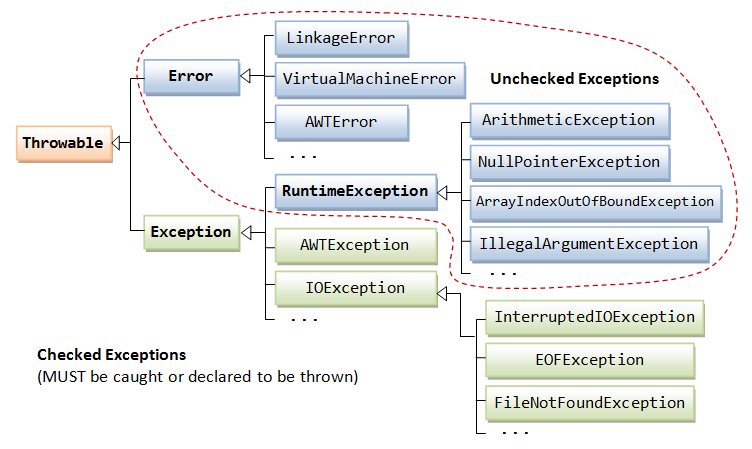
- The Error class describes internal system errors (e.g., VirtualMachineError, LinkageError) that rarely occur. If such an error occurs, there is little that you can do and the program will be terminated by the Java runtime.
- The Exception class describes the error caused by your program (e.g. FileNotFoundException, IOException). These errors could be caught and handled by your program (e.g., perform an alternate action or do a graceful exit by closing all the files, network and database connections).
As illustrated, the subclasses of Error and RuntimeException are known as unchecked exceptions. These exceptions are not checked by the compiler, and hence, need not be caught or declared to be thrown in your program. This is because there is not much you can do with these exceptions. For example, a "divide by 0" triggers an ArithmeticException, array index out-of-bound triggers an ArrayIndexOutOfBoundException, which are really programming logical errors that shall be been fixed in compiled-time, rather than leaving it to runtime exception handling.
All the other exception are called checked exceptions. They are checked by the compiler and must be caught or declared to be thrown.
String s1=”I am Java Expert”;
String s2=”I am C Expert”;
String s3=”I am Java Expert”;
In the above example, two objects of Java.Lang.String class are created. s1 and s3 are references to same object.
Thanks to the immutability of Strings in Java, the JVM can optimize the amount of memory allocated for them by storing only one copy of each literal String in the pool. This process is called interning.
When we create a String variable and assign a value to it, the JVM searches the pool for a String of equal value. If found, the Java compiler will simply return a reference to its memory address, without allocating additional memory. If not found, it’ll be added to the pool (interned) and its reference will be returned.
Let’s write a small test to verify this:
String constantString1 = "Baeldung";
String constantString2 = "Baeldung";

assertThat(constantString1).isSameAs(constantString2);Multithreading is a programming concept to run multiple tasks in a concurrent manner within a single program. Threads share same process stack and running in parallel. It helps in performance improvement of any program.
The main distinction between fail-fast and fail-safe iterators is whether or not the collection can be modified while it is being iterated. Fail-safe iterators allow this; fail-fast iterators do not.
Fail-fast iterators operate directly on the collection itself. During iteration, fail-fast iterators fail as soon as they realize that the collection has been modified (i.e., upon realizing that a member has been added, modified, or removed) and will throw a ConcurrentModificationException. Some examples include ArrayList, HashSet, and HashMap (most JDK1.4 collections are implemented to be fail-fast).
Fail-safe iterates operate on a cloned copy of the collection and therefore do not throw an exception if the collection is modified during iteration. Examples would include iterators returned by ConcurrentHashMap or CopyOnWriteArrayList.
47. ArrayList, LinkedList, and Vector are all implementations of the List interface. Which of them is most efficient for adding and removing elements from the list? Explain your answer, including any other alternatives you may be aware of.
Of the three, LinkedList is generally going to give you the best performance. Here’s why:
-
ArrayList and Vector each use an array to store the elements of the list. As a result, when an element is inserted into (or removed from) the middle of the list, the elements that follow must all be shifted accordingly. Vector is synchronized, so if a thread-safe implementation is not needed, it is recommended to use ArrayList rather than Vector.
-
LinkedList, on the other hand, is implemented using a doubly linked list. As a result, an inserting or removing an element only requires updating the links that immediately precede and follow the element being inserted or removed.
However, it is worth noting that if performance is that critical, it’s better to just use an array and manage it yourself, or use one of the high performance 3rd party packages such as Trove or HPPC.
48. Why would it be more secure to store sensitive data (such as a password, social security number, etc.) in a character array rather than in a String?
In Java, Strings are immutable and are stored in the String pool. What this means is that, once a String is created, it stays in the pool in memory until being garbage collected. Therefore, even after you’re done processing the string value (e.g., the password), it remains available in memory for an indeterminate period of time thereafter (again, until being garbage collected) which you have no real control over. Therefore, anyone having access to a memory dump can potentially extract the sensitive data and exploit it.
In contrast, if you use a mutable object like a character array, for example, to store the value, you can set it to blank once you are done with it with confidence that it will no longer be retained in memory.
A single ThreadLocal instance can store different values for each thread independently. Each thread that accesses the get() or set() method of a ThreadLocal instance is accessing its own, independently initialized copy of the variable. ThreadLocal instances are typically private static fields in classes that wish to associate state with a thread (e.g., a user ID or transaction ID). The example below, from the ThreadLocal Javadoc, generates unique identifiers local to each thread. A thread’s id is assigned the first time it invokes ThreadId.get() and remains unchanged on subsequent calls.
public class ThreadId {
    // Next thread ID to be assigned
    private static final AtomicInteger nextId = new AtomicInteger(0);

    // Thread local variable containing each thread's ID
    private static final ThreadLocal<Integer> threadId =
        new ThreadLocal<Integer>() {
            @Override protected Integer initialValue() {
                return nextId.getAndIncrement();
        }
    };

    // Returns the current thread's unique ID, assigning it if necessary
    public static int get() {
        return threadId.get();
    }
}
Each thread holds an implicit reference to its copy of a thread-local variable as long as the thread is alive and the ThreadLocal instance is accessible; after a thread goes away, all of its copies of thread-local instances are subject to garbage collection (unless other references to these copies exist).
In Java, each thread has its own stack, including its own copy of variables it can access. When the thread is created, it copies the value of all accessible variables into its own stack. The volatile keyword basically says to the JVM “Warning, this variable may be modified in another Thread”.
In all versions of Java, the volatile keyword guarantees global ordering on reads and writes to a variable. This implies that every thread accessing a volatile field will read the variable’s current value instead of (potentially) using a cached value.
In Java 5 or later, volatile reads and writes establish a happens-before relationship, much like acquiring and releasing a mutex.
Using volatile may be faster than a lock, but it will not work in some situations. The range of situations in which volatile is effective was expanded in Java 5; in particular, double-checked locking now works correctly.
The volatile keyword is also useful for 64-bit types like long and double since they are written in two operations. Without the volatile keyword you risk stale or invalid values.
One common example for using volatile is for a flag to terminate a thread. If you’ve started a thread, and you want to be able to safely interrupt it from a different thread, you can have the thread periodically check a flag (i.e., to stop it, set the flag to true). By making the flag volatile, you can ensure that the thread that is checking its value will see that it has been set to true without even having to use a synchronized block. For example:
public class Foo extends Thread {
    private volatile boolean close = false;
    public void run() {
        while(!close) {
            // do work
        }
    }
    public void close() {
        close = true;
        // interrupt here if needed
    }
}Stale state is information in an object that does not reflect reality.
Example: an object's members are filled with information from a database, but the underlying data in the database has changed since the object was filled.
Dangerously stale state is stale state that might adversely affect the operation of a program, i.e. causing it to perform incorrectly due to invalid assumptions about the data's integrity.
In computer processing, if a processor changes the value of an operand and then, at a subsequent time, fetches the operand and obtains the old rather than the new value of the operand, then it is said to have seen stale data.
52. Compare the sleep() and wait() methods in Java, including when and why you would use one vs. the other.
-
sleep()is a blocking operation that keeps a hold on the monitor / lock of the shared object for the specified number of milliseconds. -
wait(), on the other hand, simply pauses the thread until either (a) the specified number of milliseconds have elapsed or (b) it receives a desired notification from another thread (whichever is first), without keeping a hold on the monitor/lock of the shared object.
sleep() is most commonly used for polling, or to check for certain results, at a regular interval. wait() is generally used in multithreaded applications, in conjunction with notify() / notifyAll(), to achieve synchronization and avoid race conditions.
53. Tail recursion is functionally equivalent to iteration. Since Java does not yet support tail call optimization, describe how to transform a simple tail recursive function into a loop and why one is typically preferred over the other.
Here is an example of a typical recursive function, computing the arithmetic series 1, 2, 3…N. Notice how the addition is performed after the function call. For each recursive step, we add another frame to the stack.
public int sumFromOneToN(int n) {
  if (n < 1) {
    return 0;
  }

  return n + sumFromOneToN(n - 1);
}
Tail recursion occurs when the recursive call is in the tail position within its enclosing context - after the function calls itself, it performs no additional work. That is, once the base case is complete, the solution is apparent. For example:
public int sumFromOneToN(int n, int a) {
  if (n < 1) {
    return a;
  }

  return sumFromOneToN(n - 1, a + n);
}
Here you can see that a plays the role of the accumulator - instead of computing the sum on the way down the stack, we compute it on the way up, effectively making the return trip unnecessary, since it stores no additional state and performs no further computation. Once we hit the base case, the work is done - below is that same function, “unrolled”.
public int sumFromOneToN(int n) {
  int a = 0;

  while(n > 0) {
    a += n--;
  }

  return a;
}
Many functional languages natively support tail call optimization, however the JVM does not. In order to implement recursive functions in Java, we need to be aware of this limitation to avoid StackOverflowErrors. In Java, iteration is almost universally preferred to recursion.
This can be done using Thread.UncaughtExceptionHandler.
Here’s a simple example:
// create our uncaught exception handler
Thread.UncaughtExceptionHandler handler = new Thread.UncaughtExceptionHandler() {
    public void uncaughtException(Thread th, Throwable ex) {
        System.out.println("Uncaught exception: " + ex);
    }
};

// create another thread
Thread otherThread = new Thread() {
    public void run() {
        System.out.println("Sleeping ...");
        try {
            Thread.sleep(1000);
        } catch (InterruptedException e) {
            System.out.println("Interrupted.");
        }
        System.out.println("Throwing exception ...");
        throw new RuntimeException();
    }
};

// set our uncaught exception handler as the one to be used when the new thread
// throws an uncaught exception
otherThread.setUncaughtExceptionHandler(handler);

// start the other thread - our uncaught exception handler will be invoked when
// the other thread throws an uncaught exception
otherThread.start();
55. When designing an abstract class, why should you avoid calling abstract methods inside its constructor?
Hide answer answer badge This is a problem of initialization order. The subclass constructor will not have had a chance to run yet and there is no way to force it to run it before the parent class. Consider the following example class:
public abstract class Widget {
        private final int cachedWidth;
        private final int cachedHeight;

        public Widget() {
            this.cachedWidth = width();
            this.cachedHeight = height();
        }

        protected abstract int width();
        protected abstract int height();
}
This seems like a good start for an abstract Widget: it allows subclasses to fill in width and height, and caches their initial values. However, look when you spec out a typical subclass implementation like so:
public class SquareWidget extends Widget {
        private final int size;

        public SquareWidget(int size) {
            this.size = size;
        }

        @Override
        protected int width() {
            return size;
        }

        @Override
        protected int height() {
            return size;
        }
}
Now we’ve introduced a subtle bug: Widget.cachedWidth and Widget.cachedHeight will always be zero for SquareWidget instances! This is because the this.size = size assignment occurs after the Widget constructor runs.
Avoid calling abstract methods in your abstract classes’ constructors, as it restricts how those abstract methods can be implemented.
56. What variance is imposed on generic type parameters? How much control does Java give you over this?
Java’s generic type parameters are invariant. This means for any distinct types A and B, G<A> is not a subtype or supertype of G<B>. As a real world example, List<String> is not a supertype or subtype of List<Object>. So even though String extends (i.e. is a subtype of) Object, both of the following assignments will fail to compile:
List<String> strings = Arrays.<Object>asList("hi there");
List<Object> objects = Arrays.<String>asList("hi there");
Java does give you some control over this in the form of use-site variance. On individual methods, we can use ? extends Type to create a covariant parameter. Here’s an example:
public double sum(List<? extends Number> numbers) {
    double sum = 0;
    for (Number number : numbers) {
        sum += number.doubleValue();
    }
    return sum;
}

List<Long> longs = Arrays.asList(42L, 128L, -10L);
double sumOfLongs = sum(longs);
Even though longs is a List and not List, it can be passed to sum.
Similarly, ? super Type lets a method parameter be contravariant. Consider a function with a callback parameter:
public void forEachNumber(Callback<? super Number> callback) {
    callback.call(50.0f);
    callback.call(123123);
    callback.call((short) 99);
}
forEachNumber allows Callback<Object> to be a subtype of Callback <Number>, which means any callback that handles a supertype of Number will do:
forEachNumber(new Callback<Object>() {
    @Override public void call(Object value) {
        System.out.println(value);
    }
});
Note, however, that attempting to provide a callback that handles only Long (a subtype of Number) will rightly fail:
// fails to compile!
forEachNumber(new Callback<Long>() { ... });
Liberal application of use-site variance can prevent many of the unsafe casts that often appear in Java code and is crucial when designing interfaces used by multiple developers.
At first glance, HashSet is superior in almost every way: O(1) add, remove and contains, vs. O(log(N)) for TreeSet.
However, TreeSet is indispensable when you wish to maintain order over the inserted elements or query for a range of elements within the set.
Consider a Set of timestamped Event objects. They could be stored in a HashSet, with equals and hashCode based on that timestamp. This is efficient storage and permits looking up events by a specific timestamp, but how would you get all events that happened on any given day? That would require a O(n) traversal of the HashSet, but it’s only a O(log(n)) operation with TreeSet using the tailSet method:
public class Event implements Comparable<Event> {
    private final long timestamp;

    public Event(long timestamp) {
        this.timestamp = timestamp;
    }

    @Override public int compareTo(Event that) {
        return Long.compare(this.timestamp, that.timestamp);
    }
}

...

SortedSet<Event> events = new TreeSet<>();
events.addAll(...); // events come in

// all events that happened today
long midnightToday = ...;
events.tailSet(new Event(midnightToday));
If Event happens to be a class that we cannot extend or that doesn’t implement Comparable, TreeSet allows us to pass in our own Comparator:
SortedSet<Event> events = new TreeSet<>(
     (left, right) -> Long.compare(left.timestamp, right.timestamp));
Generally speaking, TreeSet is a good choice when order matters and when reads are balanced against the increased cost of writes.
Method references were introduced in Java 8 and allow constructors and methods (static or otherwise) to be used as lambdas. They allow one to discard the boilerplate of a lambda when the method reference matches an expected signature.
For example, suppose we have a service that must be stopped by a shutdown hook. Before Java 8, we would have code like this:
final SomeBusyService service = new SomeBusyService();
service.start();

onShutdown(new Runnable() {
    @Override
    public void run() {
        service.stop();
    }
});
With lambdas, this can be cut down considerably:
onShutdown(() -> service.stop());However, stop matches the signature of Runnable.run (void return type, no parameters), and so we can introduce a method reference to the stop method of that specific SomeBusyService instance:
onShutdown(service::stop);This is terse (as opposed to verbose code) and clearly communicates what is going on.
Method references don’t need to be tied to a specific instance, either; one can also use a method reference to an arbitrary object, which is useful in Stream operations. For example, suppose we have a Person class and want just the lowercase names of a collection of people:
List<Person> people = ...

List<String> names = people.stream()
        .map(Person::getName)
        .map(String::toLowerCase)
        .collect(toList());
A complex lambda can also be pushed into a static or instance method and then used via a method reference instead. This makes the code more reusable and testable than if it were “trapped” in the lambda.
So we can see that method references are mainly used to improve code organization, clarity and terseness.
Enums are essentially final classes with a fixed number of instances. They can implement interfaces but cannot extend another class.
This flexibility is useful in implementing the strategy pattern, for example, when the number of strategies is fixed. Consider an address book that records multiple methods of contact. We can represent these methods as an enum and attach fields, like the filename of the icon to display in the UI, and any corresponding behaviour, like how to initiate contact via that method:
public enum ContactMethod {
    PHONE("telephone.png") {
        @Override public void initiate(User user) {
            Telephone.dial(user.getPhoneNumber());
        }
    },
    EMAIL("envelope.png") {
        @Override public void initiate(User user) {
            EmailClient.sendTo(user.getEmailAddress());
        }
    },
    SKYPE("skype.png") {
        ...
    };

    ContactMethod(String icon) {
        this.icon = icon;
    }

    private final String icon;

    public abstract void initiate(User user);

    public String getIcon() {
        return icon;
    }
}
We can dispense with switch statements entirely by simply using instances of ContactMethod:
ContactMethod method = user.getPrimaryContactMethod();
displayIcon(method.getIcon());
method.initiate(user);
This is just the beginning of what can be done with enums. Generally, the safety and flexibility of enums means they should be used in place of integer constants, and switch statements can be eliminated with liberal use of abstract methods.
60. What is reflection? Give an example of functionality that can only be implemented using reflection.
Reflection allows programmatic access to information about a Java program’s types. Commonly used information includes: methods and fields available on a class, interfaces implemented by a class, and the runtime-retained annotations on classes, fields and methods.
Examples given are likely to include:
- Annotation-based serialization libraries often map class fields to JSON keys or XML elements (using annotations). These libraries need reflection to inspect those fields and their annotations and also to access the values during serialization.
- Model-View-Controller frameworks call controller methods based on routing rules. These frameworks must use reflection to find a method corresponding to an action name, check that its signature conforms to what the framework expects (e.g. takes a Request object, returns a Response), and finally, invoke the method.
- Dependency injection frameworks lean heavily on reflection. They use it to instantiate arbitrary beans for injection, check fields for annotations such as @Inject to discover if they require injection of a bean, and also to set those values.
- Object-relational mappers such as Hibernate use reflection to map database columns to fields or getter/setter pairs of a class, and can go as far as to infer table and column names by reading class and getter names, respectively.
A concrete code example could be something simple, like copying an object’s fields into a map:
Person person = new Person("Doug", "Sparling", 31);

Map<String, Object> values = new HashMap<>();
for (Field field : person.getClass().getDeclaredFields()) {
    values.put(field.getName(), field.get(person));
}

// prints {firstName=Doug, lastName=Sparling, age=31}
System.out.println(values);
Such tricks can be useful for debugging, or for utility methods such as a toString method that works on any class.
Aside from implementing generic libraries, direct use of reflection is rare but it is still a handy tool to have. Knowledge of reflection is also useful for when these mechanisms fail.
However, it is often prudent to avoid reflection unless it is strictly necessary, as it can turn straightforward compiler errors into runtime errors.
A static initializer gives you the opportunity to run code during the initial loading of a class and it guarantees that this code will only run once and will finish running before your class can be accessed in any way.
They are useful for performing initialization of complex static objects or to register a type with a static registry, as JDBC drivers do.
Suppose you want to create a static, immutable Map containing some feature flags. Java doesn’t have a good one-liner for initializing maps, so you can use static initializers instead:
public static final Map<String, Boolean> FEATURE_FLAGS;
static {
    Map<String, Boolean> flags = new HashMap<>();
    flags.put("frustrate-users", false);
    flags.put("reticulate-splines", true);
    flags.put(...);
    FEATURE_FLAGS = Collections.unmodifiableMap(flags);
}
Within the same class, you can repeat this pattern of declaring a static field and immediately initializing it, since multiple static initializers are allowed.
public class Foo {

 //instance variable initializer
 String s = "abc";

 //constructor
 public Foo() {
     System.out.println("constructor called");
 }

 //static initializer
 static {
     System.out.println("static initializer called");
 }

 //instance initializer
 {
     System.out.println("instance initializer called");
 }

 public static void main(String[] args) {
     new Foo();
     new Foo();
 }
}
Output:
static initializer called
instance initializer called
constructor called
instance initializer called
constructor called
62. Nested classes can be static or non-static (also called an inner class). How do you decide which to use? Does it matter? When exactly is it leak safe to use (anonymous) inner classes?
The key difference between is that inner classes have full access to the fields and methods of the enclosing class. This can be convenient for event handlers, but comes at a cost: every instance of an inner class retains and requires a reference to its enclosing class.
With this cost in mind, there are many situations where we should prefer static nested classes. When instances of the nested class will outlive instances of the enclosing class, the nested class should be static to prevent memory leaks. Consider this implementation of the factory pattern:
public interface WidgetParser {
    Widget parse(String str);
}

public class WidgetParserFactory {
    public WidgetParserFactory(ParseConfig config) {
        ...
    }

    public WidgetParser create() {
        new WidgetParserImpl(...);
    }

    private class WidgetParserImpl implements WidgetParser {
        ...

        @Override public Widget parse(String str) {
            ...
        }
    }
}
At a glance, this design looks good: the WidgetParserFactory hides the implementation details of the parser with the nested class WidgetParserImpl. However, WidgetParserImpl is not static, and so if WidgetParserFactory is discarded immediately after the WidgetParser is created, the factory will leak, along with all the references it holds.
WidgetParserImpl should be made static, and if it needs access to any of WidgetParserFactory’s internals, they should be passed into WidgetParserImpl’s constructor instead. This also makes it easier to extract WidgetParserImpl into a separate class should it outgrow its enclosing class.
Inner classes are also harder to construct via reflection due to their “hidden” reference to the enclosing class, and this reference can get sucked in during reflection-based serialization, which is probably not intended.
So we can see that the decision of whether to make a nested class static is important, and that one should aim to make nested classes static in cases where instances will “escape” the enclosing class or if reflection on those nested classes is involved.
- Static inner classes:
- Are considered "top-level".
- Do not require an instance of the containing class to be constructed.
- May not reference the containing class members without an explicit reference.
- Have their own lifetime.
- Non-Static inner classes:
- Always require an instance of the containing class to be constructed.
- Automatically have an implicit reference to the containing instance.
- May access the container's class members without the reference.
- Lifetime is supposed to be no longer than that of the container.
Garbage Collection and Non-Static Inner Classes
Garbage Collection is automatic but tries to remove objects based on whether it thinks they are being used. The Garbage Collector is pretty smart, but not flawless. It can only determine if something is being used by whether or not there is an active reference to the object.
The real issue here is when a Non-Static Inner Class has been kept alive longer than its container. This is because of the implicit reference to the containing class. The only way this can occur is if an object outside of the containing class keeps a reference to the inner object, without regard to the containing object.
This can lead to a situation where the inner object is alive (via reference) but the references to the containing object has already been removed from all other objects. The inner object is, therefore, keeping the containing object alive because it will always have a reference to it. The problem with this is that unless it is programmed, there is no way to get back to the containing object to check if it is even alive.
There are two differences between static inner and non static inner classes.
-
In case of declaring member fields and methods, non static inner class cannot have static fields and methods. But, in case of static inner class, can have static and non static fields and method.
-
The instance of non static inner class is created with the reference of object of outer class, in which it has defined, this means it has enclosing instance. But the instance of static inner class is created without the reference of Outer class, which means it does not have enclosing instance.
See this example:
class A
{
    class B
    {
        // static int x; not allowed here
    }

    static class C
    {
        static int x; // allowed here
    }
}

class Test
{
    public static void main(String… str)
    {
        A a = new A();

        // Non-Static Inner Class
        // Requires enclosing instance
        A.B obj1 = a.new B();

        // Static Inner Class
        // No need for reference of object to the outer class
        A.C obj2 = new A.C();
    }
}
63. What is the difference between String s = "Test" and String s = new String("Test")? Which is better and why?
In general, String s = "Test" is more efficient to use than String s = new String("Test").
In the case of String s = "Test", a String with the value “Test” will be created in the String pool. If another String with the same value is then created (e.g., String s2 = "Test"), it will reference this same object in the String pool.
However, if you use String s = new String("Test"), in addition to creating a String with the value “Test” in the String pool, that String object will then be passed to the constructor of the String Object (i.e., new String("Test")) and will create another String object (not in the String pool) with that value. Each such call will therefore create an additional String object (e.g., String s2 = new String("Test") would create an addition String object, rather than just reusing the same String object from the String pool).
The classloader is a subsystem of JVM that is used to load classes and interfaces.There are many types of classloaders e.g. Bootstrap classloader, Extension classloader, System classloader, Plugin classloader etc.
No. Because super() or this() must be the first statement.
The local variables are not initialized to any default value, neither primitives nor object references.
The local variables are not initialized to default values, as in the case of class variables. Same applies to primitives and object reference.
Yes, that is current instance (You cannot use return type yet it returns a value).
Yes, one of the way is static block but in previous version of JDK not in JDK 1.7.
class A3{
  static{
  System.out.println("static block is invoked");
  System.exit(0);
  }
}
In JDK7 and above, output will be:
Output:Error: Main method not found in class A3, please define the main method as:
public static void main(String[] args)
Program compiles. But at runtime throws an error "NoSuchMethodError".
Holding the reference of the other class within some other class is known as composition.
An interface that have no data member and method is known as a marker interface.For example Serializable, Cloneable etc.
An object reference can be cast to an interface reference when the object implements the referenced interface.
StringBuffer is synchronized whereas StringBuilder is not synchronized.
A synchronized collection implies that the class is thread safe. (You can have non-synchronized collections that are also thread safe, but that is a topic for about thousand theses another day.) The collections synchronize mutations by obtaining locks to make sure that other threads don't corrupt the state. Basically, use the non-synchronized versions, unless you have multiple threads. (And if you don't know, a thread is essentially a line of execution within a program. Some programs have multiple threads, all sharing the same code and memory.)
- Non synchronized - It is not-thread safe and can't be shared between many threads without proper synchronization code.
- Synchronized - It is thread-safe and can be shared with many threads.
We can create immutable class as the String class by defining final class and final data members. There are many immutable classes like String, Boolean, Byte, Short, Integer, Long, Float, Double etc. In short, all the wrapper classes and String class is immutable. We can also create immutable class by creating final class that have final data members.
Java inner class or nested class is a class which is declared inside the class or interface. We use inner classes to logically group classes and interfaces in one place so that it can be more readable and maintainable. Additionally, it can access all the members of outer class including private data members and methods.
Difference between nested class and inner class in Java Inner class is a part of nested class. Non-static nested classes are known as inner classes.
Types of Nested classes There are two types of nested classes non-static and static nested classes.The non-static nested classes are also known as inner classes.
*Non-static nested class (inner class) * Member inner class * Anonymous inner class * Local inner class *Static nested class
| Type | Description |
|---|---|
| Member Inner Class | A class created within class and outside method. |
| Anonymous Inner Class | A class created for implementing interface or extending class. Its name is decided by the java compiler. |
| Local Inner Class | A class created within method. |
| Static Nested Class | A static class created within class. |
| Nested Interface | An interface created within class or interface. |
The Java tutorial says:
Terminology: Nested classes are divided into two categories: static and non-static. Nested classes that are declared static are simply called static nested classes. Non-static nested classes are called inner classes.
In common parlance, the terms "nested" and "inner" are used interchangeably by most programmers, but I'll use the correct term "nested class" which covers both inner and static.
Classes can be nested ad infinitum, e.g. class A can contain class B which contains class C which contains class D, etc. However, more than one level of class nesting is rare, as it is generally bad design.
There are three reasons you might create a nested class:
- organization: sometimes it seems most sensible to sort a class into the namespace of another class, especially when it won't be used in any other context
- access: nested classes have special access to the variables/fields of their containing classes (precisely which variables/fields depends on the kind of nested class, whether inner or static).
- convenience: having to create a new file for every new type is bothersome, again, especially when the type will only be used in one context
There are four kinds of nested class in Java. In brief, they are:
*static class: declared as a static member of another class *inner class: declared as an instance member of another class *local inner class: declared inside an instance method of another class *anonymous inner class: like a local inner class, but written as an expression which returns a one-off object
Let me elaborate in more details.
Static Classes Static classes are the easiest kind to understand because they have nothing to do with instances of the containing class.
A static class is a class declared as a static member of another class. Just like other static members, such a class is really just a hanger on that uses the containing class as its namespace, e.g. the class Goat declared as a static member of class Rhino in the package pizza is known by the name pizza.Rhino.Goat.
package pizza;

public class Rhino {

    ...

    public static class Goat {
        ...
    }
}
Frankly, static classes are a pretty worthless feature because classes are already divided into namespaces by packages. The only real conceivable reason to create a static class is that such a class has access to its containing class's private static members, but I find this to be a pretty lame justification for the static class feature to exist.
Inner Classes An inner class is a class declared as a non-static member of another class:
package pizza;

public class Rhino {

    public class Goat {
        ...
    }

    private void jerry() {
        Goat g = new Goat();
    }
}
Like with a static class, the inner class is known as qualified by its containing class name, pizza.Rhino.Goat, but inside the containing class, it can be known by its simple name. However, every instance of an inner class is tied to a particular instance of its containing class: above, the Goat created in jerry, is implicitly tied to the Rhino instance this in jerry. Otherwise, we make the associated Rhino instance explicit when we instantiate Goat:
Rhino rhino = new Rhino();
Rhino.Goat goat = rhino.new Goat();
(Notice you refer to the inner type as just Goat in the weird new syntax: Java infers the containing type from the rhino part. And, yes new rhino.Goat() would have made more sense to me too.)
So what does this gain us? Well, the inner class instance has access to the instance members of the containing class instance. These enclosing instance members are referred to inside the inner class via just their simple names, not via this (this in the inner class refers to the inner class instance, not the associated containing class instance):
public class Rhino {

    private String barry;

    public class Goat {
        public void colin() {
            System.out.println(barry);
        }
    }
}
In the inner class, you can refer to this of the containing class as Rhino.this, and you can use this to refer to its members, e.g. Rhino.this.barry.
Local Inner Classes
A local inner class is a class declared in the body of a method. Such a class is only known within its containing method, so it can only be instantiated and have its members accessed within its containing method. The gain is that a local inner class instance is tied to and can access the final local variables of its containing method. When the instance uses a final local of its containing method, the variable retains the value it held at the time of the instance's creation, even if the variable has gone out of scope (this is effectively Java's crude, limited version of closures).
Because a local inner class is neither the member of a class or package, it is not declared with an access level. (Be clear, however, that its own members have access levels like in a normal class.)
If a local inner class is declared in an instance method, an instantiation of the inner class is tied to the instance held by the containing method's this at the time of the instance's creation, and so the containing class's instance members are accessible like in an instance inner class. A local inner class is instantiated simply via its name, e.g. local inner class Cat is instantiated as new Cat(), not new this.Cat() as you might expect.
Anonymous Inner Classes
An anonymous inner class is a syntactically convenient way of writing a local inner class. Most commonly, a local inner class is instantiated at most just once each time its containing method is run. It would be nice, then, if we could combine the local inner class definition and its single instantiation into one convenient syntax form, and it would also be nice if we didn't have to think up a name for the class (the fewer unhelpful names your code contains, the better). An anonymous inner class allows both these things:
new *ParentClassName*(*constructorArgs*) {*members*}
This is an expression returning a new instance of an unnamed class which extends ParentClassName. You cannot supply your own constructor; rather, one is implicitly supplied which simply calls the super constructor, so the arguments supplied must fit the super constructor. (If the parent contains multiple constructors, the “simplest” one is called, “simplest” as determined by a rather complex set of rules not worth bothering to learn in detail--just pay attention to what NetBeans or Eclipse tell you.)
Alternatively, you can specify an interface to implement:
new *InterfaceName*() {*members*}
Such a declaration creates a new instance of an unnamed class which extends Object and implements InterfaceName. Again, you cannot supply your own constructor; in this case, Java implicitly supplies a no-arg, do-nothing constructor (so there will never be constructor arguments in this case).
Even though you can't give an anonymous inner class a constructor, you can still do any setup you want using an initializer block (a {} block placed outside any method).
Be clear that an anonymous inner class is simply a less flexible way of creating a local inner class with one instance. If you want a local inner class which implements multiple interfaces or which implements interfaces while extending some class other than Object or which specifies its own constructor, you're stuck creating a regular named local inner class.
Any interface i.e. declared inside the interface or class, is known as nested interface. It is static by default.
Yes, it is known as nested interface.
Yes, they are static implicitely.
If you define any data member as transient,it will not be serialized.
Serializable is a marker interface but Externalizable is not a marker interface.When you use Serializable interface, your class is serialized automatically by default. But you can override writeObject() and readObject() two methods to control more complex object serailization process. When you use Externalizable interface, you have a complete control over your class's serialization process.
By InetAddress.getByName("192.18.97.39").getHostName() where 192.18.97.39 is the IP address.
Both processes and threads are units of concurrency, but they have a fundamental difference: processes do not share a common memory, while threads do.
From the operating system’s point of view, a process is an independent piece of software that runs in its own virtual memory space. Any multitasking operating system (which means almost any modern operating system) has to separate processes in memory so that one failing process wouldn’t drag all other processes down by scrambling common memory.
The processes are thus usually isolated, and they cooperate by the means of inter-process communication which is defined by the operating system as a kind of intermediate API.
On the contrary, a thread is a part of an application that shares a common memory with other threads of the same application. Using common memory allows to shave off lots of overhead, design the threads to cooperate and exchange data between them much faster.
To create an instance of a thread, you have two options. First, pass a Runnable instance to its constructor and call start(). Runnable is a functional interface, so it can be passed as a lambda expression:
Thread thread1 = new Thread(() ->
  System.out.println("Hello World from Runnable!"));
thread1.start();
Thread also implements Runnable, so another way of starting a thread is to create an anonymous subclass, override its run() method, and then call start():
Thread thread2 = new Thread() {
    @Override
    public void run() {
        System.out.println("Hello World from subclass!");
    }
};
thread2.start();The Runnable interface has a single run method. It represents a unit of computation that has to be run in a separate thread. The Runnable interface does not allow this method to return value or to throw unchecked exceptions.
The Callable interface has a single call method and represents a task that has a value. That’s why the call method returns a value. It can also throw exceptions. Callable is generally used in ExecutorService instances to start an asynchronous task and then call the returned Future instance to get its value.
| wait() | sleep() |
|---|---|
| 1) The wait() method is defined in Object class. | The sleep() method is defined in Thread class. |
| 2) wait() method releases the lock. | The sleep() method doesn't releases the lock. |
Under preemptive scheduling, the highest priority task executes until it enters the waiting or dead states or a higher priority task comes into existence. Under time slicing, a task executes for a predefined slice of time and then reenters the pool of ready tasks. The scheduler then determines which task should execute next, based on priority and other factors.
The daemon threads are basically the low priority threads that provides the background support to the user threads. It provides services to the user threads. (Ex: Garbace collector daemon)
Also, a daemon thread is a thread that does not prevent JVM from exiting. When all non-daemon threads are terminated, the JVM simply abandons all remaining daemon threads. Daemon threads are usually used to carry out some supportive or service tasks for other threads, but you should take into account that they may be abandoned at any time.
To start a thread as a daemon, you should use the setDaemon() method before calling start():
Thread daemon = new Thread(()
  -> System.out.println("Hello from daemon!"));
daemon.setDaemon(true);
daemon.start();
Curiously, if you run this as a part of the main() method, the message might not get printed. This could happen if the main() thread would terminate before the daemon would get to the point of printing the message. You generally should not do any I/O in daemon threads, as they won’t even be able to execute their finally blocks and close the resources if abandoned.
Executor and ExecutorService are two related interfaces of java.util.concurrent framework. Executor is a very simple interface with a single execute method accepting Runnable instances for execution. In most cases, this is the interface that your task-executing code should depend on.
ExecutorService extends the Executor interface with multiple methods for handling and checking the lifecycle of a concurrent task execution service (termination of tasks in case of shutdown) and methods for more complex asynchronous task handling including Futures.
The ExecutorService interface has three standard implementations:
-
ThreadPoolExecutor — for executing tasks using a pool of threads. Once a thread is finished executing the task, it goes back into the pool. If all threads in the pool are busy, then the task has to wait for its turn.
-
ScheduledThreadPoolExecutor allows to schedule task execution instead of running it immediately when a thread is available. It can also schedule tasks with fixed rate or fixed delay.
-
ForkJoinPool is a special ExecutorService for dealing with recursive algorithms tasks. If you use a regular ThreadPoolExecutor for a recursive algorithm, you will quickly find all your threads are busy waiting for the lower levels of recursion to finish. The ForkJoinPool implements the so-called work-stealing algorithm that allows it to use available threads more efficiently.
volatile has semantics for memory visibility. Basically, the value of a volatile field becomes visible to all readers (other threads in particular) after a write operation completes on it. Without volatile, readers could see some non-updated value.
The effect of the volatile keyword is approximately that each individual read or write operation on that variable is atomic. Notably, however, an operation that requires more than one read/write -- such as i++, which is equivalent to i = i + 1, which does one read and one write -- is not atomic, since another thread may write to i between the read and the write.
The Atomic classes, like AtomicInteger and AtomicReference, provide a wider variety of operations atomically, specifically including increment for AtomicInteger.
Atomic means each action take place in one step without interruption or we can say that operation is performed as a single unit of work without the possibility of interference from other operations. An Atomic operation cannot stop in the middle, either it happened completely or doesn't happen at all.
Java language specification guarantees that:
- Reading or writing of a variable/reference is atomic unless the variable is of type long or double.
- Read and write are atomic for all variable declared volatile including long and double variables.
Atomic action can be used without fear of thread interference. Using simple atomic variable access is more efficient than accessing the same variable through synchronized code. But it require more care and attention from programmer to avoid memory consistency . Example: Operation i++;
This operation is not atomic as it happens in 3 steps
- Reading the current value of i
- Increment the current value of i
- Writing the new value of i
class Counter {
  private int count = 0;

  public void increment() {
    c++;

  public void decrement() {
    c++;

  public int value() {
    return c;
}
Counter class is designed so that invocation of increment() add 1 to the variable c and decrement() subtract 1 from c. If Counter object is reference from multiple threads, interference b/w threads may prevent from happening as expected.
Suppose 2 thread are accessing the Counter object
1.Thread A: Retrieve c. 2.Thread B: Retrieve c. 3.Thread A: Increment retrieved value; result is 1. 4.Thread B: Decrement retrieved value; result is -1. 5.Thread A: Store result in c; c is now 1. 6.Thread B: Store result in c; c is now -1.
Thread A result is lost and overwritten by Thread B. Under different circumstances, it might be Thread B result is lost and overwritten by Thread A, or there could be no error.
92. What is the meaning of a synchronized keyword in the definition of a method? Of a static method? Before a block?
The synchronized keyword before a block means that any thread entering this block has to acquire the monitor (the object in brackets). If the monitor is already acquired by another thread, the former thread will enter the BLOCKED state and wait until the monitor is released.
synchronized(object) {
    // ...
}
A synchronized instance method has the same semantics, but the instance itself acts as a monitor.
synchronized void instanceMethod() {
    // ...
}
For a static synchronized method, the monitor is the Class object representing the declaring class.
static synchronized void staticMethod() {
    // ...
}A thread that owns the object’s monitor (for instance, a thread that has entered a synchronized section guarded by the object) may call object.wait() to temporarily release the monitor and give other threads a chance to acquire the monitor. This may be done, for instance, to wait for a certain condition.
When another thread that acquired the monitor fulfills the condition, it may call object.notify() or object.notifyAll() and release the monitor. The notify method awakes a single thread in the waiting state, and the notifyAll method awakes all threads that wait for this monitor, and they all compete for re-acquiring the lock.
The following BlockingQueue implementation shows how multiple threads work together via the wait-notify pattern. If we put an element into an empty queue, all threads that were waiting in the take method wake up and try to receive the value. If we put an element into a full queue, the put method waits for the call to the get method. The get method removes an element and notifies the threads waiting in the put method that the queue has an empty place for a new item.
public class BlockingQueue<T> {

    private List<T> queue = new LinkedList<T>();

    private int limit = 10;

    public synchronized void put(T item) {
        while (queue.size() == limit) {
            try {
                wait();
            } catch (InterruptedException e) {}
        }
        if (queue.isEmpty()) {
            notifyAll();
        }
        queue.add(item);
    }

    public synchronized T take() throws InterruptedException {
        while (queue.isEmpty()) {
            try {
                wait();
            } catch (InterruptedException e) {}
        }
        if (queue.size() == limit) {
            notifyAll();
        }
        return queue.remove(0);
    }

}
94. Describe the conditions of deadlock, livelock, and starvation. Describe the possible causes of these conditions.
Deadlock is a condition within a group of threads that cannot make progress because every thread in the group has to acquire some resource that is already acquired by another thread in the group. The most simple case is when two threads need to lock both of two resources to progress, the first resource is already locked by one thread, and the second by another. These threads will never acquire a lock to both resources and thus will never progress.
Livelock is a case of multiple threads reacting to conditions, or events, generated by themselves. An event occurs in one thread and has to be processed by another thread. During this processing, a new event occurs which has to be processed in the first thread, and so on. Such threads are alive and not blocked, but still, do not make any progress because they overwhelm each other with useless work.
Starvation is a case of a thread unable to acquire resource because other thread (or threads) occupy it for too long or have higher priority. A thread cannot make progress and thus is unable to fulfill useful work.
##########################################################################################################################################################################################################################################################
1. What is a potential pitfall with using typeof bar === "object" to determine if bar is an object? How can this pitfall be avoided?
Although typeof bar === "object" is a reliable way of checking if bar is an object, the surprising gotcha in JavaScript is that null is also considered an object!
var bar = null;
console.log(typeof bar === "object"); // logs true!(function(){
var a = b = 3;
})();
console.log("a defined? " + (typeof a !== 'undefined'));
console.log("b defined? " + (typeof b !== 'undefined'));Since both a and b are defined within the enclosing scope of the function, and since the line they are on begins with the var keyword, most JavaScript developers would expect typeof a and typeof b to both be undefined in the above example.
However, that is not the case. The issue here is that most developers incorrectly understand the statement var a = b = 3; to be shorthand for:
var b = 3;
var a = b;
But in fact, var a = b = 3; is actually shorthand for:
b = 3;
var a = b;
As a result (if you are not using strict mode), the output of the code snippet would be:
a defined? false
b defined? true
But how can b be defined outside of the scope of the enclosing function? Well, since the statement var a = b = 3; is shorthand for the statements b = 3; and var a = b;, b ends up being a global variable (since it is not preceded by the var keyword) and is therefore still in scope even outside of the enclosing function.
Note that, in strict mode (i.e., with use strict), the statement var a = b = 3; will generate a runtime error of ReferenceError: b is not defined, thereby avoiding any headfakes/bugs that might othewise result. (Yet another prime example of why you should use use strict as a matter of course in your code!)
var myObject = {
    foo: "bar",
    func: function() {
        var self = this;
        console.log("outer func:  this.foo = " + this.foo);
        console.log("outer func:  self.foo = " + self.foo);
        (function() {
            console.log("inner func:  this.foo = " + this.foo);
            console.log("inner func:  self.foo = " + self.foo);
        }());
    }
};
myObject.func();
Output
outer func:  this.foo = bar
outer func:  self.foo = bar
inner func:  this.foo = undefined
inner func:  self.foo = bar
In the outer function, both this and self refer to myObject and therefore both can properly reference and access foo.
In the inner function, though, this no longer refers to myObject. As a result, this.foo is undefined in the inner function, whereas the reference to the local variable self remains in scope and is accessible there.
4. What is the significance of, and reason for, wrapping the entire content of a JavaScript source file in a function block?
IFFY => Immediately-invoked function expression.
This is an increasingly common practice, employed by many popular JavaScript libraries (jQuery, Node.js, etc.). This technique creates a closure around the entire contents of the file which, perhaps most importantly, creates a private namespace and thereby helps avoid potential name clashes between different JavaScript modules and libraries.
Another feature of this technique is to allow for an easily referenceable (presumably shorter) alias for a global variable. This is often used, for example, in jQuery plugins. jQuery allows you to disable the $ reference to the jQuery namespace, using jQuery.noConflict(). If this has been done, your code can still use $ employing this closure technique, as follows:
(function($) { /* jQuery plugin code referencing $ */ } )(jQuery);5. What is the significance, and what are the benefits, of including 'use strict' at the beginning of a JavaScript source file?
The short and most important answer here is that use strict is a way to voluntarily enforce stricter parsing and error handling on your JavaScript code at runtime. Code errors that would otherwise have been ignored or would have failed silently will now generate errors or throw exceptions. In general, it is a good practice.
Some of the key benefits of strict mode include:
-
Makes debugging easier. Code errors that would otherwise have been ignored or would have failed silently will now generate errors or throw exceptions, alerting you sooner to problems in your code and directing you more quickly to their source.
-
Prevents accidental globals. Without strict mode, assigning a value to an undeclared variable automatically creates a global variable with that name. This is one of the most common errors in JavaScript. In strict mode, attempting to do so throws an error.
-
Eliminates
thiscoercion. Without strict mode, a reference to athisvalue of null or undefined is automatically coerced to the global. This can cause many headfakes and pull-out-your-hair kind of bugs. In strict mode, referencing a a this value of null or undefined throws an error. -
Disallows duplicate parameter values. Strict mode throws an error when it detects a duplicate named argument for a function (e.g.,
function foo(val1, val2, val1){})thereby catching what is almost certainly a bug in your code that you might otherwise have wasted lots of time tracking down.- Note: It used to be (in ECMAScript 5) that strict mode would disallow duplicate property names (e.g.
var object = {foo: "bar", foo: "baz"};) but as of ECMAScript 2015 this is no longer the case.
- Note: It used to be (in ECMAScript 5) that strict mode would disallow duplicate property names (e.g.
-
Makes eval() safer. There are some differences in the way
eval()behaves in strict mode and in non-strict mode. Most significantly, in strict mode, variables and functions declared inside of aneval()statement are not created in the containing scope (they are created in the containing scope in non-strict mode, which can also be a common source of problems). -
Throws error on invalid usage of
delete. Thedeleteoperator (used to remove properties from objects) cannot be used on non-configurable properties of the object. Non-strict code will fail silently when an attempt is made to delete a non-configurable property, whereas strict mode will throw an error in such a case.
function foo1()
{
  return {
      bar: "hello"
  };
}

function foo2()
{
  return
  {
      bar: "hello"
  };
}
Surprisingly, these two functions will not return the same thing. Rather:
console.log("foo1 returns:");
console.log(foo1());
console.log("foo2 returns:");
console.log(foo2());
will yield:
foo1 returns:
Object {bar: "hello"}
foo2 returns:
undefined Not only is this surprising, but what makes this particularly gnarly is that foo2() returns undefined without any error being thrown.
The reason for this has to do with the fact that semicolons are technically optional in JavaScript (although omitting them is generally really bad form). As a result, when the line containing the return statement (with nothing else on the line) is encountered in foo2(), a semicolon is automatically inserted immediately after the return statement.
No error is thrown since the remainder of the code is perfectly valid, even though it doesn’t ever get invoked or do anything (it is simply an unused code block that defines a property bar which is equal to the string "hello").
This behavior also argues for following the convention of placing an opening curly brace at the end of a line in JavaScript, rather than on the beginning of a new line. As shown here, this becomes more than just a stylistic preference in JavaScript.
console.log(0.1 + 0.2);
console.log(0.1 + 0.2 == 0.3);
An educated answer to this question would simply be: “You can’t be sure. it might print out 0.3 and true, or it might not. Numbers in JavaScript are all treated with floating point precision, and as such, may not always yield the expected results.”
The example provided above is classic case that demonstrates this issue. Surprisingly, it will print out:
0.30000000000000004
false
A typical solution is to compare the absolute difference between two numbers with the special constant Number.EPSILON:
function areTheNumbersAlmostEqual(num1, num2) {
	return Math.abs( num1 - num2 ) < Number.EPSILON;
}

console.log(areTheNumbersAlmostEqual(0.1 + 0.2, 0.3));
The NaN property represents a value that is “not a number”. This special value results from an operation that could not be performed either because one of the operands was non-numeric (e.g., "abc" / 4), or because the result of the operation is non-numeric.
While this seems straightforward enough, there are a couple of somewhat surprising characteristics of NaN that can result in hair-pulling bugs if one is not aware of them.
For one thing, although NaN means “not a number”, its type is, believe it or not, Number:
console.log(typeof NaN === "number"); // logs "true"Additionally, NaN compared to anything – even itself! – is false:
console.log(NaN === NaN); // logs "false"A semi-reliable way to test whether a number is equal to NaN is with the built-in function isNaN(), but even using isNaN() is an imperfect solution.
A better solution would either be to use value !== value, which would only produce true if the value is equal to NaN. Also, ES6 offers a new Number.isNaN() function, which is a different and more reliable than the old global isNaN() function.
This may sound trivial and, in fact, it is trivial with ECMAscript 6 which introduces a new Number.isInteger() function for precisely this purpose. However, prior to ECMAScript 6, this is a bit more complicated, since no equivalent of the Number.isInteger() method is provided.
The issue is that, in the ECMAScript specification, integers only exist conceptually; i.e., numeric values are always stored as floating point values.
With that in mind, the simplest and cleanest pre-ECMAScript-6 solution (which is also sufficiently robust to return false even if a non-numeric value such as a string or null is passed to the function) would be the following use of the bitwise XOR operator:
function isInteger(x) { return (x ^ 0) === x; } The following solution would also work, although not as elegant as the one above:
function isInteger(x) { return Math.round(x) === x; }Note that Math.ceil() or Math.floor() could be used equally well (instead of Math.round()) in the above implementation.
Or alternatively:
function isInteger(x) { return (typeof x === 'number') && (x % 1 === 0); }One fairly common incorrect solution is the following:
function isInteger(x) { return parseInt(x, 10) === x; }While this parseInt-based approach will work well for many values of x, once x becomes quite large, it will fail to work properly. The problem is that parseInt() coerces its first parameter to a string before parsing digits. Therefore, once the number becomes sufficiently large, its string representation will be presented in exponential form (e.g., 1e+21). Accordingly, parseInt() will then try to parse 1e+21, but will stop parsing when it reaches the e character and will therefore return a value of 1. Observe:
> String(1000000000000000000000)
'1e+21'
> parseInt(1000000000000000000000, 10)
1
> parseInt(1000000000000000000000, 10) === 1000000000000000000000
false
10. In what order will the numbers 1-4 be logged to the console when the code below is executed? Why?
(function() {
    console.log(1);
    setTimeout(function(){console.log(2)}, 1000);
    setTimeout(function(){console.log(3)}, 0);
    console.log(4);
})();
The values will be logged in the following order:
1
4
3
2
Let’s first explain the parts of this that are presumably more obvious:
- 1 and 4 are displayed first since they are logged by simple calls to console.log() without any delay
- 2 is displayed after 3 because 2 is being logged after a delay of 1000 msecs (i.e., 1 second) whereas 3 is being logged after a delay of 0 msecs.
OK, fine. But if 3 is being logged after a delay of 0 msecs, doesn’t that mean that it is being logged right away? And, if so, shouldn’t it be logged before 4, since 4 is being logged by a later line of code?
The answer has to do with properly understanding JavaScript events and timing.
The browser has an event loop which checks the event queue and processes pending events. For example, if an event happens in the background (e.g., a script onload event) while the browser is busy (e.g., processing an onclick), the event gets appended to the queue. When the onclick handler is complete, the queue is checked and the event is then handled (e.g., the onload script is executed).
Similarly, setTimeout() also puts execution of its referenced function into the event queue if the browser is busy.
When a value of zero is passed as the second argument to setTimeout(), it attempts to execute the specified function “as soon as possible”. Specifically, execution of the function is placed on the event queue to occur on the next timer tick. Note, though, that this is not immediate; the function is not executed until the next tick. That’s why in the above example, the call to console.log(4) occurs before the call to console.log(3) (since the call to console.log(3) is invoked via setTimeout, so it is slightly delayed).
for (var i = 0; i < 5; i++) {
  var btn = document.createElement('button');
  btn.appendChild(document.createTextNode('Button ' + i));
  btn.addEventListener('click', function(){ console.log(i); });
  document.body.appendChild(btn);
}
(a) What gets logged to the console when the user clicks on “Button 4” and why?
(b) Provide one or more alternate implementations that will work as expected.
Answers:
(a) No matter what button the user clicks the number 5 will always be logged to the console. This is because, at the point that the onclick method is invoked (for any of the buttons), the for loop has already completed and the variable i already has a value of 5. (Bonus points for the interviewee if they know enough to talk about how execution contexts, variable objects, activation objects, and the internal “scope” property contribute to the closure behavior.)
(b) The key to making this work is to capture the value of i at each pass through the for loop by passing it into a newly created function object. Here are four possible ways to accomplish this:
for (var i = 0; i < 5; i++) {
  var btn = document.createElement('button');
  btn.appendChild(document.createTextNode('Button ' + i));
  btn.addEventListener('click', (function(i) {
    return function() { console.log(i); };
  })(i));
  document.body.appendChild(btn);
}
Alternatively, you could wrap the entire call to btn.addEventListener in the new anonymous function:
for (var i = 0; i < 5; i++) {
  var btn = document.createElement('button');
  btn.appendChild(document.createTextNode('Button ' + i));
  (function (i) {
    btn.addEventListener('click', function() { console.log(i); });
  })(i);
  document.body.appendChild(btn);
}
Or, we could replace the for loop with a call to the array object’s native forEach method:
['a', 'b', 'c', 'd', 'e'].forEach(function (value, i) {
  var btn = document.createElement('button');
  btn.appendChild(document.createTextNode('Button ' + i));
  btn.addEventListener('click', function() { console.log(i); });
  document.body.appendChild(btn);
});
Lastly, the simplest solution, if you’re in an ES6/ES2015 context, is to use let i instead of var i:
for (let i = 0; i < 5; i++) {
  var btn = document.createElement('button');
  btn.appendChild(document.createTextNode('Button ' + i));
  btn.addEventListener('click', function(){ console.log(i); });
  document.body.appendChild(btn);
}console.log(1 + "2" + "2");
console.log(1 + +"2" + "2");
console.log(1 + -"1" + "2");
console.log(+"1" + "1" + "2");
console.log( "A" - "B" + "2");
console.log( "A" - "B" + 2);The above code will output the following to the console:
"122"
"32"
"02"
"112"
"NaN2"
NaN
The fundamental issue here is that JavaScript (ECMAScript) is a loosely typed language and it performs automatic type conversion on values to accommodate the operation being performed. Let’s see how this plays out with each of the above examples.
- Example 1:
1 + "2" + "2" Outputs: "122" Explanation: The first operation to be performed in 1 + "2". Since one of the operands ("2") is a string, JavaScript assumes it needs to perform string concatenation and therefore converts the type of 1 to "1", 1 + "2" yields "12". Then, "12" + "2" yields "122".
- Example 2:
1 + +"2" + "2" Outputs: "32" Explanation: Based on order of operations, the first operation to be performed is +"2" (the extra + before the first "2" is treated as a unary operator). Thus, JavaScript converts the type of "2" to numeric and then applies the unary + sign to it (i.e., treats it as a positive number). As a result, the next operation is now 1 + 2 which of course yields 3. But then, we have an operation between a number and a string (i.e., 3 and "2"), so once again JavaScript converts the type of the numeric value to a string and performs string concatenation, yielding "32".
- Example 3:
1 + -"1" + "2" Outputs: "02" Explanation: The explanation here is identical to the prior example, except the unary operator is - rather than +. So "1" becomes 1, which then becomes -1 when the - is applied, which is then added to 1 yielding 0, which is then converted to a string and concatenated with the final "2" operand, yielding "02".
- Example 4:
+"1" + "1" + "2" Outputs: "112" Explanation: Although the first "1" operand is typecast to a numeric value based on the unary + operator that precedes it, it is then immediately converted back to a string when it is concatenated with the second "1" operand, which is then concatenated with the final "2" operand, yielding the string "112".
- Example 5:
"A" - "B" + "2" Outputs: "NaN2" Explanation: Since the - operator can not be applied to strings, and since neither "A" nor "B" can be converted to numeric values, "A" - "B" yields NaN which is then concatenated with the string "2" to yield “NaN2”.
- Example 6:
"A" - "B" + 2 Outputs: NaN Explanation: As exlained in the previous example, "A" - "B" yields NaN. But any operator applied to NaN with any other numeric operand will still yield NaN.
13. The following recursive code will cause a stack overflow if the array list is too large. How can you fix this and still retain the recursive pattern?
var list = readHugeList();

var nextListItem = function() {
    var item = list.pop();

    if (item) {
        // process the list item...
        nextListItem();
    }
};
The potential stack overflow can be avoided by modifying the nextListItem function as follows:
var list = readHugeList();

var nextListItem = function() {
    var item = list.pop();

    if (item) {
        // process the list item...
        setTimeout( nextListItem, 0);
    }
};
The stack overflow is eliminated because the event loop handles the recursion, not the call stack. When nextListItem runs, if item is not null, the timeout function (nextListItem) is pushed to the event queue and the function exits, thereby leaving the call stack clear. When the event queue runs its timed-out event, the next item is processed and a timer is set to again invoke nextListItem. Accordingly, the method is processed from start to finish without a direct recursive call, so the call stack remains clear, regardless of the number of iterations.
A closure is an inner function that has access to the variables in the outer (enclosing) function’s scope chain. The closure has access to variables in three scopes; specifically: (1) variable in its own scope, (2) variables in the enclosing function’s scope, and (3) global variables.
Here is an example:
var globalVar = "xyz";

(function outerFunc(outerArg) {
    var outerVar = 'a';

    (function innerFunc(innerArg) {
    var innerVar = 'b';

    console.log(
        "outerArg = " + outerArg + "\n" +
        "innerArg = " + innerArg + "\n" +
        "outerVar = " + outerVar + "\n" +
        "innerVar = " + innerVar + "\n" +
        "globalVar = " + globalVar);

    })(456);
})(123);
In the above example, variables from innerFunc, outerFunc, and the global namespace are all in scope in the innerFunc. The above code will therefore produce the following output:
outerArg = 123
innerArg = 456
outerVar = a
innerVar = b
globalVar = xyz
const outer = () => {
let message = "Hello";
return (name) => console.log(`${message}, ${name}`)
}
const inner = outer()
inner("George") // Hello, Georgeconsole.log("0 || 1 = "+(0 || 1));
console.log("1 || 2 = "+(1 || 2));
console.log("0 && 1 = "+(0 && 1));
console.log("1 && 2 = "+(1 && 2));The code will output the following four lines:
0 || 1 = 1
1 || 2 = 1
0 && 1 = 0
1 && 2 = 2
In JavaScript, both || and && are logical operators that return the first fully-determined “logical value” when evaluated from left to right.
The or (||) operator. In an expression of the form X||Y, X is first evaluated and interpreted as a boolean value. If this boolean value is true, then true (1) is returned and Y is not evaluated, since the “or” condition has already been satisfied. If this boolean value is “false”, though, we still don’t know if X||Y is true or false until we evaluate Y, and interpret it as a boolean value as well.
Accordingly, 0 || 1 evaluates to true (1), as does 1 || 2.
The and (&&) operator. In an expression of the form X&&Y, X is first evaluated and interpreted as a boolean value. If this boolean value is false, then false (0) is returned and Y is not evaluated, since the “and” condition has already failed. If this boolean value is “true”, though, we still don’t know if X&&Y is true or false until we evaluate Y, and interpret it as a boolean value as well.
However, the interesting thing with the && operator is that when an expression is evaluated as “true”, then the expression itself is returned. This is fine, since it counts as “true” in logical expressions, but also can be used to return that value when you care to do so. This explains why, somewhat surprisingly, 1 && 2 returns 2 (whereas you might it expect it to return true or 1).
&& returns first value converting to false or last value converting to true. It's because no need to calculate full logical condition with && if first value is falsy
console.log(55 && 66); // 66
console.log(0 && 77); // 0
console.log(88 && 0); // 0
Also you can use && or || as if operator:
if (itsSunny) takeSunglasses();
//equals to
itsSunny && takeSunglasses();
16. What will be the output when the following code is executed? Explain the difference between == and ===.
console.log(false == '0')
console.log(false === '0')
true
false
In JavaScript, there are two sets of equality operators. The triple-equal operator === behaves like any traditional equality operator would: evaluates to true if the two expressions on either of its sides have the same type and the same value. The double-equal operator, however, tries to coerce the values before comparing them. It is therefore generally good practice to use the === rather than ==. The same holds true for !== vs !=.
When comparing values, there is a difference between the == operator and the === operator. The == equality operator happily converts between types to find a match, so 1 == true evaluates to true because true is converted to 1. The === type equality operator doesn't do type conversions, so 1 === true evaluates to false because the values are of different types.
17. What is the output out of the following code? Can an object be a key for another object? Explain your answer.
var a={},
    b={key:'b'},
    c={key:'c'};

a[b]=123;
a[c]=456;

console.log(a[b]);
The output of this code will be 456 (not 123).
The reason for this is as follows: When setting an object property, JavaScript will implicitly stringify the parameter value. In this case, since b and c are both objects, they will both be converted to "[object Object]". As a result, a[b] and a[c] are both equivalent to a["[object Object]"] and can be used interchangeably. Therefore, setting or referencing a[c] is precisely the same as setting or referencing a[b].
var hero = {
    _name: 'John Doe',
    getSecretIdentity: function (){
        return this._name;
    }
};

var stoleSecretIdentity = hero.getSecretIdentity;

console.log(stoleSecretIdentity());
console.log(hero.getSecretIdentity());
The code will output:
undefined
John Doe
The first console.log prints undefined because we are extracting the method from the hero object, so stoleSecretIdentity() is being invoked in the global context (i.e., the window object) where the _name property does not exist.
One way to fix the stoleSecretIdentity() function is as follows:
var stoleSecretIdentity = hero.getSecretIdentity.bind(hero);
Visiting all elements in a tree is a classic Depth-First-Search algorithm application. Here’s an example solution:
function Traverse(p_element,p_callback) {
   p_callback(p_element);
   var list = p_element.children;
   for (var i = 0; i < list.length; i++) {
       Traverse(list[i],p_callback);  // recursive call
   }
}var length = 10;
function fn() {
console.log(this.length);
}
var obj = {
length: 5,
method: function(fn) {
fn();
arguments[0]();
}
};
obj.method(fn, 1);Output:
10
2
Why isn’t it 10 and 5?
In the first place, as fn is passed as a parameter to the function method, the scope (this) of the function fn is window. var length = 10; is declared at the window level. It also can be accessed as window.length or length or this.length (when this === window.)
method is bound to Object obj, and obj.method is called with parameters fn and 1. Though method is accepting only one parameter, while invoking it has passed two parameters; the first is a function callback and other is just a number.
When fn() is called inside method, which was passed the function as a parameter at the global level, this.length will have access to var length = 10 (declared globally) not length = 5 as defined in Object obj.
Now, we know that we can access any number of arguments in a JavaScript function using the arguments[] array.
Hence arguments[0]() is nothing but calling fn(). Inside fn now, the scope of this function becomes the arguments array, and logging the length of arguments[] will return 2.
(function () {
    try {
        throw new Error();
    } catch (x) {
        var x = 1, y = 2;
        console.log(x);
    }
    console.log(x);
    console.log(y);
})();
1
undefined
2
var statements are hoisted (without their value initialization) to the top of the global or function scope it belongs to, even when it’s inside a with or catch block. However, the error’s identifier is only visible inside the catch block. It is equivalent to:
(function () {
    var x, y; // outer and hoisted
    try {
        throw new Error();
    } catch (x /* inner */) {
        x = 1; // inner x, not the outer one
        y = 2; // there is only one y, which is in the outer scope
        console.log(x /* inner */);
    }
    console.log(x);
    console.log(y);
})();var x = 21;
var girl = function () {
console.log(x);
var x = 20;
};
girl ();Neither 21, nor 20, the result is undefined.
It’s because JavaScript initialization is not hoisted.
(Why doesn’t it show the global value of 21? The reason is that when the function is executed, it checks that there’s a local x variable present but doesn’t yet declare it, so it won’t look for global one.)
var obj = {a: 1 ,b: 2}
var objclone = Object.assign({},obj);
Now the value of objclone is {a: 1 ,b: 2} but points to a different object than obj.
Note the potential pitfall, though: Object.assign() will just do a shallow copy, not a deep copy. This means that nested objects aren’t copied. They still refer to the same nested objects as the original:
let obj = {
    a: 1,
    b: 2,
    c: {
        age: 30
    }
};

var objclone = Object.assign({},obj);
console.log('objclone: ', objclone);

obj.c.age = 45;
console.log('After Change - obj: ', obj);           // 45 - This also changes
console.log('After Change - objclone: ', objclone); // 45
Deep cloning alternative
// Deep Clone
  obj1 = { a: 0 , b: { c: 0}};
  let obj3 = JSON.parse(JSON.stringify(obj1));
  obj1.a = 4;
  obj1.b.c = 4;
console.log(JSON.stringify(obj3)); // { a: 0, b: { c: 0}}console.log(1 < 2 < 3);
console.log(3 > 2 > 1);The first statement returns true which is as expected because 1 < 2 < 3 is translated as true < 3 which translates to 1 < 3 which is true.
The second returns false because of how the engine works regarding operator associativity for < and >. It compares left to right, so 3 > 2 > 1 JavaScript translates to true > 1. true has value 1, so it then compares 1 > 1, which is false.
var myArray = ['a', 'b', 'c', 'd'];
myArray.push('end');
myArray.unshift('start');
console.log(myArray); // ["start", "a", "b", "c", "d", "end"]
With ES6, one can use the spread operator:
myArray = ['start', ...myArray];
myArray = [...myArray, 'end'];
Or, in short:
myArray = ['start', ...myArray, 'end'];var a = [1, 2, 3];a) Will this result in a crash?
a[10] = 99;b) What will this output?
console.log(a[6]);a) It will not crash. The JavaScript engine will make array slots 3 through 9 be “empty slots.”
b) Here, a[6] will output undefined, but the slot still remains empty rather than filled with undefined. This may be an important nuance in some cases. For example, when using map(), empty slots will remain empty in map()’s output, but undefined slots will be remapped using the function passed to it:
var b = [undefined];
b[2] = 1;
console.log(b);             // (3) [undefined, empty × 1, 1]
console.log(b.map(e => 7)); // (3) [7, empty × 1, 7]The expression will be evaluated to true, since NULL will be treated as any other undefined variable.
Note: JavaScript is case-sensitive and here we are using NULL instead of null.
console.log(typeof typeof 1);string
typeof 1 will return "number" and typeof "number" will return string.
var b = 1;
function outer(){
   	var b = 2
    function inner(){
        b++;
        var b = 3;
        console.log(b)
    }
    inner();
}
outer();
Output to the console will be “3”.
There are three closures in the example, each with it’s own var b declaration. When a variable is invoked closures will be checked in order from local to global until an instance is found. Since the inner closure has a b variable of its own, that is what will be output.
Furthermore, due to hoisting the code in inner will be interpreted as follows:
function inner () {
    var b; // b is undefined
    b++; // b is NaN
    b = 3; // b is 3
    console.log(b); // output "3"
}
##########################################################################################################################################################################################################################################################
1. Write a simple function (less than 160 characters) that returns a boolean indicating whether or not a string is a palindrome.
function isPalindrome(str) {
  str = str.replace(/\W/g, '').toLowerCase();
  return (str == str.split('').reverse().join(''));
}
For example:
console.log(isPalindrome("level"));                   // logs 'true'
console.log(isPalindrome("levels"));                  // logs 'false'
console.log(isPalindrome("A car, a man, a maraca")); // logs 'true'a = a + b;
b = a - b;
a = a - b;
The hour hand rotates 0.5° per minute while the minute hand rotates 6° per minute. At exactly four, the hour hand as completed 240 minutes = 120°. Hence angle between minute and hour hand at that point is 120°. At 4:25, the minute hand has moved 25 x 6 = 150°. Thus angle between minute hand and 12(on the clock) is 150°. But at the same time, even the our hand has moved 0.5 x 25 = 12.5°. Now, the angle between the hour hand and 12(on the clock) is 120+12.5=132.5°. Now the angle between the two hands of the clock is 150°-132.5° = 17.5° .