ProcessWire module for simple, secure and versatile forms based on NetteForms.
RockForms registers the new API variable $rockforms that is available in all your template files or via $this->wire->rockforms.
Wording: RockForms (with s, plural) is the module and RockForm (without s, singular) is one instance of a RockForm object.
// create form with name "demo"
$form = new RockForm("demo");
$form->addText("forename", "Enter your first name")
  ->setRequired();
$form->addText("surname", "Enter your given name");
$form->addSubmit("submit", "Submit your name");

// render success message or form
if ($form->showSuccess()) {
  echo "Thank you for your order!";
} else echo $form->render();If you don't specify a form action ($form->setAction('/foo/')) rockforms will submit the form to the currently viewed page and set the success parameter that is configured in the module's settings.
By default this is form-success so a form on page /foo/bar/ would submit to /foo/bar/?form-success=demo where demo is the required name that you gave your form.
Note that if you reload that page, RockForms will automatically redirect to the page url without the success parameter. This even works with multiple forms on the same page!
See https://doc.nette.org/en/forms/rendering for all details about nette forms rendering!
Every field for your form is called a control (or component) in NetteForms. It is very important to understand that every field usually consists of two parts:
- the
label - the
inputelement, wich is less than ideally also calledcontrol
In Nette this is called a pair. See https://doc.nette.org/en/forms/rendering#toc-renderer for details and this illustration:
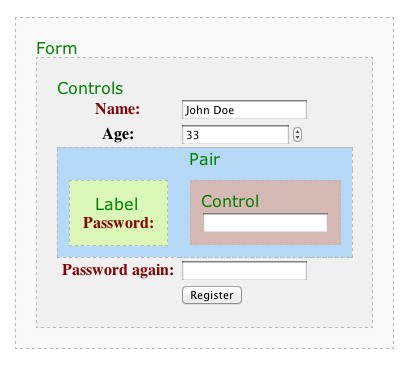
You have very granular control over all your fields in Nette, but at the beginning this makes working with NetteForms a little cumbersome.
The most important thing to understand is that when it comes to manipulating HTML of your form (like adding classes or style attributes etc), you work with a Nette HTML object. You get this object by calling $form->getElementPrototype() or $input->getLabelPrototype() or $input->getControlPrototype().
To better understand how NetteForms will render your form inspect the renderer your form is using:
$renderer = $form->getRenderer();
bd($renderer); // using TracyDebugger!
You can then modify the markup of all form elements by setting new wrapper templates:
$renderer = $form->getRenderer();
$renderer->wrappers['controls']['container'] = 'dl';
$renderer->wrappers['pair']['container'] = null;
$renderer->wrappers['label']['container'] = 'dt';
$renderer->wrappers['control']['container'] = 'dd';Most likely you don't want to apply these changes to all of your forms manually, so you can create a custom Renderer that your forms can then use globally for rendering. Also using a custom Renderer you have a lot more control and options for rendering your forms!
RockForms will automatically inject all necessary assets into your site on page render. See RockForms.module.php method hookAddAssets methods for details!
You can modify many aspects of your form via PHP code, but sometimes it's just easier (or even better) to do adjustments via CSS. The RockFormsRenderer will automatically apply the field's name and type to the wrapping div to make it possible to target styles for every individual field or for a given type:

There are two kind of errors: Form errors and field errors. For testing and styling errors it is handy to add errors directly in the setup of your form:
$form = new RockForm("demo");
$form->addError('demo form error');

$control = $form->addText("forename", "First name")
  ->setHtmlAttribute('placeholder', "Enter your first name here")
  ->setRequired();
$control->addError("This is a demo error");See section "Understanding NetteForms" above for important background!
$form = new RockForm("demo");

// add a custom class to the form element
$form->getElementPrototype()->addClass('uk-grid-small');

// add a custom class to the label element
$control = $form->addText("forename");
$control->getLabelPrototype()->addClass('uk-text-bold');

// add a custom class to the control (input) element
$control->getControlPrototype()->addClass('uk-form-small');RockForms adds the following hookable methods to make is easy to customise your forms:
- RockForms::renderField
- RockForms::renderFieldMulti
- RockForms::renderFields