





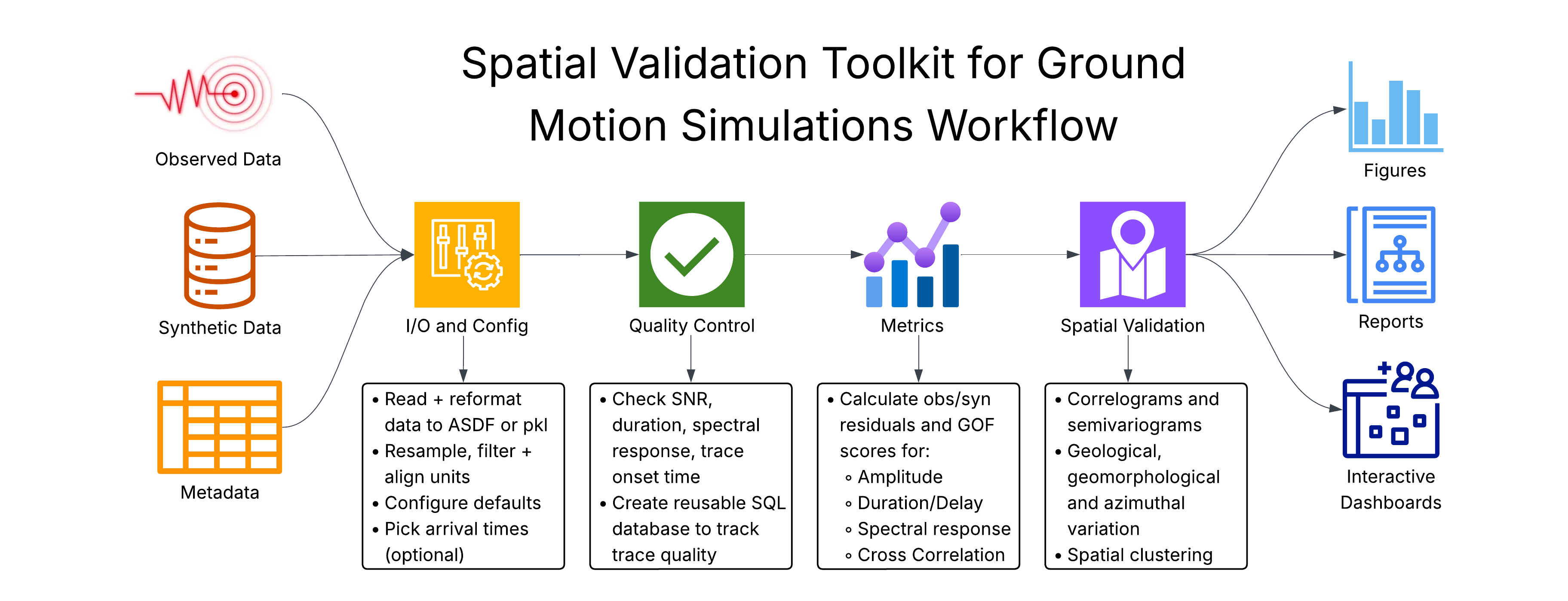
spatial-vtk provides spatial validation tools for ground-motion simulations,
with data QC, residual and metric calculations, geologic metadata integration,
spatial statistics, mapping, and dashboard preparation for understanding model
performance patterns.
Install from PyPI:
python -m pip install spatial-vtk
Or create the conda environment and install from a source checkout:
conda env create -f svtk_environment.yaml
conda activate spatial-vtk
python -m pip install -e .
The package imports as spatial_vtk and installs the svtk command:
python -c "import spatial_vtk; print(spatial_vtk.__version__)"
svtk --help
spatial_vtk.io: metadata preparation, input inventories, waveform preprocessing, manifests, and waveform format helpers.spatial_vtk.config: repository paths, bounds, and runtime settings.spatial_vtk.qc: quality-control build, review, and summary workflows.spatial_vtk.metrics: ground-motion metric and residual calculations.spatial_vtk.spatial: metric-field preparation, spatial correlation, PCA spatial modes, REDCAP and residual-feature clustering, geology joins, pattern tests, plots, and map helpers.spatial_vtk.visualize: context figures, QC views, and dashboard data.spatial_vtk.cli: command-line entry points.
See the public documentation for installation, package overview, examples, API reference, support, and changelog pages.