CLI that renders git tree visualizations as SVG from JSONL input.




pip install gitsvgOr with uv:
uv tool install gitsvgA .gitsvg.jsonl file is a list of operations, one JSON object per line, applied top-to-bottom to build a diagram. Render it with:
gitsvg render diagram.gitsvg.jsonl -o diagram.svgValidate without rendering:
gitsvg validate diagram.gitsvg.jsonlThe examples/ folder ships ten self-contained input files demonstrating the format. The first seven examples cover the diagram operations; the Theming section below covers visual customisation. Each subsection shows the rendered output and the source it came from.
A single branch with a few commits. The minimum viable diagram.
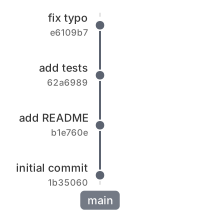
{"op": "branch", "name": "main", "label_side": "before"}
{"op": "commit", "branch": "main", "id": "c1", "msg": "initial commit", "hash": "auto"}
{"op": "commit", "branch": "main", "id": "c2", "msg": "add README", "hash": "auto"}
{"op": "commit", "branch": "main", "id": "c3", "msg": "add tests", "hash": "auto"}
{"op": "commit", "branch": "main", "id": "c4", "msg": "fix typo", "hash": "auto"}A feature branch forks off main, accumulates a couple of commits, then merges back.
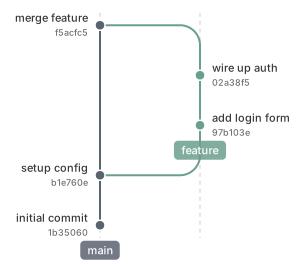
{"op": "branch", "name": "main", "label_side": "before"}
{"op": "commit", "branch": "main", "id": "c1", "msg": "initial commit", "hash": "auto"}
{"op": "commit", "branch": "main", "id": "c2", "msg": "setup config", "hash": "auto"}
{"op": "branch", "name": "feature", "from_branch": "main"}
{"op": "commit", "branch": "feature", "id": "f1", "msg": "add login form", "hash": "auto"}
{"op": "commit", "branch": "feature", "id": "f2", "msg": "wire up auth", "hash": "auto"}
{"op": "merge", "from": "feature", "into": "main", "as": "m1", "msg": "merge feature", "hash": "auto"}Two concurrent branches share lanes 1 and 2; after both merge, a later feature-b reclaims the now-free lane 1 instead of starting a new one. Lane assignment is automatic and geometry-driven.
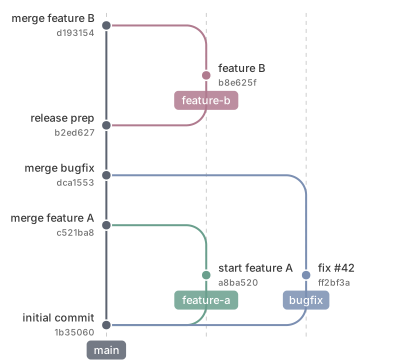
{"op": "branch", "name": "main", "label_side": "before"}
{"op": "commit", "branch": "main", "id": "c1", "msg": "initial commit", "hash": "auto"}
{"op": "branch", "name": "feature-a", "from_branch": "main"}
{"op": "commit", "branch": "feature-a", "id": "a1", "msg": "start feature A", "hash": "auto"}
{"op": "branch", "name": "bugfix", "from_branch": "main"}
{"op": "commit", "branch": "bugfix", "id": "x1", "msg": "fix #42", "hash": "auto"}
{"op": "merge", "from": "feature-a", "into": "main", "as": "m1", "msg": "merge feature A", "hash": "auto"}
{"op": "merge", "from": "bugfix", "into": "main", "as": "m2", "msg": "merge bugfix", "hash": "auto"}
{"op": "commit", "branch": "main", "id": "c2", "msg": "release prep", "hash": "auto"}
{"op": "branch", "name": "feature-b", "from_branch": "main"}
{"op": "commit", "branch": "feature-b", "id": "b1", "msg": "feature B", "hash": "auto"}
{"op": "merge", "from": "feature-b", "into": "main", "as": "m3", "msg": "merge feature B", "hash": "auto"}The highlight op marks an existing commit with an enlarged dot and a bold label — useful for drawing attention to a release or a key milestone.
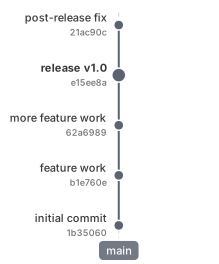
{"op": "branch", "name": "main", "label_side": "before"}
{"op": "commit", "branch": "main", "id": "c1", "msg": "initial commit", "hash": "auto"}
{"op": "commit", "branch": "main", "id": "c2", "msg": "feature work", "hash": "auto"}
{"op": "commit", "branch": "main", "id": "c3", "msg": "more feature work", "hash": "auto"}
{"op": "commit", "branch": "main", "id": "v1", "msg": "release v1.0", "hash": "auto"}
{"op": "commit", "branch": "main", "id": "c4", "msg": "post-release fix", "hash": "auto"}
{"op": "highlight", "commit": "v1"}A feature branch is removed and re-declared on top of a more recent main commit, with the same commit IDs as before. This is the rebase-style "move my work onto the new tip" pattern, expressed as primitives.
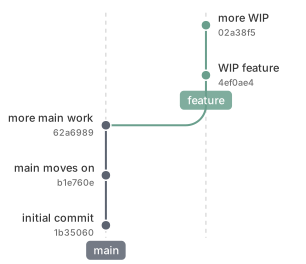
{"op": "branch", "name": "main", "label_side": "before"}
{"op": "commit", "branch": "main", "id": "c1", "msg": "initial commit", "hash": "auto"}
{"op": "branch", "name": "feature", "from_branch": "main"}
{"op": "commit", "branch": "feature", "id": "f1", "msg": "WIP feature", "hash": "auto"}
{"op": "commit", "branch": "feature", "id": "f2", "msg": "more WIP", "hash": "auto"}
{"op": "commit", "branch": "main", "id": "c2", "msg": "main moves on", "hash": "auto"}
{"op": "commit", "branch": "main", "id": "c3", "msg": "more main work", "hash": "auto"}
{"op": "remove", "branches": ["feature"]}
{"op": "branch", "name": "feature", "from_branch": "main"}
{"op": "commit", "branch": "feature", "id": "f1", "msg": "WIP feature", "hash": "auto"}
{"op": "commit", "branch": "feature", "id": "f2", "msg": "more WIP", "hash": "auto"}The import op replays another file as a prelude — here it picks up the rebased state from Example 5. A single new commit then squashes f1 and f2 into one via replaces:.
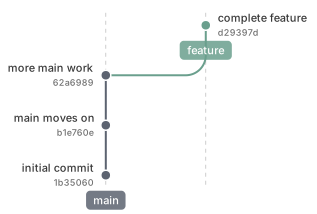
{"op": "import", "path": "05_remove_rebuild.gitsvg.jsonl"}
{"op": "commit", "branch": "feature", "replaces": ["f1", "f2"], "id": "f_squash", "msg": "complete feature", "hash": "auto"}The pull_request op declares a pending merge between two branches. Both endpoints live-track the current branch tips: as commits accumulate on either side, the dashed arc advances. The optional title renders as a pill anchored at the source-tip commit. The typical lifecycle closes the PR with remove and then runs a real merge; this example stops before either, so the open PR remains visible in the final state.
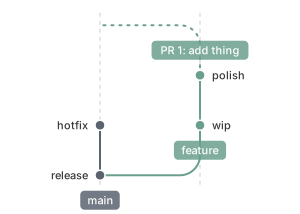
{"op": "branch", "name": "main", "label_side": "before"}
{"op": "commit", "branch": "main", "id": "m1", "msg": "release"}
{"op": "branch", "name": "feature", "from_branch": "main"}
{"op": "commit", "branch": "feature", "id": "f1", "msg": "wip"}
{"op": "pull_request", "id": "pr1", "from": "feature", "into": "main", "title": "PR 1: add thing"}
{"op": "commit", "branch": "feature", "id": "f2", "msg": "polish"}
{"op": "commit", "branch": "main", "id": "m2", "msg": "hotfix"}The theme op customises the diagram's presentational surface — spacings, sizes, fonts, the branch-colour palette, the SVG background, the orientation, and more. Each op only overrides the fields it lists; a name (default, dark, compact) selects a built-in theme to base resolution on.
Here we import Example 3 unchanged and apply a saturated palette with thicker strokes, larger labels, and a warm background.
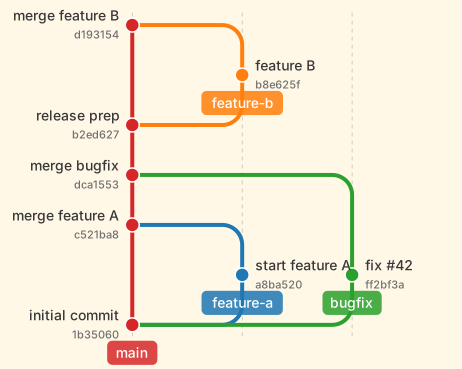
{"op": "import", "path": "03_multi_branch.gitsvg.jsonl"}
{"op": "theme", "background_color": "#fff8e7", "branch_spacing": 110, "branch_line_width": 4, "label_font_size": 14, "branch_label_font_size": 14, "hash_font_size": 11, "commit_radius": 7, "highlight_radius": 9, "branch_name_pill_offset_commit_axis_in_rows": -0.56, "colors": {"main": "#d62728", "branch1": "#1f77b4", "branch2": "#2ca02c", "branch3": "#ff7f0e", "branch4": "#9467bd"}}A theme.orientation of lr flips the diagram left-to-right: the commit axis grows rightward and branches stack downward. The same input renders identically in bt (default, bottom-to-top), tb (top-to-bottom), and rl (right-to-left); pill placement, margin defaults, and label-side mapping all adjust per orientation. Accepted values include the canonical short codes (bt, tb, lr, rl) and common aliases (Mermaid's TD, CSS's ltr / rtl, long forms like bottom_to_top, and top_down / bottom_up).
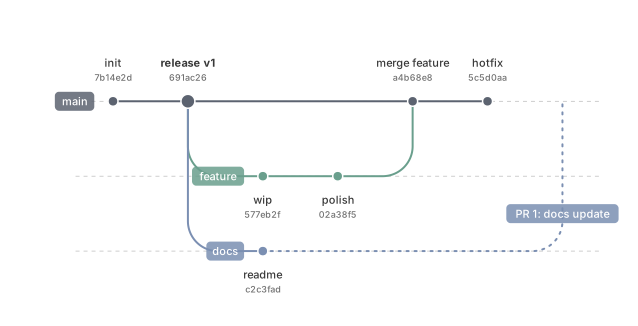
{"op": "branch", "name": "main", "label_side": "before"}
{"op": "commit", "branch": "main", "id": "m1", "msg": "init", "hash": "auto"}
{"op": "commit", "branch": "main", "id": "m2", "msg": "release v1", "hash": "auto", "highlight": true}
{"op": "branch", "name": "feature", "from_branch": "main"}
{"op": "commit", "branch": "feature", "id": "f1", "msg": "wip", "hash": "auto"}
{"op": "commit", "branch": "feature", "id": "f2", "msg": "polish", "hash": "auto"}
{"op": "branch", "name": "docs", "from_branch": "main"}
{"op": "commit", "branch": "docs", "id": "d1", "msg": "readme", "hash": "auto"}
{"op": "merge", "into": "main", "from": "feature", "msg": "merge feature", "hash": "auto"}
{"op": "commit", "branch": "main", "id": "m3", "msg": "hotfix", "hash": "auto"}
{"op": "pull_request", "id": "pr1", "from": "docs", "into": "main", "title": "PR 1: docs update"}
{"op": "theme", "orientation": "lr"}Beyond default, gitsvg ships two built-in themes:
dark— One Dark-inspired palette on a#282c34canvas.compact— ~30 % denser spacing with smaller fonts.
Selecting one is a single field on a theme op:
{"op": "import", "path": "03_multi_branch.gitsvg.jsonl"}
{"op": "theme", "name": "dark"}
The shipped preview below shows the three built-in themes side-by-side on the same input file:
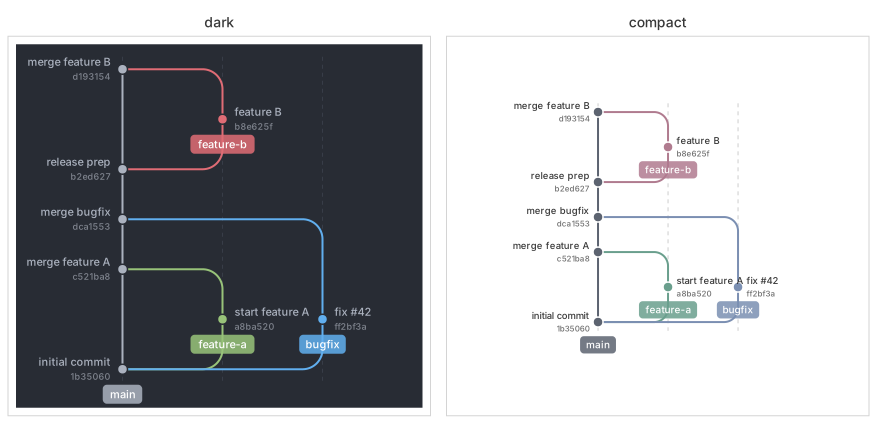
Selecting a named theme also wipes any theme: field overrides and branch.color overrides accumulated earlier — useful for "use exactly this theme." To layer a chosen theme on top of those overrides instead (e.g. when importing a diagram that already carries its own theming), pass keep_prior_overrides: true on the same op.
| Command | Purpose |
|---|---|
gitsvg render <input> -o <output> |
Render a .gitsvg.jsonl file to SVG. Pass a directory at both ends to recursively walk the input tree and write mirrored .svg outputs under the output directory. --small=N selects minification level 0-3; bare --small is level 2 (lossless structural compression). |
gitsvg state <input> |
Emit a JSON snapshot of the diagram (branches, commits with their parent chain, open pull requests) — a structural description of the resolved graph. Stdout by default; pass -o <file> to write to a file, or pass a directory pair to recursively walk and emit one <stem>.state.json per input. Output format may change before 1.0; pin a gitsvg version when caching the schema. |
gitsvg layout <input> |
Emit a JSON view of the resolved layout (grid extent, lane assignments, commit positions, arcs, open pull-request geometry) — what the renderer consumes, useful for debugging visual placement. Same invocation matrix as state (stdout by default, -o <file> for a file, directory pair for recursive walking with <stem>.layout.json outputs). Output format may change before 1.0; pin a gitsvg version when caching the schema. |
gitsvg validate <input> |
Run the full validation pipeline; report errors with file:line: [code] field: message. Add --json for a structured report. |
gitsvg schema |
Index of all input operations. gitsvg schema <op> prints the JSON Schema for one operation (e.g. gitsvg schema theme for the theme op's field schema); --list-ops prints a bare op list. gitsvg schema themes lists the registered named themes; gitsvg schema theme <name> prints a named theme's resolved field values. |
gitsvg errors |
Index of all validation error codes. gitsvg errors <code> prints the long-form catalog entry; --list-codes prints a bare code list. |
gitsvg schema and gitsvg errors are designed for agents and tooling: an LLM-based agent producing input can fetch the schema for a single op and the catalog entry for any error it hits, without reading the rest of the documentation.
MIT.