Gene fusion detection and visualization
- Sample report: http://opengene.org/FusionScan/report.html
Get latest (may be not stable)
# download use http
https://github.com/OpenGene/FusionScan/archive/master.zip

# or download use git
git clone https://github.com/OpenGene/FusionScan.git
Get the stable releases
https://github.com/OpenGene/FusionScan/releases/latest
FusionScan only depends on libz, which is always available on Linux or Mac systems. If your system has no libz, install it first.
cd FusionScan
makeYou should provide following arguments to run fusionscan
- the reference genome fasta file, specified by
-ror--ref= - the fusion setting file, specified by
-for--fusion= - the fastq file(s), specified by
-1or--read1=for single-end data. If dealing with pair-end data, specify the read2 file by-2or--read2= - use
-hor--html=to specify the file name of HTML report - the plain text result is directly printed to STDOUT, you can pipe it to a file using a
>
fusionscan -r hg19.fasta -f genes/cancer.hg19.csv -1 R1.fq -2 R2.fq -h report.html > resultThe reference genome should be a single whole FASTA file containg all chromosome data. This file shouldn't be compressed. For human data, typicall hg19/GRch37 or hg38/GRch38 assembly is used, which can be downloaded from following sites:
hg19/GRch37: ftp://ftp.ncbi.nlm.nih.gov/sra/reports/Assembly/GRCh37-HG19_Broad_variant/Homo_sapiens_assembly19.fastahg38/GRch38: http://hgdownload.cse.ucsc.edu/goldenPath/hg38/bigZips/hg38.fa.gz Remember to decompress hg38.fa.gz since it is gzipped and is not supported currently.
The fusion file is a list of coordinated target genes together with their exons. A sample is:
>EML4_ENST00000318522.5,chr2:42396490-42559688
1,42396490,42396776
2,42472645,42472827
3,42483641,42483770
4,42488261,42488434
5,42490318,42490446
...

>ALK_ENST00000389048.3,chr2:29415640-30144432
1,30142859,30144432
2,29940444,29940563
3,29917716,29917880
4,29754781,29754982
5,29606598,29606725
...
The coordination system should be consistent with the reference genome.
Two fusion files are provided with fusionscan:
genes/cancer.hg19.csv: all COSMIC curated fusion genes (http://cancer.sanger.ac.uk/cosmic/fusion) based onhg19/GRch37reference assembly.genes/cancer.hg38.csv: all COSMIC curated fusion genes (http://cancer.sanger.ac.uk/cosmic/fusion) based onhg38/GRch38reference assembly.- These two pre-defined fusion files should be enough for most cancer related studies, since all COSMIC curated genes are included. If you want to create a custom one, please follow the instructions given on next section.
If you'd like to create a custom fusion file, you can use scripts/gen_fusion_file.jl, which is based on the Julia library OpenGene.jl to generate the fusion file you want.
You should prepare a file containing all genes you want, seperated by space or line break. Please note that comma is not supported. Each gene should be the HGNC standard name.
By default, the primary transcript (named as GENE_001) will be used. But you can specify the transcript by add _TranscriptId to the gene. For example: use CD74_ENST00000009530 to specify the transcript of CD74.
When the gene list file (genes.txt) is prepared, you can used following command to generate a fusion file (fusion.csv):
julia scripts/gen_fusion_file.jl -r hg19 -g genes.txt -f fusion.csvThe reference genome is specified by -r option, which can be hg19/GRch37/GRch38.
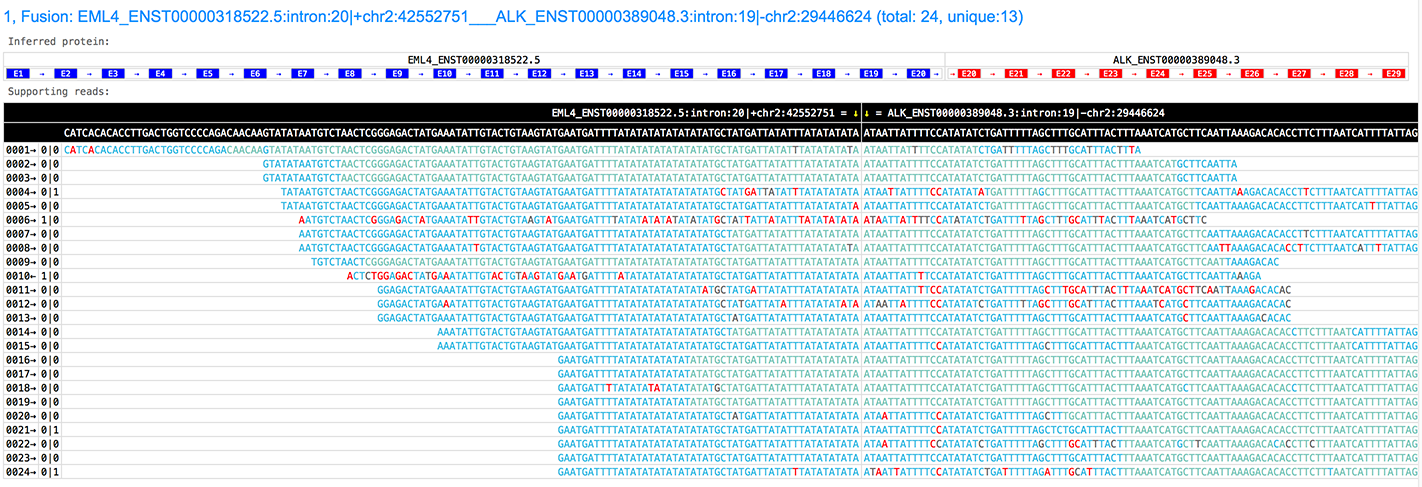
FusionScan can generate very informative and interactive HTML pages to visualize the fusions with following information:
- the fusion genes, along with their transcripts.
- the inferred break point with reference genome coordinations.
- the inferred fusion protein, with all exons and the transcription direction.
- the supporting reads, with all bases colorized according to their quality scores.
- the number of supporting reads, and how many of them are unique (the rest may be duplications)
See the HTML page of this picture: http://opengene.org/FusionScan/report.html