Generate a clean, vlog-style location label for each photo/video, and optionally burn it into the media. Obviously, this tool only works when your photos/videos include location (GPS) metadata. Make sure Location Services are enabled for your camera app so new media is saved with location information.
This is a hobby project I made to complement aidvid.com (without pay). If it is unclear what's the point of this project, using aidvid.com once will probably clear things up.
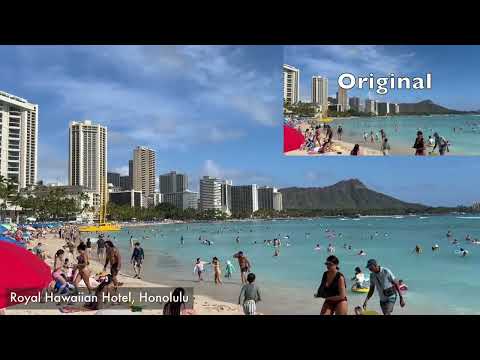
The location "Royal Hawaiian Hotel, Honolulu" was add by vlogify automatically!
Clone the repo:
git clone https://github.com/biona001/iphone-vlogify.git
cd iphone-vlogify
Install dependencies (macOS):
brew install ffmpeg-full exiftool
brew link ffmpeg-full
Then install the package:
pip install -e .Notes:
exiftoolis required for reading GPS and timestamps from media.ffmpegmust include thedrawtextfilter (most builds do). If embedding fails, reinstall with freetype support.brewis macOS-only. The project itself is Python and should be portable, but you’ll need a workingffmpegon your system.- For Linux/Windows, you can typically install
ffmpegvia your OS package manager or a static build and then run the samepip install -e .. See the evaluation notes below for details.
To label video or photo with a vlog-style location label, simply execute
vlogify --embed --out-dir OUTPUT_DIR FILE_OR_FOLDERWithout the --embed keyword, you'll only get the location of the files (no video output)
IMG_1464.MOV → 2330 Kalākaua Avenue, Waikīkī, Honolulu
IMG_1500.MOV → Hokulani Waikiki, Honolulu
IMG_1441.MOV → Royal Hawaiian Hotel, Honolulu
IMG_1651.MOV → USS Arizona, Waipahu
By default, a “vlog-like” font is chosen from common macOS fonts. You can set a custom font:
VLOGIFY_FONT_PATH=/path/to/your/font.ttf vlogify --embed ~/Desktop/2026_March_HawaiiCorner placement:
vlogify --embed --corner bottom-right ~/Desktop/2026_March_HawaiiSupported extensions:
.mov.mp4.jpg.jpeg.heic
Notes:
- HEIC inputs are written as
.jpgwhen embedding, to ensure broad compatibility.
- Requires location (GPS) metadata in your files. If Location Services were off, you’ll get
No GPS metadata. - Reverse geocoding uses OpenStreetMap via Nominatim. Requests are rate-limited and network-dependent, so you may see
Unknown locationif the service is unavailable. - Location labels reveal precise places. Double-check outputs before sharing, especially for home or private locations.