Run a RunPod Hosted Model and use it as a local Ollama provider in VS Code Copilot.
currently hardcoded to the Q8 version of Qwen3.6-27B-uncensored-heretic-v2 model, but you can modify the dockerfile and proxy script to use any model you like (see make_your_own/README.md).
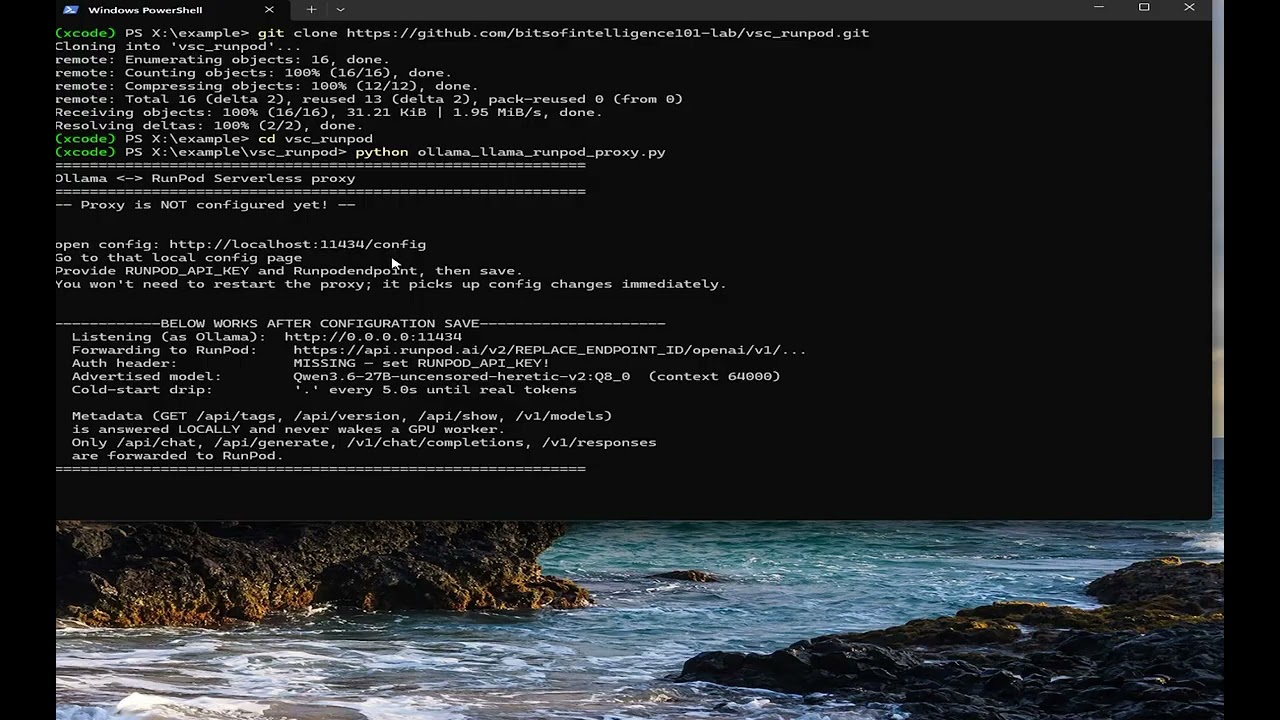
git clone https://github.com/bitsofintelligence101-lab/vsc_runpod.git
cd vsc_runpodPlease use my referal link if you don't have a runpod account yet, it gives us both $10 in free credits: https://runpod.io?ref=0tg2p4r0
- RunPod Console → Serverless → New Endpoint
- Choose Import from Docker Registry and enter your image, or choose Start from GitHub Repo to build directly on RunPod (nothing downloaded to your machine).
- Settings:
- Container Image:
marsdefender5/qwen27b_q8_heritic:v1 - GPU: 48 GB+ VRAM (L40, A6000, A100 48GB) — the Q8_0 27B model requires ~29 GB weights + KV cache
- Container Disk: 40 GB
- Advanced > Minimum CUDA version: set to 12.6
- Container Image:
- Scaling:
- Min Workers:
0(scale to zero) - Max Workers:
1–2for low volume - Idle Timeout:
60seconds (worker lingers between calls, avoiding repeat cold starts, the longer this is the more it costs. balance according to your expected call volume and latency tolerance) - FlashBoot: on
- Min Workers:
- Hit Deploy. Copy your Endpoint ID from the dashboard.
Network Volume (one-time setup): A 27B Q8_0 model is ~29 GB. Create a Network Volume, mount it to a temporary Pod, and run
./download_models.shonce. The serverless worker mounts it at/runpod-volumeon every start — no re-downloading.
VS Code Copilot only supports Ollama as a local model provider (as of this writing). This proxy pretends to be Ollama and forwards generation requests to RunPod. Metadata probes (/api/tags, /api/version) are answered locally — they never wake a GPU worker else it would burn credits unnecessarily.
python3 ollama_llama_runpod_proxy.pyFirst time you run go to the config page (http://localhost:11434/config) and provide your RunPod API key and Endpoint ID. Save the config, and the proxy picks it up immediately — no restart needed.
Then in VS Code: Settings → GitHub Copilot: Local Provider → Ollama (localhost:11434).
from openai import OpenAI
client = OpenAI(
    api_key="<RUNPOD_API_KEY>",
    base_url="https://api.runpod.ai/v2/<ENDPOINT_ID>/openai/v1",
)
resp = client.chat.completions.create(
    model="Qwen3.6-27B-uncensored-heretic-v2",
    messages=[{"role": "user", "content": "hello"}],
    stream=True,
)
for chunk in resp:
    print(chunk.choices[0].delta.content or "", end="", flush=True)