Describe the Bug
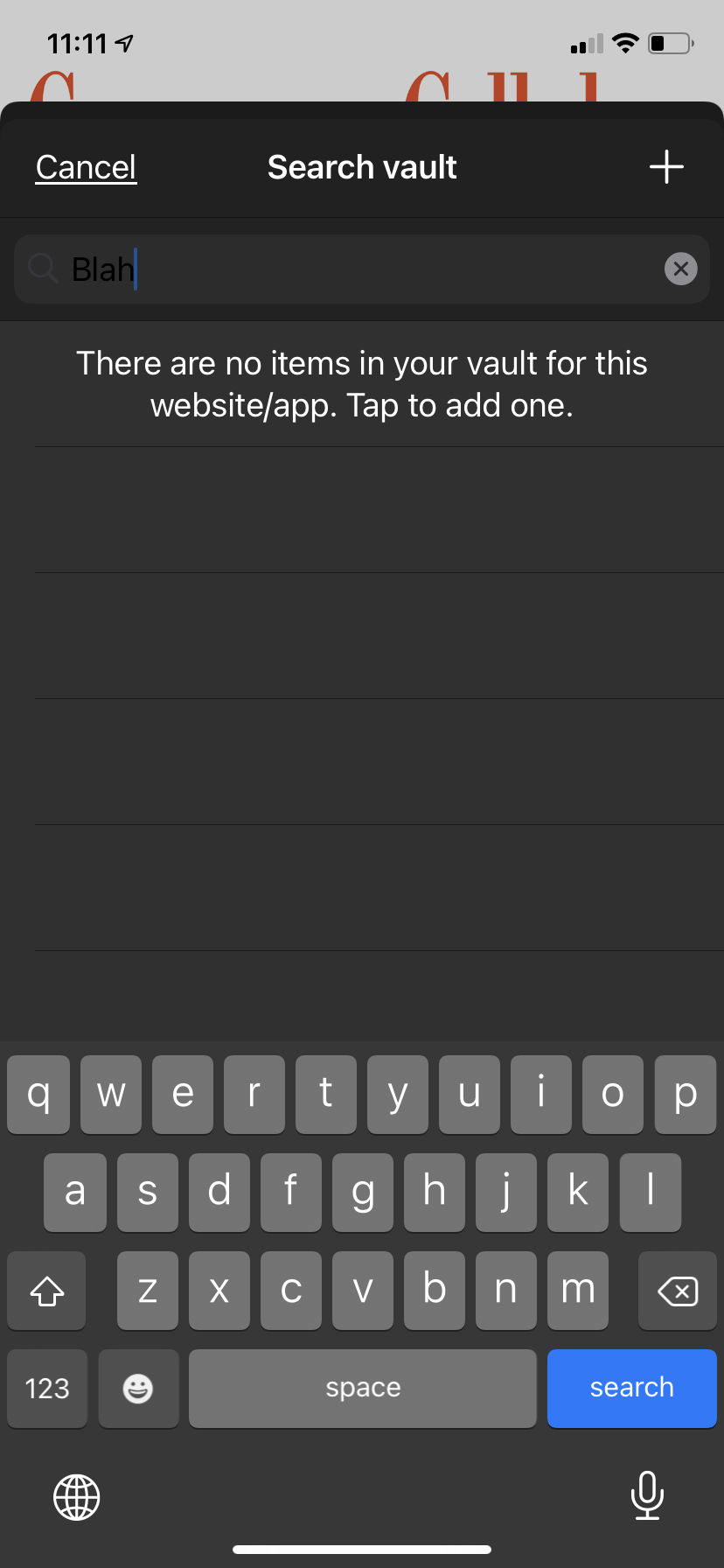
If you have Dark Mode activated in an iPhone running iOS 14.4.2 with the AutoFill functionality active it's almost impossible to read the search field.
Steps To Reproduce
- Activate Dark Mode
- Activate Autofill on Bitwarden
- Open an app that needs Bitwarden to autofill their password
- Tap the iOS Passwords button
- Unlock the Bitwarden app
- Tap in the Search field and start typing
Expected Result
The text appears as white on a dark gray background. See Screenshot 2
Actual Result
The text appears as black on a dark gray background. See Screenshot 1
Screenshots or Videos

Environment
- Device: iPhone SE 2020
- Operating system: iOS 14.4.2
- Build Version (go to "Settings" → "About" in the app): 2.9.1
- Is this a Beta release? N


Describe the Bug
If you have Dark Mode activated in an iPhone running iOS 14.4.2 with the AutoFill functionality active it's almost impossible to read the search field.
Steps To Reproduce
Expected Result
The text appears as white on a dark gray background. See Screenshot 2
Actual Result
The text appears as black on a dark gray background. See Screenshot 1
Screenshots or Videos
Environment