The iOS version apparently ignores the Preferred Language Order setting.
Steps To Reproduce
-
On an iOS device, go to Settings, General, Language & Region. Under Preferred Language Order, tap on Add Language... and add both "Portuguese (Brasil)" and "Portuguese (Portugal)".
-
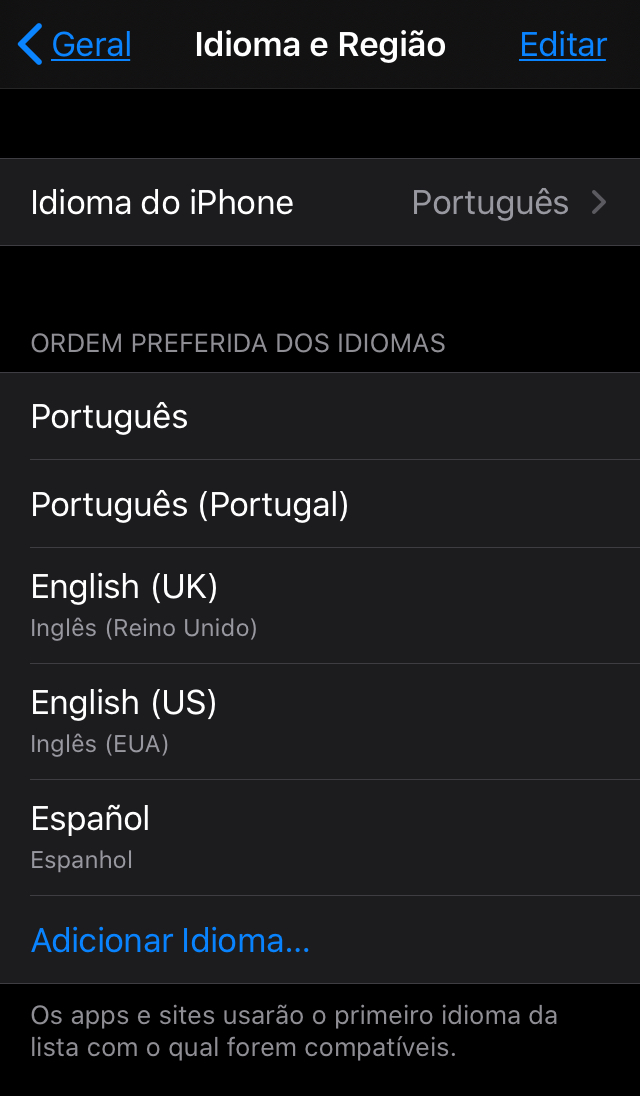
Edit the Preferred Language Order to put "Português" on the top and "Português (Portugal)" on the second row. That will change the iPhone Language to Portuguese (Brazil).
-
Open Bitwarden.
Expected Result
The app should appear with the European Portuguese translation (since -- I suppose -- it doesn't have a Brazilian Portuguese translation yet).
Actual Result
The app appears in English. Apparently it is ignoring the Preferred Language Order setting. If "Portuguese (Portugal)" is set above English, the app should use "Portuguese (Portugal)".
Screenshots or Videos
Environment
- Device: iPhone SE, iPhone 6S (tested on both)
- Operating system: iOS 13.4.1
- Build Version: 2.4.3 (69)
- Is this a Beta release? No


The iOS version apparently ignores the Preferred Language Order setting.
Steps To Reproduce
On an iOS device, go to Settings, General, Language & Region. Under Preferred Language Order, tap on Add Language... and add both "Portuguese (Brasil)" and "Portuguese (Portugal)".
Edit the Preferred Language Order to put "Português" on the top and "Português (Portugal)" on the second row. That will change the iPhone Language to Portuguese (Brazil).
Open Bitwarden.
Expected Result
The app should appear with the European Portuguese translation (since -- I suppose -- it doesn't have a Brazilian Portuguese translation yet).
Actual Result
The app appears in English. Apparently it is ignoring the Preferred Language Order setting. If "Portuguese (Portugal)" is set above English, the app should use "Portuguese (Portugal)".
Screenshots or Videos
Environment