Create a 4-digit security code input that allows you to enter a two-factor authorization code. It should resemble the screenshot below:
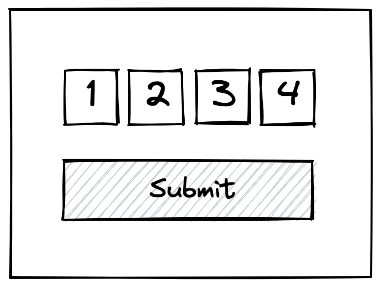
Implement a form submission handler that calls a submitCode(code) function with the 4 digits as a concatenated string. Implement a submitCode function that validates the code given against a hardcoded 4-digit string.
The inputs should be as usable as possible, specifically:
- Each field should allow only one digit between 0-9. Any other input should be rejected
- Entering a number in a field should advance the cursor to the next field, except in the case of the last field
- Pressing backspace at the beginning of a field (whether that field is populated or not) should focus the previous field and delete the input inside
- Very basic styling guidance:
- Inputs should be positioned next to one another
- Inputs should be roughly rectangular as pictured
- Submit button should be positioned below.
Note: Pasting input into the field(s) is a complicated problem, addressed in one of the additional challenges. For the main problem, assume that copying and pasting a number into the field(s) results in undefined behavior.
- How will you handle rejecting feedback invalid feedback, i.e. if not all the fields are filled out or the code is invalid?
- The main difficulty with this problem is moving the cursor between the fields. You’ll probably want some sort of key handler on all the inputs in order to do this. Think about what type of key handler(s) would work best for this, e.g. input, change, keydown, keyup, keypress.
- You’ll probably need a specific key handler for Backspace.
- It doesn’t make sense to submit anything other than a 4-digit number. Add some validation to ensure that the user cannot submit without having all fields populated. Highlight the fields that are missing.
- Is this built as a reusable component? Turn it into a reusable component if not. Make the number of digits customizable.
- People will often be copying and pasting their one-time code from their SMS. Make copy and paste work if you have the first field highlighted.
Reference: https://frontendeval.com/questions/code-input
You can see it in action on this address: https://blasus.github.io/two-factor-code-input