
Osmedeus - A Modern Orchestration Engine for Security





Osmedeus is a security focused declarative orchestration engine that simplifies complex workflow automation into auditable YAML definitions, complete with encrypted data handling, secure credential management, and sandboxed execution.
Built for both beginners and experts, it delivers powerful, composable automation without sacrificing the integrity and safety of your infrastructure.
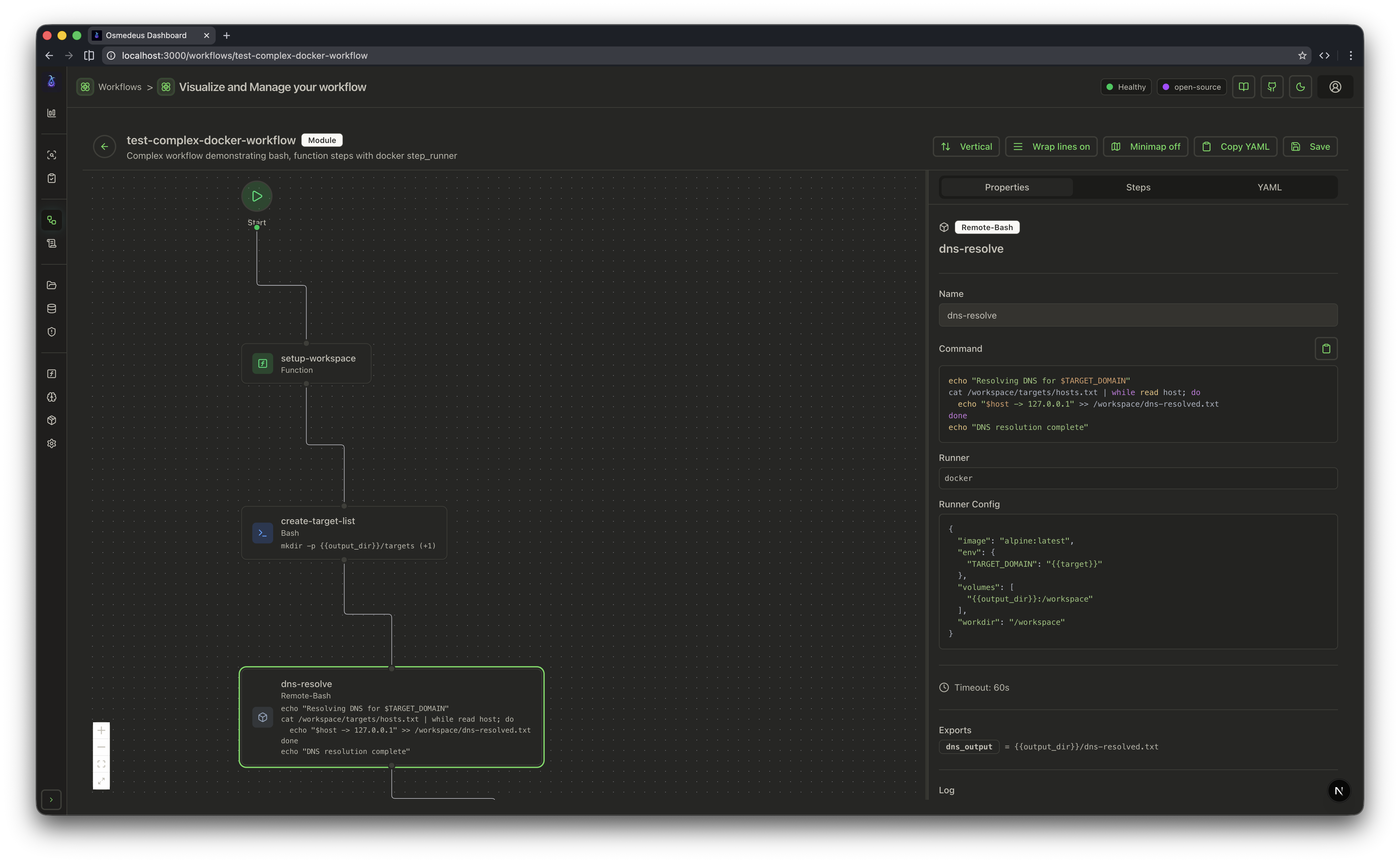
- Declarative YAML Workflows - Define pipelines with hooks, decision routing, module exclusion, and conditional branching across multiple runners (host, Docker, SSH)
- Distributed Execution - Redis-based master-worker pattern with queue system, webhook triggers, and file sync across workers
- Rich Function Library - 80+ utility functions including nmap integration, tmux sessions, SSH execution, TypeScript/Python scripting, SARIF parsing, and CDN/WAF classification
- Local Knowledge Base - Ingest local documents (
pdf,txt,md,json,jsonl,html,epub,docx, and more), fetch review-first webpage article previews with suggested metadata, search them from CLI/API, and synthesize scan findings back into reusable workspace/public knowledge layers - Independent Vector Knowledge DB - Store reusable semantic knowledge in a standalone
vector-kb.sqlite, auto-index onkb ingest/kb learn, and let workflows query it directly - Campaign Batch Operations - Create grouped queued runs with shared strategy metadata, aggregated target status, failed-target rerun, and optional high-risk deep-scan escalation
- Vulnerability Lifecycle Center - Manage vulnerabilities through
new,triaged,verified,false_positive,retest, andclosedstates with AI verdicts, analyst notes, retest tasks, workspace risk boards, and evidence/status timelines - Attack Chain Workbench API - Persist AI attack-chain outputs as queryable reports, expose summary/detail APIs, generate execution checklists, and keep visualization artifacts linked to the same report with execution-ready recommendations
- Superdomain AI Workflow Family -
superdomain-extensive-ai-optimized,superdomain-extensive-ai-stable,superdomain-extensive-ai-hybrid, andsuperdomain-extensive-ai-litenow share a cleaner AI closure: validated findings, attack-chain visualization where enabled, targeted rescan, and post-run knowledge auto-learning - Event-Driven Scheduling - Cron, file-watch, and event triggers with filtering, deduplication, and delayed task queues
- Agentic LLM Steps - Tool-calling agent loops with sub-agent orchestration, memory management, and structured output; plus ACP subprocess agents (Claude Code, Codex, OpenCode, Gemini)
- Cloud Infrastructure - Provision and run scans across DigitalOcean, AWS, GCP, Linode, and Azure with cost controls and automatic cleanup
- Rich CLI Interface - Interactive database queries, bulk function evaluation, workflow linting, progress bars, and comprehensive usage examples
- REST API & Web UI - Full API server with webhook triggers, database queries, and embedded dashboard for visualization
See Documentation Page for more details.
curl -sSL http://www.osmedeus.org/install.sh | bashSee Quickstart for quick setup and Installation for advanced configurations.
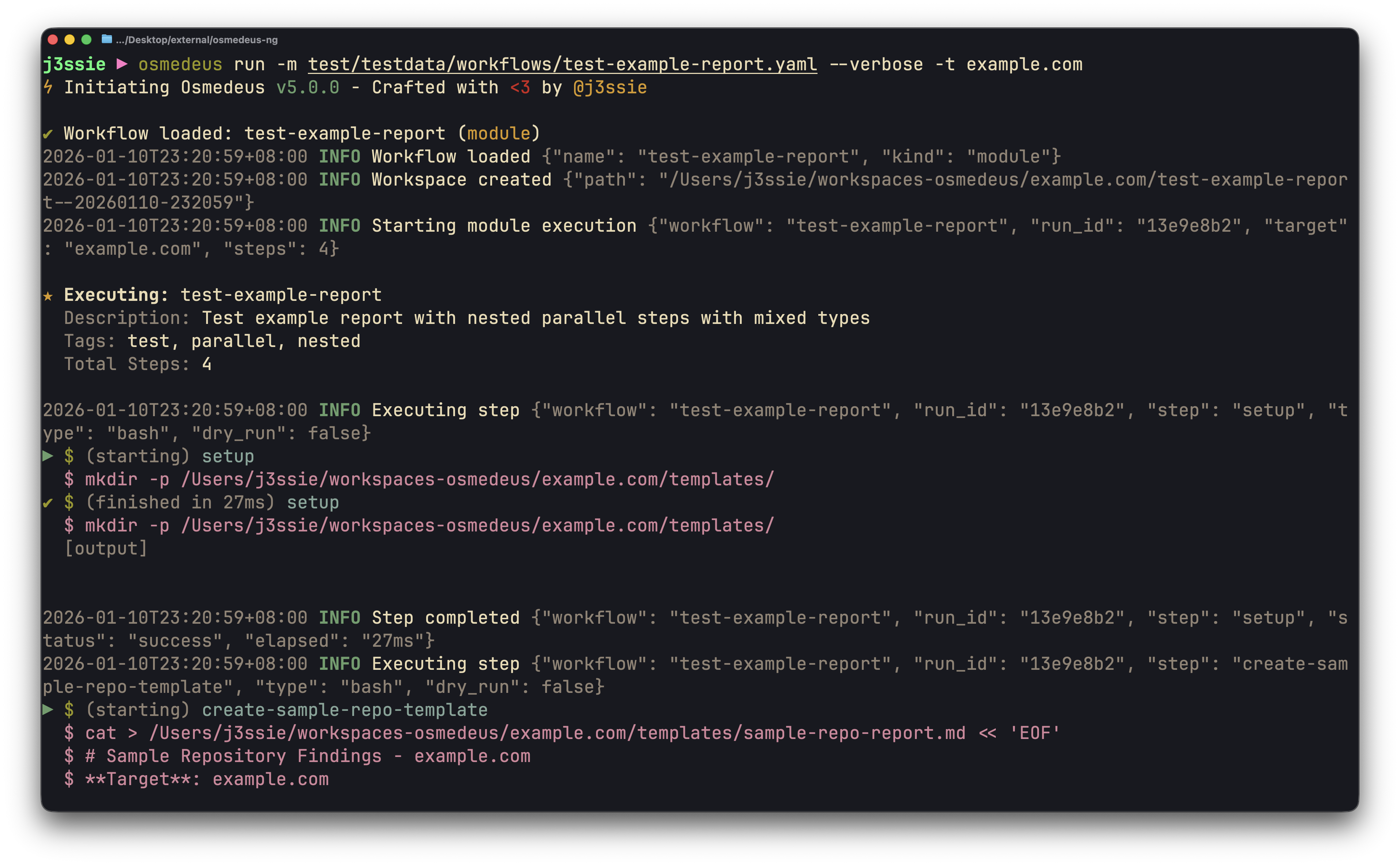
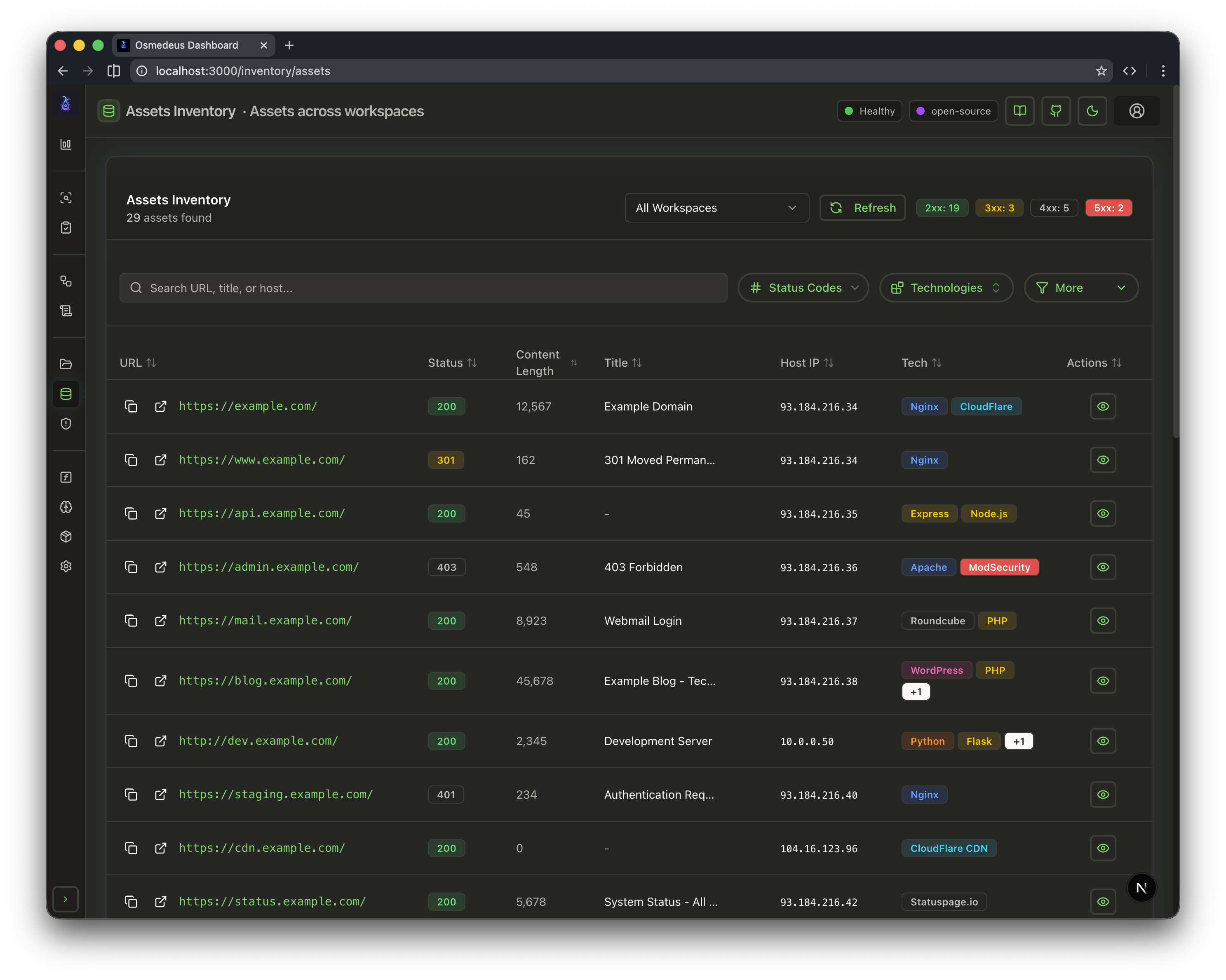
| CLI Usage | Web UI Assets | Workflow Visualization |
|---|---|---|
 |
 |
 |
# Run a module workflow
osmedeus run -m recon -t example.com

# Run a flow workflow
osmedeus run -f general -t example.com

# Multiple targets with concurrency
osmedeus run -m recon -T targets.txt -c 5

# Dry-run mode (preview)
osmedeus run -f general -t example.com --dry-run

# Start API server
osmedeus serve

# List available workflows
osmedeus workflow list

# Query discovered assets
osmedeus assets -w example.com                          # List assets for workspace
osmedeus assets --stats                                 # Show unique technologies, sources, types
osmedeus assets --source httpx --type web --json        # Filter and output as JSON

# Query database tables
osmedeus db list --table runs
osmedeus db list --table event_logs --search "nuclei"

# Evaluate utility functions
osmedeus func eval 'log_info("hello")'
osmedeus func eval -e 'http_get("https://example.com")' -T targets.txt -c 10

# Platform variables available in eval
osmedeus func eval 'log_info("OS: " + PlatformOS + ", Arch: " + PlatformArch)'

# Install from preset repositories
osmedeus install base --preset
osmedeus install base --preset --keep-setting   # preserve existing osm-settings.yaml
osmedeus install workflow --preset

# Exclude modules from flow execution
osmedeus run -f general -t example.com -x portscan
osmedeus run -f general -t example.com -X vuln    # Fuzzy exclude by substring

# Worker queue system
osmedeus worker queue new -f general -t example.com   # Queue for later
osmedeus worker queue run --concurrency 5              # Process queue

# Local knowledge base
osmedeus kb ingest --path ./notes -w example.com --recursive
osmedeus kb fetch-url --url https://example.com/blog/post -o ./article-preview.md
osmedeus kb fetch-url --url-file ./article-urls.txt --output-dir ./article-previews
osmedeus kb ingest-preview --path ./article-preview.md -w example.com
osmedeus kb search --query "jwt bypass" -w example.com
osmedeus kb docs -w example.com
osmedeus kb learn -w example.com
osmedeus kb export -w example.com --output ./knowledge-index.txt
osmedeus kb bridge-yakrag --path /path/to/mitre_attack_techniques.rag.gz --output ./mitre-attack-techniques.jsonl
osmedeus kb import --type security-sqlite --path /path/to/security_kb.sqlite -w security-kb
osmedeus kb vector index -w example.com
osmedeus kb vector search --query "jwt bypass" -w example.com
osmedeus kb vector stats
osmedeus kb vector doctor -w example.com
osmedeus kb vector rebuild -w example.com
osmedeus kb vector purge -w example.com
osmedeus kb vector sync -w example.com

# AI-heavy recon workflows
osmedeus run -f superdomain-extensive-ai-stable -t example.com
osmedeus run -f superdomain-extensive-ai-hybrid -t example.com
osmedeus run -f superdomain-extensive-ai-optimized -t example.com
osmedeus run -f superdomain-extensive-ai-lite -t example.com

# Worker management
osmedeus worker status                          # Show workers
osmedeus worker eval -e 'ssh_exec("host", "whoami")'  # Eval with distributed hooks

# Run an ACP agent interactively
osmedeus agent "analyze this codebase"
osmedeus agent --agent codex "explain main.go"
osmedeus agent --list

# Show all usage examples
osmedeus --usage-exampleFor Docker-free live regressions against a real local osmedeus serve / queue-worker process, run:
make test-regression-api-ai
make test-regression-api-knowledge
make test-regression-api-vector
make test-regression-ai-workflow-smoke
make test-regression-ai-semantic-vector-smoke
make test-regression-scan-content-smoke
make test-regression-superdomain-lite-smoke
make test-regression-superdomain-optimized-smoke
make test-regression-queue-live
make test-regression-stable-core
make test-regression-api-ai- verifies the
campaign / vulnerabilities / attack-chainsworkflow on real HTTP endpoints - stores temporary artifacts under
/tmp/osm-api-ai-workbench-live
- verifies the
make test-regression-api-knowledge- verifies
knowledge ingest / documents / search / learnplus workspace-to-public layered retrieval without requiring a vector provider - stores temporary artifacts under
/tmp/osm-api-knowledge-live
- verifies
make test-regression-api-vector- verifies
knowledge vector index / stats / searchplus ingest/learn auto-index with a local mock embeddings endpoint - stores temporary artifacts under
/tmp/osm-api-vector-live
- verifies
make test-regression-ai-workflow-smoke- runs a controlled current-source superdomain-style follow-up chain:
intelligent-analysis -> apply-decision -> retest/operator fallback -> campaign create -> retest queue -> post-followup -> knowledge autolearn - validates that workflow-internal CLI calls stay bound to the active
base-folderandworkflow-folder - stores temporary artifacts under
/tmp/osm-ai-workflow-smoke
- runs a controlled current-source superdomain-style follow-up chain:
make test-regression-ai-semantic-vector-smoke- runs a controlled provider-enabled semantic workflow chain against the current source
ai-semantic-searchandai-semantic-search-hybridfragments using a local mock embeddings endpoint - verifies real
kb ingest, vectorkb indexing for workspace/shared/global layers, clean--jsonCLI output under an explicit workflow folder, deterministicenableSemanticAgent=falseexecution, live KB hits in both vector and merged semantic artifacts, and stable scan-data fallback - auto-selects the next free local embeddings mock port when the default regression port is already occupied
- stores temporary artifacts under
/tmp/osm-ai-semantic-vector-smoke
- runs a controlled provider-enabled semantic workflow chain against the current source
make test-regression-scan-content-smoke- runs the real current-source
scan-contentmodule against deterministic local mockdeparos,ffuf, andhttpxbinaries - verifies the deparos-success path does not double-run ffuf fallback, and the ffuf fallback path still feeds the downstream fingerprint/import stage
- stores temporary artifacts under
/tmp/osm-scan-content-smoke
- runs the real current-source
make test-regression-superdomain-lite-smoke- runs the real current-source
superdomain-extensive-ai-liteflow in a controlled workspace with seeded scan artifacts, live vectorkb retrieval, decision application, follow-up coordination, and knowledge auto-learning enabled - verifies semantic search, decision artifacts, and KB writeback all stay aligned to the active
base-folderandworkflow-folder - auto-selects the next free local embeddings mock port when the default regression port is already occupied
- stores temporary artifacts under
/tmp/osm-superdomain-lite-flow-smoke
- runs the real current-source
make test-regression-superdomain-optimized-smoke- runs the real current-source
superdomain-extensive-ai-optimizedflow in a controlled workspace with seeded scan artifacts, live vectorkb retrieval, direct AI decision closure, follow-up packaging, and knowledge auto-learning enabled - verifies the optimized AI chain stays bound to the active
base-folderandworkflow-folderwhile producing reusable decision / retest / operator / campaign / follow-up artifacts - auto-selects the next free local embeddings mock port when the default regression port is already occupied
- stores temporary artifacts under
/tmp/osm-superdomain-optimized-flow-smoke
- runs the real current-source
make test-regression-queue-live- verifies CLI queued runs, vulnerability retest queue consumption, and campaign deep-scan queue consumption against a real worker
- stores temporary artifacts under
/tmp/osm-queue-live
make test-regression-stable-core- runs the core stable-release smoke path serially: superdomain workflow validation, support/common-module validation (
incremental-check,osint,scan-content,scan-backup,scan-vuln,url-gf,iis-shortname,04-http-probe,05-fingerprint,06-web-crawl,07-content-analysis,09-vuln-suite,10-report), fragment validation (do-ai-knowledge-autolearn,do-scan-content), AI follow-up smoke, provider-enabled semantic workflow smoke, deterministic localscan-contentsmoke, controlled current-sourcesuperdomain-extensive-ai-lite/superdomain-extensive-ai-stable/superdomain-extensive-ai-optimizedflow smoke, deterministic localvuln-suiteNuclei smoke, AI API, knowledge, vectorkb, and queue live regressions - verifies ACP-timeout fallback closure for vulnerability validation, attack-chain generation, attack-chain visualization, path planning, follow-up packaging, and knowledge auto-learning on the real current-source stable flow
- verifies the real
scan-contentworkflow keeps deparos-first behavior, avoids redundant ffuf fallback after success, and still closes the fingerprint/import path when ffuf fallback is required - verifies the real
09-vuln-suiteworkflow produces a deterministic local Nuclei hit and report output, guarding against command-line regressions in the main Nuclei scan path - keeps the mock embeddings regressions resilient to back-to-back runs by auto-selecting the next free local embeddings port when the default one is occupied
- stores temporary artifacts under
/tmp/osm-stable-core-*
- runs the core stable-release smoke path serially: superdomain workflow validation, support/common-module validation (
If gotestsum is noisy or fails to exit cleanly in your environment, you can bypass it with plain Go test entry points:
make test-unit-plain
make test-plain
Release checklist:
docs/stable-core-checklist.md
You can now extend the local knowledge base with your own documents and have superdomain-extensive-ai-optimized, superdomain-extensive-ai-stable, superdomain-extensive-ai-hybrid, and superdomain-extensive-ai-lite consume that knowledge during semantic search.
The practical storage layout is now split into two layers:
- Main DB:
knowledge_documents/knowledge_chunksstay in the primary Osmedeus database as the source of truth - Independent vector DB: semantic embeddings are stored in a separate SQLite file, defaulting to
{{base_folder}}/knowledge/vector-kb.sqlite
txt,md,markdown,logyaml,yml,csvjson,jsonlhtml,htmepubdoc,docxpdfpptx,xlsx
If you already have the structured security_kb.sqlite database, prefer importing it directly instead of raw-ingesting the surrounding YAML/JSON folder. This keeps records bounded per document/chunk and avoids the oversized-source problem that can break embedding requests later.
osmedeus kb import \
  --type security-sqlite \
  --path /home/user/osmedeus-base/knowledge/knowledge/security_kb.sqlite \
  --workspace security-kb

# Then index/search it with the normal vectorkb flow
osmedeus kb vector index -w security-kb
osmedeus kb vector search --query "authentication bypass" -w security-kb
Notes:
- This importer writes standard
knowledge_documents/knowledge_chunksrows into the main Osmedeus database. - The first adapter is
security-sqlite; other prebuilt KBs can follow the same importer framework with additional adapters later. - Import does not auto-run vectorkb indexing by itself; keep indexing as an explicit next step.
If you already imported a Yakit knowledge package into a local Yakit profile DB, Osmedeus can bridge that KB into an open jsonl or markdown export without reusing Yakit's private vector format directly.
# Auto-detect the local Yakit DB, inspect the package header, and export jsonl
osmedeus kb bridge-yakrag \
  --path /home/user/yakit-projects/projects/libs/mitre_attack_techniques.rag.gz \
  --output ./mitre-attack-techniques.jsonl

# Or export by explicit Yakit DB path and KB name into markdown
osmedeus kb bridge-yakrag \
  --db /home/user/yakit-projects/yakit-profile-plugin.db \
  --kb-name "MITRE ATT&CK Techniques" \
  --format md \
  --output ./mitre-attack-techniques.md

# Then ingest the bridged file back into Osmedeus
osmedeus kb ingest --path ./mitre-attack-techniques.jsonl --workspace global
Notes:
- This is a one-way bridge for already imported Yakit knowledge bases.
- The command does not reuse Yakit's original embeddings or HNSW index.
- Osmedeus will re-index the bridged text with your currently configured vector provider/model.
- Use markdown output when the next step is
osmedeus kb ingest;jsonlis better for interchange, but markdown chunks much better with the current KB splitter.
docling- Required for
pdf,docx,pptx, andxlsxingestion
- Required for
antiword- Required for legacy
.docingestion
- Required for legacy
- either a dedicated
embeddings_configprovider, or at least one configuredllm.llm_providersentry with an OpenAI-compatible/embeddingsendpoint- Enables vectorkb indexing/search and AI workflow semantic retrieval
- optional
rerank_configwith an OpenAI-compatible/rerankendpoint- Enables second-stage reranking for
kb vector search,/knowledge/vector/search, and the AI semantic-search workflow fragments
- Enables second-stage reranking for
- a matching
knowledge_vector.default_provider/knowledge_vector.default_model- Keeps vectorkb index/search bound to the same provider/model pair unless you override them explicitly
- If left empty, Osmedeus now falls back to
embeddings_config.providerand that provider's configured model
Add or verify this section in ~/osmedeus-base/osm-settings.yaml:
knowledge_vector:
  enabled: true
  db_path: "{{base_folder}}/knowledge/vector-kb.sqlite"
  default_provider: ""
  default_model: ""
  auto_index_on_ingest: true
  auto_index_on_learn: true
  top_k: 20
  hybrid_weight: 0.7
  keyword_weight: 0.3
  batch_size: 32
  max_indexing_chunks: 5000

embeddings_config:
  enabled: true
  provider: openai
  openai:
    api_url: "https://router.tumuer.me/v1/embeddings"
    model: "BAAI/bge-m3"
    api_key: "${TUMUER_API_KEY}"

rerank_config:
  enabled: true
  provider: openai
  top_n: 10
  max_candidates: 40
  timeout: 15s
  openai:
    api_url: "https://router.tumuer.me/v1/rerank"
    model: "Pro/BAAI/bge-reranker-v2-m3"
    api_key: "${TUMUER_API_KEY}"

llm_config:
  max_retries: 3
  retry_delay: 1s
  retry_backoff: true
  request_delay: 2s
There is no separate semantic_search_config block anymore. AI semantic retrieval is now driven by workflow parameters plus knowledge_vector and embeddings_config.
If rerank_config.enabled=true, ai-semantic-search and ai-semantic-search-hybrid now automatically pass rerank through the same KB retrieval path and surface rerank_applied / vector_ranking_source metadata in their JSON artifacts.
Reference files:
public/presets/superdomain-ai-kb.example.yamldocs/knowledge-kb-layout.mddocs/knowledge-kb-ingest-guide.md
- Ingest your documents into a workspace-scoped knowledge base:
osmedeus kb ingest --path /data/kb/books --workspace example.com --recursive
osmedeus kb ingest --path /data/kb/playbook.pdf --workspace example.com
If the source is an existing structured security_kb.sqlite, use the importer instead of raw folder ingest:
osmedeus kb import --type security-sqlite --path /data/kb/security_kb.sqlite --workspace security-kbIf the source is a public article page, fetch it into a reviewable markdown file first:
osmedeus kb fetch-url --url https://example.com/blog/post --output ./article-preview.md
osmedeus kb fetch-url --url-file ./article-urls.txt --output-dir ./article-previews
osmedeus kb ingest-preview --path ./article-preview.md --workspace example.com
The preview file now includes a generated Suggested Metadata section plus a stable preview manifest, so you can trim the article body or edit labels/confidence before confirming it into the KB.
If vectorkb auto-index is enabled but the embedding provider is not configured yet, the primary KB write still succeeds and the CLI/API return a warning instead of failing the whole ingest. Keyword search remains available; semantic search becomes available after a later successful reindex.
osmedeus kb vector doctor --json now exposes semantic_status, semantic_search_ready, and semantic_status_message so you can distinguish configuration problems (provider_not_configured, model_not_bound, provider_not_available) from data problems such as index_missing or stale vector records. When you need a live auth/runtime check, run osmedeus kb vector doctor --probe-provider (or GET /osm/api/knowledge/vector/doctor?probe=true) to issue a tiny embedding probe and surface provider_auth_failed / provider_probe_failed without changing the default offline-friendly doctor behavior.
- Verify the content is searchable:
osmedeus kb docs -w example.com
osmedeus kb search --query "authentication bypass" -w example.com
osmedeus kb vector search --query "authentication bypass" -w example.com
osmedeus kb vector search --query "authentication bypass" -w example.com --rerank
osmedeus kb vector doctor -w example.com
osmedeus kb vector doctor -w example.com --probe-provider- Optionally synthesize scan findings back into the same workspace knowledge:
osmedeus kb learn -w example.com --include-aiWhen knowledge_vector.auto_index_on_ingest=true or knowledge_vector.auto_index_on_learn=true, Osmedeus will refresh vector-kb.sqlite automatically after these commands succeed.
If the vector DB drifts over time, use:
osmedeus kb vector doctor -w example.com
osmedeus kb vector sync -w example.com
osmedeus kb vector purge -w example.com
osmedeus kb vector rebuild -w example.com- Run an AI workflow that will automatically use the same knowledge workspace during semantic search:
osmedeus run -f superdomain-extensive-ai-hybrid -t example.comBy default, the AI semantic-search modules use knowledgeWorkspace={{TargetSpace}}. If you want to reuse a shared document corpus across different targets, pass a params file:
# params.yaml
knowledgeWorkspace: shared-websec
includeKnowledgeBase: true
maxKnowledgeChunks: 400
osmedeus run -f superdomain-extensive-ai-hybrid -t example.com -P params.yamlThis only changes semantic retrieval. Post-run ai-knowledge-autolearn now defaults to learning from the current target workspace (knowledgeLearningWorkspace={{TargetSpace}}), so shared retrieval corpora do not accidentally become the source-of-truth for new learned documents. Only override knowledgeLearningWorkspace if you intentionally want to synthesize knowledge from a different workspace.
kb exportturns stored knowledge chunks into a line-oriented corpus for retrievalai-semantic-searchnow:- performs direct
kb vector searchhits against the standalonevector-kb.sqlite - automatically applies rerank when
rerank_config.enabled=trueand recordsrerank_applied,rerank_provider,rerank_model,vector_ranking_source - merges those results with direct
kb searchkeyword hits as fallback/supplement - supports layered retrieval with primary/shared/global knowledge workspaces
- keeps vectorkb bound to the selected provider/model pair
- feeds both direct knowledge hits and vector recall candidates into the downstream semantic-search agent
- performs direct
ai-semantic-search-hybridnow:- uses vectorkb vector recall plus
kb searchkeyword recall - can reuse the same rerank stage and carry rerank metadata into the final hybrid JSON output
- avoids Chroma/Python runtime-install behavior
- fuses vector hits, keyword hits, and local scan corpus hits through jq-based ranking
- uses vectorkb vector recall plus
ai-apply-decisionnormalizes the AI output intoapplied-ai-decision-{{TargetSpace}}.json,dynamic-config.yaml, andscan-env.sh, so downstream modules consume one stable decision layertargeted-rescannow feeds verified follow-up hits back into the main nuclei result set instead of leaving them isolated in a side artifactai-post-followup-coordinationaggregates retest, operator queue, campaign handoff/create, and rescan outputs intofollowup-decision-{{TargetSpace}}.jsonand.mdai-retest-queuenow forwards normalizedprevious_followup_*state into queued reruns, and the pre-scan / apply-decision / intelligent-analysis stages can recover that context even when only queue params remain- the default follow-up workflow for retest/campaign execution is
web-analysis ai-knowledge-autolearnnow generates structured learned knowledge documents such as workspace summary, verified findings, false-positive samples, and AI insights
curl -X POST http://localhost:8002/osm/api/knowledge/vector/index \
  -H "Authorization: Bearer $TOKEN" \
  -H "Content-Type: application/json" \
  -d '{"workspace":"example.com"}'

curl -X POST http://localhost:8002/osm/api/knowledge/vector/search \
  -H "Authorization: Bearer $TOKEN" \
  -H "Content-Type: application/json" \
  -d '{"workspace":"example.com","query":"authentication bypass","limit":10,"enable_rerank":true,"rerank_top_n":8}'

curl http://localhost:8002/osm/api/knowledge/vector/stats \
  -H "Authorization: Bearer $TOKEN"

curl "http://localhost:8002/osm/api/knowledge/vector/doctor?workspace=example.com" \
-H "Authorization: Bearer $TOKEN"- Knowledge Base APIs and CLI
- Ingest local files into a searchable workspace-scoped knowledge store
- Search/list stored documents from CLI and REST API
- Auto-learn scan results back into the knowledge base for later reuse
- Maintain a standalone
vector-kb.sqlitewith direct CLI/API semantic search - Knowledge search now defaults to
workspace + publiclayered recall when a workspace is provided - Learned knowledge now preserves source confidence, sample type, target-type tags, shared
publicstorage, stable cross-layer fingerprints, and age-aware ranking hints - Default
/osm/api/workspaceslisting now overlays real asset-table counts when available, instead of trusting staleworkspaces.total_assetsblindly
- Campaign APIs
GET /osm/api/campaignsPOST /osm/api/campaignsGET /osm/api/campaigns/:idGET /osm/api/campaigns/:id/reportGET /osm/api/campaigns/:id/exportGET /osm/api/campaigns/:id/profilesPUT /osm/api/campaigns/:id/profiles/:nameDELETE /osm/api/campaigns/:id/profiles/:namePOST /osm/api/campaigns/:id/rerun-failedPOST /osm/api/campaigns/:id/deep-scan- CLI now includes
osmedeus campaign report <id>,osmedeus campaign export <id> --format csv|json, andosmedeus campaign profile list|save|delete - report/export now support
risk/status/triggertarget-row filters andhigh-risk,recovered,failedexport presets - report/export now support post-filter
offset/limitpagination with explicit page metadata - report/export now support operator-friendly ordering overrides such as
target,latest_run, andopen_high_risk - report/export now support reusable saved profiles with
--profileor?profile=..., plus saved default export format - campaign target status now includes
attack_chain_summarybesidevuln_summary - high-risk deep-scan escalation can now be triggered by operational critical/high-impact attack-chain signals, not only raw vulnerability severities
- Vulnerability Lifecycle APIs
GET /osm/api/vulnerabilities/boardPATCH /osm/api/vulnerabilities/:idPOST /osm/api/vulnerabilities/:id/retest- vulnerability creation now supports merge-on-create with fingerprint dedup and evidence history
- vulnerability list now supports
fingerprint_keyandsource_run_uuidfilters - vulnerability detail now resolves evidence timeline, status timeline, retest timeline, related runs, related asset rows, and related attack-chain matches
- Attack Chain Workbench APIs
GET /osm/api/attack-chainsGET /osm/api/attack-chains/:idPOST /osm/api/attack-chains/importPOST /osm/api/attack-chains/:id/queue-retestPOST /osm/api/attack-chains/:id/queue-deep-scan- attack-chain import now backfills matching vulnerability rows with reverse
attack_chain_ref, mergedreport_refs, and mergedrelated_assets - attack-chain retest queue now persists the selected chain linkage onto queued vulnerabilities
- attack-chain detail now returns execution-ready counts, queue recommendations, and recommended deep-scan targets
- Superdomain AI workflow closure
stableandhybridnow generate persisted attack-chain visualization artifacts in addition to the attack-chain reportstable,hybrid,optimized, andlitenow run knowledge auto-learning at the end of the workflow whenenableKnowledgeLearning=true- All four workflows now emit a normalized
applied-ai-decisionartifact and a post-executionfollowup-decisionartifact for downstream reuse and reporting - Retest, operator queue, campaign handoff, and targeted rescan are now folded back into the same decision chain instead of remaining isolated outputs
- Queued reruns now preserve manual-first, high-confidence, campaign-create, and retest follow-up signals through normalized
previous_followup_*params when the previousfollowup-decisionfile is unavailable - Retest lifecycle now propagates source run UUIDs so post-retest state can converge back to
verified,closed, ortriaged - Knowledge auto-learning now writes higher-signal learned knowledge back into the KB for future retrieval
- Attack-chain ACP input is now pre-curated to prefer verified findings and exclude false-positive nodes from chain generation
- Verification snapshot
- Current source builds successfully with
make build make test-unitandmake test-regression-stable-corepass on the current source- focused handler tests now cover vulnerability evidence/timeline enrichment, attack-chain reverse linkage, and campaign attack-chain-aware deep-scan selection
- focused workflow tests now cover queued
previous_followup_*recovery acrossai-pre-scan-decision,ai-pre-scan-decision-acp,ai-apply-decision,ai-intelligent-analysis, andai-retest-queue - Local real-API regression passed for campaign, vulnerability, and attack-chain flows on a clean no-auth server instance
- controlled current-source
superdomain-extensive-ai-liteflow smoke now passes with real semantic hits and KB auto-learn writeback - controlled current-source
superdomain-extensive-ai-stableflow smoke now passes with ACP fallback closure, persisted attack-chain visualization artifacts, follow-up packaging, and KB auto-learn writeback - deterministic local
vuln-suitesmoke now passes with a real Nuclei match and report generated through the current workflow path superdomain-extensive-ai-stable,superdomain-extensive-ai-hybrid,superdomain-extensive-ai-optimized,superdomain-extensive-ai-lite, andai-knowledge-autolearnall pass workflow validation- Remaining runtime gap is the full provider-backed superdomain chain on real scan tooling, beyond the controlled lite-flow smoke and current stable-core regression path
- Current source builds successfully with
# Show help
docker run --rm j3ssie/osmedeus:latest --help

# Run a scan
docker run --rm -v $(pwd)/output:/root/workspaces-osmedeus \
    j3ssie/osmedeus:latest run -f general -t example.com
For more CLI usage and example commands, refer to the CLI Reference.
┌───────────────────────────────────────────────────────────────────────────┐
│                   Osmedeus Orchestration Engine                           │
├───────────────────────────────────────────────────────────────────────────┤
│  ENTRY POINTS                                                             │
│  ┌──────────┐  ┌──────────┐  ┌──────────┐  ┌─────────────┐                │
│  │   CLI    │  │ REST API │  │Scheduler │  │ Distributed │                │
│  └────┬─────┘  └────┬─────┘  └────┬─────┘  └─────┬───────┘                │
│       └─────────────┴─────────────┴──────────────┘                        │
│                              │                                            │
│                              ▼                                            │
│  ┌─────────────────────────────────────────────────────────────────────┐  │
│  │ CONFIG ──▶ PARSER ──▶ EXECUTOR ──▶ STEP DISPATCHER ──▶ RUNNER       │  │
│  │                          │                                          │  │
│  │  Step Executors: bash | function | parallel | foreach | remote-bash │  │
│  │                  http | llm | agent | agent-acp | SARIF/SAST       │  │
│  │  Hooks: pre_scan_steps → [main steps] → post_scan_steps             │  │
│  │                          │                                          │  │
│  │  Runners: HostRunner | DockerRunner | SSHRunner                     │  │
│  │  Queue: DB + Redis polling → dedup → concurrent execution           │  │
│  └─────────────────────────────────────────────────────────────────────┘  │
└───────────────────────────────────────────────────────────────────────────┘
For more information about the architecture, refer to the Architecture Documentation.
The high-level ambitious plan for the project, in order:
| # | Step | Status |
|---|---|---|
| 1 | Osmedeus Engine reforged with a next-generation architecture | ✅ |
| 2 | Flexible workflows and step types | ✅ |
| 3 | Event-driven architectural model and the different trigger event categories | ✅ |
| 4 | Beautiful UI for visualize results and workflow diagram | ✅ |
| 5 | Rewriting the workflow to adapt to new architecture and syntax | ✅ |
| 6 | Testing more utility functions like notifications | ✅ |
| 7 | SAST integration with SARIF parsing (Semgrep, Trivy, etc.) | ✅ |
| 8 | Cloud integration, which supports running the scan on the cloud provider. | 🚧 |
| 9 | Generate diff reports showing new/removed/unchanged assets between runs. | ❌ |
| 10 | Adding step type from cloud provider that can be run via serverless | ❌ |
| N | Fancy features (to be discussed later) | ❌ |
| Topic | Link |
|---|---|
| Getting Started | docs.osmedeus.org/getting-started |
| CLI Usage & Examples | docs.osmedeus.org/getting-started/cli |
| Writing Workflows | docs.osmedeus.org/workflows/overview |
| Event-Driven Triggers | docs.osmedeus.org/advanced/event-driven |
| Deployment | docs.osmedeus.org/deployment |
| Architecture | docs.osmedeus.org/concepts/architecture |
| Development | docs.osmedeus.org/development and HACKING.md |
| Extending Osmedeus | docs.osmedeus.org/development/extending-osmedeus |
| Full Documentation | docs.osmedeus.org |
Osmedeus is designed to execute arbitrary code and commands from user supplied input via CLI, API, and workflow definitions. This flexibility is intentional and central to how the engine operates.
Please refer to the
Think twice before you:
- Run workflows downloaded from untrusted sources
- Execute commands or scans against targets you don't own or have permission to test
- Use workflows without reviewing their contents first
You are responsible for what you run. Always review workflow YAML files before execution, especially those obtained from third parties.
Osmedeus is made with ♥ by @j3ssie and it is released under the MIT license.