proctortrack
This write-up is a description of how I bypassed the VM detection of the online exam proctoring software Proctortrack from Verificient Technologies. The software is meant to prevent cheating for students taking online exams. It records your screen, your webcam, and microphone during the exam and prevents you from using non approved software while taking it. The software has protections in place to make sure it is not run in a virtual machine. If a student were able to run the software in a VM, it would render the software useless since they could escape the VM and do whatever they wanted without the software having the ability to track or prevent it. For example, they could open a web browser in their host OS and google the subject of an exam question, or chat online with other students taking the exam. The below walkthrough was done specifically for Windows, but I imagine the same steps can be taken to work in the Mac version of the software as well.
In short, I bypassed the checks that the software does to determine if it is in a VM by opening the executable up in a disassembler (like Ida, Binary Ninja, etc) and searched for the string in the message box that basically says "You're in a VM, quitting program". From there I traced the calls back until I found the point where it branches based on the result of the VM checks and simply changed one instruction from a conditional jump to jump always. This one change completely bypassed the checks and let me open the software right up in a Windows VM.
To patch the software to bypass the VM checks, just follow the below steps. This works as of 12-2-2016, but is unlikely to work precisely on future versions due to the offset locations likely changing.
-
Run the
Proctortrack.exedownloaded from the website for the test you are trying to take. The offset locations were taken based on the executable provided for the practice test. I'm unsure if the executable is different based on which test it was downloaded for. -
When the executable opens up the software, it unpacks it into the
C:\Users\CurrentUser\AppData\Roaming\Verificientdirectory. Close out of the program that runs after it gives you the VM error message. -
Run the following commands in powershell to make the patch:
$bytes = [System.IO.File]::ReadAllBytes("$env:APPDATA\Verificient\Proctortrack.exe") $offset = 17012
$bytes[$offset] = 0xE9 $bytes[$offset+1] = 0xC4 $bytes[$offset+2] = 0x00
[System.IO.File]::WriteAllBytes("$env:APPDATA\Verificient\Proctortrack.exe", $bytes) ``` 4. Run the binary in the AppData directory again and it works! Just don't run the original exe that you downloaded from the website, otherwise it will unpack again over the modified binary.
My first plan to bypass the VM detection was to open up the Proctortrack.exe file downloaded from the website when you begin a test and search for the string that appears in a dialog box when it detects you are running the software in a VM.
The string it gives is:
"You seem to be running this software inside a virtual machine! The application will now exit."
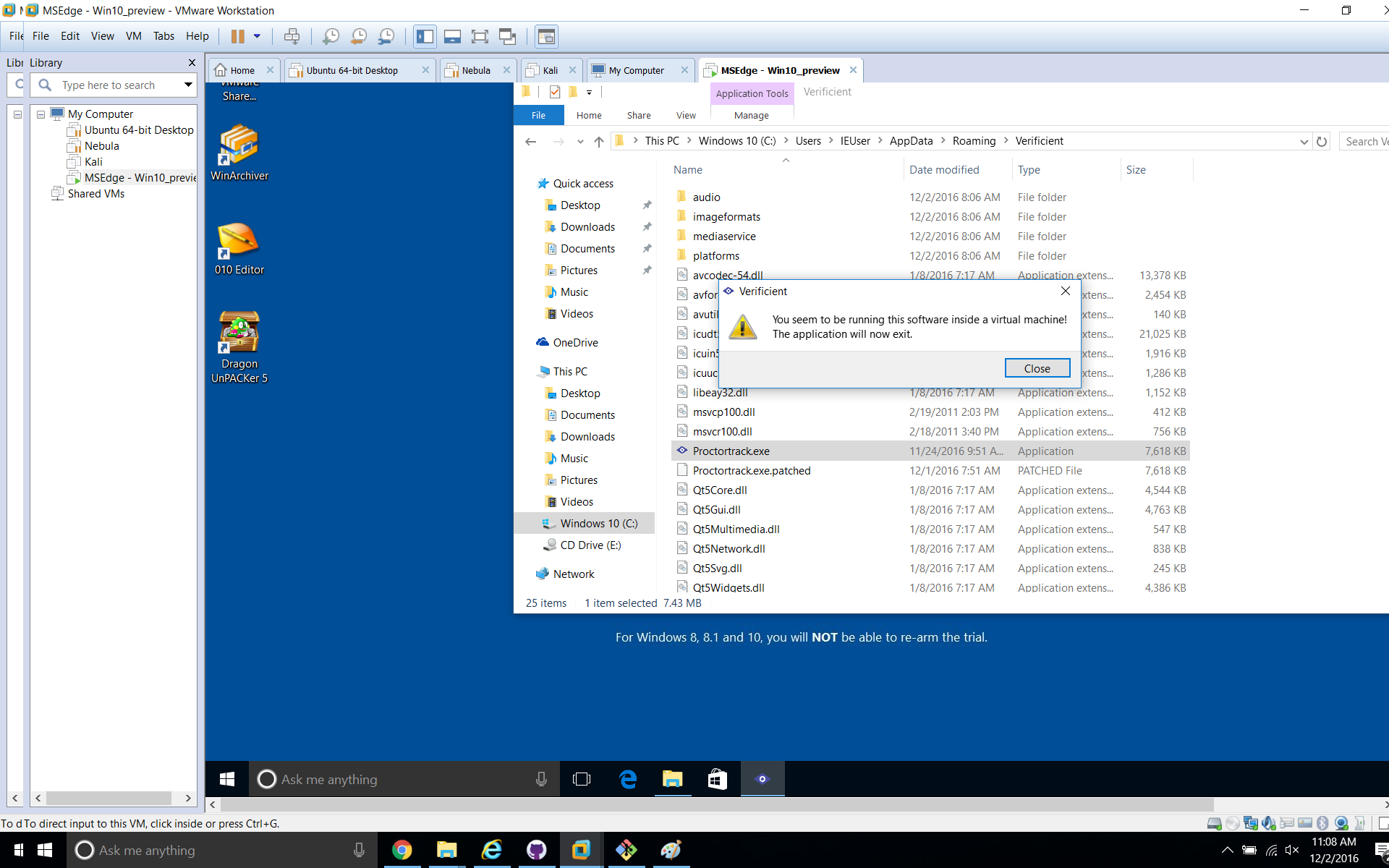
However, searching for this string in Ida yielded no results. The binary also seemed to be too small for the amount of functionality that the software contains. After scanning through the code, I realized it was packed, and the code I was able to see was simply responsible for unpacking the rest of it.
I traced the system calls and realized the actual unpacked binary was being run from the
C:\Users\**CurrentUser**\AppData\Roaming\Verificient\Proctortrack.exe
directory. I opened up the unpacked binary, searched for the same string as before and voila.

Using Ida (or any other disassembler), I traced the Xref to where that string was referenced in the code, as seen below.
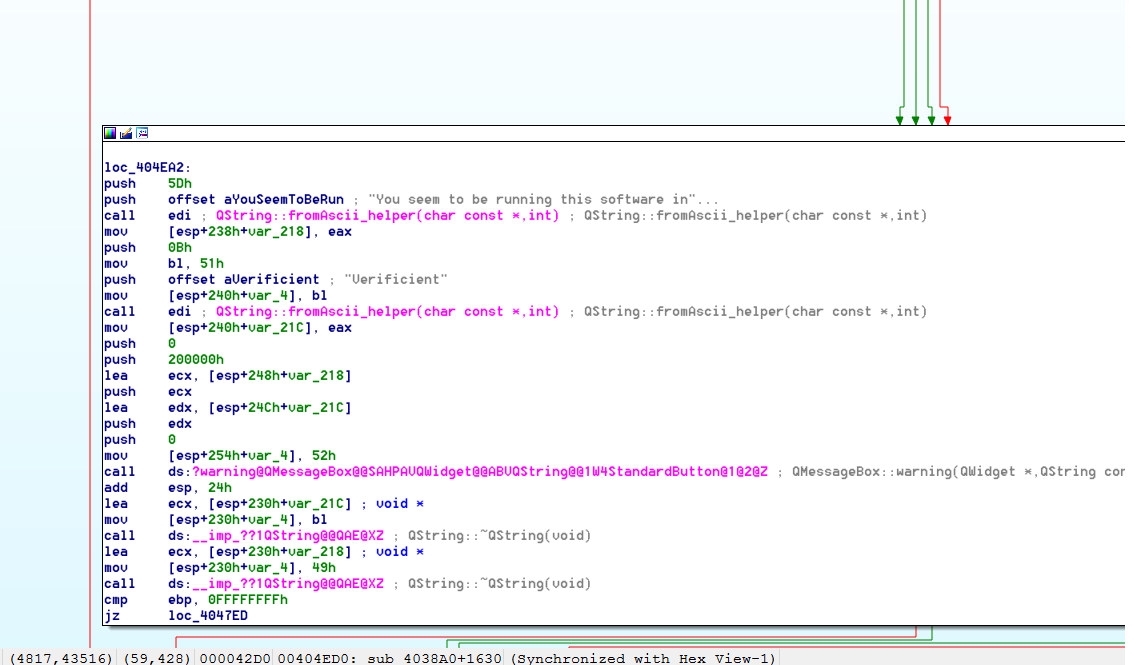
The next step is to examine the conditions that lead to this block of code being executed and make sure they never see the light of day. Thanks to Ida's graph view, I simply scrolled up to the possible jump instructions that leads to the "bad" message.
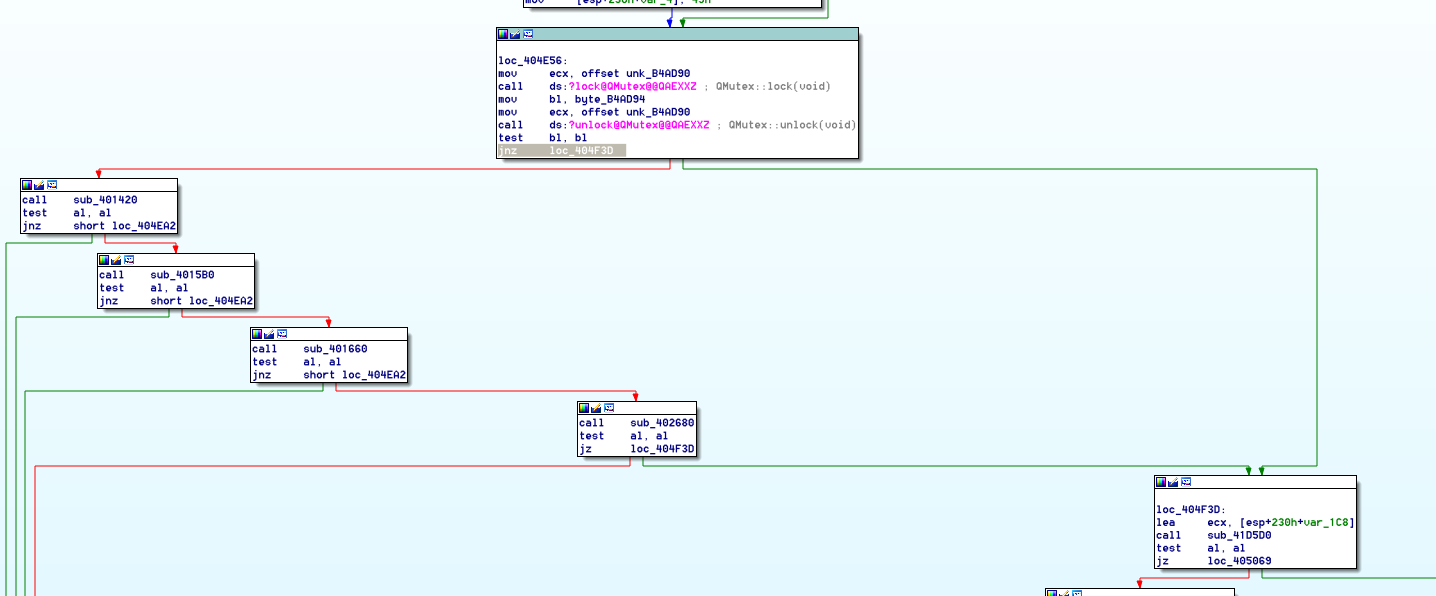
As you can see, the three conditionals to the left of the screenshot all call a subroutine that performs some type of VM check. If the test returns positive, the program jumps to 0x404EA2, which is our bad code block. We don't want to do that! We want to run the software inside a VM. So let's make sure those pesky VM checks are never executed. Let's just patch the highlighted instruction from jne to jmp. In practice, all we're doing is modifying 3 bytes starting at 0x404E74 from 0x0f85c3 to 0xe9c400.
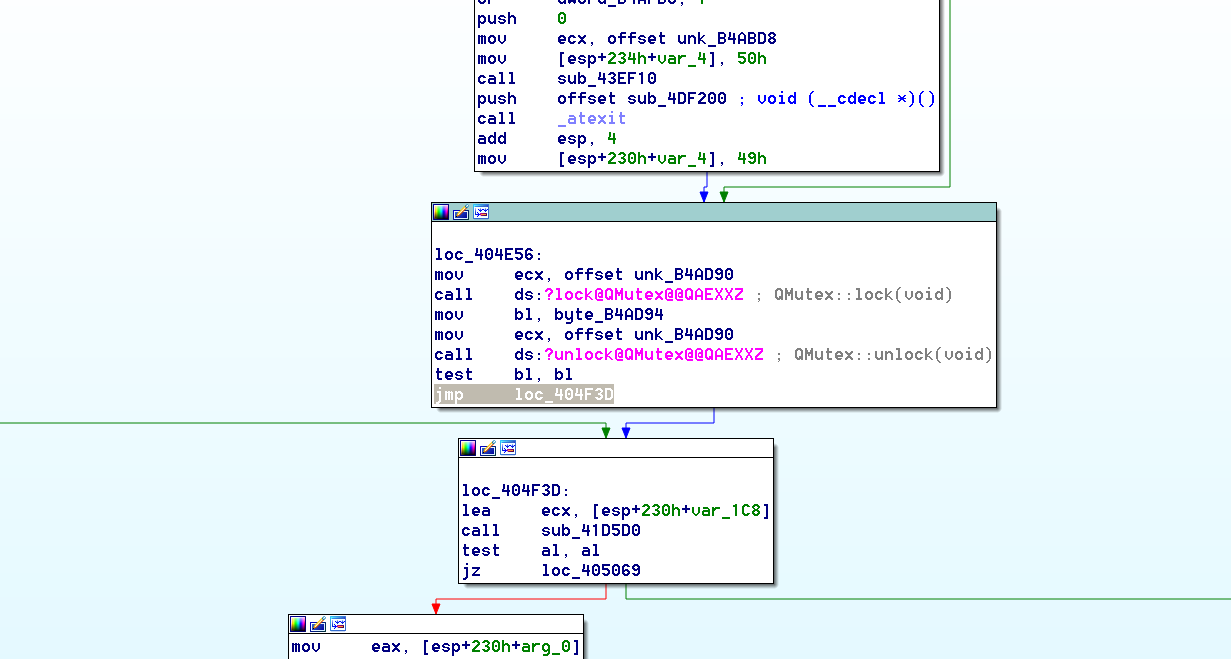
As you can see, there are no longer any branches that take us to the VM checks. Let's run the program now and make sure it worked.
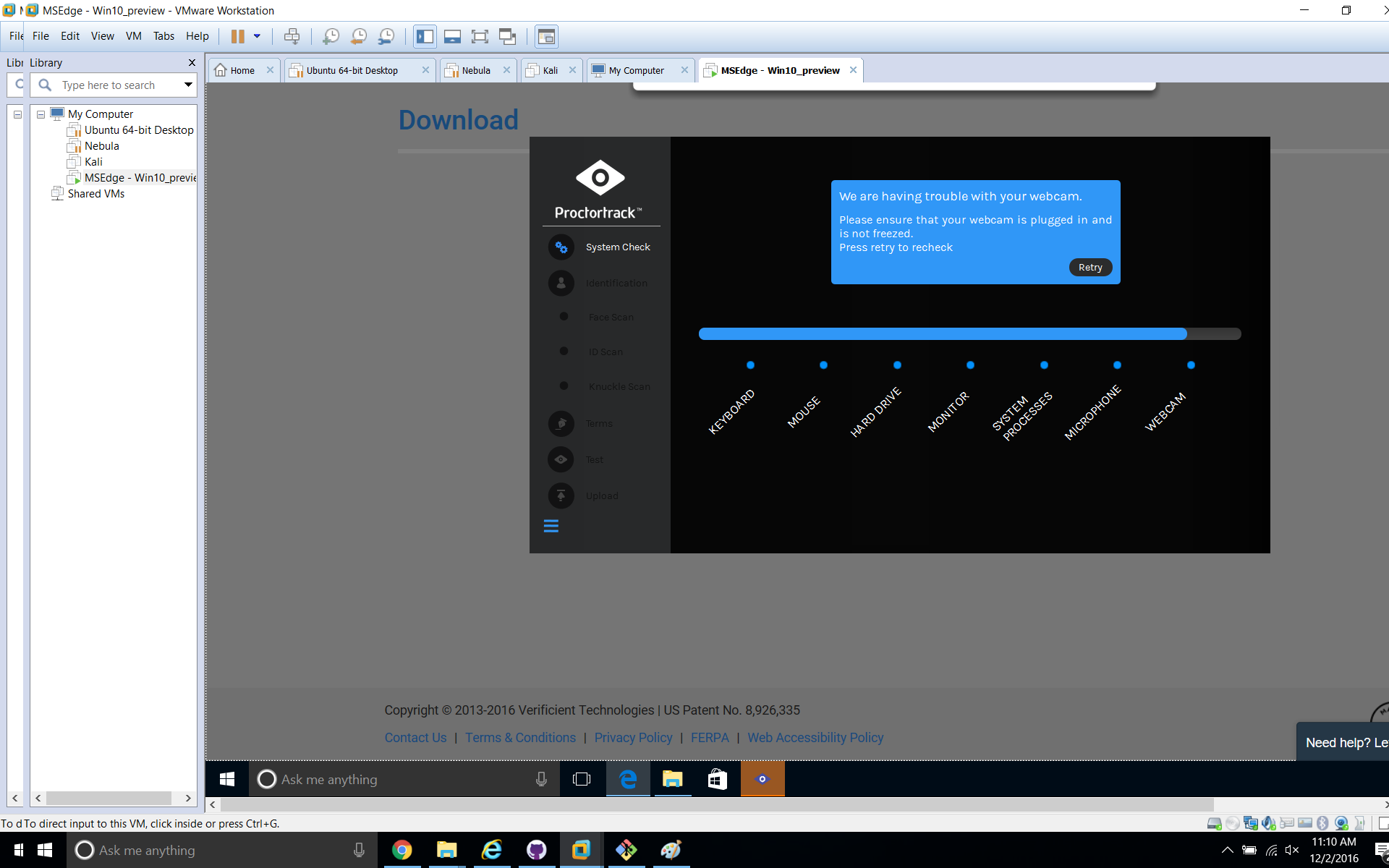
Success!
Note, I was able to complete the practice test completely fine within the VM. I don't have my laptop open for the above screenshot, so that's the only reason it doesn't detect my webcam.
The proof of concept powershell script above works on the version of the executable that I downloaded from the website today (December 2, 2016) when running the practice test. It relies on the offset getting us to the right instruction, so if the binary is patched or modified, the offset may not be correct anymore. Nevertheless, the above method should get you where you need to go until this bypass is made more difficult or impossible.
The way I see it, there are a few possible solutions to this, none of them foolproof. Any solution would essentially have to solve the same problem that video game companies are trying to solve with pirates cracking their software. Whenever you are depending on someone running software on their own machine, you run the problem of it being reverse-able. The only advantage a software developer has over a reverse-engineer is that they can write their code in a higher level language that is easy to read, where as the reverser has to read the code in assembly. That being said, here are two possible solutions that can be implemented by themselves or together for maximum effectiveness.
-
Obfuscate the code to make it more difficult for someone to reverse engineer. There are a few ways to do this, but none of them are foolproof. The code can be packed with a custom or common packing tool to make the assembly more difficult to read through static analysis, but the reverse engineer may still be able to unpack it. There are also several tools that can obfuscate code by adding random jumps and loops to make it much more difficult to follow in a disassembler. This may help make it more difficult to reverse-engineer, but it is a band-aide.
-
The best solution would be a server-side integrity check of the binary. Since the software already must communicate with the web server to run as intended, it shouldn't be too difficult to send an md5 sum of the binary back to the server and compare it against the expected value. This wouldn't prevent the software from running in a VM, but it could prevent the student from being able to actually take any tests if they are using a modified binary.
Option 2 would work best if implemented in conjunction with option 1. If not done properly, a reverse-engineer could intercept the call to perform the md5 hash of the binary and simply return the expected value instead of the actual value.
Neither of these options are perfect solutions, but they will at least make it so that a 6 line powershell script can't bypass the VM detection completely. If a perfect solution existed for preventing software from being modified in a way the engineers didn't intend, the software industry wouldn't still be playing tug of war with pirates. However, these two steps would go a long way towards making Proctortrack better able to withstand attacks and perform the task it was designed to do: stop cheaters.