


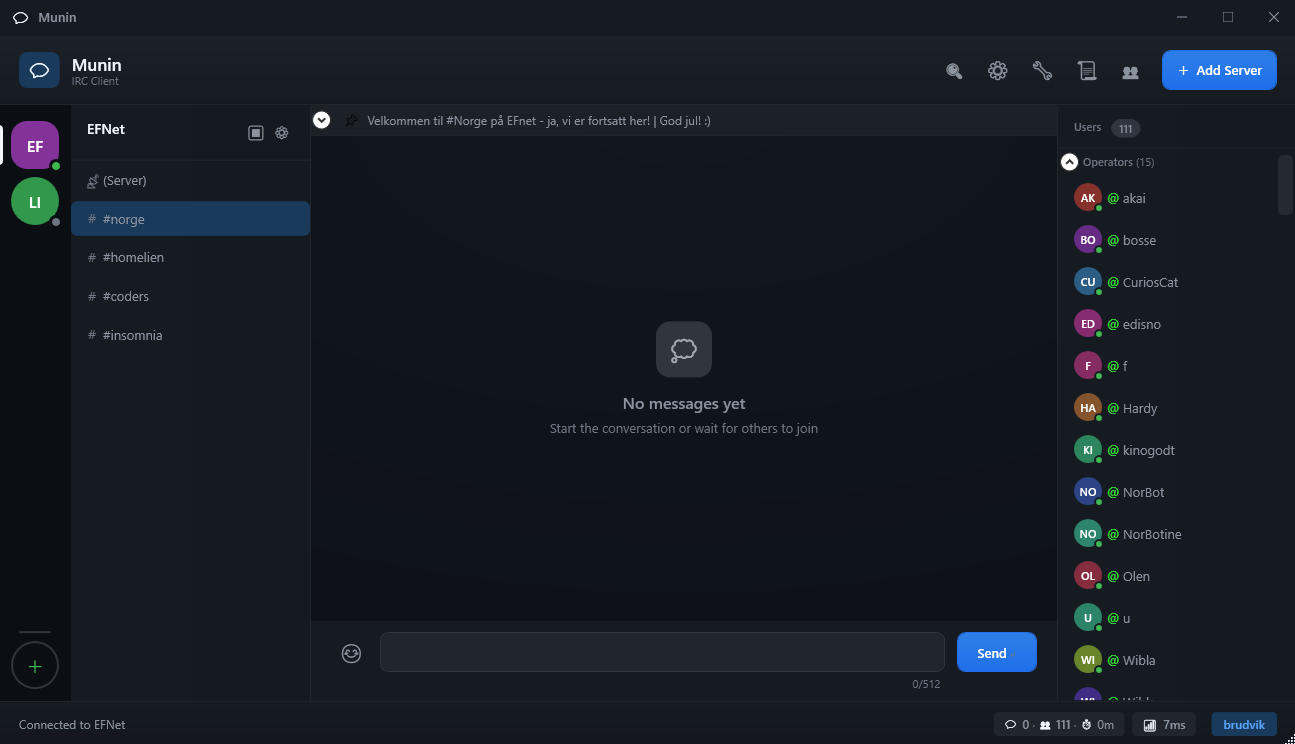
- Multi-server support - Connect to multiple IRC servers simultaneously
- SSL/TLS - Secure connections with optional certificate validation
- SASL authentication - PLAIN and SCRAM-SHA-256 support
- Client certificates - Authentication with PFX/P12 certificates
- Proxy support - SOCKS4, SOCKS5, and HTTP proxy
- IPv6 support - Native IPv6 with configurable preference and IPv4 fallback
- Built-in Ident server - RFC 1413 compliant identd for IRC authentication
- MuninRelay - Route IRC through VPN on another machine (companion tool)
- AES-256-GCM encryption - All local data can be encrypted
- PBKDF2 key derivation - 310,000 iterations (OWASP 2023)
- FiSH encryption - End-to-end message encryption compatible with mIRC/HexChat
- DH1080 key exchange - Automatic secure key negotiation
- Anonymous filenames - Hides server/channel names in log files
- Auto-lock - Lock after configurable inactivity period
- Secure deletion - Overwrite files before deletion
- Security log - Track unlock attempts
- Certificate pinning - Detect SSL certificate changes
- Modern dark theme - Professional polished design with Windows 11-style window chrome
- Modern layout - Vertical server rail, channel sidebar, and expandable chat area
- Custom title bar - Borderless window with rounded corners and integrated controls
- Multi-language - English and Norwegian (auto-detects system language)
- Tab completion - For nicknames and commands
- Command history - Arrow up/down navigation
- Highlight words - Custom alert words with red unread badges
- Ignore list - Hide messages from users
- Sound and flash alerts - Configurable notifications
- Connection spinner - Visual feedback during server connections
- History loading - Configurable message history on channel join (10-1000 lines)
- History timestamps - Shows date range when loading previous messages
- Welcome screen - Feature highlights when no servers are configured
- Empty states - Friendly icons for empty channels and no selection
- Channel statistics - Live message count, user count, and session duration in status bar
- Server latency - Real-time ping display in status bar
- Topic bar - Expandable channel topic display
- Enhanced user list - Initials-based avatars, status indicators, collapsible groups
- Text emoticon picker - Quick access to IRC-style emoticons
- Character counter - Shows message length (512 char limit)
- Smooth animations - Fade-in effects for messages and UI elements
- Smart auto-scroll - Pauses when you scroll up, resumes when you reach bottom
- Jump to Latest - Button with unread message count when scrolled up
- Message grouping - Consecutive messages from same user show compact headers
- Zebra striping - Alternating row backgrounds for better readability
- Message search - Ctrl+F to search with visual highlighting of matches
- Right-click menu - Copy message, copy nickname, whois, open query, ignore user
- Double-click to copy - Quickly copy any message to clipboard
- Keyboard shortcuts - Ctrl+End for latest, Page Up/Down for scrolling
- Auto-perform - Run commands on connection
- Aliases - Custom command shortcuts
- Flood protection - Token bucket algorithm
- Portable mode - Run from USB drive
- Encrypted logs - Secure log storage
- Eggdrop-inspired - Familiar user flags and management concepts
- 24/7 operation - Runs as Windows Service or Linux systemd
- Remote control - TLS-secured control from Munin UI
- Encrypted config - All sensitive data encrypted (AES-256-GCM)
- User database - Eggdrop-style flags (n/m/o/v/f/a/g/j/k/b/d)
- Auto-reconnect - Exponential backoff on disconnect
- Multi-server - Connect to multiple IRC networks
- Lua scripting - Powerful Lua scripts with full IRC API (MoonSharp engine)
- JSON triggers - Simple pattern-based automation without coding
- C# plugins - Compiled plugins for maximum power and extensibility
- Script storage - Persistent storage API for scripts
- Timer support - Schedule one-shot and repeating actions
- Custom commands - Register your own /commands
- Full event access - Messages, joins, parts, kicks, mode changes, and more
- Script console - Test and debug scripts with live output
- Auto-load - Scripts in
%APPDATA%\Munin\scripts\load automatically on startup
- Hugin: IRC server companion project
- Windows 10/11
- .NET 8.0 Runtime
git clone https://github.com/your-username/Munin.git
cd Munin
dotnet build
dotnet run --project Munin.UIdotnet publish Munin.UI -c Release -r win-x64 --self-containedMunin/
├── Munin.Core/ # Core logic and services
│ ├── Models/ # Data models
│ ├── Scripting/ # Scripting system
│ │ ├── Lua/ # MoonSharp Lua engine
│ │ ├── Triggers/ # JSON trigger automation
│ │ └── Plugins/ # C# plugin loader
│ └── Services/ # Business logic
│ ├── IrcConnection.cs # IRC protocol
│ ├── EncryptionService.cs # AES-256-GCM
│ ├── SecureStorageService.cs
│ ├── LoggingService.cs
│ ├── RelayConnector.cs # MuninRelay client
│ └── ...
├── Munin.UI/ # WPF interface
│ ├── Views/ # XAML windows
│ ├── ViewModels/ # MVVM ViewModels
│ ├── Controls/ # Custom controls
│ ├── Themes/ # Styling and themes
│ └── Converters/ # XAML converters
├── Munin.Relay/ # VPN relay companion tool
│ ├── Program.cs # Entry point and CLI
│ ├── RelayConfiguration.cs # JSON config handling
│ ├── RelayService.cs # Background service
│ ├── RelayConnection.cs # Connection handling
│ ├── RelayProtocol.cs # Binary protocol
│ ├── TokenProtection.cs # DPAPI encryption
│ ├── IpVerificationService.cs # GeoIP checking
│ └── CertificateGenerator.cs # SSL cert generation
├── scripts/ # User scripts
│ └── examples/ # Example scripts
└── docs/ # Documentation
| Setting | Description | Default |
|---|---|---|
| History lines | Number of history messages to load | 100 |
| Auto-lock minutes | Minutes of inactivity before lock | 5 |
| Auto-delete logs | Days to keep log files | 30 |
| Secure delete | Overwrite files before deletion | Off |
Data is stored in: %APPDATA%\Munin\
- Create an empty file
portable.txtnext toMunin.exe - Data will now be stored in
[exe-folder]\data\
Munin includes a built-in Ident server, similar to mIRC's identd. Many IRC servers query port 113 to verify your identity before allowing connection.
| Setting | Description | Default |
|---|---|---|
| Enable Ident Server | Turn the ident server on/off | Off |
| Port | TCP port for ident queries | 113 |
| Username | Custom username (empty = system user) | (empty) |
| Operating System | Reported OS type (UNIX/WIN32/OTHER) | WIN32 |
| Hide User | Respond with HIDDEN-USER error | Off |
Note: Port 113 requires administrator privileges on Windows. You can use a higher port and configure port forwarding, or run Munin as administrator.
MuninRelay is a companion tool that allows you to route your IRC traffic through a VPN running on a different machine. This is useful when:
- Your VPN is on a dedicated server/VM and you want IRC traffic to appear from that location
- You want to separate VPN traffic (IRC only) from your main connection
- You need to bypass restrictive firewalls that block IRC but allow HTTPS
┌─────────────────┐         SSL/TLS           ┌─────────────────┐         TCP/SSL         ┌─────────────────┐
│                 │ ◄────────────────────────►│                 │◄───────────────────────►│                 │
│   Munin Client  │    Auth: HMAC-SHA256      │   MuninRelay    │                         │   IRC Server    │
│   (Your PC)     │                           │   (VPN Server)  │                         │  (e.g. Libera)  │
│                 │                           │                 │                         │                 │
└─────────────────┘                           └─────────────────┘                         └─────────────────┘
      Your IP                                      VPN's IP                                   Server sees
    192.168.1.x                                  45.67.89.xxx                                VPN's IP
| Feature | Description |
|---|---|
| SSL/TLS Encryption | All traffic between Munin and relay is encrypted (TLS 1.2+) |
| HMAC-SHA256 Auth | Challenge-response authentication prevents replay attacks |
| DPAPI Token Storage | Auth token encrypted at rest using Windows DPAPI |
| Machine-Bound Keys | Token can only be decrypted on the machine where it was created |
| IP Verification | Verifies VPN is active before accepting connections |
| GeoIP Detection | Confirms traffic exits from expected country |
| Server Allowlist | Restrict which IRC servers can be accessed through relay |
-
Copy MuninRelay to your VPN server:
MuninRelay.exe -
Run for first time to generate configuration:
MuninRelay.exe
This creates
config.jsonand displays your authentication token:╔═══════════════════════════════════════════════════════════════╗ ║ IMPORTANT: Copy this token now - it cannot be retrieved! ║ ╠═══════════════════════════════════════════════════════════════╣ ║ Token: abc123...xyz789 ║ ╚═══════════════════════════════════════════════════════════════╝⚠️ Save this token! It's encrypted inconfig.jsonand cannot be viewed again. -
Set a master password when prompted:
=== MuninRelay Configuration Setup ===
Enter a master password to protect the configuration.

Enter master password: ********
Confirm password: ********
Master password set successfully!
🔐 Master password protection: The entire
config.jsonis encrypted with your master password using AES-256. You'll need this password whenever you start MuninRelay or modify settings. -
Configure allowed servers using the
--configcommand:MuninRelay.exe --config
This opens an interactive menu where you can:
- Change listen port (default: 6900)
- Enable/disable IP verification
- Set expected country code for VPN verification
- Add/remove allowed IRC servers
- Set maximum connections
Example allowed servers configuration:
Allowed servers: 1. irc.libera.chat:6697 (SSL) 2. irc.efnet.org:6697 (SSL) [A]dd server, [R]emove server, [B]ack -
Open firewall port (e.g., 6900):
netsh advfirewall firewall add rule name="MuninRelay" dir=in action=allow protocol=TCP localport=6900
-
Install as Windows Service (optional, for auto-start):
MuninRelay.exe --install
net start MuninRelay
-
Add or Edit a Server (Settings → Server List)
-
Enable MuninRelay in the "MuninRelay (VPN Routing)" section:
- ☑️ Enable MuninRelay
- Host: Your VPN server's IP or hostname
- Port: 6900 (or your configured port)
- Auth Token: Paste the token displayed during first run
- ☑️ Use SSL (recommended)
-
Connect - Your IRC traffic now routes through the VPN
| Command | Description |
|---|---|
MuninRelay |
Run in console mode |
--install |
Install as Windows Service (requires Admin) |
--uninstall |
Remove Windows Service (requires Admin) |
--config |
Interactive configuration menu |
--setup-password |
Set up or reset the master password |
--change-password |
Change the master password |
--generate-token |
Generate new authentication token |
--generate-cert |
Generate new SSL certificate |
--verify-ip |
Check current IP and VPN status |
--list-servers |
List allowed IRC servers |
--add-server |
Add an allowed server (see below) |
--remove-server |
Remove an allowed server |
--help |
Display help |
MuninRelay requires a master password to protect sensitive configuration data. On first run, you'll be prompted to create one:
First-time setup: Master Password Required
══════════════════════════════════════════════════════
A master password is needed to encrypt sensitive configuration.
This password will be required each time MuninRelay starts.
Minimum 8 characters.

Create master password: ********
Confirm password: ********
How it works:
- Your password hash is stored encrypted with DPAPI (machine-bound)
- Sensitive data (auth token, server list) is encrypted with AES-256 using your password
- Double protection: Even on this machine, you need the password to decrypt
Changing the password:
MuninRelay.exe --change-passwordThis re-encrypts all configuration with the new password.
To manage the allowed IRC server list:
# List current servers
MuninRelay.exe --list-servers

# Add a server (with SSL)
MuninRelay.exe --add-server irc.private.net 6697 ssl

# Add a server (without SSL)
MuninRelay.exe --add-server irc.private.net 6667

# Remove a server
MuninRelay.exe --remove-server irc.private.net 6697| Setting | Description | Default |
|---|---|---|
listenPort |
Port to listen for Munin connections | 6900 |
authToken |
Master password encrypted auth token | (generated) |
encryptedAllowedServers |
Master password encrypted server list | (generated) |
certificatePath |
Path to SSL certificate (PFX) | (auto-generated) |
certificatePassword |
Password for certificate | (auto-generated) |
enableIpVerification |
Verify VPN is active on startup | true |
ipCheckIntervalMinutes |
How often to re-verify IP | 5 |
expectedCountryCode |
Expected GeoIP country (e.g., "SE", "NL") | (none) |
maxConnections |
Maximum simultaneous connections | 10 |
logFilePath |
Path for log files | logs/muninrelay-.log |
verboseLogging |
Enable debug logging | false |
Security Note: Configuration encryption uses a two-layer approach:
- Master password - AES-256 encryption of sensitive data
- DPAPI - Machine-bound encryption of the password hash
This means you need both access to this machine AND the master password to decrypt the configuration.
MuninRelay can verify that your VPN is active by checking your public IP:
MuninRelay.exe --verify-ipOutput:
IP Address:   45.67.89.123
Country:      Netherlands (NL)
City:         Amsterdam, North Holland
Organization: NordVPN
Likely VPN:   Yes


Expected country: NL
Country matches:  Yes ✓
If the IP changes or VPN disconnects, the relay logs a warning.
MuninRelay recognizes these VPN providers (for informational purposes):
- NordVPN, ExpressVPN, Surfshark, ProtonVPN, CyberGhost
- Private Internet Access, IPVanish, Mullvad, Windscribe
- TunnelBear, Hotspot Shield, Hide.me, VyprVPN
- DigitalOcean, AWS, Azure, Google Cloud (for self-hosted VPNs)
| Problem | Solution |
|---|---|
| "Cannot decrypt AuthToken" | Token was created on a different machine. Run --generate-token |
| Connection refused | Check firewall rules and that relay is running |
| Authentication failed | Verify token matches between client and relay |
| "Server not in allowed list" | Add the IRC server to allowedServers in config.json |
| Certificate errors | Enable "Accept Invalid Certificates" in client, or use --generate-cert |
-
Token Security
- The auth token is encrypted with Windows DPAPI
- Even if someone copies
config.json, they cannot decrypt the token on another machine - Generate a new token immediately if you suspect compromise:
--generate-token
-
Network Security
- Always use SSL between Munin and MuninRelay
- The relay generates a self-signed certificate automatically
- For production, consider using a proper SSL certificate
-
Access Control
- Use
allowedServersto restrict which IRC servers can be accessed - Keep
maxConnectionslow to prevent abuse - Monitor logs for unauthorized access attempts
- Use
-
VPN Verification
- Enable
enableIpVerificationto ensure VPN is active - Set
expectedCountryCodeto your VPN exit country - The relay will warn if IP changes unexpectedly
- Enable
- Algorithm: AES-256-GCM (authenticated encryption)
- Key derivation: PBKDF2-SHA256, 310,000 iterations (OWASP 2023)
- Salt: 32 bytes, unique per installation
- Nonce: 12 bytes, unique per encryption operation
- Algorithm: Blowfish (custom implementation, no external dependencies)
- Modes: ECB (+OK prefix) and CBC (*OK prefix)
- Compatibility: Works with mIRC FiSH, HexChat FiSH, and other FiSH clients
- Key Exchange: DH1080 for automatic secure key negotiation
- Usage:
/setkey #channel secretor/keyx nickfor automatic key exchange
- Filenames are anonymized with HMAC-SHA256 when encryption is enabled
- No telemetry or network requests outside of IRC
- Stores SHA-256 fingerprints for each server's SSL certificate
- Alerts when server certificate changes unexpectedly
- Helps detect MITM attacks
| Command | Description |
|---|---|
/join #channel |
Join a channel |
/part [message] |
Leave current channel |
/msg nick message |
Send private message |
/me action |
Send action message |
/nick newnick |
Change nickname |
/quit [message] |
Disconnect from server |
/topic [text] |
View/set channel topic |
/whois nick |
View user info |
/ignore nick |
Ignore a user |
/alias name command |
Create alias |
/setkey [target] key |
Set FiSH encryption key |
/delkey [target] |
Remove FiSH encryption key |
/keyx nick |
Initiate DH1080 key exchange |
/showkey [target] |
Show current FiSH key (masked) |
Munin supports three scripting methods for automation and extensibility.
Scripts are loaded automatically from: %APPDATA%\Munin\scripts\
Full-featured scripting with the MoonSharp Lua interpreter.
-- greet.lua - Auto-greet on join
irc.on("join", function(e)
    if e.nick ~= irc.me(e.server) then
        irc.say(e.server, e.channel, "Welcome, " .. e.nick .. "!")
    end
end)

-- Respond to messages
irc.on("message", function(e)
    if e.text:match("^!hello") then
        e:reply("Hello, " .. e.nick .. "!")
    end
end)

-- Timer example
timer.timeout(function()
    print("5 seconds have passed!")
end, 5000)
Available IRC API:
irc.say(server, target, message)- Send messageirc.msg(server, target, message)- Alias for sayirc.action(server, target, message)- Send /me actionirc.notice(server, target, message)- Send noticeirc.raw(server, command)- Send raw IRC commandirc.join(server, channel, [key])- Join channelirc.part(server, channel, [reason])- Leave channelirc.kick(server, channel, nick, [reason])- Kick userirc.mode(server, target, modes)- Set modesirc.me(server)- Get current nicknameirc.on(event, callback)- Register event handlertimer.timeout(callback, ms)- One-shot timertimer.interval(callback, ms)- Repeating timerstorage.get(key)/storage.set(key, value)- Persistent storageprint(text)- Print to script console
Simple pattern-based automation without coding.
{
  "name": "Auto-Response Bot",
  "triggers": [
    {
      "pattern": "^!help$",
      "response": "Available commands: !help, !info, !ping",
      "type": "message"
    },
    {
      "pattern": "^!ping$",
      "response": "Pong!",
      "type": "message"
    },
    {
      "pattern": ".*",
      "response": "Welcome to the channel!",
      "type": "join",
      "excludeSelf": true
    }
  ]
}
Trigger types: message, join, part, quit, nick, topic
Compiled plugins for maximum power. Implement IPlugin interface:
public class MyPlugin : IPlugin
{
    public string Name => "My Plugin";
    public string Version => "1.0.0";

    public void Initialize(IPluginContext context)
    {
        context.RegisterCommand("greet", args =>
        {
            context.SendMessage(context.CurrentChannel, $"Hello {args}!");
        });

        context.OnMessage += (sender, e) =>
        {
            if (e.Content.Contains("hello"))
                context.SendMessage(e.Channel, $"Hi {e.Nick}!");
        };
    }

    public void Shutdown() { }
}- .NET 8.0 - Platform
- WPF - UI framework
- MoonSharp - Lua scripting engine
- Serilog - Logging
- CommunityToolkit.Mvvm - MVVM framework
Munin has a comprehensive test suite to ensure reliability and correctness. All new features and bug fixes must include corresponding tests.
The project currently has 904 tests (100% passing) covering:
-
Phase 1 - Security & Core Logic (144 tests)
- EncryptionService, FishCryptService, SecureStorageService
- IrcMessageParser with IRCv3 tags and CTCP
-
Phase 2 - Protocol & Network (50 tests)
- SASL SCRAM-SHA-256 authentication
- DH1080 key exchange for FiSH encryption
-
Phase 3 - Integration Testing (13 tests)
- End-to-end encryption workflows
- Complete authentication handshakes
-
Phase 4 - Critical Infrastructure (96 tests)
- IRCv3 capability negotiation
- Channel and user state management
- Flood protection (token bucket algorithm)
-
Phase 5 - Security & Privacy (78 tests)
- Filename anonymization (HMAC-SHA256)
- Security audit logging with rate limiting
- Secure file deletion with cryptographic overwriting
-
Phase 6 - Configuration & UX (40 tests)
- Server/channel configuration persistence
- Toast notifications and sound alerts
-
Phase 7 - Advanced Features (79 tests)
- Lua script engine (MoonSharp)
- Friend list tracking (ISON polling)
- Auto-perform command automation
-
Phase 8 - Core Models (68 tests)
- Server configuration with SSL/SASL/proxy
- IRCv3 batch processing
- WHOIS data management
-
Phase 9 - Data Models (65 tests)
- Channel LIST entries and mode state
- WHO reply parsing
- Server grouping/organization
-
Phase 10 - Protocol Models (76 tests)
- ISUPPORT (005) token parsing
- IRC message structure with IRCv3 tags
- Ban/exception/invite list entries
-
Phase 11 - Services Testing (67 tests)
- RFC 1413 ident server implementation
- Command alias management and expansion
- SSL certificate pinning and MITM detection
-
Phase 12 - IrcConnection Integration (18 tests)
- MockIrcServer helper with auto CAP negotiation
- Full TCP/IRC protocol integration testing
- Connection, disconnection, and message flow verification
-
Phase 13 - UI ViewModels (61 tests)
- UserViewModel: Mode prefixes, away status, group classification
- MessageViewModel: Timestamp formatting, message types, nickname coloring
- ServerViewModel: Connection state, status icons, latency display
- ChannelViewModel: Message/user management, unread tracking
Run all tests:
dotnet testRun tests for a specific project:
dotnet test tests/Munin.Core.Tests
dotnet test tests/Munin.UI.Tests
dotnet test tests/Munin.Agent.Tests
dotnet test tests/Munin.Relay.Tests
Run specific test class:
dotnet test --filter "FullyQualifiedName~EncryptionServiceTests"- xUnit 2.6.6 - Test runner
- FluentAssertions 6.12.0 - Expressive assertions
- Moq - Mocking framework (where needed)
See ISSUES.md for documented test failures and known bugs.
- DH1080KeyExchange: ~27% flaky failure rate in key exchange tests (under investigation)
When contributing new features:
- Write tests first - Follow TDD when possible
- Test all paths - Cover success, failure, and edge cases
- Use descriptive names - Test names should explain what is being tested
- Follow Arrange-Act-Assert - Structure tests clearly
- Update documentation - Document test coverage in CHANGELOG.md
See .github/copilot-instructions.md for detailed testing guidelines.
| Shortcut | Action |
|---|---|
Ctrl+F |
Toggle message search |
Ctrl+End |
Jump to latest message |
Page Up/Down |
Scroll through messages |
Up/Down |
Navigate command history |
Tab |
Auto-complete nicknames/commands |
Escape |
Close search/dialogs |
Enter |
Send message |
This project is licensed under the MIT License. See LICENSE for details.
Contributions are welcome!
- Fork the project
- Create a feature branch (
git checkout -b feature/MyNewFeature) - Commit your changes (
git commit -m 'Add new feature') - Push to the branch (
git push origin feature/MyNewFeature) - Open a Pull Request
Create an issue for questions or bug reports.
- ISSUES.md - Known issues and bugs requiring investigation