Iran map in SVG format for React JS applications.
Note: This library works with ⚛️ React versions ^18.0.0 and ^19.0.0




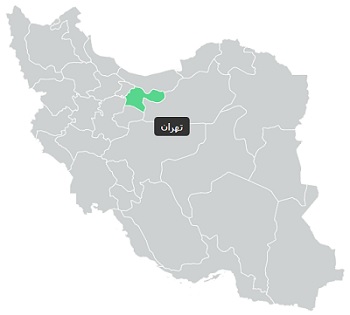
Run the following command to install:
npm i iran-map-simple
| Prop | Type | Default | Description |
|---|---|---|---|
| width | number |
500 | Sets the map width. (px) |
| defaultProvinces | number[] |
[] | Pre-selected provinces IDs. |
| fillColor | string |
#CCD1D1 |
Background color of provinces. |
| hoverColor | string |
#C1C1C1 |
Background color on hover. |
| selectedColor | string |
#58D68D |
Background color for selected provinces. |
| tooltipBackground | string |
#333333 |
Tooltip background color. |
| tooltipColor | string |
#FFFFFF |
Tooltip text color. |
| tooltipFontSize | number |
12 |
Font size of tooltip text. (px) |
| tooltipFontFamily | string |
sans-serif |
Font family of tooltip text. |
| onSelect | (provinces: number[]) => void |
console.log |
Callback fn when provinces are selected. |
The list of provinces is separated by ID. After clicking on each province, the corresponding ID is returned.
| Province name | id |
|---|---|
| آذربایجان شرقی | 1 |
| آذربایجان غربی | 2 |
| اردبیل | 3 |
| اصفهان | 4 |
| ایلام | 5 |
| بوشهر | 6 |
| تهران | 7 |
| چهار محال و بختیاری | 8 |
| خوزستان | 10 |
| زنجان | 11 |
| سمنان | 12 |
| سیستان و بلوچستان | 13 |
| فارس | 14 |
| کرمان | 15 |
| کردستان | 16 |
| کرمانشاه | 17 |
| کهگیلویه و بویر احمد | 18 |
| گیلان | 19 |
| لرستان | 20 |
| مازندران | 21 |
| مرکزی | 22 |
| هرمزگان | 23 |
| همدان | 24 |
| یزد | 25 |
| قم | 26 |
| گلستان | 27 |
| قزوین | 28 |
| خراسان جنوبی | 29 |
| خراسان رضوی | 30 |
| خراسان شمالی | 31 |
| البرز | 32 |
CSS classes based on the BEM naming convention:
- Wrapper:
iran-map-simple - SVG:
iran-map-simple__svg - Path:
iran-map-simple__province - Path-selected):
iran-map-simple__province--selected - Tooltip:
iran-map-simple__tooltip
import IranMapSimple from 'iran-map-simple';

const App = () => {
  return (
    <IranMapSimple defaultProvinces={[7]} onSelect={console.log} />
  )
}

export default App;In order to start the demo version, run the following commands:
npm run build
cd ./demo
npm i
npm run dev
The example project uses Vite in background and the output will be here by default: http://localhost:5173/