



A Flutter plugin that provides native in-app update experiences using StoreKit (iOS) and the Google Play In-App Updates API (Android), letting users update without leaving the app.
On iOS, it presents the App Store product page using SKStoreProductViewController (StoreKit), keeping users inside the app during the update flow. On Android, it integrates with Google Play's In-App Updates API to support both immediate (blocking) and flexible (background) update flows.
| Platform | Supported |
|---|---|
| Android | ✅ |
| iOS | ✅ |
| Web | ❌ |
| Windows | ❌ |
| macOS | ❌ |
| Linux | ❌ |
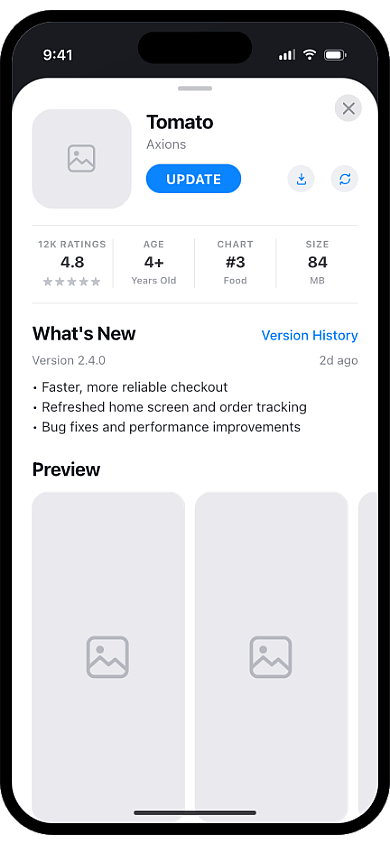
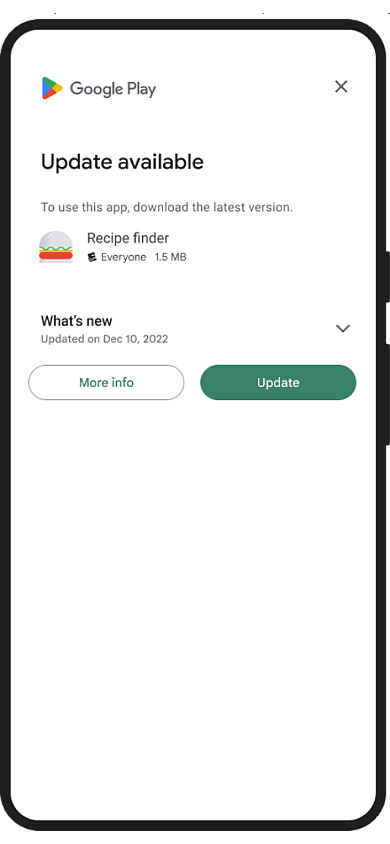
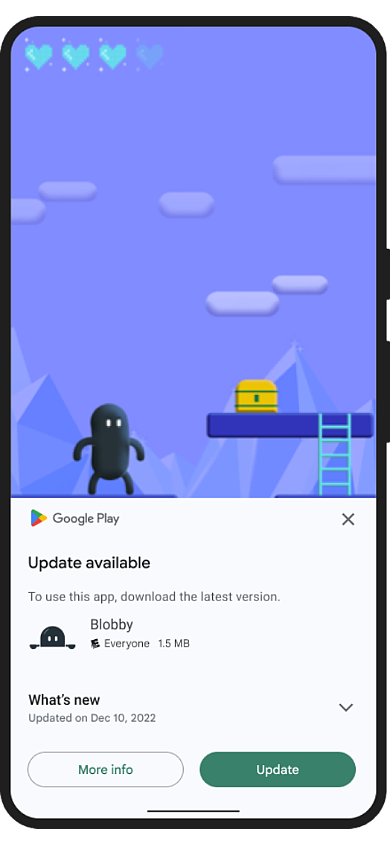
| iOS | Android Immediate | Android Flexible |
|---|---|---|
 |
 |
 |
- Prompts users to update directly inside the app using the native App Store sheet — no browser redirect, no app switch
- Pure Swift with zero native setup — no AppDelegate changes needed
- Works with both CocoaPods and Swift Package Manager out of the box
- Check if an update is available and how long it's been pending before showing any prompt
- Immediate update — blocks the app with a full-screen prompt for critical updates the user must install
- Flexible update — lets users keep using the app while the new version downloads in the background
- Track download progress in real time via a stream to show your own UI
This package offers one plugin that supports native in-app updates on both Android and iOS. It uses Google Play's official In-App Updates API on Android and StoreKit-powered App Store update flows on iOS, allowing users to update without leaving the app experience.
| Feature | in_app_update_flutter | in_app_update | upgrader |
|---|---|---|---|
| iOS in-app update prompt (no redirect) | ✅ | ❌ | ❌ |
| Android immediate update (blocking) | ✅ | ✅ | ❌ |
| Android flexible update (background) | ✅ | ✅ | ❌ |
| Android install state / progress stream | ✅ | ✅ | ❌ |
This package is designed for developers who want native update experiences on both Android and iOS from a single package. If you only need Android's Google Play In-App Updates API, in_app_update may be sufficient. If you prefer fully customizable update prompts, upgrader may be a better fit.
Add the package to your pubspec.yaml:
dependencies:
  in_app_update_flutter: ^3.0.1
Then run:
flutter pub getPass your numeric App Store ID to showUpdateForIos. The ID can be found in your App Store Connect URL or the app's public App Store link.
import 'package:in_app_update_flutter/in_app_update_flutter.dart';

await InAppUpdateFlutter().showUpdateForIos(appStoreId: '1234567890');
How to find your App Store ID:
- Open your app's App Store URL — for example:
https://apps.apple.com/app/id1234567890 - The numeric portion after
idis your App Store ID.
iOS notes:
- Requires iOS 13.0 or later
- Does not work on simulators — test on a real device
Android uses Google Play's In-App Updates API. The typical flow is:
- Call
checkUpdateAndroid()to retrieve update availability and metadata. - Based on the result, start either an immediate or flexible update.
An immediate update presents a full-screen prompt that the user must complete before continuing. Use this for critical updates.
import 'package:in_app_update_flutter/in_app_update_flutter.dart';

final plugin = InAppUpdateFlutter();

final info = await plugin.checkUpdateAndroid();

if (info.updateAvailability == UpdateAvailabilityAndroid.updateAvailable &&
    info.isImmediateUpdateAllowed) {
  final result = await plugin.startImmediateUpdateAndroid();
  // result is UpdateResultAndroid.success, UpdateResultAndroid.userCanceled,
  // or UpdateResultAndroid.inAppUpdateFailed
}A flexible update downloads in the background while the user continues using the app. When the download completes, call completeUpdateAndroid() to apply the update.
import 'package:in_app_update_flutter/in_app_update_flutter.dart';

final plugin = InAppUpdateFlutter();

final info = await plugin.checkUpdateAndroid();

if (info.updateAvailability == UpdateAvailabilityAndroid.updateAvailable &&
    info.isFlexibleUpdateAllowed) {
  await plugin.startFlexibleUpdateAndroid();

  plugin.installStateStreamAndroid.listen((state) {
    if (state.status == InstallStatusAndroid.downloaded) {
      plugin.completeUpdateAndroid();
    }
  });
}| Field | Type | Description |
|---|---|---|
updateAvailability |
UpdateAvailabilityAndroid |
Whether an update is available |
availableVersionCode |
int? |
Version code of the available update |
updatePriority |
int |
Developer-assigned priority (0–5) |
clientVersionStalenessDays |
int? |
Days since the update became available |
isImmediateUpdateAllowed |
bool |
Whether immediate update is allowed |
isFlexibleUpdateAllowed |
bool |
Whether flexible update is allowed |
installStatus |
InstallStatusAndroid |
Current install status |
Emitted by installStateStreamAndroid during a flexible update.
| Field | Type | Description |
|---|---|---|
status |
InstallStatusAndroid |
Current install status |
bytesDownloaded |
int |
Bytes downloaded so far |
totalBytesToDownload |
int |
Total bytes to download |
When a call fails, it throws a PlatformException. Check its code to decide what to do:
import 'package:flutter/services.dart';
import 'package:in_app_update_flutter/in_app_update_flutter.dart';

final plugin = InAppUpdateFlutter();

try {
  await plugin.startImmediateUpdateAndroid();
} on PlatformException catch (e) {
  if (e.code == 'UPDATE_NOT_AVAILABLE') {
    // Nothing to update, or this update type isn't allowed
  } else {
    // Handle or log other errors, e.g. e.code, e.message, e.details
  }
}| Code | Thrown by | Meaning |
|---|---|---|
NO_ACTIVITY |
All Android methods | The plugin isn't attached to an Activity |
CHECK_UPDATE_FAILED |
checkUpdateAndroid, startImmediateUpdateAndroid, startFlexibleUpdateAndroid |
Google Play couldn't return update info |
ALREADY_RUNNING |
startImmediateUpdateAndroid, startFlexibleUpdateAndroid |
Another update flow is still in progress |
UPDATE_NOT_AVAILABLE |
startImmediateUpdateAndroid, startFlexibleUpdateAndroid |
No update is available, or the requested update type isn't allowed |
UPDATE_NOT_STARTED |
startImmediateUpdateAndroid, startFlexibleUpdateAndroid |
Google Play declined to start the update flow |
START_UPDATE_FAILED |
startImmediateUpdateAndroid, startFlexibleUpdateAndroid |
Launching the update flow threw an error; details has the message |
COMPLETE_UPDATE_FAILED |
completeUpdateAndroid |
Google Play couldn't start installing the update (for example, none has finished downloading) |
| Code | Thrown by | Meaning |
|---|---|---|
INVALID_APP_STORE_ID |
showUpdateForIos |
appStoreId isn't numeric |
STORE_ERROR |
showUpdateForIos |
StoreKit returned an error loading the product; details has the message |
STORE_NOT_LOADED |
showUpdateForIos |
StoreKit couldn't load the product, for example on a simulator |
NO_VIEW_CONTROLLER |
showUpdateForIos |
There's no view controller to present the App Store sheet from |
A complete working example is available in the example/ directory.
cd example
flutter runin_app_update_flutter is a Flutter plugin that provides native in-app updates on both Android and iOS. On Android it uses Google Play's In-App Updates API (immediate and flexible flows); on iOS it presents the App Store product page via StoreKit, so users can update without leaving the app.
Yes — in_app_update_flutter supports iOS using StoreKit's SKStoreProductViewController, which presents the App Store product page inside your app. It requires iOS 13.0 or later.
Yes — in_app_update_flutter supports Android through Google Play's In-App Updates API, including both immediate (blocking) and flexible (background) update flows.
No — forced and immediate updates are Android-only. On iOS the plugin simply opens the App Store product page; it does not check versions or block the app. Use Android's immediate update flow if you need to require an update.
An immediate update is a full-screen, blocking flow the user must complete before continuing — use it for critical updates. A flexible update downloads in the background while the user keeps using the app, then applies on the next restart via completeUpdateAndroid() — use it for non-critical updates.
No — iOS requires zero AppDelegate configuration, and Android works through the bundled Google Play In-App Updates API integration with no extra native setup.
Yes — on Android, flexible updates let users continue using the app while the new version downloads in the background. iOS and Android immediate updates do not, since the user is taken to the update prompt.
No — the iOS App Store sheet does not load on the simulator, and Android In-App Updates require an app installed through Google Play, so neither flow can be triggered on a standard simulator or emulator. Test on a real device.
Pull requests and feedback are welcome. For major changes, please open an issue first to discuss what you would like to change.
If this package helps your project, consider starring the repository on GitHub and liking the package on pub.dev. Community support helps improve visibility and ongoing maintenance.