Kinetic Py2 Solution
Solution of the Exercise Based on Kinetic-Py2
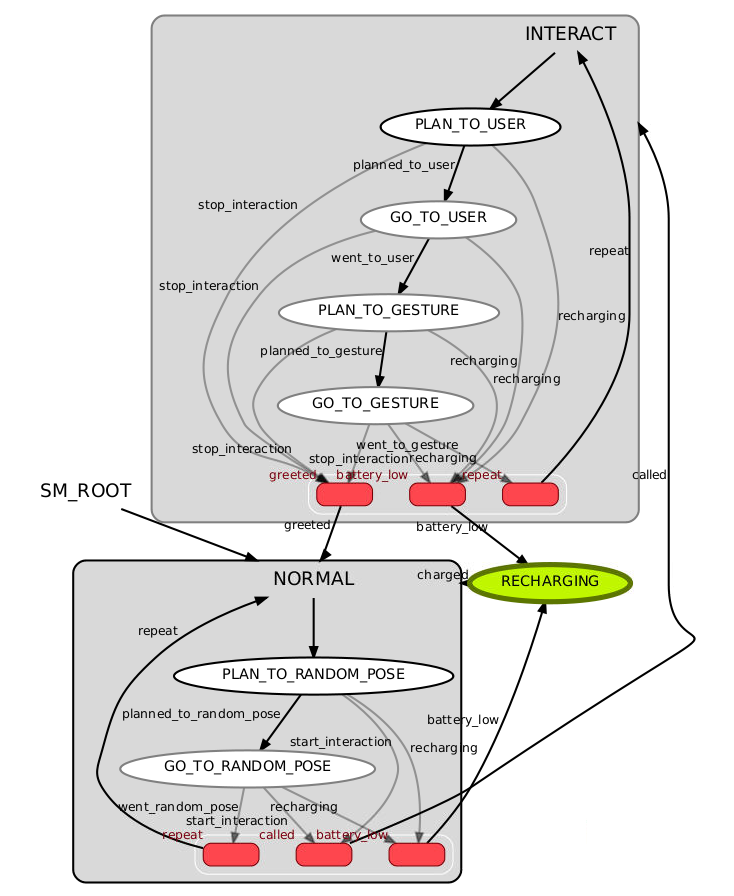
The proposed solution is made by the behaviour node, which implement the Finite
State Machine, and a helper class called InterfaceHelper, which only address the
stimulus, i.e., the interface to trigger transitions on the Finite State Machine.
This approach allow decoupling the Finite State Machine implementation from its
interfaces with the other components of the architecture.
The proposed solution has been implemented such to make the robot reactive to the stimulus, i.e., battery level, user's speech-based and gesture-based commands. In other words, the implementation is such to never block the robot computation. The implemented solution has also been designed in order to be robust but further improvements can be done to optimize the computation speed and robustness.
The implemented solution assumes that no states of the Finite State Machine run concurrently. Therefore, no clients of the plan and control action server can make concurrent requests.
The figure below show the complete software architecture. This figure connects the
components presented in the README
file with the behaviour node.
Note that this example relies on the behaviour node set the initial position.
This is a simplification made fow showing purposes but, for more realistic architectures,
a general solution should be used instead. This is important to do not make the
behaviour node dependent on the initialization of the robot's position.
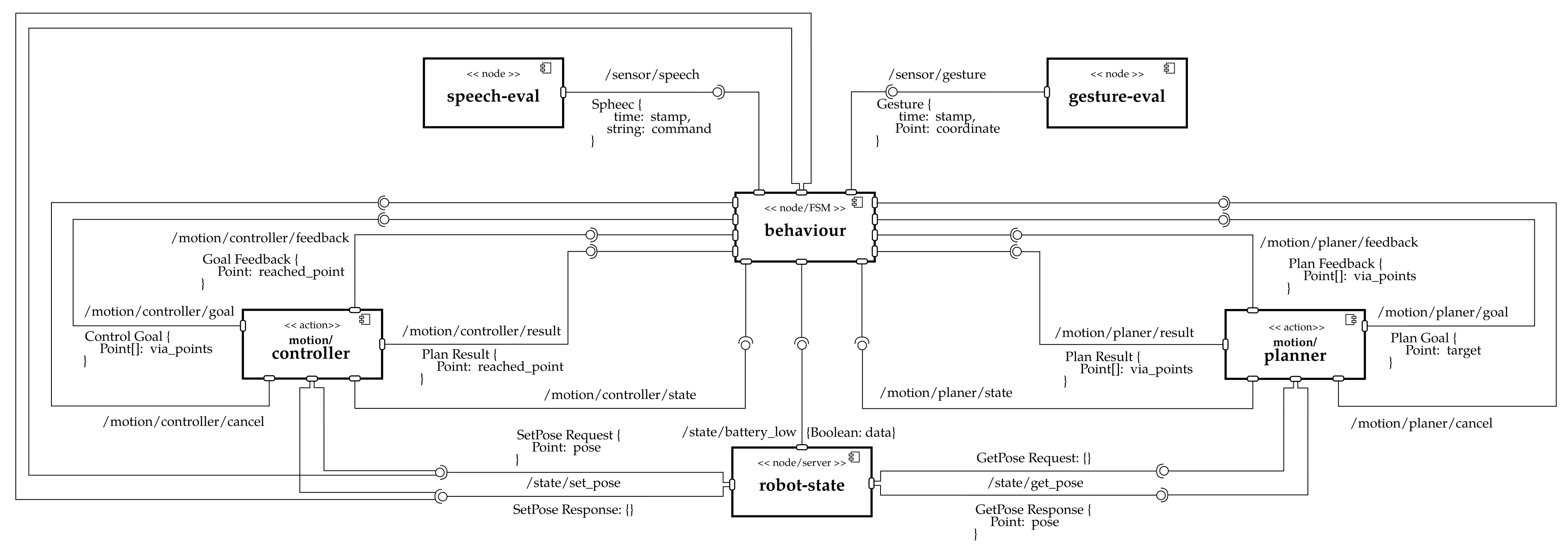
The figure below show the Finite State Machine, which is made by three main nodes,
two of which are sub Finite State Machine. This implementation is done to make the
execute function of each node as simple as possible. This approach also has the
effect to simplify the synchronization among the ROS-based thread concerning
subscribers and action servers.
To install the solution, install the repository first as detailed in the README file. Then, perform the following steps:
- Create the
scripts/behaviour.pyfile. - Copy on that file the code available here.
- Give running permissions to that file with
chmod +x behaviour.py. - Create the file
scripts/fsm_helper.py. - Copy on that file the code available here.
- Give running permissions to that file with
chmod +x fsm_helper.py. - Modify file
scripts/architecture_name_mapper.pyin order to add the following two variablesNote that a ROS parameter with name# The name of the node implementing the Finite State Machine. NODE_BEHAVIOUR = 'behaviour' # The name of the ROS parameter to configure the user's position as static coordinate. # `PARAM_USER_POSE` should be a list of two coordinates ordered as `[x, y]`. PARAM_USER_POSE = 'config/user_pose'
config/user_poseis already configured by the launcher files available in thelaunch/folder. - Add the
behaviournode to thelaunch/manual_sense.launchandlaunch/random_sense.launchfile by adding<node pkg = "arch_skeleton" type = "behaviour.py" name = "behaviour" output = "screen" > </node>
- For consistency, you might want to add the
scripts/behaviour.pyscript in thecatkin_install_pythonfield of theCMakeLists.txtfile. After that, you might want to runcatkin_makeandcatkin_make install. Since Python has been used, this step is not strictly required. - User
roslaunch arch_skeleton manual_sense.launchorroslaunch arch_skeleton random_sense.launchto run the code. Eventually, you might want to runrosrun smach_viewer smach_viewer.pyto check the behavior.