Releases: byjg/parolsh
Release list
v0.3.0: A prompt that shows where your text goes

Speak to your terminal. Natural language first.
A new prompt that shows where your text goes, a shell mode for runs of commands, Tab completion, and conversations that survive a failed turn.
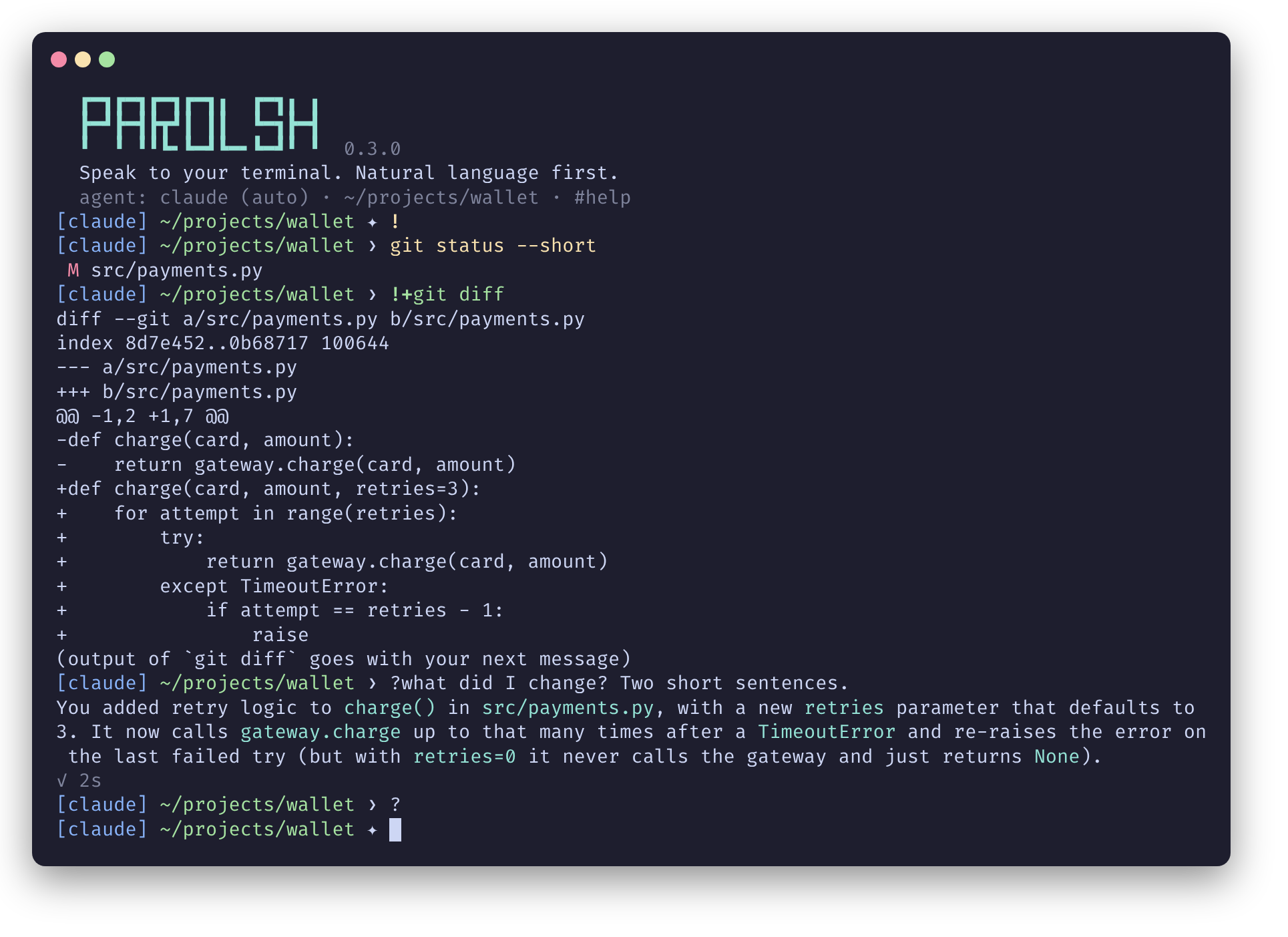
New prompt
The prompt used to show only the directory name (wallet ❯): it looked like a shell prompt, even though plain text went to the agent. It now shows the agent that answers, a short path and where plain text goes:
[claude] ~/…/byjg/parolsh ✦
[claude]is the running agent;[no agent]when none is running.- The path uses
~and keeps the last two folders. ✦means plain text goes to the agent,❯to the shell. It turns red after a failed command or turn.
Shell mode
! alone locks plain text to the shell, ? alone unlocks it back to the agent. While locked, ?text still asks the agent, and !+command still shares a command's output with it.
| Input | Agent mode ✦ (default) |
Shell mode ❯ |
|---|---|---|
text |
the agent | the shell, like !text |
?text |
the agent | the agent |
/command |
the agent | the shell; ?/command reaches the agent |
!…, !+…, !bash, #… |
as before | as before |
- To start in shell mode:
input = "shell"inconfig.toml(global or project), orparolsh --input=shell. Without an agent configured, Parolsh starts in shell mode. - Each command still runs in its own shell: after a plain
cd <dir>, Parolsh says which#cdmoves Parolsh itself. - Colors, hints and Tab completion follow the mode. Starship gets
PAROLSH_INPUT(agentorshell).
Tab completion
On !command and !+command lines (and plain lines in shell mode), Tab completes command names from your PATH and your bash aliases, functions and builtins, then file and directory names, as bash does.
A failed turn keeps the conversation
When an agent answered a message with an error, such as Qwen Code's tool-call loop protection, Parolsh stopped the agent and the conversation was lost. Now only that turn fails: Parolsh prints the agent's message and you can send another one. A new Troubleshooting page explains the agent messages.
Behavior changes
?textis sent to the agent without the?.- A lone
!locks to the shell (it used to do nothing).
Upgrading
No configuration change is needed: input = "agent" is the default.
sudo apt install --only-upgrade parolsh   # or: sudo dnf upgrade parolsh
brew upgrade parolsh
Docs: Shell mode · Prompt · Tab completion · Troubleshooting
What's Changed
- Complete shell commands and file names with Tab by @byjg in #12
- Keep the conversation when the agent fails a turn by @byjg in #13
- New prompt, shell mode lock, starting mode, and a shell-mode screenshot by @byjg in #14
Full Changelog: v0.2.1...v0.3.0
Contributors

Assets 9
v0.2.1: Agents start outside the terminal too
Speak to your terminal. Natural language first.
A fix release: agents now start even when Parolsh is not launched from a terminal.
Fixed: agents not found outside a terminal
Started from a desktop launcher, a terminal profile that runs parolsh directly, or an IDE, Parolsh did not get what ~/.profile and ~/.bashrc set up. npm agents installed under nvm (claude-agent-acp, codex-acp, qwen, gemini) live in a directory only your shell adds to PATH, so they failed with:
parolsh: Internal error: { ... "data": "No such file or directory (os error 2)" }
Parolsh now imports your shell's environment in that case: it runs your shell as bash -ilc 'env -0', which reads ~/.profile and ~/.bashrc, and adopts the result. This fixes the nvm PATH and anything else your shell exports, such as API keys and proxies.
- The shell runs without a terminal and with a 5-second limit, so a startup file waiting for input cannot block Parolsh; whatever it prints is ignored.
- The new
shell_envsetting chooses when:"auto"(default, only when the process that started Parolsh is not a shell),"always", or"never".
Clearer error
When an agent's program really cannot be found, the message now says so and how to fix it:
parolsh: cannot start `claude-agent-acp`: not found on PATH. Agents installed with npm under nvm are only on the PATH your ~/.bashrc sets up: start Parolsh from a terminal, or set shell_env = "always" in the configuration (see #config).
Also
The README's early development note is now a usage disclaimer.
Upgrading
No configuration change is needed: shell_env = "auto" is the default.
sudo apt install --only-upgrade parolsh   # or: sudo dnf upgrade parolsh
brew upgrade parolsh
Docs: Shell environment · When an agent cannot start
What's Changed
- Replace the early development note with a usage disclaimer, and drop stale version numbers by @byjg in #10
- Load the shell environment when not started from a shell by @byjg in #11
Full Changelog: v0.2.0...v0.2.1
Contributors
Assets 9
v0.2.0: Agents that ask, output you share, markdown you read
Speak to your terminal. Natural language first.
Parolsh 0.2.0 makes conversations with the agent much richer: agents can ask you questions, you see what they want to change before allowing it, you can share command output with them, and answers are rendered as markdown. It also sets itself up on the first run.
Highlights
Agents can ask, and you see what they do
- Permission prompts show what the agent wants to do: file edits as a diff, and the tool's input otherwise.
- Agents can ask you questions and get your answers: Claude and Codex through the standard ACP form request, Qwen Code through its own question tool.
- The agent's reasoning ("thinking") shows as its latest line in the status line:
⠸ Thinking: Let me calculate · 3s.
Share a command's output: !+
wallet ❯ !+docker ps
...
(output of `docker ps` goes with your next message)
wallet ❯ which of these containers looks unhealthy?
The agent answers from that output instead of running the command again. Only !+ commands are shared; a plain ! never reaches the agent.
Markdown, rendered while it streams
**bold**, `code` and code blocks in cyan, headings, • bullets, and links that are clickable and keep their URL. Nothing is buffered: only a marker cut in half between two chunks waits for the next one. markdown = false and links = "both" | "clickable" | "inline" configure it.
Agent options: options and #options
Set each agent's own options (reasoning effort, model, fast mode) in the configuration, or change them live:
wallet ❯ #options effort low
effort = low, until you leave Parolsh.
Less thinking: Claude effort = "low", Codex reasoning_effort = "low"; for Qwen Code, "reasoning": false in ~/.qwen/settings.json (see the Agents docs). thinking = "status" | "hidden" | "show" chooses how reasoning is displayed. Kilo Code's mode now works.
Easier to start
- The first run writes
~/.config/parolsh/config.tomlwith the agents found on yourPATHalready enabled, and starts the first one. #configshows the configuration files in use;#config sampleprints every option.- Install with Homebrew:
brew install byjg/tap/parolsh.
Smoother typing
- The line shows where it will go as you type:
!yellow,!+green,#magenta,/blue, with a short hint for a bare prefix. - A multi-line paste is one input: nothing runs until Enter.
Upgrading from 0.1.0
Your configuration keeps working; every new setting is optional. The first-run setup only happens when there is no configuration file. Run #config sample to see the new options (options, thinking, markdown, links).
Install
sudo apt install parolsh           # Debian/Ubuntu, from https://opensource.byjg.com/docs/packages
sudo dnf install parolsh           # Fedora/RHEL
brew install byjg/tap/parolsh      # macOS or Linux, built from source
Documentation: https://opensource.byjg.com/docs/ai/parolsh
What's Changed
- Show permission details, thinking, and answer agent questions by @byjg in #1
- Treat a multi-line paste as one input by @byjg in #2
- Create the configuration on the first run, and add #config by @byjg in #3
- Set the agents' config options, and choose how thinking is shown by @byjg in #4
- Render the answers' markdown on ANSI terminals by @byjg in #5
- Share a command's output with the agent: !+command by @byjg in #7
- Show where the line goes while typing by @byjg in #8
- Release 0.2.0 by @byjg in #9
New Contributors
Full Changelog: v0.1.0...v0.2.0
Contributors
Assets 9
v0.1.0: Speak to your terminal
Speak to your terminal. Natural language first.
The first release of Parolsh: a shell where what you type goes to an AI agent through the Agent Client Protocol (ACP), and Bash stays one ! away. It runs in your usual terminal and keeps the normal scrollback, no full-screen UI.
Highlights
Deterministic input routing. The first character decides, nothing guesses:
| You type | What happens |
|---|---|
text |
Sent to the agent |
/command |
Sent to the agent unchanged (its own slash commands) |
!command |
Run with bash -ic in the current directory, with your ~/.bashrc aliases |
!bash |
Interactive Bash session; exit returns to Parolsh |
#command |
Parolsh itself, see #help |
Any ACP agent. Claude (claude-agent-acp), Codex (codex-acp) and Qwen Code are tested; Gemini CLI, Kilo Code, Goose and other ACP agents are configured the same way.
- Answers stream as they arrive, with a live status line (
⠹ Running: Terminal · 12s) and a summary at the end. - Permission requests are asked in the terminal;
Ctrl+Ccancels a turn. #newstarts a new conversation,#cd <path>moves to another directory or project,#agent <name>switches agents.- Per agent:
modesets the agent's own session mode (e.g. Claudeauto, Codexagent),envadds environment variables (base URL, model).
A real shell underneath.
!commands run as foreground jobs: Ctrl+C stops only the command, and Parolsh always takes the terminal back.parolsh -c "cmd"runs a plainbash -c, for scripts and tools that call$SHELL -c.
Look. A startup banner; prompt styles parolsh (dir ❯), minimal, and starship (your Starship prompt, with exit status and duration), switchable with #prompt.
Projects. A .parolsh/ directory marks a project; its config.toml overrides the global one field by field.
Install
Debian/Ubuntu and Fedora/RHEL, from the ByJG package repository (amd64 and arm64, glibc 2.28+):
sudo apt install parolsh # or: sudo dnf install parolshmacOS or Linux with Homebrew (builds from source):
brew install byjg/tap/parolshThen install an ACP agent, for example Claude:
npm install -g @agentclientprotocol/claude-agent-acpand start from the sample configuration, which has a ready block for each agent:
mkdir -p ~/.config/parolsh
cp /usr/share/doc/parolsh/config.sample.toml ~/.config/parolsh/config.toml
# Homebrew: cp "$(brew --prefix)/share/parolsh/config.sample.toml" ~/.config/parolsh/config.toml
Uncomment your agent and default_agent, then run parolsh.
Documentation
https://opensource.byjg.com/docs/ai/parolsh
Early development
Not in this release yet: #resume, and sending !command output to the agent.
Full Changelog: https://github.com/byjg/parolsh/commits/v0.1.0