Utility written in C# and XAML (Windows WPF) which displays the hostname, domain and IP addresses of an ednpoint. It can also be configured to test connectivity to a specified URL to determine a connection status. Useful for remote support technicians.
I have intentionally left out various parts of the project code from this as it contains icon files bespoke to my employer or other such information/assets which I cannot share on here. If you create a new WPF project in Visual Studio (or a tool of your choice) and impot the XAML and C# code you should be fine to go.
The application presents the following information on launch:
- Computer Hostname - retrieves the local computers hostname
- Active Directory Domain Name - retrieves the local computers Active Directory domain
- IP Address List - retrieves a list of all IP addresses on the local computer (can include virtualisation software addresses)
- Connection Status Indicator - provides a colour coded indication of network connection status
- Copy Button - Copies the visible information and any other attributes defined in code to the clipboard
The connection status indicator has the following possible colours:
- Green - All connections successful
- Amber - Internet connection successful but internal domain connection failed
- Red - All connections failed, no network connectivity detected
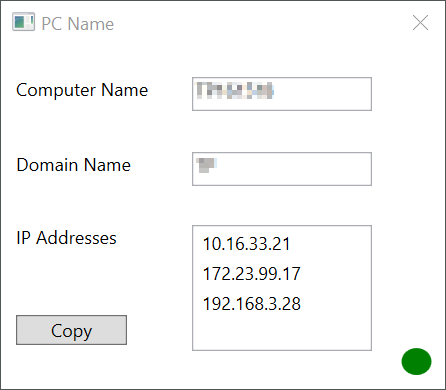
Hostname: AB
Domain Name: AB
Internet Connection Status: Successful
Internal Domain Connection Status: Successful
Windows 10 Release: 1803
IP Address: 10.16.33.21
IP Address: 172.23.99.17
IP Address: 192.168.3.28
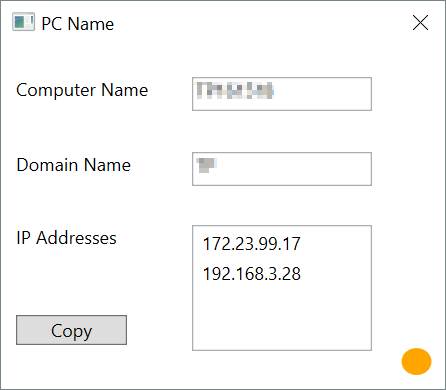
Hostname: AB
Domain Name: AB
Internet Connection Status: Successful
Internal Domain Connection Status: Failed
Windows 10 Release: 1803
IP Address: 172.23.99.17
IP Address: 192.168.3.28
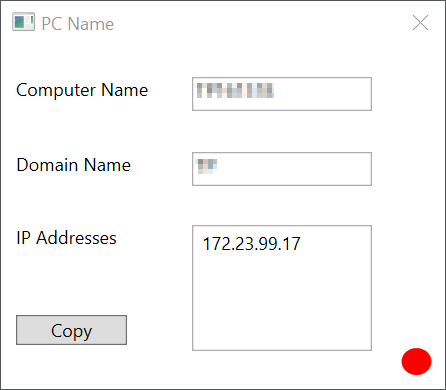
Hostname: AB
Domain Name: AB
Internet Connection Status: Failed
Internal Domain Connection Status: Failed
Windows 10 Release: 1803
IP Address: 172.23.99.17