Current behaviour
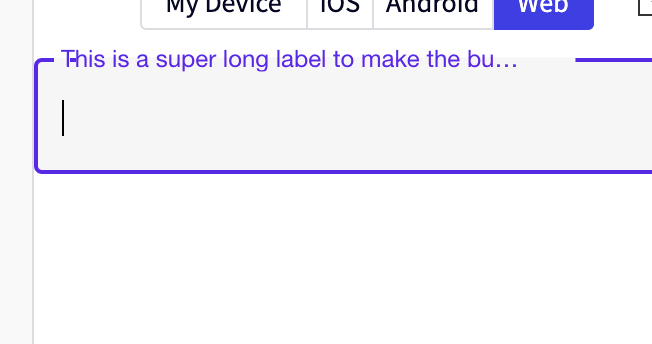
If the label on a TextInput is too long, and the mode is outlined, when you focus the field and the label moves up there will be a part of the border that appears after the first letter in the label, and between the rest of the word.
Expected behaviour
I would expect that the border would not be visible under the label text.
Code sample
https://snack.expo.dev/@achilders1988/textinput
https://snack.expo.io/@achilders1988/textinput
import * as React from 'react';
import { TextInput } from 'react-native-paper';
const MyComponent = () => {
const [text, setText] = React.useState('');
return (
<TextInput
label="This is a super long label to make the bug appear"
mode="outlined"
value={text}
onChangeText={text => setText(text)}
/>
);
};
export default MyComponent;
Screenshots (if applicable)
What have you tried
It works as expected until the label gets long and the ... appears, then this issue occurs.
Your Environment
https://snack.expo.dev/@achilders1988/textinput

Current behaviour
If the label on a TextInput is too long, and the mode is outlined, when you focus the field and the label moves up there will be a part of the border that appears after the first letter in the label, and between the rest of the word.
Expected behaviour
I would expect that the border would not be visible under the label text.
Code sample
https://snack.expo.dev/@achilders1988/textinput
https://snack.expo.io/@achilders1988/textinput
import * as React from 'react';
import { TextInput } from 'react-native-paper';
const MyComponent = () => {
const [text, setText] = React.useState('');
return (
<TextInput
label="This is a super long label to make the bug appear"
mode="outlined"
value={text}
onChangeText={text => setText(text)}
/>
);
};
export default MyComponent;
Screenshots (if applicable)
What have you tried
It works as expected until the label gets long and the
...appears, then this issue occurs.Your Environment
https://snack.expo.dev/@achilders1988/textinput