Current behaviour
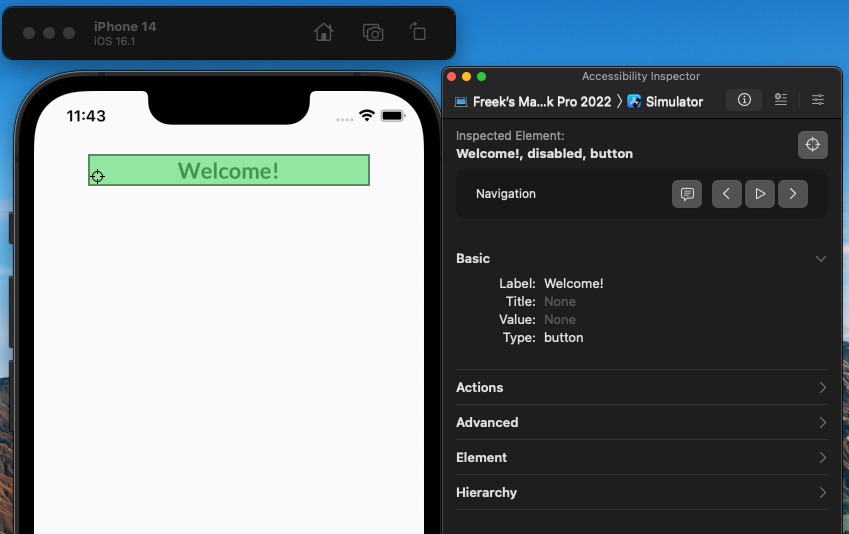
The AppBar's heading, when inspected via the Accessibility Inspector on iOS, is marked as and read out as an "disiabled button"
Expected behaviour
If no onPress callback is given, it should not be accessible; it should read out the Text element of the title, since that already has the correct accessibility properties.
I'm not sure what should happen if the user passes a component as the title though, I presume they're on their own then?
Also a disclaimer, I'm not an expert on accessibility, I've just done a quick review of our app in development to see what it looks like. I'm not sure if this is considered an issue.
I suspect the fix is passing something like accessible={!!onPress} to the TouchableWithoutFeedback element in src/components/Appbar/AppbarContent.tsx
How to reproduce?
Create an AppBar with a title:
      <Appbar.Header>
        <Appbar.Content title="hello" />
      </Appbar.Header>
- Start the app
- Open Xcode, then go to the Xcode menu -> Open Developer Tool -> Accessibility Inspector
- Select the heading
Preview
What have you tried so far?
Set the accessibilityRole property on the AppBar.Content, but it's not permitted.
Your Environment
| software |
version |
| ios |
16.1 |
| android |
n/a |
| react-native |
0.71.3 |
| react-native-paper |
5.0.2 |
| node |
16.16.0 |
| npm or yarn |
npm 8.11.0 |
| expo sdk |
n/a |


Current behaviour
The AppBar's heading, when inspected via the Accessibility Inspector on iOS, is marked as and read out as an "disiabled button"
Expected behaviour
If no
onPresscallback is given, it should not be accessible; it should read out theTextelement of the title, since that already has the correct accessibility properties.I'm not sure what should happen if the user passes a component as the
titlethough, I presume they're on their own then?Also a disclaimer, I'm not an expert on accessibility, I've just done a quick review of our app in development to see what it looks like. I'm not sure if this is considered an issue.
I suspect the fix is passing something like
accessible={!!onPress}to theTouchableWithoutFeedbackelement insrc/components/Appbar/AppbarContent.tsxHow to reproduce?
Create an AppBar with a title:
Preview
What have you tried so far?
Set the
accessibilityRoleproperty on theAppBar.Content, but it's not permitted.Your Environment