feat: Snackbar component#305
Conversation


|
Hey @Trancever, thank you for your pull request 🤗. The documentation from this branch can be viewed here. |

|
I am excited for this 😄 |


| export const grey600 = '#757575'; | ||
| export const grey700 = '#616161'; | ||
| export const grey800 = '#424242'; | ||
| export const grey850 = '#323232'; |

There was a problem hiding this comment.
Since our colors file is just material design colors, maybe move this to the component? We do that for other colors.
| * }); | ||
| * ``` | ||
| */ | ||
| class SnackBar extends React.Component<Props, State> { |
There was a problem hiding this comment.
Let's name it Snackbar since it's a single word, like Toolbar
| /** | ||
| * Text that will be displayed inside SnackBar. | ||
| */ | ||
| content: string, |
There was a problem hiding this comment.
Maybe use the children prop for this?
| * - `onPress` - Callback that is called when action button is pressed, user needs to update the `visible` prop. | ||
| * - `color` - Color of the action button | ||
| */ | ||
| action?: { |
There was a problem hiding this comment.
Maybe we want to support multiple actions?
There was a problem hiding this comment.
MD docs say that only one action is allowed, so that's why i did it like that. Do we really want to support more than one?

| action?: { | ||
| text: string, | ||
| onPress: () => mixed, | ||
| color?: string, |
There was a problem hiding this comment.
Probably unnecessary since people can already override the accent color with the theme prop.
| duration: SNACKBAR_ANIMATION_DURATION, | ||
| useNativeDriver: true, | ||
| }), | ||
| ]).start(this.props.onDismiss); |
There was a problem hiding this comment.
Since we're calling hide on componentDidUpdate, we shouldn't call this.props.onDismiss again.
| const { duration } = this.props; | ||
| if (duration !== 'indefinite') { | ||
| this.hideTimeout = setTimeout( | ||
| this.hide, |
There was a problem hiding this comment.
Let's call this.props.onDismiss here instead of hide. componentDidUpdate will trigger the animation.
| }; | ||
| } | ||
|
|
||
| hideTimeout: number; |
There was a problem hiding this comment.
Use _ prefix for private properties and methods.
| }, | ||
| ]} | ||
| > | ||
| <Animated.Text |
| <TouchableWithoutFeedback | ||
| onPress={() => { | ||
| this.hide(); | ||
| action.onPress(); |
There was a problem hiding this comment.
Maybe call onPress first, then hide

| > | ||
| <View> | ||
| <Text style={{ color: action.color || colors.accent }}> | ||
| {action.text} |
There was a problem hiding this comment.
This needs to be uppercase. You can use our own Button with compact (I think).
There was a problem hiding this comment.
I used our button and forgot to add toUpperCase when I changed it, will fix it. I decided not to use button from paper cause it has padding and margin by default and styling was not so clear and also it has ripple effect that we don't want in snackbar.
| const contentRightMargin = action ? 0 : 24; | ||
|
|
||
| return ( | ||
| <Animated.View |
There was a problem hiding this comment.
Can you wrap everything with ThemedPortal
| }; | ||
|
|
||
| _hide = () => { | ||
| if (this._hideTimeout) { |
There was a problem hiding this comment.
Let's clear this on unmount too
| const contentRightMargin = action ? 0 : 24; | ||
|
|
||
| return ( | ||
| <ThemedPortal theme={theme}> |
There was a problem hiding this comment.
You don't need to pass theme here
| import RadioButtonGroupExample from './RadioButtonGroupExample'; | ||
| import RippleExample from './RippleExample'; | ||
| import SearchBarExample from './SearchBarExample'; | ||
| import SnackBarExample from './SnackBarExample'; |
| }; | ||
|
|
||
| class SnackBarExample extends React.Component<Props, State> { | ||
| static title = 'Snack bar'; |
| }} | ||
| duration={Snackbar.DURATION_INDEFINITE} | ||
| > | ||
| <Text>Put your message here</Text> |
There was a problem hiding this comment.
Maybe don't need the wrapper <Text>
| @@ -0,0 +1,292 @@ | |||
| /* @flow */ | |||
| import * as React from 'react'; | |||
| /** | ||
| * Text that will be displayed inside SnackBar. | ||
| */ | ||
| children: string | React.Node, |
There was a problem hiding this comment.
React.Node should already include string
| * Object that determines button text and callback for button press. It should contains following properties: | ||
| * - `text` - Content of the action button | ||
| * - `onPress` - Callback that is called when action button is pressed, user needs to update the `visible` prop. | ||
| * - `color` - Color of the action button |
| */ | ||
| duration?: number, | ||
| /** | ||
| * Callback called when Snackbar is dismissed, user needs to update the `visible` prop. |
There was a problem hiding this comment.
Callback called when Snackbar is dismissed. The `visible` prop needs to be updated when this is called.

|
I'm trying to use this but getting this: I'm not using any theme stuff, that might be the cause, investigating.... |

|
My render fn: render() {
return (
<View style={{ flex: 1 }}>
{ this.renderList() }
<FAB
small
color={COLOR_WHITE}
style={styles.fab}
icon="add"
onPress={() => this.new()}
/>
<Snackbar
visible={this.state.visible}
onDismiss={() => this.setState({ visible: false })}
action={{
text: 'Undo',
onPress: () => {
this.setState({ visible: false });
},
}}
duration={Snackbar.DURATION_INDEFINITE}
>
Put your message here
</Snackbar>
</View>
);
} |

|
@vladikoff did you follow the getting started guide? you need a |
Yeah I have the rest of paper working. Just trying to add a snackbar from this Pull Request render () {
return (
<Provider store={store}>
<App/>
</Provider>
)
}Removing |
|
@satya164 oh I have |
|
Nvm, let me revisit https://callstack.github.io/react-native-paper/getting-started.html again , sorry |
|
Cool it's working here! I just need to move my fab up now :) However, note that if you set the initial state to: constructor(props) {
super(props);
this.props = props;
this.state = {
visible: true // <---------- TRUE here
}then it will not show the Snackbar when the view renders for the first time, not sure if bug or something with my setup. Thanks again! |


|
@vladikoff Cool that it's working! We are planning to add support for automatically moving FAB whenever Snackbar shows so stay tuned 😄 |
|
Sorry for a stupid question but what controls the stacking order (like css z-index) for this? For example if I have a drawer, how do I make sure the Snackbar doesn't overlay it? Example:
|
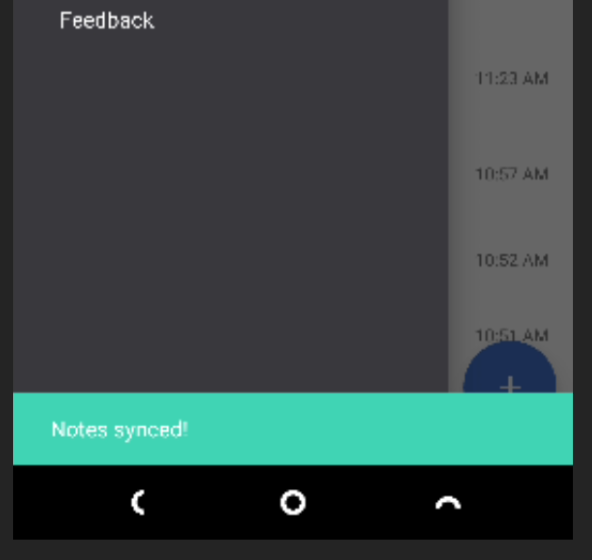
It's controlled by the |
Ah right, that helps! I tried doing the animation of the FAB and the Snackbar together but it is very choppy. Probably because it is not using the |
|
@vladikoff There is a description in a Portal issue #43 which says how those components (Snackbar, FAB, etc.) should behave together and how we would like to implement it. You can check it out. |


5 participants


Closes #16