refactor: make ListItem accepts a custom description#996
refactor: make ListItem accepts a custom description#996brunohkbx merged 2 commits intocallstack:masterfrom
Conversation


|
Hey @brunohkbx, thank you for your pull request 🤗. The documentation from this branch can be viewed here. Please remember to update Typescript types if you changed API. |
 brunohkbx
changed the title
brunohkbx
changed the title
 brunohkbx
force-pushed
the
refactor/List.Item
branch
2 times, most recently
from
brunohkbx
force-pushed
the
refactor/List.Item
branch
2 times, most recently
from
a930312 to
96e31af
Compare
brunohkbx
changed the title

 Trancever
left a comment
Trancever
left a comment
Trancever
left a comment
There was a problem hiding this comment.
I am generally ok with render prop approach and I like it, but I don't like exposing List.Description component. Can we remove it?
Also, could you pass ellipsizeMode, color, fontSize to render function instead of ellipsizeMode and whole style obj?
brunohkbx
force-pushed
the
refactor/List.Item
branch
2 times, most recently
from
e6d74b4 to
5ae1695
Compare
 brunohkbx
force-pushed
the
refactor/List.Item
branch
from
brunohkbx
force-pushed
the
refactor/List.Item
branch
from
5ae1695 to
95f3cab
Compare

|
Thanks @Trancever. Done 5ae1695 |

|
@brunohkbx Awesome, one more thing, can we improve |
brunohkbx
force-pushed
the
refactor/List.Item
branch
from
1cbae2c to
cc56e4f
Compare
|
Good catch, thanks. Added in f00d906 |
brunohkbx
force-pushed
the
refactor/List.Item
branch
from
cc56e4f to
f00d906
Compare

| title="List Item 1" | ||
| description={({ | ||
| ellipsizeMode, | ||
| color: descriptionColor, |

There was a problem hiding this comment.
imo the color and fontSize should be in style, not as separate props.
There was a problem hiding this comment.
@satya164 hmm, other components expose them as separate props, I wanted it to be consistent
There was a problem hiding this comment.
hmm I think in most places where it's this way, it's usually for icons etc., but here looks like the render callback is passing a bunch of props (do we need to pass ellipsizeMode and fontSize for example?)
There was a problem hiding this comment.
@satya164 I found these components doing the same: ListItem, ListAccordion, Banner
I think we should pass ellipsizeMode and fontSize because could have cases when the user only wants to add more content to the description and keep the Text as the original. e.g. #686


* refactor: make ListItem accepts a custom description

* fix: update prop description type


|
This should have never been merged as it's a breaking change but aside from that. the implementation here isn't really the "react way". What do I mean by that? Well you shouldn't have to pass in a callback in order to use a react component. Because of this breaking change, it's no longer possible to pass in a text component to it which was perfectly valid beforehand. Here it checks that the description is explicitly a string, in order to put it into the text component, but then this PR #1199 has reversed it and is now explicitly checking for a function. This PR did not remove the React.Node type which meant that this didn't throw any errors within TS The ideal way to fix this is to do the following which would have satisfied all needs, without creating a breaking change: // renderDescription function
const isDescReactElement = React.isValidElement(description); // would be false for anything that's not a react element, such as a string;
if (isDescReactElement) {
const desc = React.cloneElement(description, {
ellipsizeMode: descriptionEllipsizeMode,
color: descriptionColor,
fontSize: styles.description.fontSize,
});
return desc;
}
return (
<Text
ellipsizeMode={descriptionEllipsizeMode}
numberOfLines={2}
style={[
styles.description,
{
color: descriptionColor,
},
descriptionStyle,
]}
>
{description}
</Text>
); |
|
@BenWildeman I didn't realize that it would break the current implementation 😞. I apologize for the inconvenience. |
|
it's fine with this, it's just that the original types are incorrect really. there shouldn't have been React.Node if it was only supposed to accept a string. you fixed it to be inline with the rest of the codebase. it's just annoying that a minor bump included a breaking change that broke our app in places that we didn't know about. luckily we do regression testing so it was caught |
5 participants


Motivation
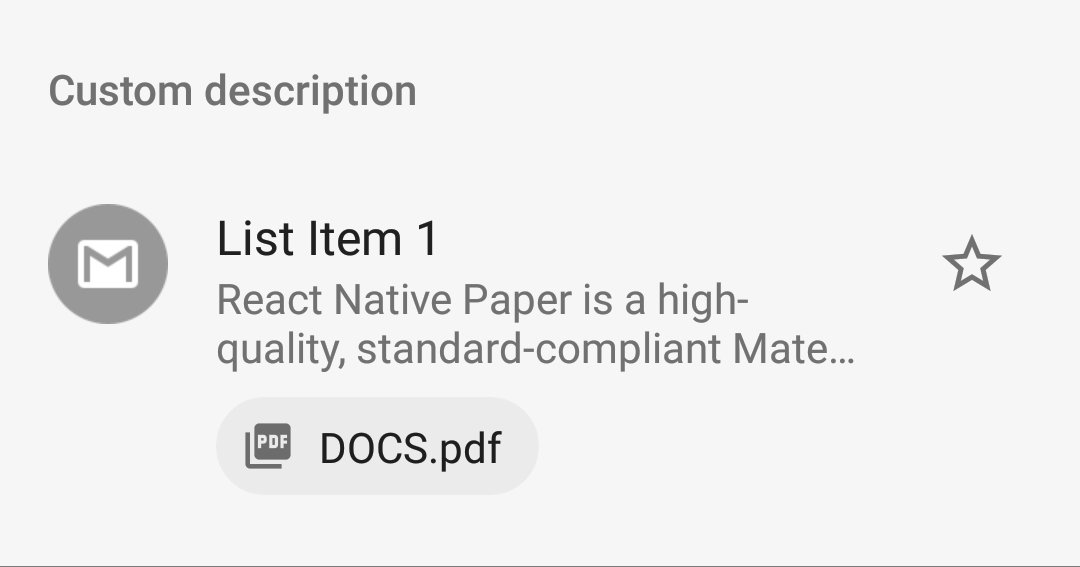
Currently, there's no way to customize the description of
List.Item. In order to make it able to be customized,List.Itemnow accepts a custom node as description.With these changes we can implement a list item like Gmail app:
Test plan
List.Sectionto see the new example.